 Connexion
Lazy Loading Images: How loading="lazy" and eager Work
28 septembre 2026 à 02:00
How far ahead Chrome, Firefox and Safari fetch loading="lazy" images, why a lazy hero image slows your page, and when to use eager and fetchpriority instead.

Le calendrier de l’avent des gens qui font le web d’après est de retour pour une quatorzième édition. Du 1er décembre au 24 décembre, vous pourrez retrouver chaque jour l’article d’une autrice ou d’un auteur différent.
Mais pour que cette nouvelle édition voit le jour, nous avons besoin de vous : nous recherchons 24 autrices et auteurs, mais aussi des relectrices et relecteurs, ainsi qu’un illustrateur ou une illustratrice pour réaliser le thème visuel de cette nouvelle édition.

Vous travaillez dans le développement, le design, la communication, la gestion de projet, le référencement ou encore l’accessibilité ? Vous utilisez le web à titre personnel ou d’une manière originale ? Vous avez un message à faire passer à la communauté ? Ou encore vous aviez proposé un sujet de conférence pour Paris Web ou un autre événement et il n'a malheureusement pas été retenu ?
Alors proposez un sujet d’article !
24 jours de web souhaite être particulièrement bienveillant pour accueillir de nouvelles plumes, alors ne soyez pas intimidé·e si vous n’avez jamais publié d’article en ligne.
C’est aussi très important pour nous de proposer un programme varié et diversifié. Alors si vous pensez que votre voix est déjà souvent entendue, nous vous encourageons aussi à accompagner quelqu’un d’autre dans cet exercice, plutôt que de proposer un article.
Si l’aventure vous intéresse, envoyez une proposition de sujet via le formulaire d’appel à sujets avant le vendredi 23 octobre à 23h59, heure de Paris.
Nous ferons une sélection des sujets et nous vous donnerons une réponse au plus tard le mercredi 28 octobre. Si votre proposition est sélectionnée, nous vous demanderons ensuite de nous fournir votre article avant le dimanche 22 novembre à 23h59.
La relecture et la mise en forme des articles sur le site est une tâche importante mais consommatrice de temps. Si vous avez du temps entre mi-novembre et mi-décembre et souhaitez rejoindre l’équipe de relecture, n’hésitez pas à faire signe par e-mail à 24joursdeweb@paris-web.fr.
Nous recherchons aussi un illustrateur ou une illustratrice bénévole pour réaliser le thème graphique de cette année. Un guide d’illustration est disponible pour vous faire une idée des attentes. Pour avoir le temps d’implémenter le thème annuel, nous aurons besoin d’un visuel finalisé livré pour le 15 octobre au plus tard. N’hésitez pas à nous contacter par e-mail si ce projet vous intéresse.
Si vous ne vous sentez pas d’écrire ou de relire des articles, partager cette annonce contribue tout autant à la réussite du projet.
D’avance un grand merci et #ShareTheLove.
Les bénévoles de Paris Web
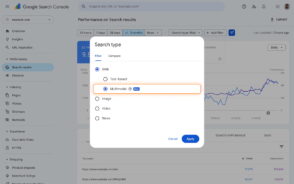 Les recherches lancées depuis l'appareil photo d'un smartphone ou une capture d'écran ne se confondent plus avec les requêtes textuelles dans la Search Console.
 Plus de quinze ans après la fermeture de Lycos Europe, l'éditeur ADN Contents mise sur le souvenir laissé par le portail chez les internautes des années 1990. Mais pas que.

Understanding how users find your content is crucial for any publisher or site owner. As Search evolves to include more visual and multimodal experiences, we want to ensure you have the data you need to analyze your performance.
To be completely honest with you, I missed the news when CSS Container Queries first shipped. And when I finally heard about it, my very first thought was, “Why exactly do I need this when media queries already exist?”
I’m not proud of that reaction, knowing what I know now, but it was comforting to know that I wasn’t alone. In fact, there are legions of us out there.
What baffles me is that container queries aren’t a new feature, as it currently sits at around 94% browser support. And yet, very few people are actually using it. According to the State of CSS survey, 86% of developers are aware of container queries, but only 41.4% actually use them. Surveys can be biased and not completely representative of our entire field, but this one is certainly the best indicator we’ve got.
Kevin Powell also talked about this at SmashingConf Amsterdam 2026: Container Queries adoption has been terrible. And that is so strange to me, knowing that the ability for components to adapt to the size of their outer container has been at the top of so many CSS wishlists over the years.
I’m not particularly interested in how many people are using container queries as much as in how they are using them. I can’t account for everyone, but from what I’ve seen — including in my own early attempts — many of us are using them wrong.
The bottom line is that incorrect use comes down to the same impression I had when learning about them: they absolutely look just like media queries at first glance. And since they look similar, it’s easy to assume they serve similar purposes and work the same way.
They don’t.
Note: I should state up front that what I’m focusing on in this article is using container size queries, i.e., a responsive design technique for responding to the size of a particular container. There are also container style queries that respond to a container’s computed styles (and are experimental at the time of this writing). You can catch up on those in Juan Diego’s piece here on Smashing Magazine where he examines their possible use cases.
Media Queries Look OutwardThe viewport is a proxy. It always has been. Media queries are what gave us the illusion that screen width alone is responsible for how responsive apps adapt to their environment.
Ask yourself this: When you write @media, what are you asking the browser?
@media (min-width: 1024px) {
  .card {
    display: flex;
  }
I, like most developers, am asking the browser: How wide is the screen right now? That’s it.
Media queries answer that beautifully, but what happens when this .card component is placed in a grid cell that’s 300px wide on a 1920px desktop screen?
The media query doesn’t care; it does its job. The viewport is still 1920px, so min-width: 1024px fires and the matched query styles are applied, even though the card only has 300px of space to work with. Eventually, everything in the card deforms, overflows, or cramps up.
“Media queries are dumb. Not dumb in terms of the concept, but dumb in that they don’t know very much. In fact, most people assume that they know more than they do.”
— Kevin Powell
It’s common to think of responsive design purely as a system for updating complete page layouts, like going from two columns on a large screen to a single column on a small screen.
Container Queries Look InwardContainer queries are smarter than that. They make responsive layouts more reliant on what’s happening inside a component rather than on the outer context that has no insight into a component’s contents. It is more like: “How much space is available for me in this specific spot, right now?”
Here is the same card code example we looked at in the last section, but with a container query:
.card-wrapper {
  container-name: card;
  container-type: inline-size;
}

@container card (min-width: 450px) {
  .card {
    display: flex;
    flex-direction: row;
  }
}
This changes everything. The card isn’t influenced by the viewport; its only concern is whether the .card component’s parent wrapper has at least 450px of inline (i.e., horizontal in a left-to-right writing mode) space. If that condition is true, the component goes horizontal; if not, it goes to its default block display.
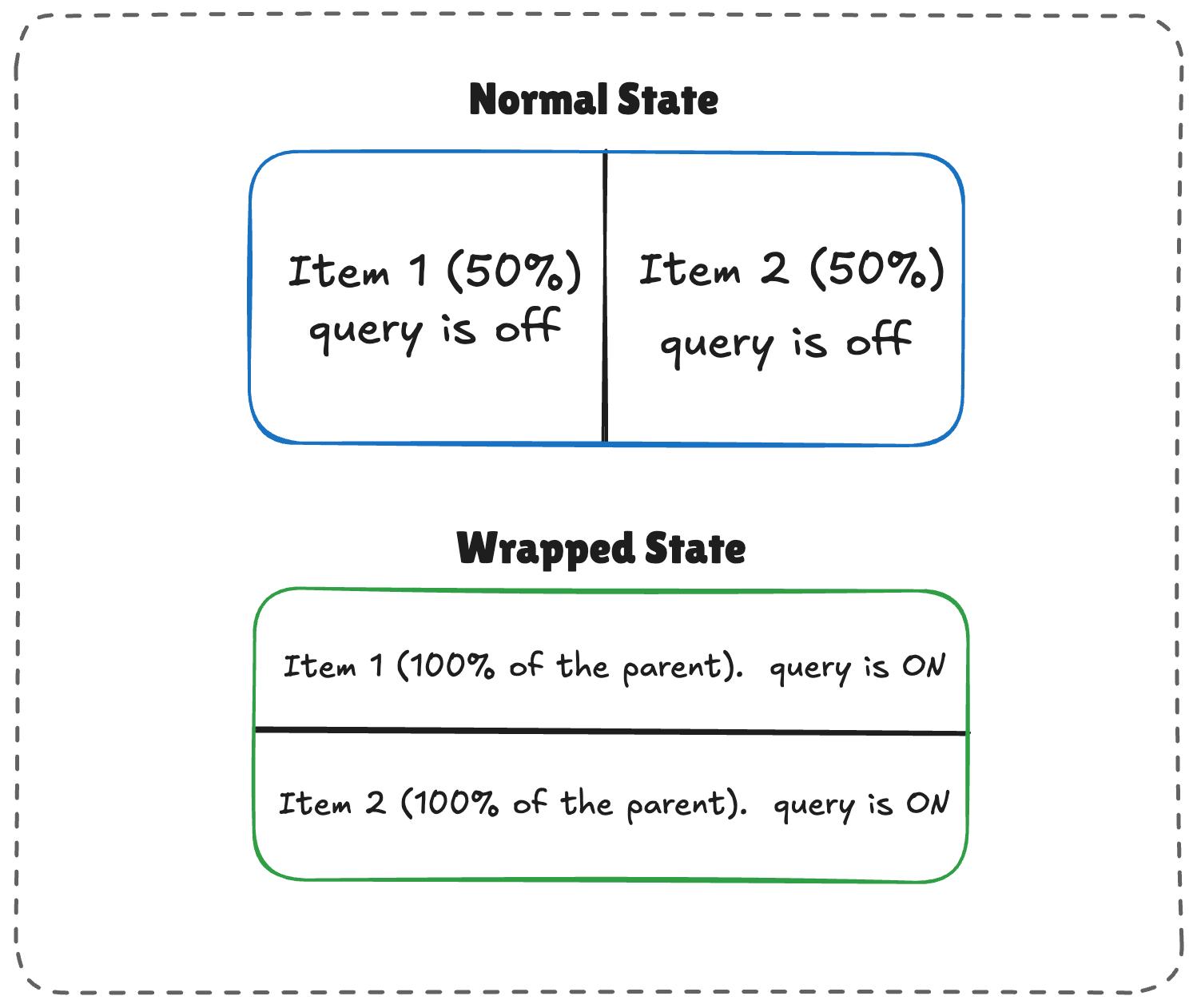
The logic works like this:
.flex-item) sit side-by-side, each exactly half the parent container’s width.flex-grow is active on each item, the wrapped items stretch to fill most of the parent’s width./* The flex parent */
.flex-layout {
display: flex;
flex-wrap: wrap;
}
/* Register a flex item as a container */
.flex-item {
container-type: inline-size;
flex: 1 1 390px; /* Grow to fill space, wrap at 390px */
}
/* Default Card Styles (narrow / side-by-side) */
.card {
display: flex;
flex-direction: column;
background: #f4f4f4;
}
/* Once there's enough room for a full row */
@container (min-width: 600px) {
.card {
flex-direction: row;
align-items: center;
background: #e2f0d9;
}
}
This works. As the parent size shrinks and the cards wrap to two lines, the card item expands, the container query fires, and applies the necessary styles.
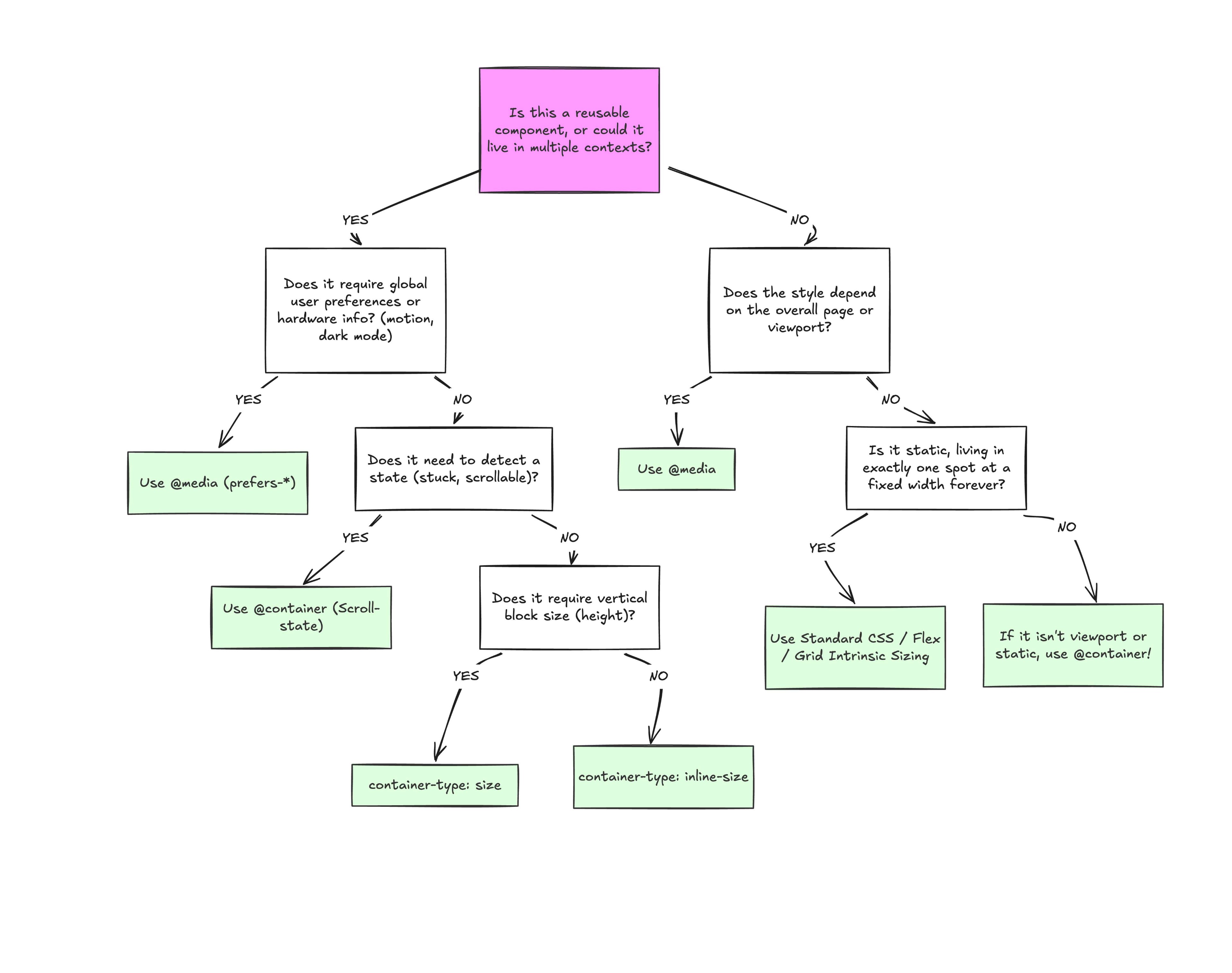
At the end of the day, the core reason why container queries look incredibly similar to media queries is simply familiarity. They’re not exactly “new”, but they are way less understood and adopted than media queries. But media queries have plenty of their own limitations; otherwise, we wouldn’t need container queries to fill those gaps.
What we have is a more effective feature for detecting when a specific component’s context changes and a means for adjusting styles based on its content, as it should be when that component can exist in multiple contexts.
 Dans cette tribune, Marjorie Bicaïs, head of SEA/Média chez CyberCité, décrypte ce que l'arrivée des AI Overviews et de l'AI Mode de Google change pour les stratégies paid media en France.
Pour la deuxième année consécutive, nous avons le grand plaisir de pouvoir compter sur le soutien de la MAIF comme partenaire Platine.
Parmi les avantages inclus dans cette formule, nous offrons de mettre en avant le partenaire dans une actualité dédiée sur notre site web. Nous avons l’habitude de proposer un format d’entretien dans lequel il peut se présenter, raconte comment il a découvert Paris Web et pourquoi il a fait le choix de soutenir l’association. En l’occurence pour la MAIF, c’est un exercice que nous avons déjà fait ensemble l’an dernier et vous pouvez toujours consulter cet entretien.
Ça n’avait évidemment pas de sens de recommencer cette année donc nous avons choisi de mettre en avant les orateurs et oratrices de la MAIF, qui sont intervenus sur la scène de Paris Web à deux reprises ces dernières années, dans le cadre de conférences partenaire :
Il est intéressant de noter, en passant, que cette dernière avait été l’une des conférences les plus appréciées du programme cette année-là. Quand on parle de « conférence sponsor », on s’attend à entendre un discours marketing ou commercial, mais nous demandons toujours explicitement aux partenaires de ne pas prendre ce chemin et de proposer un sujet qui soit aussi intéressant pour le public que n’importe quelle autre conférence au programme. C’est donc une satisfaction à la fois pour nous et pour les partenaires quand le public apprécie leur conférence.
Au-delà des conférences partenaires, nous pouvons aussi mentionner Tamara Sredojevic qui est prestataire au sein de la Digital Factory de la MAIF depuis un certain temps. Elle vient justement de publier un retour d’expérience sur l’organisation de tests de service numérique auprès de personnes handicapées, réalisés dans le cadre de son travail avec la MAIF. En plus d’être une lecture très intéressante, cet article est aussi une démonstration de l’investissement réel de la MAIF pour répondre aux besoins des publics en situation de handicap, qui mérite d’être salué.
Par ailleurs, vous pouvez aussi revisionner les conférences qu’elle a données lors des précédentes éditions, non pas moins intéressantes :
Nous souhaitons remercier la MAIF et ses équipes pour leur soutien indéfectible ces deux dernières années (d’autant plus apprécié dans le contexte difficile que les événements comme le nôtre traversent depuis quelques temps), ainsi que pour leur apport de contenus de qualité dans le cadre de ce partenariat. Merci la MAIF !💜
Si vous aussi vous souhaitez soutenir Paris Web, n’hésitez pas à nous contacter.
Si vous avez encore des resources cette année, il n’est pas trop tard pour soutenir l’édition 2026. Mais nous sommes aussi bien sûr déjà ouverts pour discuter des potentiels soutiens pour 2027.
In Trying out a Two-state Dark Mode Toggle I summarized the Two-state Dark and Light mode Toggle discussion as I experimented with a toggle in my personal website footer.
After launch, Curtis Wilcox left some good feedback to improve the accessibility of the component.
I decided to fold this into a reusable component so that I can benefit from this work on future websites (and you can use it too, I guess!). It’s called @zachleat/solar-eclipse-toggle and you can find it on GitHub or on npm now.
My favorite parts about the component are that it shows an inert button pre-JS, incurs no CLS, is still functional when the (separate) CSS doesn’t load successfully ([hidden] for the win), and all strings are inserted from light DOM for good internationalization.
Hope it’s useful to others!
npm install @zachleat/solar-eclipse-toggleAprès la 20e édition pour laquelle nous avions ouvert l’accès à la soirée communautaire aussi aux personnes non inscrites aux conférences, nous avons décidé de renouveler l’opération cette année.
Vous pouvez donc à nouveau vous inscrire spécifiquement à la soirée communautaire qui se déroulera le jeudi 24 septembre, de 18h à 20h, juste après que les dernières conférences et ateliers de la journée soient terminés.
L’inscription à la soirée communautaire est proposée au tarif fixe de 10 € TTC et vous pouvez vous inscrire dès à présent.
Important : si vous êtes inscrit·es aux conférences et ateliers le jeudi, vous n’avez pas besoin de vous inscrire à la soirée. L’accès est inclus avec votre place.
Pour pouvoir participer, vous devrez vous présenter à l’accueil de l’Institut Pasteur entre 17h45 et 18h30.
Vous pourrez retrouver à tout moment l’adresse et toutes les informations pratiques pour venir sur la page des informations pratiques de l’événement.
Toute l’équipe a hâte de vous retrouver autour d’un verre !
The general idea is that we create a Document Picture-in-Picture window (DPIP window), and then we put HTML, CSS, and JavaScript into it.
Creating Web Widgets Using the Document Picture-in-Picture API originally handwritten and published with love on CSS-Tricks. You should really get the newsletter as well.
I used to enjoy talking about the web, in many ways. I love the fact that it is for everyone, by design. And I used to love talking about the consequences of this design decision: that everyone is allowed to do whatever they want on the web, and that everyone is allowed to use the web any way they want to, and that everyone must be able to use the web, and that it is hard, but fun, to make stuff that everybody can use. And I used to love talking about, what I consider to be the wonderful material of the web: HTML and CSS, two beautiful, and extremely powerful languages, if you take your time to understand them.
Since a year or two it gets harder and harder to talk about these things, things that I care about. Every time I mention such a thing, someone will say “but AI can do that”. And now, immediately, instead of continuing discussing this wonderful thing, I have to think, and talk about the question if an AI can really do that. So instead of talking about the beauty of taking your time to write well considered HTML, I am now talking about the idea that a robot could do this wonderful work instead. Instead of talking about working out a complicated layout with CSS, and trying and trying until it works, I have to answer the question why I don’t just use an LLM to fix this for me. And instead of talking about the life changing experience I give to my students when I invite real people into our classrooms, people, with their very particular ways of using the web, people with screenreaders, or people who cannot use a mouse, instead of talking about these incredible experiences, that really change the perspective on design of some of my students I have to talk about synthetic users, the most cynical concept of all.
I think this tactic is called something like “fill them with bullshit.” The idea is that they fill us with so much bullshit, in such enormous quantities, that there is nothing else left anymore. It is a weapon used by certain politicians, and silicon valley is using it as well, in an incredibly aggressive way.
I’m not sure what to do about this. I’ve noticed that being naive helps. People tell me that a senior developer with an AI can do the job of 10 junior frontend developers. Instead of becoming desperate about these kinds of things, I have decided to ignore them. I try to keep on doing what I do in order to stay sane. I keep on teaching about the wonderful web to my students, even if nobody will ever hire a talented, creative, junior developer again. I keep on teaching about the consequences of the open web, even if it’s harder and harder to find anything open in this monopolised web anymore. And I do that because I still care. Because I still think HTML and CSS are wonderful creative materials, and I still think we should use these languages to make nice things that really work for everybody.
So, next time you ask me if an AI can’t do that job I’ll ignore your question and keep on talking about what I believe we should be talking about.
L’IA générative donne aujourd’hui accès à des connaissances et à des capacités qui étaient autrefois réservées à des spécialistes. Le risque est de confondre cette puissance de production avec nos propres connaissances ou compétences : produire ne signifie pas nécessairement comprendre, juger ou savoir reprendre la main. Je vous propose dans cet article d’examiner cette […]
L’article De l’illusion des connaissances ou des compétences apportées par l’IA est apparu en premier sur FredCavazza.net.
Cela fait trop longtemps que je n'ai pas écrit sur ce blog. Le manque de temps, le fait que pour parler technique, je privilégie mon émission radio CPU, le manque parfois d'envie.
Alors réveillons-le comme une sorte de brouillons pour mes futurs sujets, pour des à-côtés, ou simplement comme ça, dire que je suis toujours là.
Certains le savent, je manipule les emoji depuis 1999. Oui, depuis aussi longtemps, et les traces sont sur ce site web. Cela a été l'objet d'une de mes premières conférences techniques en 2012, adaptation d'une série de billets persos Des emoji dans l'Unicode
. D'une manière assez amusante, on m'a cité une fois en entretien d'embauche mon propre sujet en ignorant que j'en étais le rédacteur. J'ai eu aussi des informations précieuses de première main, parfois très drôles, et j'ai toujours envie de raconter cette épopée des emoji dans l'Unicode et les implications techniques.
Mais ça ferait peut-être hautain.
Donc je me baladais sur LinkedIn en quête de ma prochaine quête quand je tombe sur ce post d'une ESN française
The emojis we got vs. the emojis we deserve 💭
The world is evolving faster than ever. New technologies, smarter engineering, cleaner energy and more connected industries are just some of the advances impacting our everyday lives.
However, most of the emojis available don’t represent these innovations… So we decided to take the matter into our own hands and create the versions that would best fit the ALTEN approach!
Take a look at our refreshed emojis. 👇🏻
Suivi d'une collection d'images opposant des emoji de la fonte Google Noto (donc Android ?) à leur réinterprétation par IA générative. Par exemple, une personne derrière un laptop revu dans un environnement holographique, ou une paire de lunettes revue en dispositif de Réalité Augmentée

Pour une boite spécialisée dans l'ingénierie informatique, ne pas avoir compris pourquoi et comment les emoji existent, les contraintes optiques, les usages directs, le besoin d'abstraction, tout cela pour s'exprimer graphiquement par des images générées par IA,…
Qu'en 3 petits prompts pour générer ton post sur LinkedIn pour faire plus joli plus rapide
sans en comprendre contraintes et complexité, cela laisse rêveur.
C'est encore plus drôle quand ce post arrive une semaine après que, dans un spectaculaire retour en arrière, LinkedIn supprime ses outils d'amélioration par Copilot
des contenus et propose maintenant de filtrer et modérer fortement tout contenu post généré par IA, constatant que c'était devenu infernal.
Allez, à la prochaine bafouille
Earlier this month, we announced platform properties for Search Console, allowing you to track how your social and video posts on Instagram, TikTok, X, and YouTube perform on Google Search, Discover, and Google News. Today, platform properties are globally available to everyone.
The polygon() value of clip-path accepts a new (optional) corner-rounding parameter that allows you to create curved and rounded shapes easily!

The code is as simple as the one below.
We’ve all heard of the sacred rule in modern web development, the rule never to be broken. The rule of “Never block the main thread.”
You almost can’t miss it as a web developer; it’s in almost every performance guide, and to be fair, it is good advice. We all know the browser’s main thread is single-threaded, meaning it can only do one thing at a time.
Plus, as we know, the main thread isn’t ours alone; we share it with the browser’s rendering engine, input handlers, and other critical tasks. As a result, the less time we hold onto the main thread, the more responsive an app feels. That leads us to share tasks with background workers as we’ve convinced ourselves there should be a hard line between the UI and any computation, and that line shouldn’t be crossed.
And that is what a “recommended” architecture looks like.
But I dare say that sometimes**, moving the data to a worker is slower than just letting the main thread do the work.
I found this out a few months ago while building a Chrome extension with screenshotting features called Fastary. I kept finding a latency of about 2 to 3 seconds in all my testing, even after using an Offscreen Document (a background process in Chrome extensions) to handle the canvas operations. A screenshot task should feel instant without lag, after all.
It is quite ironic that by reflex, we move work away from the main thread to avoid freezing the UI, but sometimes the act of moving that work (e.g., serializing, copying, and deserializing) can also freeze the UI. And sometimes the recommended approach of letting the background do the work can be slower than just doing the work on the main thread.
Let’s talk about that.
The Architecture Of Browser Context IsolationTo put things in perspective, let’s understand why we isolate browser contexts and how they communicate with each other, with emphasis on the communication part.
A browser is more than a single environment. Different environments are running at the same time, each having its own memory space, what it can access, and rules:
Each one of these is isolated from the others. A web worker or background script lives in a different memory space from the main thread. They cannot just reach and read each other’s variables or logic, and this is known as the “shared-nothing” architecture.
How do these isolated environments communicate? They explicitly message each other back and forth using APIs, like postMessage().
postMessage() tells the browser to take a piece of data and deliver it to the context that requested it. But to do this, the browser relies on the Structured Clone Algorithm (SCA).
You’re probably familiar with JSON.stringify(). SCA is similar, but much stronger and smarter. In its simplest form, SCA is a deep, recursive copy operation, i.e., cloning. It walks through the entire data structure it is given, clones every single value, serializes it into a transportable format, ships those bytes to the target contexts, and then reconstructs the original object on the receiving side.
SCA is fast, or maybe fast-ish... For a small regular config object like {theme: "dark"}, it is imperceptible; you don’t even notice it. The story changes, however, when dealing with heavy data because the SCA is a synchronous blocking O(n) operation, i.e., the cost increases linearly with the size of your data.
Let’s put that into perspective. A user clicks a button, and internally, an 8MB image payload is sent to a background worker for processing. When you call postMessage(), the main thread must immediately stop what it is doing to run this serialization and copying process.
So, if the time it takes to pack, ship, unpack the data, and go back to the start is longer than the time to just process the data on the main thread, why not do that instead?What About Transferable Objects?
I’m sure some of you are already thinking, “Why not just use Transferable objects?” And that is a valid point. Let’s talk about that.
Developers who really pursue ultra-high-performance web apps usually use Transferable objects (e.g., ArrayBuffer, ImageBitmap, or MessagePort) to bypass the Structured Clone Algorithm. This is because when you transfer an object, you’re not making a copy (like SCM). Instead, the browser switches ownership of the data from one context to another.
The browser performs a hand-off whereby the sending context loses access to the data instantly, and the receiving context takes full control. It is actually insanely fast. According to Chrome Developers’ benchmark, transferring a massive 32MB ArrayBuffer can take under 7ms, compared to about 300ms when cloning with SCM. That’s a 43x speed boost.
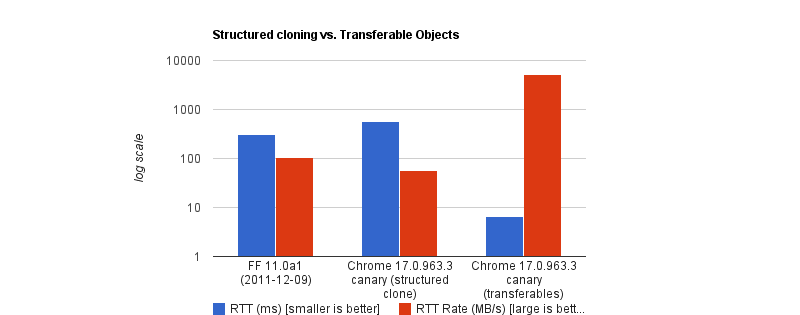
But like all good things, there are downsides. To name a few:
chrome.runtime.sendMessage) traditionally forces everything through JSON serialization.So, as far as my screenshot extension went, Transferable objects were not an option.
Why We Isolate Contexts AnywayWhy do we even bother isolating contexts at all? Why not just leave it all to the main thread?
Offloading long-running CPU tasks to a background thread is absolutely the right thing to do. The browser needs to paint a new frame every 16.6ms to keep things fluid; that means any task that takes >50ms is generally considered “long”. Offloading to the background is absolutely the right thing to do.
The issue, however, is that we’ve turned this “never block the main thread” into an absolute rule, without asking is this task expensive to process or expensive to move?
I have come to realize now that the rule is less “never block the main thread” than “never block the main thread for too long.”
When The Right Architecture Is The Wrong ArchitectureMy goal with the Fastary extension was to make it feel like a native app, running as smoothly and instantly as you would expect a native app to.
As you already know, I took the recommended approach to use the Offscreen Document to handle DOM work in the background. But to my surprise, that took a different turn.
The Offscreen Document API is a clear winner. You create a hidden, undisplayed document that runs entirely in the background. It has a DOM and supports Canvas. For example, if I want to crop a screenshot, stitch multiple screenshots together, perform heavy image manipulation, or add a watermark, Offscreen Document was made for that.
Turns out that was not the best approach. This was my architecture:
chrome.tabs.captureVisibleTab(), which returns a Base64-encoded data URL string.chrome.runtime.sendMessage() to ship this image payload to the Offscreen Document.<img> element, then draws it onto a canvas before it applies the user’s crop coordinates, encodes the result, and sends the processed image back to the background worker.But when I tested it, the screenshot didn’t feel instant. As I said earlier, there was a consistent 2–3 second lag.
I figured out that when captureVisibleTab() takes a screenshot, it returns a Base64 URL string, and on a standard 1080p screen, that string could be approximately 1MB or more, depending on how detailed the image is. It gets even more interesting on modern Retina displays (e.g., MacBooks) as they tend to automatically double the image’s size by default.
Keep in mind that since the image payload could be doubled and extension messaging relies on JSON serialization (as of this writing), we potentially deal with massive synchronous communication that costs an entire round trip.
The image string data is JSON-serialized at least twice: once when going into the Offscreen Document and once coming back out with the processed results to the background worker. The actual image processing (cropping) done inside the Offscreen Document was fast, no doubt, but I can’t say the same about the transfer overhead.
As if the latency itself wasn’t enough, I noticed a rather subtle bug — which, now that I think of it, was more of my ignorance. After a screenshot was taken, the crop result was completely off in a way that either weirdly scaled the image or resulted in incorrect coordinates.
It turns out that when a user selects a region to crop, the content script gets the box coordinates using getBoundingClientRect(), which is measured in CSS pixels; this is what the DOM uses. But when the screenshot is captured natively in Chrome, the browser doesn’t crop it automatically; it instead uses the physical hardware pixels to get the full screen capture. And the browser uses devicePixelRatio (DPR) to know how many physical pixels should represent one CSS pixel. Basically, if a user on a Retinal display (DPR = 2) highlights an area of 400x300 CSS pixels, the actual captured image area is 800x600 physical pixels.
Note: One CSS pixel is equal to 1 physical pixel (DPR of 1) on a standard monitor. On a Mac Retina display or a modern 4K monitor, however, the DPR is usually 2 or 3.
For an accurate crop, I needed to apply these two different measurement systems with the right DPR, i.e., scale the crop coordinates by the DPR. But remember, Offscreen Documents have no physical display. Processing any image would have a default DPR equal to 1. To fix this, I would have to capture the exact devicePixelRatio from the active tab, serialize it, pass it alongside the image payload, and manually do the scaling math inside the Offscreen Document. The complexity starts to compound.
What if I broke the golden rule and did the work on the main thread instead?
Working On The Main ThreadSome developers will argue that UI tasks are the only things that should run on the main thread, but I don’t fully agree with that. Personally, I believe that user explicitly-invoked actions that need immediate results can sometimes get a solid pass to run on the main thread, provided the work is incredibly fast (e.g., 1s).
That’s what I did: scrap out the Offscreen Document and reengineer the logic. Instead of:
Background → [serialize] → Offscreen Document → [serialize] → Background → Content Script…I decided to run the whole image processing in the active tab:
chrome.scripting.executeScript().// Background Script
const screenshotUrl = await chrome.tabs.captureVisibleTab(undefined, { format: "png" });
// Inject the processing function into the active tab as a content script
await chrome.scripting.executeScript({
target: { tabId: activeTab.id },
func: processAndCopyImage,
args: [{ base64Image: screenshotUrl, cropData: userSelection }]
});
This approach completely clears out multiple context hops and round trips that JSON serialization requires. The only cross-context transfer involves sending the data URL from the background to the content script.
The Retina DPI issue essentially solved itself, as the content script runs directly inside the real, active browser tab because it knows the monitor’s real devicePixelRatio.
But there’s an elephant in the room that you may have noticed.
Sure, the image is now processed on the main thread, and the background manipulates the canvas in the active tab. I could technically be blocking the main thread. That’s where I amended the “no blocking the main thread” rule to “no blocking the main thread for too long.” In this specific case, at least, blocking the main thread for a task the user requests for approximately one second is justifiable. It works conversely as well: maybe don’t isolate processes if the data transfer cost is greater than the processing cost.
Conclusion: When To Isolate And When Not ToI’ve boiled it down to a mental model that depends on whether the task is:
These are tasks where the primary cost is computation and not the size of the data itself. These are tasks where most of the time is spent on doing calculations or heavy transformations, e.g., image compression, audio profiling, physics simulation, etc.
The transfer cost for these tasks is minuscule compared to the actual work.
These tasks are the exact opposite. These tasks are only expensive because of the size. The processing time is almost insignificant, but the data is expensive to transport, e.g., image cropping, filtering an array, shallow copy, etc.
In my specific case, offloading the task to the background falls mostly into negative-sum efficiency. If we are talking about moving megabytes of data to perform a 50ms operation, there is no benefit to offloading it to the background.
Perhaps we can think of it like this:
Total Time = Serialization Cost
  + Transit
  + Background Processing Time
  + Deserialization Cost
Looking at this, if the “background processing time” is the most dominant task in your operation, then isolation is the clear winner. But if serialization, plus deserialization, plus transit exceeds that cost, then there’s no need to isolate things.
And if you can’t figure out if the task is CPU-heavy or data-heavy, it certainly doesn’t hurt to measure it, for example, using performance.mark() and performance.measure() around postMessage calls to profile the transfer cost.
Read all about boundary-aware CSS, accessible grid lanes, time-based web designs, full-bleed, the customizable select, and new web platform features.
What’s !important #15: Boundary-aware CSS, Time-based CSS, Full-bleed CSS, and More originally handwritten and published with love on CSS-Tricks. You should really get the newsletter as well.
The earth is heating up and AI isn't helping. It drives major increases in electricity use, water use and CO2 emissions. Yet, industry and governments alike seem keen to leverage the latest tech. Can we make greener choices?
Yesterday, I spoke at a conference on AI in government about sustainable choices. The presentation and slides were in Dutch, this post is a high level summary of what I covered.
As the presentation took place during a record-breaking heatwave, which meteorologists attribute to climate change, and there were some airconditioning-related issues, very little irony was lost on us.
I started out talking about if AI is good or bad for sustainability and called it the wrong question. It's the wrong question, because both AI and sustainability are concepts that have many meanings.
AI can be understood in different ways:
Sustainability is multi-faceted too. In the Web Sustainability Guidelines, we center our definition around three pillars that ultimately need balance between them: Planet, People, and Profit:
So, there's some nuance about what the words mean, but despite that, it's worthwhile to try and reduce climate impact of our services. The pope said so, and in government, it's an increasingly a priority (like in the UK, where the Digital Service expanded their design guidance last year with principle 11: Minimise environmental impact) .
I shared five tips to make greener choices around AI, but couldn't help myself to add a bonus tip as tip zero: in many cases, not using AI for your project makes the most sense. Which is fine.
Many of us will have sat in meetings around a new idea or project, where someone put up their finger and said ”oh, maybe we can use AI for this”. The AI vendors primed us for this with hype.
Often, using AI, and especially generative AI, is like going to your local corner shop using a helicopter. What if you could solve the same problem with a couple of lines of Python, and Excel-sheet, people, or manually summarising?
I wanted to mention this specifically, because nobody wants to be the downer in the group and suggest not doing the thing that everyone is hyped about. But to be sustainable, we need to pick out just the cases where AI is absolutely necessary, and go without it for anything else.
When using a specific type of AI actually solves your problem best, here's five tips to make greener choices.
When using generative AI, model size differs wildly. An example of a large model is DeepSeek v4 Pro, which has 1.6 trillion parameters (12 zeroes), while there are small models like Hugging Face's SmollLM that has 135 million parameters (6 zeroes).
A smaller model could save 30⨉ emissions of CO2 (and equivalent greenhouse gases), explain Luccioni, Jernite, & Strubell in their paper “Power Hungry Processing: Watts Driving the Cost of AI Deployment?”.
A lot of generative AI uses so-called general purpose models, which are systems that know pretty much everything about the world. When hiring humans, we usually list a specific area of expertise. That's partially because there are no humans that know it all (just ones that think they do).
We should try to do the same with language models. If we're building a system that answers questions about taxes, we don't need to tell it what the capital of France is.
In “Power Hungry Processing”, Luccioni, Jernite, & Strubell explains this: “multi-purpose generative architectures are orders of magnitude more expensive than task-specific systems for a variety of tasks, even when controlling for the number of model parameters” (emphasis mine).
In many applications of AI, the relevant software needs lots of computing: GPUs, CPUs, memory, and storage. This computing is often done in the “cloud”, or: data centres. The climate impact of data centres is widely seen as three components: electricity, CO2 emissions (and equivalent greenhouse gases), and water usage.
The International Energy Agency predicts the amount of data centres to double or triple over the next few years. The electricity used for this will be green, partially. But it won't all be green : gas and coal will continue to be a share of what powers data centres.
On an operational level, we could reduce the load on data centres by reducing how many tokens we use, via smarter prompting (shorter, more specific, more explicit, less repetition through variables). The paper Smarter, smaller, stronger by Perez Ortiz and Drobnjak details tests that show reducing a response from 400 to 200 words reduced energy consumption by 54%.
On a policy level, one tip I learned at the AI reporting event I attended, is to question how many 9's you really need. Data centres are convenient because they offer compute for rent and make it easy to scale. And they offer uptime, guaranteeing sometimes up to 99,99999 availability: five nines. More nines could mean less sustainability: some data centres will use diesel power or other unsustainable sources when they have a power cut. So to get to a higher uptime guarantee, they need to make such choices. What if we required less nines? What if we decided it's ok to have the AI thing not work for a couple of days a year?
Greenwashing is everywhere, and to make sustainable choices, we'll need to develop our skills to recognise it from afar. Sometimes it's easy to recognise, like an airline that said with them, you can “fly responsibly” (a Dutch court said this is misleading). EU Directive 2024/825 effectively forbids greenwashing, but companies still tend to do it.
Examples from The AI Climate Hoax include:
My last tip is around data collection. It's tricky to know how much energy data centres use, not the least because Big Tech successfully lobbied the EU to treat energy usage data as company secrets.
When you do get data, it often does not include Scope 3 emissions, which are estimated to be a very large part (I've seen percentages from 30 to 89%, and I am not sure what's right, other than that it is large).
There can also be a major difference in reporting: some companies do location-based reporting, others market-based reporting. Location-based means that you get information about how much a specific data centre is actually using, whereas with market-based, factors outside are taken into account, including certificates for carbon.
Location-based data is the most helpful if your team is trying to make optimisations, because it allows them to see the numbers go down (or up),where they would appear constant with market-based reports.
Lastly, I mentioned grid intensity: because there are many different power sources, and they deliver different amounts of energy depending on the time and location, grid intensity vary. For instance, if it's sunny and windy today at noon, the grid intensity will be low because there is lots of green energy available. At other times there's less.
Your application can use this difference, that constantly changes, by moving your computing to the right place at the right time. This is also called “carbon aware computing” and companies like Google already do it, to save emissions and costs at the same time.
AI-related electricity usage, water use, and carbon emissions can be huge. That's a problem, but it's also an opportunity (cheesy but it's true). There is lots of low-hanging fruit that we can start addressing. As there's still so much to reduce, our efforts really can make a dent.
I really enjoyed giving this talk and hearing the audience comments afterwards. The main worry seems to be: how do I sell this within my organisation, and an answer emerged in the group: cost-savings and carbon-savings often go hand in hand.
Originally posted as AI and greener choices on Hidde's blog.
