❌

Vue normale

Maybe Don’t Rely on Google’s “Modern Web Guidance”

25 mai 2026 à 16:08

Just in time for Google I/O, the Chrome for Developers site announced Modern Web Guidance (MWG):

Orange star between two curly braces, topped with a circle-line and a flat line at the bottom, appearing almost as an ASCII art lantern.

Modern Web Guidance is a set of evergreen and expert-vetted skills that guide your AI coding agents across many common use cases to build modern web experiences that are accessible, performant, and secure.

I appreciate this set of LLM skills lists accessibility first, something I feel strongly every MVP (or early preview as Google calls this) must:

Simply, if your MVP does not have accessibility factored in, it is not viable. If you claim accessibility is a core principle but your version 0 does not include it, then it is not a core principle.

Last year I made a straightforward and simple request to Google (that also respects the law in most jurisdictions where Google does business):

Please, if your team cannot explain how the thing satisfies all WCAG Success Criteria at Level AA, then don’t release the thing.

Unfortunately, MWG accessibility doesn’t satisfy. Partly because not every pattern has tailored guidance. For example, you may remember when Google ran at a toast pattern before abandoning it:

Again, the people designing the feature neither understood accessibility nor had consulted anyone who did while they designed it, instead relegating accessibility to the later stages of their design and assuming it could simply be remediated with a modest effort and without any serious redesign or rethink.

I hoped Google also remembered and applied that experience here, making a skill tailored to toasts to avoid another debacle. Nope.

Reopening because this guide needs accessibility guidance in some form as there’s no general toast guidance.

22 May comment reopening issue #393 “Create guide and evals for the persistent-toast-notifications use case,” originally marked complete 4 April 2026

But this is an early preview of what developers can do with MWG. It’s not going to cover every pattern. That would be absurd. So let’s look to a pattern Google decided to showcase at launch via this first example prompt on the page:

Create an accordion-style stats component that smoothly animates on open and close.

First prompt on MWG home page, under Build new user experiences heading.

I expected a pile of <details name> elements, maybe CSS block-size with a JavaScript fallback, probably a couple placeholder images for generic stats, possibly a well-formed table to accompany them, and of course all of it passing WCAG. This is what Antigravity produced with MWG:

See the Pen Google Modern Web Accordion by Adrian Roselli (@aardrian) on CodePen.

Antigravity with MWG went well beyond the prompt, providing a theme switcher, configuration settings, and plenty of calls to Google fonts. But it failed to do what I asked. The animation doesn’t work in Firefox. This despite the promise of baseline / Baseline support and fallbacks:

  • Progressive Enhancement & Nuanced Fallbacks: We distinguish between purely additive enhancements (like speculative preloading) which are safe to let older browsers silently ignore, and critical behaviors (like dialog controls or network beacons) where we write highly considered, low-overhead fallbacks.
  • […]
  • Baseline-Aware Integration: We leverage real-time compatibility data from the Baseline project so agents can dynamically adapt to current browser support and any browser support preferences.

This is already worrisome given we know that three years on, Baseline still doesn’t really address baseline support:

The relatively new Web Platform Baseline offering does not track browser support for accessibility features built into the web platform. If you need to understand whether browsers support accessibility features as your own base level set of requirements, for legal or other compliance reasons, then Web Platform Baseline does not represent a baseline.

Let’s ignore the non-DRY code, like duplicated HTML text in the script and stringing out the transition instead of using transition-property. Antigravity with MWG didn’t even create a WCAG-conformant example from its own prompt. I found errors within moments. MWG failed its core promises of creating accessible and performant code. Despite its own explicit guidance.

For the first two of these MWG already had guidance, and the a11y skill just wasn’t picked up. Overall activation aside, this highlights the importance of including contextual a11y information.

[…] [W]e should try to have one guide for each common interactive element summarizing and linking/embedding relevant bits of guidance (e.g. tabs, accordions, drawers, etc). The more scattered the use case guidance is, the less likely it is that agents will actually pick up all the pieces.

And there’s the rub. There’s no way to guarantee you’ll get what you ask for, that you won’t get something else, and that these guides — the entire promise of MWG — will be honored. MWG asks authors to trust MWG when using an LLM to code interfaces. But MWG knows its guidance may be ignored:

LLMs are non-deterministic. Even if we do everything right, there is no guarantee any guideline will be used for any given prompt. Even if the relevant guide is picked up, it may not be read fully. Case in point: As you say, MWG already had guidelines for many of these things!

Mastodon post from a domain expert consultant to Google for MWG, 21 May 2026

The underlying code generation technology can’t be trusted to follow the rules and the rules aren’t robust enough to blunt that reality.

Crude orange Vonnegut-style asterisk between two curly braces angled out a bit, topped with a rounded rectangle and a curved line at the bottom, appearing almost as an ASCII art toilet.

If your job requires you to burn tokens to satisfy some manager’s dashboard, then yes, grab the MWD skills files and integrate them into your LLM work. You’ll almost definitely get better output than if you do nothing at all. There are smart people working on this and many of the accessibility rules I saw were on-point.

But that output will be wrong in subtler and more nuanced ways across potentially fatter piles of code with more unrelated output and unwanted dependencies. It will require a more specialized set of skills to identify errors. And those errors will be different every time the code is generated.

So on the side, keep supporting any existing pattern library. If it’s built well, it’s copy-ready code that you can stuff into a project just as quickly as a chatbot could generate it. It’s deterministic, so you get the same code every time. Ideally it’s been vetted, so you don’t need to look for errors. It’s tailored to your context, meaning you don’t need to yank out random style switchers and typefaces (hoping you got all the dependencies).

If your job doesn’t require you to burn tokens, then probably ignore MWG and, by extensions, LLM for code. In case the environmental damage, intellectual property theft, wealth redistribution to the rich, encoded biases, and built-in support of fascism weren’t enough.

Update: 24 June 2026

The Silktide blog has this banger of a quote:

Across the board, [Google Antigravity using Modern Web Guidance] was a deprioritization of accessibility requirements in favor of visual presentation.

I don’t agree Antigravity nor MWG should use APG, which a regular visitor here may know, but the author is correct the APG disclosure pattern is mostly harmless.

But Silktide is right that the, once again, Google built the wrong thing for the wrong people and then proudly shoved it out into the world with no hint of self-awareness.
Freebox 4.11.1 : Comment fonctionne le nouveau DNS local ?

Freebox 4.11.1 : Comment fonctionne le nouveau DNS local ?

Avec la mise à jour 4.11.1 du Freebox Server déployée le 20 mai 2026[1], Free corrige un oubli historique : les Freebox savent désormais résoudre les noms des appareils du réseau local via leur DNS interne. Une fonctionnalité réclamée sur le bug tracker officiel depuis plus de quinze ans[2].

Ce que change réellement la 4.11.1

Jusqu'ici, le DNS embarqué dans la Freebox se contentait de relayer vos requêtes vers les résolveurs externes. Pour joindre un NAS ou un Raspberry Pi, il fallait connaître son adresse IP, du type 192.168.1.42. Et si le bail DHCP changeait, tout tombait.

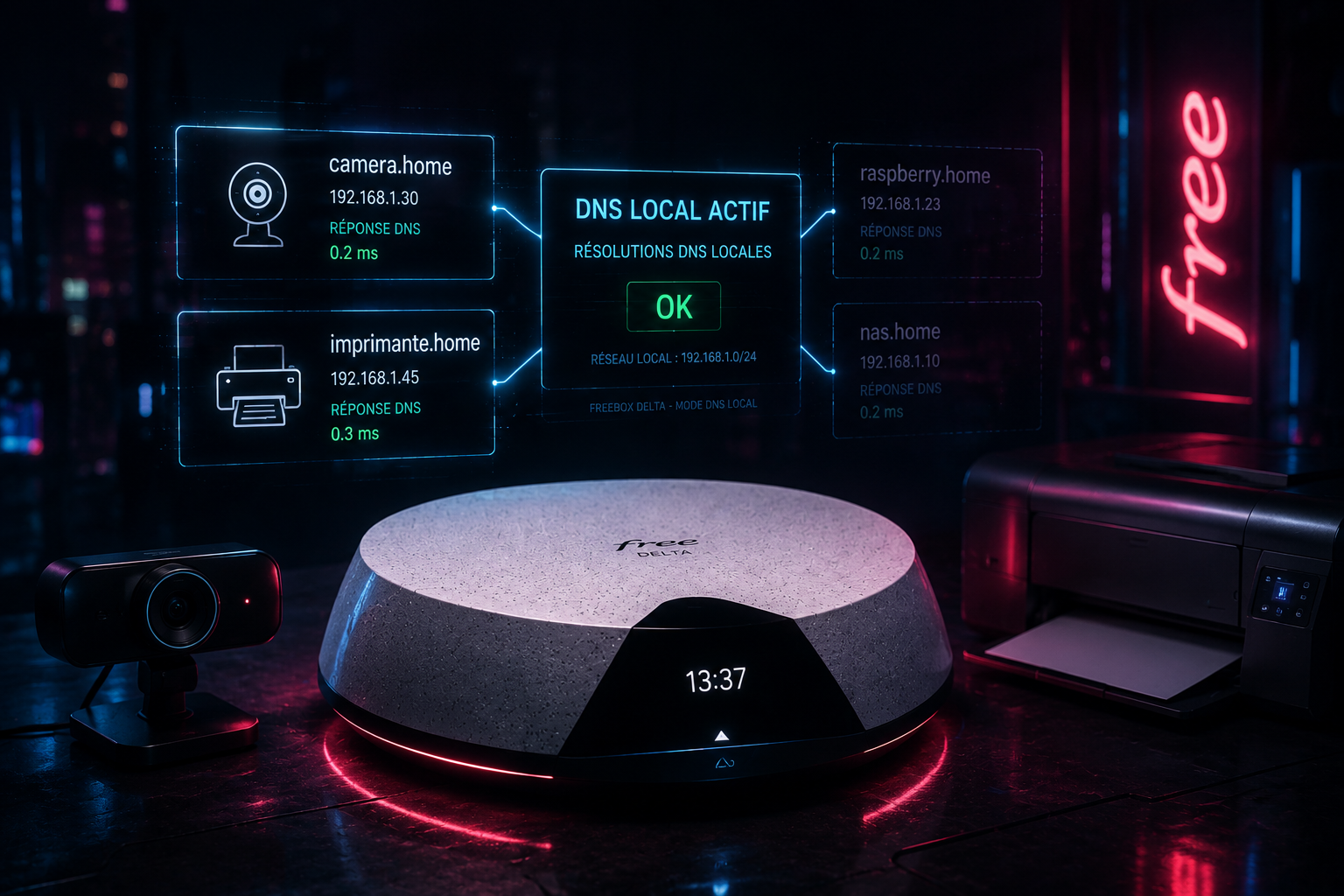
La 4.11.1 ajoute la brique manquante : « un nom de domaine est maintenant associé automatiquement à chaque périphérique réseau »[3]. Concrètement, le Freebox Server expose un résolveur DNS local capable de répondre à des requêtes du type mon-nas.home ou monserveur.home et de retourner l'IP courante de l'appareil correspondant.

Cette évolution correspond à l'objet du ticket FS#4079, ouvert début 2011 sur le tracker officiel, qui réclamait un couplage DHCP/DNS sur la Freebox[2:1]. Quinze ans plus tard, c'est enfin fait.

Comment ce DNS local fonctionne ?

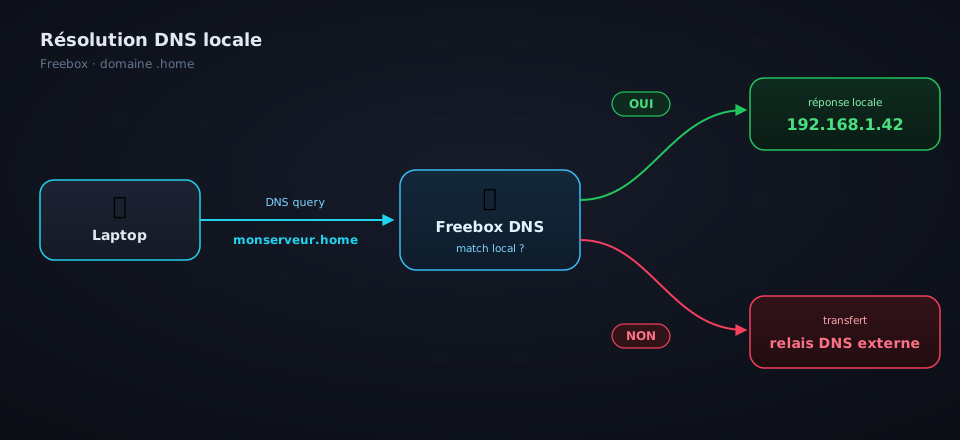
Le mécanisme de résolution DNS est classique, voici les trois étapes :

  1. Le client demande une IP en DHCP. Au passage, l'appareil annonce son hostname (option DHCP 12), ce nom visible dans Freebox OS dans la liste des périphériques.
  2. La Freebox enregistre le couple nom ↔ IP. Le bail DHCP est désormais injecté dans la table de résolution du DNS local du Server. Soyons précis : la Freebox lisait déjà le hostname annoncé par chaque appareil, c'est lui qui s'affiche dans la liste des périphériques de Freebox OS. Ce qui manquait jusqu'ici, c'était le pont entre cette information et le résolveur DNS embarqué.
  3. Le DNS interne répond aux requêtes. Si la requête correspond à un appareil connu, il renvoie l'IP du LAN. Sinon, relais vers les DNS externes comme avant.

Freebox 4.11.1 : Comment fonctionne le nouveau DNS local ?

Aucun fichier hosts à maintenir, aucun bail statique forcé. Le hostname annoncé par l'appareil suffit.

Et le suffixe de domaine ?

Free n'a pas communiqué officiellement sur le suffixe utilisé dans le changelog, mais en explorant les écrans du Freebox Server après la mise à jour, on découvre que c'est .home qui a été retenu. Vos appareils sont donc accessibles sous la forme monserveur.home, nas-synology.home, raspberrypi.home, etc.

Choix pragmatique mais discutable techniquement : .home n'est pas réservé par l'IETF pour un usage local. La RFC 8375 a justement créé home.arpa pour combler ce besoin de manière normalisée[4]. À l'inverse, .local est réservé par la RFC 6762 au protocole mDNS (Bonjour, Avahi)[5] et Apple recommande explicitement de ne pas l'utiliser comme suffixe interne[6] Free a donc bien fait de l'écarter.

En pratique, .home est largement répandu sur les box concurrentes et fonctionne sans accroc aujourd'hui. Le seul risque serait qu'un futur registre l'enregistre comme TLD public, mais c'est très improbable vu son usage déjà massif dans les LAN domestiques.

Le nom exact attribué à chacun de vos appareils est visible dans Freebox OS > Périphériques réseau après la mise à jour.

Ce que cela débloque concrètement

Ce serveur DNS local connecté au DHCP vous permet de contacter vos périphériques directement sans que vous ayez connaissance de leur adresse IP :

  • ssh raspberrypi.home sans relire la liste DHCP à chaque fois
  • Pointer un docker-compose ou un script de backup vers un hostname stable du type nas.home
  • Configurer Plex, Jellyfin ou Home Assistant sur mobile sans dépendre d'un bail statique
  • Imprimer sur imprimante-salon.home depuis n'importe quel poste
  • Se passer d'un Pi-hole ou d'un AdGuard Home déployé uniquement pour la résolution locale

Ce DNS local est d'autant plus pratique si vous avez beaucoup d'équipements connectés à votre réseau dans votre baie de brassage.

Les limites à connaître

Le DNS interne reste strictement local :

  • Un appareil avec IP fixe configurée manuellement sur l'appareil lui-même (sans bail DHCP) ne sera pas résolu.
  • Un appareil qui n'annonce pas de hostname en DHCP restera invisible côté DNS.
  • Les équipements derrière un routeur secondaire ne bénéficient pas de la résolution.
  • Si vos clients pointent directement vers un DNS externe (Cloudflare, Quad9, NextDNS, Google…), la résolution .home est évidemment court-circuitée. En revanche, si vous faites tourner un AdGuard Home, un Pi-hole ou un Unbound sur votre réseau, il suffit de configurer la Freebox comme upstream DNS de ces outils pour conserver la résolution locale en plus de votre filtrage maison. Le meilleur des deux mondes.

Comment activer le DNS Local de la Freebox ?

Il n'y a rien à activer. Il suffit de redémarrer le Freebox Server[1:1]. Pour vérifier que la 4.11.1 est bien installée : écran de la box (menu Système / Informations avancées), application Free dans l'Espace Abonné, ou Freebox OS (mafreebox.freebox.fr).

Une fois en place, un simple ping monserveur.home depuis un poste du réseau confirme que le DNS interne répond.

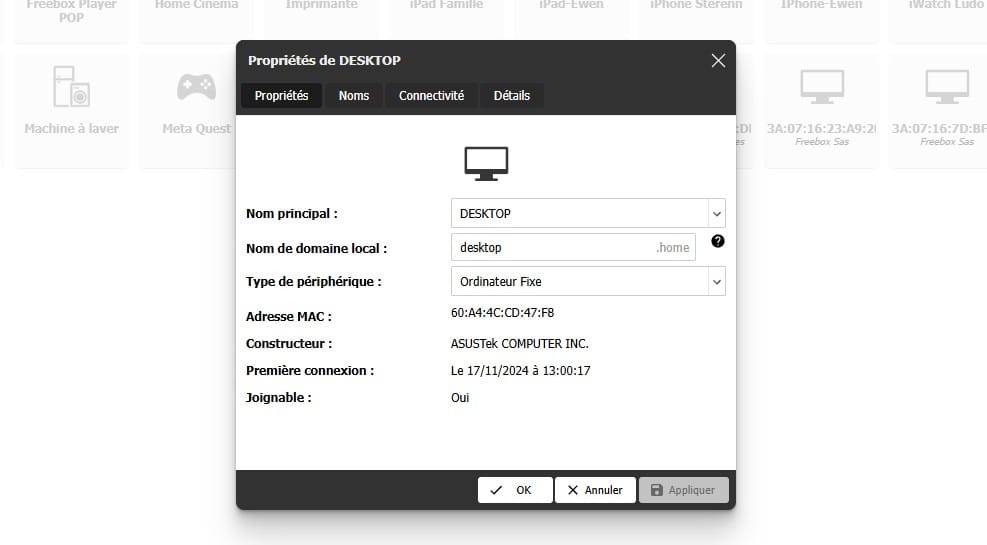
Pour modifier l'entrée DNS du périphérique, il suffit de se rendre dans la vue "Périphériques réseau" et de modifier le champ DNS Local :

Freebox 4.11.1 : Comment fonctionne le nouveau DNS local ?

En résumé

Une vraie bonne nouvelle, même si j'ai un doute sur la cible : les profils qui ont vraiment besoin de résolution DNS locale font souvent tourner leur propre solution de DHCP (Pi-hole, AdGuard Home, OPNsense, OpenWrt ...) et n'ont pas forcément envie de confier cette brique à un hardware lié à leur opérateur.

Et vous, vous repassez sur le DHCP Freebox pour profiter du .home, ou vous gardez votre stack maison ? N'hésitez pas à rejoindre le serveur Discord Geeek pour discuter.

Si les sujets réseau vous intéressent, n'hésitez pas à découvrir mon article sur la transformation d'un Raspberry Pi en IDS.


  1. Clubic, La nouvelle mise à jour Freebox apporte une fonctionnalité attendue depuis plus de dix ans par certains, 21 mai 2026. https://www.clubic.com/actualite-613777-la-nouvelle-mise-a-jour-freebox-apporte-une-fonctionnalite-attendue-depuis-plus-de-dix-ans-par-certains.html ↩︎ ↩︎

  2. Bug tracker officiel Free, ticket FS#4079 DNS local couplé au DHCP. https://dev.freebox.fr/bugs/task/4079 ↩︎ ↩︎

  3. Univers Freebox, Free lance une mise à jour des Freebox Révolution, Pop, Delta et Ultra avec deux nouveautés, 21 mai 2026. https://www.universfreebox.com/article/594433/free-lance-une-mise-a-jour-des-freebox-revolution-pop-delta-et-ultra-avec-deux-nouveautes ↩︎

  4. IETF, RFC 8375 - Special-Use Domain 'home.arpa.'. https://datatracker.ietf.org/doc/html/rfc8375 ↩︎

  5. IETF, RFC 6762 - Multicast DNS. https://datatracker.ietf.org/doc/html/rfc6762 ↩︎

  6. Apple Support, Impossible de résoudre les noms DNS se terminant par .local sous iOS. https://support.apple.com/fr-afri/101297 ↩︎

❌