The post On Demand Webinar: Understanding ADA Title II: Accessibility Auditing, Compliance, and Prioritization appeared first on TPGi — a Vispero company.
Vue lecture
Weekly Reading List October 13 2025

- Understanding the Removal of 4.1.1 Parsing in WCAG 2.2
TPGi: Aditya Jainapur explains what SC 4.1.1 covered, why it was removed, how it affects accessibility in practice, and which criteria now address issues once covered by parsing. - Tables: Beyond Rows and Columns
TPGi: Akash Shukla explains the best way to use semantic table markup to present web content in accessible rows and columns. - Blindness Awareness Month: Focus on Education and Accessibility
Freedom Scientific: Each October, Blindness Awareness Month and World Sight Day invite us to reflect on the global impact of vision loss. - Use the Find and Replace Feature in Word with JAWS
Freedom Scientific: Learn how to save time and edit documents more efficiently using the Find and Replace feature in Microsoft Word with JAWS. - 5.15 Million Dollar Settlement in California Web Accessibility Class Action
Lainey Feingold: Fashion Nova website barriers spark lawsuit that should have settled. - Should you outsource accessibility or build it in-house?
Bogdan Lazar: What you’re really asking is you can just throw money at the problem. - Stop inviting overlay employees & bad actors into Accessibility spaces
Chris Yoong: It hands them blueprints for exploitation, legitimacy and control. - Testing Methods: Text Spacing
Dennis Deacon: ensure that content can adapt to user-defined text settings, making it easier to read. - Testing Methods: Content on Hover or Focus
Dennis Deacon: when content appears on hover or keyboard focus it must be dismissible, hoverable, and persistent. - a11y-tools bookmarklets
Ian Lloyd: All the bookmarklets from a11y-tools.com wrapped up and organised in one place for your convenience. - Why WordPress Themes Require Underlines on Links
Joe Dolson: what kinds of link decorations can pass the Web Content Accessibility Guidelines and be fundamentally more interesting than an underline. - No Accessibility No UX
Julia Undeutsch: there is no such thing as user experience if not all users can experience it. - Podcast: Understanding the Tools Blind Users Rely on
Laura Wissiak: From Screen Readers to White Canes. - Rethinking Cookie Dialogs
Nat Tarnoff: Most cookie dialogs load at the bottom of the page. However, cookie banners tend to load after the main content of the page. - Keyboard Accessibility for Everyone!
Niq Bernadowitsch: Hear ye, hear ye, builders of the web. - Designing for Dyslexia: Accessibility Requirements and Best Practices
Sheri Byrne-Haber: Dyslexia impacts fluency, comprehension, and reading comfort, but careful accessibility practices can lower those barriers. - The Architecture of Anxiety and Shame, Part One
Todd Libby: The Scarcity and Pressure to Make Decisions and Placing Guilt in the Users Lap. - When to Use Modal vs Dialog Components
A11Y Collective: Discover implementation patterns, accessibility guidelines, and best practices for creating user-friendly interfaces. - Essential Visually Hidden CSS Techniques for Web Accessibility
A11Y Collective: Fix vanishing focus indicators & conflicting sr-only classes. - Your Guide to Writing Better Alt Text
Accessible Web: “Alt text,” meaning alternative text, concisely describes an image’s content on a website or in a digital environment. - Accessibility: defined
Atomic Accessibility: Are you designing a UI? Writing a new Web feature? Native app for iOS or Android? - The Importance of Digital Accessibility for Financial and Banking Websites
Be Accessible: Thanks to ADA, accessible banking is now made easier for the elderly, persons with disabilities, and the underserved. - Be My Eyes and Tesco team up on World Sight Day
Be My Eyes: to make in-store shopping more accessible across the UK. - Section 1557: Understanding Document Accessibility Requirements
BrailleWorks: The 2024 final rule updating Section 1557 of the Affordable Care Act (ACA) has stirred up uncertainty in the healthcare world. - Finalists announced for the 2025 Australian Access Awards
Centre For Accessibility Australia: The judging for the 4th biennial Australian Access Awards has been completed. - 10 Easy Accessibility Tests Anyone Can Do
DigitalA11y: You don’t need to be an accessibility ninja to run the tests outlined in this article. - Accessibility Audits: Because Everyone Deserves to Stay in Focus
Equal Entry: Accessibility isn’t a one-and-done checklist. It’s a living commitment. - Accessible Reading and Assistive Tech for Visually Impaired Readers | A 2025 guide
Hable: we stand at an exciting moment for accessible reading and assistive technology for people who are blind or visually impaired. - Video: Now we’re past the EAA Deadline – What should you do now?
Hassell Inclusion: The EAA’s June 2025 deadline wasn’t the end of the accessibility work organisations need to do. - Level Access Launches New AI Agents to Pioneer the Next Wave of Digital Accessibility
Level Access: New AI agents will power the human side of digital accessibility, helping organizations find accessibility issues earlier. - Video: Building Digital Accessibility Excellence
Microassist: Essential Training for Government Teams - Co-Creating Mental Health Solutions
Microsoft: Mental health matters—everywhere, for everyone. - Digital Accessibility Quick Cards
Minnesota IT Services: We’ve updated most of our Accessibility Quick Cards with new tips based on WCAG 2.1, Level AA criteria. - Rethinking Cookie Dialogs
Nat Tarnoff: If you are anything like me, you don’t want your data sold to third parties. - Making a Case for Vision
Pedal Point: a Story of Inclusive Marketing for Assistive Tech. - Accessible form validation with examples and code
Pope Tech: When something goes wrong, and users can’t complete a form, that’s where error messages come in. - Website accessibility strategy
Pope Tech: These are tasks and examples to start building your website content accessibility strategy. - Video: How to test your form for accessibility issues with the WAVE extension
Pope Tech: we’ll use the WAVE extension to test an example form for accessibility issues. - Chasing the Sun
The Repository: Inside WP Accessibility Day’s 24-Hour Event & What to Expect in 2025 - Why the European Accessibility Act is a game-changer for businesses
Shaw Trust: is set to reward responsible businesses who embrace accessibility as a core value. - Eyeing accessibility deadline, states root out ancient web issues
Statescoop: One state official said his goal isn’t only to remove inaccessible content, but retrain staff so that old design mistakes don’t need to be revisited. - Guide to the Inclusive Design Principles
TetraLogical: who the principles are for, what they can be applied to, how they help people, and how you can integrate them into your own practices. - The Difference Between Alt Text and Image Captions
University of Colorado: Both describe images, but they serve very different purposes. - Restaurant App Accessibility
UsableNet: A Screen Reader Experience When Menus Won’t Scroll. - Podcast: Interview with Amber Hinds and Nathan Wrigley
WP Builds: Amber is the CEO of Equalize Digital, a company specialising in WordPress accessibility solutions. - Fluid Headings
Donnie D’Amato: What I set out to do is to have a rule that helps explain what the transition should be for heading font sizes between large and small screen sizes. - Simplify
Jeremy Keith: My old brain immediately thought this would be fairly complicated to do, but actually it’s ludicrously straightforward. - HTML—the Most Difficult Programming Language in the World
Jens Oliver Meiert: This is tongue-in-cheek, but the underlying point isn’t: If you’re a professional who puts HTML on your resume, ship valid HTML. - If you are good at code review, you will be good at using AI agents
Sean Goedecke: The thing is, reviewing code is something a lot of developers aren’t particularly good at. - Hue shifting when you have to work in RGB
Jim Kang: How RGB is related to HSV, and how to implement hue shifting.
The post Weekly Reading List October 13 2025 appeared first on TPGi — a Vispero company.
Tables: Beyond Rows and Columns

There are many semantic HTML tags covered under WCAG SC 1.3.1: Info and Relationships, but in this article, we’ll zoom in on one of the most misunderstood, the table.
You might be thinking: “Do we really need tables when we already have semantic tags like lists?”
It’s a valid question. Lists (<ul>, <ol>, <dl>) are fantastic for presenting structured information, but when data grows beyond a simple one-to-one relationship, tables step in as the powerhouse.
Lists vs. Tables: When Does a Table Make Sense?
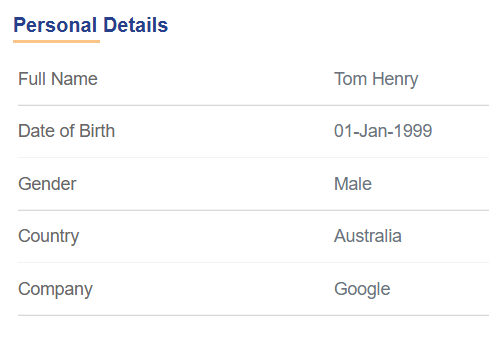
Imagine you want to display personal details. Using a description list, the information looks clean and simple:
<h2>Personal Details</h2>
<dl>
<dt>Full Name</dt>
<dd>Tom Henry</dd>
<dt>Date of Birth</dt>
<dd>01-Jan-1999</dd>
<dt>Gender</dt>
<dd>Male</dd>
<dt>Country</dt>
<dd>Australia </dd>
<dt>Company</dt>
<dd>Google</dd>
</dl>
It would look like this:

That’s great for a single person’s data. But what if you have multiple people’s details?
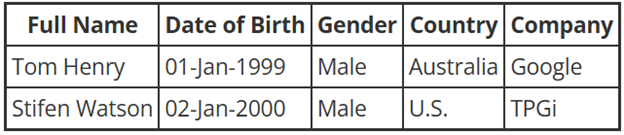
A list would stretch the page endlessly, making it harder for users (especially screen reader users) to locate specific information. This is where a table becomes the clear winner:
<table>
<thead>
<tr>
<th>Full Name</th>
<th>Date of Birth</th>
<th>Gender</th>
<th>Country</th>
<th>Company</th>
</tr>
</thead>
<tbody>
<tr>
<td>Tom Henry</td>
<td>01-Jan-1999</td>
<td>Male</td>
<td>Australia</td>
<td>Google</td>
</tr>
<tr>
<td>Stifen Watson</td>
<td>02-Jan-2000</td>
<td>Male</td>
<td>U.S.</td>
<td>TPGi</td>
</tr>
</tbody>
</table>
This will look like:

Now, the same information is organized in rows and columns. Users can scan by column (e.g., find all employees from India) or by row (see all details of one person) in an instant.
Defining the Data Table
A well-structured table is more than just rows and cells. For screen readers and other assistive technologies, the right markup tells the story:
The data table’s semantic structure is already explained in the Tables Tutorial | Web Accessibility Initiative (WAI) | W3C. but just to be on the same page, here’s the basic concept of defining a data table:
<table>defines the table<tr>defines each row.<td>holds the data.<th>indicates headers. Column headers are defined together as a row of<th>elements, while row headers are defined as a single<th>within each row of<td>.
This semantic structure allows assistive technologies to announce relationships like: “Date of Birth, 01-01-2000.” Instead of just reading “01-01-2000” without context.
Labeling the Table
When there’s only one table on a page, users usually know what it represents. But if you have multiple tables, things get tricky.
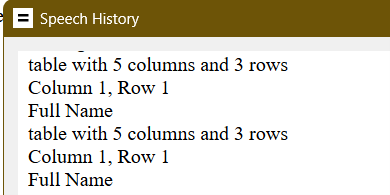
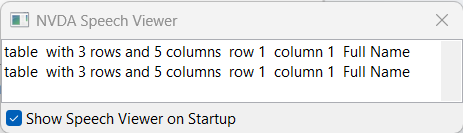
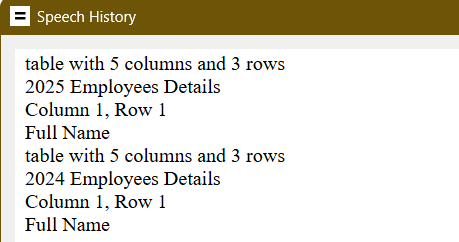
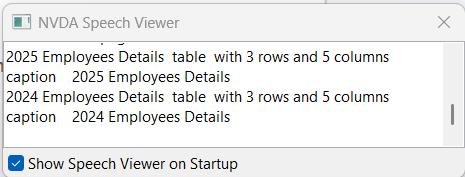
For example, screen reader might announce both tables simply as: “Table with 3 rows and 5 columns.”
JAWS speech viewer screenshot:

NVDA speech viewer screenshot:

Confusing, right?
That’s why naming tables is important. You can do this using the <caption> element:
<table>
<caption>2025 Employees Details</caption>
...
</table>
<table>
<caption>2024 Employees Details</caption>
...
</table>
JAWS announcement:
- “table with 5 columns and 3 rows 2025 Employees Details, Column 1, Row 1” for the first table.
- “table with 5 columns and 3 rows 2024 Employees Details, Column 1, Row 1” for the second table.

NVDA announcement:
- “2025 Employees Details table with 3 rows and 5 columns” for the first table.
- “2024 Employees Details table with 3 rows and 5 columns” for the second table.

Problem solved! Users now know exactly what each table represents.
Alternatively, aria-label or aria-labelledby can also be used to define the label for the table.
<table aria-label=”2024 Employees Details”>
...
</table>
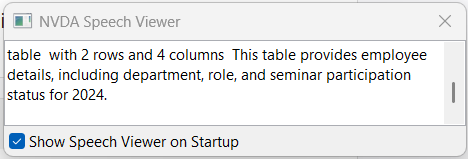
If a table is complex or requires extra explanation, you can add an aria-describedby attribute to provide a short description. This helps screen reader users understand the table’s purpose and structure before navigating through its data.
<p id="tableDesc">
This table provides employee details, including department, role, and seminar participation status for 2024.
</p>
<table aria-describedby="tableDesc">
...
</table>
JAWS announcement:
“Table with 4 columns and 2 rows. This table provides employee details, including department, role, and seminar participation status for 2024. Column l, Row 1 Employee Name”

NVDA announcement:
“Table with 2 rows and 4 columns This table provides employee details, including department, role, and seminar participation status for 2024.”

summary property served a similar purpose in earlier HTML versions, but it is now deprecated in HTML5. While some assistive technologies may still recognize it, it’s best practice to use aria-describedby for long-term compatibility.
Layout table
A layout table is a table used purely for visual arrangement of content rather than for presenting data. In layout tables, there is no meaningful relationship between cells, and the table is only used for decorative or structural purposes.
Layout tables are acceptable in WCAG and can be used to arrange page elements such as headers, sidebars, and footers. However, this approach works visually, but it introduces accessibility challenges. Screen readers and other assistive technologies interpret tables semantically — announcing rows, columns, and headers — which can confuse users when no real data relationship exists.
For this reason, table markup should not be used for page design or visual layout.
What Not to Use in Layout Tables
Assistive technologies depend on table elements like <th> and <caption> to announce structure and meaning. Including these in layout tables misleads users by suggesting relationships that don’t actually exist.
For layout tables, avoid:
headersattributescopeattributesummaryattribute<th>element<caption>element
Although WCAG does not prohibit the use of layout tables, CSS-based layouts are strongly recommended to preserve the proper semantic meaning of HTML table elements. When a table is used purely for layout, the <th> element, headers attribute, and scope attribute should not be used, since there is no actual relationship between data cells.
Likewise, the <caption> element and summary attribute should not be used, as they are intended to provide descriptions for data tables, not layout structures.
<table>
<tbody>
<tr>
<td colspan="2" >
<h1>Header Area</h1>
</td>
</tr>
<tr>
<td>
<p>Sidebar content goes here. <br>Links or navigation. </p>
</td>
<td>
<p>Main page content goes here. <br>This is where the main article, text, or image would be placed. </p>
</td>
</tr>
</tbody>
</table>
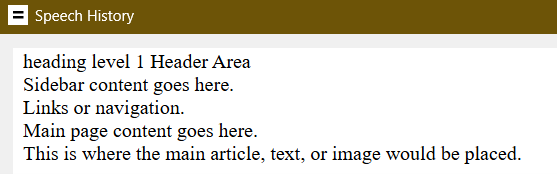
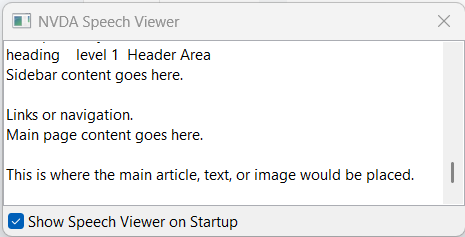
When read by a screen reader, this table is treated as layout-only, and table structure is ignored.
Screen reader announces:
“heading level 1 Header Area. Sidebar content goes here. Links or navigation. Main page content goes here. This is where the main article, text, or image would be placed.”
JAWS speech screenshot:

NVDA speech screenshot:

Identifying Layout Tables
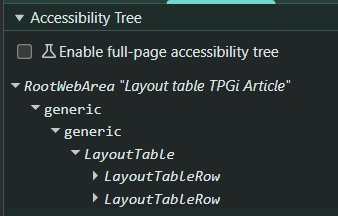
If your markup is long and complex, the easiest way to confirm whether a table is being treated as a layout table is to inspect the accessibility tree. In such cases, you’ll see the table identified as a “LayoutTable” rather than a semantic data table.

Making Layout Tables Invisible to Assistive Tech
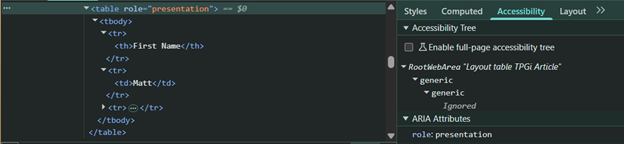
Alternatively, role="presentation" or role="none" can be applied to remove the semantic meaning of a table from the accessibility API, even if elements like <table> or <th> are present.
<table role=”presentation”>
...
</table>
With this approach, the entire table structure is ignored in the accessibility tree, and only the actual content inside the table is exposed to assistive technologies.

Making Tables Responsive While Preserving Accessibility
Tables often contain large amounts of data, which can make them difficult to view on smaller screens. While many developers try to make tables “fit” by hiding columns or reflowing them into lists, these approaches can break relationships between data cells and headers.
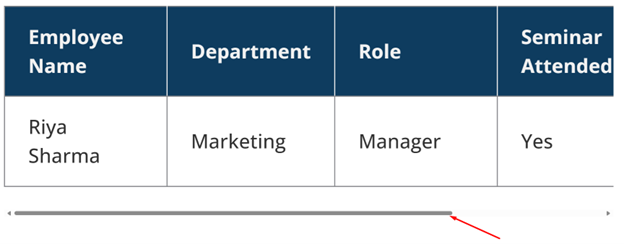
A simple and effective way to handle this is to make the table scrollable horizontally.
<div style="overflow-x: auto;">
<table>
...
</table>
</div>

The overflow-x: auto; property allows users to scroll horizontally when the table width exceeds the viewport.
Conclusion
In my opinion, tables are one of the most powerful semantic tools in HTML, but they’re also among the most misunderstood. While lists and other tags can handle simple cases, tables shine when it comes to organizing and presenting complex datasets. A well-structured table does more than group information—it creates meaningful relationships between data and headers, making content more accessible for everyone, especially users of assistive technologies.
At the same time, tables should never be misused for layout purposes. Layout tables may still “work” visually, but can introduce barriers when screen readers announce them as data. By choosing semantic HTML elements appropriately and relying on CSS for layout, developers can create content that is both visually appealing and accessible to all users.
Resources
- Tables Tutorial | Web Accessibility Initiative (WAI) | W3C
- Table Pattern | APG | WAI | W3C
- Understanding Success Criterion 1.3.1: Info and Relationships | WAI | W3C
- Understanding Success Criterion 1.3.2: Meaningful Sequence | WAI | W3C
- F46: Failure of Success Criterion 1.3.1 due to using th elements, caption elements, or non-empty summary attributes in layout tables | WAI | W3C
- H39: Using caption elements to associate data table captions with data tables | WAI | W3C
The post Tables: Beyond Rows and Columns appeared first on TPGi — a Vispero company.
Weekly Reading List October 6 2025

- Understanding the Removal of 4.1.1 Parsing in WCAG 2.2
TPGi: what SC 4.1.1 covered, why it was removed, how it affects accessibility in practice, and which criteria now address issues once covered by parsing. - Webinar: An Introduction to ChatGPT: Conversations, Creativity, and Clarity
Freedom Scientific: Rescheduled to Thursday, October 9 at 12noon ET. - Podcast: Enhancing Web Accessibility With JAWS Tools + Kristina Misiunaite
Freedom Scientific: FSCast #262: latest tools in JAWS and a chat a tax policy officer from the Netherlands. - Why I gave the world wide web away for free
Tim Berners-Lee: My vision was based on sharing, not exploitation – and here’s why it’s still worth fighting for. - Tim Berners-Lee Invented the World Wide Web. Now He Wants to Save It
New Yorker: In 1989, Sir Tim revolutionized the online world. Today, in the era of misinformation, addictive algorithms, and extractive monopolies, he thinks he can do it again. - Video: The World Wide Web Consortium (W3C) adopts a new logo to signal positive changes
W3C: The World Wide Web Consortium is rolling out a new logo. - Web Sustainability Guidelines (WSG) becomes a first public Draft Note
W3C: The Sustainable Web Interest Group published a first public Draft Note of Web Sustainability Guidelines (WSG). - Videos: #id24 2025
Full list of videos on inclusive design and digital accessibility streamed live on September 25 2025. - How to Create an Accessible Table with Clickable Rows
Alexander Lehner: what if you want to make the rows clickable, e.g., to show more information about the thing that the row is about? - A threat model for accessibility on the web
Alice Boxhall: The primary threat for accessibility on the web is neglect. - Auditing your Design system for accessibility
Allie Paschal: How to fix A11y issues at the system-level. - Five years goes fast – they go even faster when it comes to accessibility
Bogdan Cerovac: 5 years of Web Accessibility Directive went fast. Progress is evident, but is it enough? - Why are NHS trusts buying Accessibility overlays?
Chris Yoong: These trusts are wasting public money on useless overlays. - HTML’s Best Kept Secret: The
Tag
Den Odell: It’s been in the spec for years. Yet it’s hiding in plain sight. - Digital Accessibility and Mufflers
Dennis Deacon: whether it’s a muffler that disrupts your neighborhood or a chatbot that excludes users, the responsibility is yours. - Testing Methods: Non-text Contrast
Dennis Deacon: visual elements must have a contrast ratio of at least 3:1 against adjacent colors. - Nothing About Us Without Us
Christiane Link: It’s the difference between designing for everyone and designing for disabled people with incidental benefits for others. - Headings: the invisible compass of web accessibility
Diana Khalipina: there’s a hidden hero of accessible content that too often gets forgotten: headings. - WCAG’s Longevity
Eric Eggert: There are several reasons why WCAG 2 is such a long-living standard. - “The primary threat for accessibility on the web is neglect.”
Joe Dolson: It’s easy to believe that once something is a standard that it is safe to use…but that’s just not true. - ADA Title II and PDFs: Fix, Archive, or Delete?
Karl Groves: The DOJ has provided an important distinction between documents that are part of current services and those that are purely historical. - Control web content with your eyes (or head or facial movements)
Kazuhiko Tsuchiya: macOS and iOS actually have built-in features that allow you to control web content using your gaze, head, or facial movements. - Video: Why you should take your makeup advice from a blind woman
Molly Burke: universal design isn’t just good for disabled people – it’s good for business and for everyone. - Why Americans with Disabilities Should Consider Entrepreneurship During Economic Upheaval
Sheri Byrne-Haber: The harsh reality is that traditional employment is rarely designed with accessibility and flexibility in mind. - WP A11y Docs update September 2025
Rian Rietveld: In September we made the website wpaccessibility.org ready to contribute. - Lazy
Todd Libby: I am still around and up to some new shenanigans. - cielo24 Acquisition: The Case for Migrating
3Play Media: captioning, transcription, and data labeling provider cielo24 been acquired by Rev. 3Play suggests migrating to them. - Make Navigation Accessible with aria-current
A11y Collective: Simple examples for navigation, breadcrumbs, and multi-step processes. - Podcast: Overlays vs Automation: What’s the Difference
The Accessibility Advantage: Maxwell Ivey Jr. interviews Mike Paciello, AudioEye’s Chief Accessibility Officer. - Video: When Accessibility Isn’t Easy: Features That Need Love
Accessibility Talks: Suzanne Dergacheva on features and design patterns that often require additional attention to meet accessibility standards. - How to handle accessibility reporting under the European Accessibility Act (EAA)
Axess Lab: If you’re covered by the EAA, you’ll need to handle two types of accessibility reporting. - Podcast: From Developer to Advocate: Building an Accessible Future in Germany
AXS Chat: Guest is March Haunschild, 20 years an accessibility developer, teacher, author, and tester. - Be My Eyes and BT/EE Pilot New Accessibility Support in UK
Be My Eyes: on-demand, accessible customer support for blind and low-vision users across the UK. - Accessibility Standards Explained
Be My Eyes: What You Need to Know. - Podcast: What Makes a Table Accessible?
Chax Chat: Chad Chelius and Dax Castro break down the nuts and bolts of accessible tables. - Make accessible carousels
Chrome for Developers: when a carousel is implemented, it should be robust and accessible. - Legal Update: September 2025
Converge: Third Circuit and “Intent to Return” in Web Accessibility Cases, Bill Tracker. - How to test the new ARIA Notify API with Cypress
Cypress: helps make interactive web applications more accessible and solves some problems with current workarounds. - axe-con 2026
Deque: The global community is coming together to accelerate digital accessibility at axe-con 2026. - Podcast: Breaking the ‘Overlay’ Stigma
The Digital Accessibility Podcast: Joe James interviews Chris Holloway, head of Recite:Me. - WordPress Cookie Banner Accessibility Lies
Equalize Digital: false accessibility claims can put the website owner on the wrong side of not just accessibility laws but privacy laws, too. - Accessibility Info Bites – The anatomy of an accessible button
Intopia: Learn how to create buttons that are clear, easy to interact with, and properly coded. - Accessibility Info Bites – The anatomy of an accessible link
Intopia: improve access for people with disability and boost usability for everyone. - How to conduct user testing with people with disabilities
Intopia: You’ve finally gotten senior exec buy-in to include people with disabilities in your research study – what now? - Accessibility Testing Comparison
Intopia: Automated Testing vs Human Auditing vs Usability Testing. - I completed an IT degree… What’s accessibility?
Intopia: unfortunately, the lack of accessibility in tech education wasn’t unique to my university. - Closing the Gaps
Level Access: Harnessing AI Accessibility Agents in Your Workflows. - Beyond Compliance: The Economic Case for Digital Accessibility
NASCIO: context about the importance of digital accessibility, its benefits to state and local economies and the repercussions of inaccessible platforms. - A guide to creating accessible PDFs using free tools
Piccalilli: I’m going to show you how to do the following things using a practical example. - Video accessibility strategy
Pope Tech: Identify environment, Put processes in place, Fix existing content. - Silktide Expands Globally
Silktide: New Offices Across Three Continents in 2025. - Meet the team: Ian Lloyd
TetraLogical: Lloydi to you and me. - The European Accessibility Act in Action: Key Takeaways
UsableNet: understand the EAA’s scope, implement sustainable accessibility practices, create effective testing programs, and maintain compliance over time. - Common Accessibility Challenges When Interacting With Navigation Menus
UsableNet: common accessibility challenges that screen reader users face when interacting with menus on desktop websites. - Navigating College Course Catalogs as a Blind Student: Barriers and Fixes
UsableNet: In practice, this experience is frequently flawed for screen reader users. - How Chunking Makes Content More Accessible
Vision Australia: a simple but powerful technique that makes content more accessible by breaking information into manageable pieces. - Reading List, Oct 2025
WebAxe: 12 selected digital accessibility articles. - Google’s New Rules Could Threaten Sideloading And Accessibility Along With It
Accessible Android: the ability to install (or “side-load”) apps from outside the Google Play Store, or to use alternative app stores such as F-Droid. - Apple confirms Voice Control bugs in macOS 26
Aestumanda: Accessibility team acknowledges multiple dictation issues, promises fixes in future updates. - 6 ways Kindle supports readers with disabilities
Amazon: Discover how Kindle provides the best reading experience for all kinds of readers. - Apple releases iOS 26.0.1 and iPadOS 26.0.1
Apple: with fix for VoiceOver loss of speech. - Terminal Mode Goes Live with JAWS on Monarch
The Braillists Foundation: Thanks to the newest updates from NVDA and Vispero’s JAWS, the two screen readers are officially ready for terminal mode use with Monarch. - AI Is Overlooking Accessibility.
Built In: Here’s how to Change That. - Target launches accessible self-checkout
Fox: an accessible self-checkout for guests with disabilities, including blind and low-vision shoppers. - User cum expert judgement model for accessibility using fuzzy approach
Nature.com: The datasets of 20 websites have been evaluated against the conformance of WCAG 2.1. - The Rogue Prince of Persia
Ubisoft: developed by Evil Empire, the team worked hard to ensure the game’s new version would be accessible to everyone. - Design for All feat. Martin Underhill
AdLib: Interview with a digital accessibility consultant with a background in user experience design and frontend development. - ADHD pride
Chris Ferdinandi: my ADHD is not “a disorder.” My brain is different. Not better. Not worse. Different. - Storefront & Warehouse
Donnie D’Amato: One of the problems I’ve seen is a person coming into design system resources and being immediately overwhelmed by the options. - Community language doesn’t mean inclusive language…
Lauren Sherrard: I’m talking about inclusive language (again) — this time in relation to themed brands. - In the economy of user effort, be a bargain, not a scam
Lea Verou: design the tradeoff curve of use case complexity to user effort with the same care you design your pricing scheme. - Boring is good
Scott Jenson: I want to answer the question: why should we still care?
The post Weekly Reading List October 6 2025 appeared first on TPGi — a Vispero company.

Understanding the Removal of 4.1.1 Parsing in WCAG 2.2

For anyone developing accessible digital content, keeping up with changes to the Web Content Accessibility Guidelines (WCAG) is essential. One of the more notable updates in WCAG 2.2 is the removal of Success Criterion (SC) 4.1.1: Parsing.
This article explains what SC 4.1.1 covered, why it was removed, how it affects accessibility in practice, and which criteria now address issues once covered by parsing.
Why Does It Matter?
Parsing errors, such as invalid or poorly structured markup, were once a significant concern because they could affect how assistive technologies interpreted a webpage. Earlier, assistive technologies sometimes performed their own parsing, which made them more vulnerable to broken markup. Since WCAG 2.0 was published, however, both web specifications (such as HTML) and browsers have greatly improved in handling these errors.
Today, assistive technologies rely on the browser’s interpretation of markup rather than doing their own parsing. Because of this, most parsing errors no longer create real barriers for users, which is why SC 4.1.1 was made obsolete in WCAG 2.2.
SC 4.1.1 was originally included to encourage valid, well-structured markup. Its removal does not mean that writing clean code is unimportant; rather, it acknowledges that this requirement is no longer necessary because modern browsers and assistive technologies handle parsing errors far more reliably.
What Was 4.1.1 Parsing?
Under WCAG 2.1, SC 4.1.1 required:
- HTML, XML, or other markup languages to follow syntax rules.
- Proper nesting and closing of elements.
- Unique ID attributes for all elements.
- Avoidance of stray or unclosed tags that could disrupt the document structure.
The aim was to ensure that assistive technologies and browsers could interpret content reliably, improving both accessibility and interoperability.
What Changed in WCAG 2.2?
WCAG 2.2 removed SC 4.1.1 for several reasons:
- Limited Direct Impact
Many parsing issues no longer create real barriers for assistive technology users.
Example:
<div> <p>Hello, world <--missing </div> and </p> -->This markup triggers a validator error, but browsers typically auto-correct it, and therefore assistive technologies will interpret it correctly.
- Relevance Under Other Criteria
Real-world issues tied to invalid markup are better addressed under other criteria:
- Duplicate ID values → SC 4.1.2: Name, Role, Value
- Incorrect nesting of interactive elements → SC 2.4.3: Focus Order, SC 4.1.2: Name, Role, Value
- Stray or unclosed tags → SC 1.3.1: Info and Relationships, SC 4.1.2: Name, Role, Value
- Technology Evolution
When SC 4.1.1 was introduced, browsers and assistive tech often broke on stray tags or invalid nesting. Today, both are far better at handling minor syntax errors, so these issues rarely block access.
- Focus and Simplicity
Removing SC 4.1.1 helps WCAG focus on accessibility issues that affect users directly, instead of minor coding mistakes that don’t cause real problems.
What Are the Risks Now?
Although most parsing errors no longer block accessibility, some mistakes can still cause real problems when they affect element relationships, accessible names, roles, or focus order. These issues are now handled under other Success Criteria rather than SC 4.1.1.
Duplicate ID values
Every id attribute in a document is required to be unique. Problems caused by duplicates depend on context:
- A
<label for="id">may associate with the wrong input, causing screen readers to announce incorrect or confusing information. - ARIA references such as
aria-labelledby,aria-controls, oraria-describedbymay fail, breaking the link between elements and leaving users without instructions. - Links pointing to an
idmay direct users to the wrong location or confuse screen reader navigation.
Relevant SCs: 1.3.1 Info and Relationships, 1.3.2 Meaningful Sequence, 2.4.3 Focus Order, 2.4.4 Link Purpose, 4.1.2 Name, Role, Value, 2.5.3 Label in Name
Improper nesting of interactive elements
Interactive elements (like <a>, <button>, <input>, <select>) should not be nested inside one another.
Example:
<a href="#">:
<button>Click Me</button>
</a>>
Risks include:
- Confusing the accessibility tree, making it unclear which element should receive focus.
- Inconsistent behavior across browsers and assistive technologies.
- Keyboard navigation issues, such as incorrect focus order or unexpected activation.
Relevant SCs: 2.4.3: Focus Order, 4.1.2: Name, Role, Value
Stray tags or unclosed elements
Errors like unclosed elements or misplaced tags generally do not block access today because modern browsers can handle them. However, issues arise when they disrupt:
- Relationships between labels, controls, and interactive elements.
- Heading order, table structures, or list order.
- ARIA widget structure or scripted behavior dependent on the DOM.
Example:
<ul>
<li>First item
<li>Second item
</div> <!-- Stray closing div -->
Risks include:
- Screen readers may skip content or read it in the wrong order.
- CSS and JavaScript that rely on a predictable DOM structure may break.
- Layout or structure may render inconsistently across browsers, making navigation harder for users with disabilities.
Relevant SCs: 1.3.1: Info and Relationships, 4.1.2: Name, Role, Value
Labels not programmatically associated
Example:
<label>First Name</label>
<input type="text" id="firstName">
Since there’s no for linking the label to the input, screen readers may not announce it when focus enters the field, confusing users relying on assistive technology or voice input.
Relevant SCs: 1.3.1: Info and Relationships, 4.1.2: Name, Role, Value
Best Practices Going Forward
To ensure accessible experiences under WCAG 2.2:
- Write clean, semantic HTML – While no longer enforced by 4.1.1, well-formed markup improves consistency across platforms.
- Match visible labels with accessible names – Essential for screen reader and voice control users.
- Test keyboard navigation – Verify logical focus order, operable controls, and no traps.
- Use semantic structure – Apply headings, ARIA landmarks, and labels to convey relationships clearly.
Conclusion
The removal of SC 4.1.1 from WCAG 2.2 marks a shift from syntax enforcement to user-centered accessibility. Clean code remains a best practice, but WCAG now emphasizes whether users with disabilities can access, perceive, and operate digital content.
Developers should continue to:
- Write semantic, valid code.
- Provide proper labeling.
- Ensure robust keyboard support.
- Maintain logical content structures.
By prioritizing real user experience over strict validator compliance, we can build more inclusive and usable digital environments.
References
- https://www.w3.org/WAI/WCAG21/Understanding/parsing.html
- https://www.w3.org/WAI/WCAG22/Understanding/parsing.html
- https://adrianroselli.com/2022/12/the-411-on-4-1-1.html
The post Understanding the Removal of 4.1.1 Parsing in WCAG 2.2 appeared first on TPGi — a Vispero company.
Weekly Reading List September 29 2025

- Creating a truly accessible Flip Card
TPGi: small blocks of content designed to resemble a playing card or business card, or similar two-sided thing. - Webinar: An Introduction to ChatGPT – Conversations, Creativity, and Clarity
Freedom Scientific: Introduction to Using ChatGPT with JAWS, ZoomText, and Fusion. Thursday, October 2 at noon ET on Zoom. - Employee Spotlight: Anthony Priore’s Story
Freedom Scientific: we’re shining the spotlight on Anthony Priore, Digital Marketing Manager at Vispero. - Leading Autism and Disability Organizations Call for Decision-Making based on Quality Science and Compassion for the Autism Community
ASAN: The theories that Secretary Kennedy presented to the public demonstrate his continued disrespect for autistic people. - DOJ Questioning the New Title II Web Regulation
Converge Accessibility: a pretty direct indication that they want to water down the requirements. - Let’s Play Accordion with the HTML details element
Alexander Lehner: One helpful strategy is to place content in sections with show/hide functionality. - Black Friday and Cyber Monday
Dave Davies: why accessibility could be your biggest sales advantage. - ARIA and Real World Dangers
Dennis Deacon: When applied correctly, ARIA is invaluable. Think of it as asphalt for the potholes in HTML. - Baby Steps Accessibility – PDFs
Dennis Deacon: unless you’ve been creating accessible PDFs for years, chances are most of your files are not accessible. - Testing Methods: Reflow
Dennis Deacon: content can be presented without loss of information or functionality, and without requiring scrolling in two dimensions. - Threats and opportunities for mature design systems
Erin White: there are some recurring patterns I’ve observed as product teams work with our design system. - Add an Accessibility Nutrition Label
Geri Reid: I’ve just completed an audit for one of these labels. Here’s what I learned. - Turns out I’m not ready to write a book
Geri Reid: I’m starting a monthly blog about accessibility. - Does your website need an accessibility statement? (Yes!)
Helena Ferry: They are not just a formality, but a public commitment to inclusivity. - Another AI reading list: these books are worth your time
Hidde de Vries: they provide a critical look at the current wave of AI. - Control web content with your voice
Kazuhiko Tsuchiya: voice control is now a standard feature of devices (OS). - Podcast: Where to start learning about Accessibility
Laura Wissiak: Masterpost of Web Accessibility Resources for Developers, Designers, and Editors. - Human Censored Design
Liz Jackson & Rua Williams: Inclusive Design was created to systematize — the extraction of disabled ideas. - HTMHell Advent Calendar
Manuel Matuzović: Any topic or piece of HTML code you love that improves accessibility, performance … Submit ideas by October 1. - Quick Tip: ARIA Live Regions
Nat Tarnoff: This tip is to provide a super high level on how they function. - Liquid Glass: Apple, you know better
Nat Tarnoff: Update 9.26.25 – Apple has iOS 26.1 in developer beta and some of the concerns about Liquid Glass are being addressed. - A11y 101: 2.4.4 Link Purpose (In Context)
Nat Tarnoff: To make them as effective as they can be, we want to make them clear in what they do. - What using a screen reader taught me about real web accessibility
Sebastian Weber: Suddenly, we couldn’t ignore a11y anymore; legal compliance became a business imperative. - Why Sticky Navigation Can Undermine Accessibility
Sheri Byrne-Haber: or many people with disabilities, sticky navigation creates more problems than it solves. - NVDA Keyboard Shortcuts for Different User Needs
A11Y Collective: Navigate content, test forms, and build more accessible websites with this essential guide. - Are Accessibility Overlays a Good Investment?
A11Y Collective: why accessibility overlays create legal liability, break assistive tech, and cost more than fixing code properly. - Magento Accessibility
A11Y Collective: Creating Stores Everyone Can Use - How to Use Accessibility Bookmarklets for Better Testing
A11Y Collective: quickly identify WCAG issues and streamline your testing workflow for more inclusive websites. - A Quick Guide to WCAG Color Contrast and Accessibility
Accessible Web: Text color contrast should typically have a minimum contrast ratio of 4.5:1. - Captioning Videos in Vimeo
Converge Accessibility: a quick post showing how dead simple it is to caption videos in Vimeo. - Enjoy rapid collaboration and localized compliance expertise with a Deque partner
Deque: has launched a global partner network comprising carefully selected organizations - Why false claims and false positives ruin digital accessibility programs
Deque: our commitment to zero false positives still grounds our approach. - Shopify Accessibility Guide
DigitalA11y: WCAG Compliance for E-commerce Stores. - Video: JAWS Tips
Easterseals Crossroads: Using PictureSmart with PowerPoints - Accessibility Matters: Turning High-Level Audits into Tangible Wins
FE News: the question is no longer whether accessibility matters, but how quickly and effectively it can be embedded. - Sponsorship of PDF/UA Standard
Grackledocs: Reinforcing Commitment to Digital Accessibility. - CAPTCHA, when security takes precedence over accessibility
Grand Duchy of Luxembourg: its impact on accessibility in general and in Luxembourg in particular. - Navigating EAA Compliance
Level Access: Five Core Requirements and How to Meet Them - How Accessible Are U.K. Retail Websites?
Level Access: our research suggests many U.K. retailers aren’t keeping pace with evolving requirements. - 8 in 10 Top U.K. Retail Websites Have Critical Accessibility Issues
Level Access: the majority of U.K. retail websites do not meet basic digital accessibility requirements. - Web Accessibility Audit Buyer’s Guide
Microassist: Not to put too fine a point on it, but a web accessibility audit is important because accessibility is important. - Annotating designs using common language
TetraLogical: design documentation often includes annotations, but accessibility-specific ones are still rare. - What Makes an Accessible College Application Form Work for Screen Reader Users
UsableNet: When accessibility is built in, you can feel the difference. - Accessibility First
UsableNet: WCAG Makes Your Content Easier for People—and for AI to Understand. - Fall 2025 Accessibility
UsableNet: A Screen Reader User’s Look Ahead - Simple ways to make your workplace communications accessible
Vision Australia: writing descriptive subject lines and headings, creating meaningful links, ensuring sufficient colour contrast, and adding alternative text to images. - Logitech’s new Signature Slim Solar+ K980 Keyboard is powered by light
beta news: Good for testers. Switch between three devices. No batteries to replace. - Podcast: How Meta’s Glasses Could Be the iPhone Moment for Blind Users
Double Tap: a built-in screen reader and low-vision accessibility features. - The Need for Accessibility Excellence
Accessible Android: Google has a long, long way to go to make TalkBack a desktop-class screen reader. - Beyond convenience: how smart tech can enable disabled lives
Axess Lab: Smart tech lets me be a writer, a cat owner, and a caffeine addict on my own terms. - Digital Accessibility Tools for Customer Service Teams
Be My Eyes: For blind and low-vision consumers in particular, traditional customer service channels often fall short. - Training: Catching Up With JAWS Chapter 5
Hartgen Consultancy: Why JAWS 2026 could be the best upgrade in recent years. - Able Player 4.7.0 & Able Player for WordPress 2.2.0 Released
Joe Dolson: continues the process of modernizing Able Player, but also includes some useful new key features. - The Gift Horse’s Mouth is Full of Terrible Braille
Robert Kingett: The game was not inaccessible. It was anti-accessible. - The End of the User Interface?
Alex Cerqueira: The AI Agent Revolution and the Future of Human Experience - Ambient Animations In Web Design: Principles And Implementation (Part 1)
Andy Clarke: Checkprefers-reduced-motion, and don’t assume everyone’s device can handle complex animations. - What You Need to Know about Modern CSS (2025 Edition)
Chris Coyier: There is more this year than there was last. - Design Attractors
Donnie D’Amato: stable solutions that emerge as the natural equilibrium of usability, accessibility, and implementation constraints. - Against the protection of stocking frames
Ethan Marcotte: it’s long past time I start discussing “artificial intelligence” (“AI”) as a failed technology. - Unstructured Input in AI Apps Instead of Web Forms
Luke Wroblewski: Instead of a Web form enforcing the database’s input requirements a dynamic context system can handle it. - From Prompt To Partner: Designing Your Custom AI Assistant
Lyndon Cerejo: how to turn one-off “aha” prompts into reusable assistants that are tailored to your audience, grounded in your knowledge, and consistent every time. - A workaround for using custom properties in media queries
Manuel Matuzović: Instead of using a media query, you can use a container style query. - Design Dialects: Breaking the Rules, Not the System
Michael Ferreira: The web has accents. So should our design systems. - The Web’s Most Tolerated Feature
Mike Pennisi: The idea behindzoomwas fairly simple: allow developers to visually expand or shrink any given element. - The Best CSS Unit Might Be a Combination
Miriam Suzanne: We don’t have to choose betweenpxandremfor spacing. - Why WordPress Lost the Cool Kids (And How to Win Them Back)
Nick Hamze: in creative communities, “accessible” gets read as “amateur” rather than “powerful.” - 7 UX Skills that will be DEAD by 2026: AI will replace them
Shai Krishna: no one is actually average … and accessibility needs are ignored. - Call for “More Weirdness” in WordPress Theme Design Sparks Debate About Accessibility
The Repository: Matt Mullenweg says accessibility expert [ Amber Hinds] “tipping into net negative contribution territory”. - Web Content Accessibility Guidelines (WCAG) 2.2 — Draft Proposal
Comedy gold from 2019 (contains swearing)
The post Weekly Reading List September 29 2025 appeared first on TPGi — a Vispero company.
Creating a truly accessible Flip Card
This article describes an approach for creating accessible Flip Cards — small blocks of content designed to resemble a playing card or business card, or similar two-sided thing. They have front and back “faces” and can be “flipped” with a 3D rotation effect.
There are many existing scripts and libraries that implement this effect, but none I’ve found have good enough accessibility, and not for want of trying. Creating an accessible pattern for this was challenging.
Demos and codebase
The problem with flip cards
The front and back faces are separate blocks of content within a parent container, using transform and perspective to create the appearance of a two-sided card that turns on its vertical axis. This is quite easy to make, but quite hard to make accessible, because there aren't any ARIA semantics that fit the pattern.
Screen reader users need accessible state information, so they know when the card is flipped, and which side is currently shown. However we can't use ARIA state attributes to provide this information, simply because there aren't any valid choices. States like aria-expanded or aria-pressed are not applicable, because they don't mean the same thing — the card is never expanded or collapsed, never pressed or not pressed — the behavior and presentation just aren't equivalent.
The button that triggers the flip could be used to provide accessible feedback, by changing the button's label or description. However dynamically changing a button's content isn't conveyed by screen readers, unless it's also accompanied by a semantic state change … which we can't use!
ARIA live regions are not a suitable replacement here, because they're only appropriate for status updates, not state information.
An old-school solution
Without an ARIA state change, the most reliable way to make screen readers announce a button, is to programmatically focus() it. But in order to do that, the button first has to lose focus, yet we can't use blur() because that resets the focus position back to the top of the page, causing screen readers to re-announce the page summary (e.g., the title and main heading).
Focus has to go somewhere, and it has to go somewhere that won't be announced:
- An invisible element is positioned and sized directly behind the button;
- When the button is pressed, focus shifts to this invisible element, which isn't announced because it has no conveyable content;
- Meanwhile, the button's accessible label and description are updated;
- Then the button is focused again, and this triggers its re-announcement.
The button's label has values like Flip to back
and Flip to front
, which denote its current action. State information is provided by the accessible description, such as Now showing the front
or Now showing the back
. The label and description are both announced when the button is programmatically focused.
Overall, this combination of dynamic label and description provides a functional label, a dynamic state update, and a persistent state summary.
HTML
The content of each card face can be any valid HTML, there are no explicit requirements or restrictions. However the surrounding markup is very specific, and must have the following node structure and required attributes:
<div id="MyID" role="group" aria-labelledby="MyID_1">
<aside hidden>
<span id="MyID_1">Flip Card</span>
<span id="MyID_2">Flip to front</span>
<span id="MyID_3">Flip to back</span>
<span id="MyID_4">Now showing the front</span>
<span id="MyID_5">Now showing the back</span>
</aside>
<div>
<button hidden aria-describedby="MyID_1"></button>
<div>
<!-- default content on the front face -->
</div>
<div>
<!-- flipped content on the back face -->
</div>
</div>
</div>
Required elements and attributes
The <div>, <aside>, and <span> elements don't have to use those tags, any valid elements can be used. However their attributes must be as specified, and the button must be a <button>.
- Group container
-
<div id="MyID" role="group" aria-labelledby="MyID_1">The group container needs
role="group"to provide a semantic context. The role doesn’t imply any other meaning or functionality, only that everything inside it is part of the same “thing”.The
aria-labelledbyattribute defines the group’s accessible name, and must reference theidof the first language data element.The group
idis used in the demo as an identifier for theFlipCardconstructor, and a syntactical namespace for other IDs. - Language data
-
<aside hidden> <span id="MyID_1">Flip Card</span> <span id="MyID_2">Flip to front</span> <span id="MyID_3">Flip to back</span> <span id="MyID_4">Now showing the front</span> <span id="MyID_5">Now showing the back</span> </aside>The language container must include the
hiddenattribute, which prevents it from being visibly rendered or present in the accessibility tree (equivalent todisplay:nonein the user agent stylesheet, so it doesn’t rely on author CSS to remain hidden).The five child elements define individual language strings. They must have
idattributes, and they must be defined in the same order:- Group name.
- Button label to flip the card to its front face.
- Button label to flip the card to its back face.
- Button description when the front face is displayed.
- Button description when the back face is displayed.
This content is not intended to be shown or directly announced, it only serves as reference data for
aria-labelledbyoraria-describedby, or to be parsed by the script in order to generate dynamic labels. - Card faces
-
<div> ... <div> <!-- default content on the front face --> </div> <div> <!-- flipped content on the back face --> </div> </aside>The parent container provides a positioning context, and defines the
perspectivesize for 3D transforms:{ perspective: 64rem; position: relative; }The first face element is considered to be the front, and is displayed by default. The faces can contain any valid markup, including interactive elements, but it’s recommended to start each one with a heading (e.g.,
<h2>or<h3>as applicable to the page structure). - Flip button
-
<button hidden aria-describedby="MyID_1"></button>The flip button’s
hiddenattribute is removed by the script, and exists only to hide the button when scripting is unavailable or hasn’t loaded yet.The
aria-describedbyattribute must reference theidof the first language data element. This will be dynamically updated when the card state changes, however iOS/VoiceOver doesn’t support those dynamic description updates, therefore the static value is necessary to provide some fallback context for users, as to what the button’s action is referring to.The button’s accessible name is also maintained by scripting, defined using
aria-label, and rendered with CSS pseudo-content to provide a visible label:button::before { content: attr(aria-label); }This approach provides more flexibility when styling the flip button, and since the values it’s derived from are already present as in-page text, there are no translation issues with using
aria-labelin this case.
CSS
The flip card has two static states — the front face is displayed, or the back face is displayed — and it flips between them by using transition to animate rotational transform on the faces' container.
This requires two separate transforms. If we only applied rotation to the container, then flipping from front to back would result in the back face being reversed (like a mirror image). But if we also apply rotation to the back face itself, then they cancel each other out by the end of the transition:
@media (prefers-reduced-motion: no-preference) {
[data-flip-state] {
perspective: 64rem;
}
[data-flip-state] > .faces {
transform: rotateY(0deg);
transition: transform 0.5s;
}
[data-flip-state~="flipped"] > .faces {
transform: rotateY(180deg);
}
[data-flip-state] > .faces > .back {
transform: rotateY(180deg);
}
}
Most flip card implementations use absolute positioning and fixed dimensions, where the faces are stacked on top of each other and visibly rotate together. However that means the content can't be responsive to changes in font-size or text spacing, which might cause the layout to reflow and make one or both faces overflow the container.
This pattern does something different to avoid that problem — the two card faces are never displayed at the same time — so they don't need fixed dimensions or absolute positioning, they can freely adapt to reflow, and they don't even have to be the same size.
The trick here is that the displayed face changes in the middle of the transition (when rotation is 90°), which is not visually apparent because neither face is visible for that precise moment (like looking at the side of a playing card).
Styling hooks
The demo uses class names for each container element, but these are not required or even identified by the script, so you can do whatever you want:
<div class="card">
...
<div class="faces">
...
<div class="front">
...
</div>
<div class="back">
...
</div>
</div>
</div>
The script provides a dynamic [data-flip-state] attribute, which can be used as an attribute selector for state-dependent styling. For example, the following rule controls which face is currently displayed:
[data-flip-state~="front"] > .faces > .back,
[data-flip-state~="back"] > .faces > .front {
display: none;
}
This attribute has four possible token values, and at any given moment it might have multiple tokens:
| Token | Meaning |
|---|---|
"front" |
The front face is currently displayed. |
"back" |
The back face is currently displayed. |
"flipped" |
The card is flipped to its back face. |
"busy" |
The card is currently transitioning between states. |
Flipping from front to back will pass through the following states:
"front""front flipped busy""back flipped busy""back flipped"
Whereas flipping from back to front will do the reverse:
"back flipped""back busy""front busy""front"
Alternate button designs
The demo stylesheet uses pseudo-content to create a visible label from the button's aria-label attribute:
.faces > button::before {
content: attr(aria-label);
}
This approach is recommended for the sake of accessible visual affordance — it clearly conveys the function to sighted users, and also provides a command cue for speech recognition. Users can press the button with a spoken command like Click flip to front
(which still works without a visible label, but then how would they know what to say). However that provision is not absolutely critical, since users have other ways to reach and interact with controls (e.g., using the Show Numbers
function in Voice Control for macOS and iOS).
One alternative presentation could be to use an icon, or an empty dot-like button:
.faces > button {
border-radius: 1rem;
height: 1rem;
width: 1rem;
}
.faces > button::before {
content: none;
}
Another possibility is to style the button so it's completely transparent and covers the entire card.
In this case it's essential to prevent the button from receiving pointer events, otherwise it wouldn't be possible to select text or interact with the card content. For sighted keyboard users, it will seem as though the card itself is in the focus order, while the button's action is still effectively available to pointer users, since they can also trigger a flip by clicking the card:
.faces > button {
background: transparent;
border: none;
border-radius: 0.6rem;
height: 100%;
margin: 0;
pointer-events: none;
width: 100%;
}
.faces > button::before {
content: none;
}
.faces > button:disabled {
filter: none;
opacity: 1;
}
Testing the focus hook element
The focus hook is the element that receives focus during a card transition. The focus hook isn't announced or visibly displayed, but its :focus-visible state is used to maintain the flip button's outline, when the button itself isn't focused:
.card > [tabindex="-1"]:not([hidden]) {
display: inline-block;
overflow: hidden;
pointer-events: none;
position: absolute;
z-index: -1;
}
.card > [tabindex="-1"]:focus {
outline: none;
}
[tabindex="-1"]:focus-visible + .faces > button {
outline: 0.15rem solid var(--outline-color);
outline-offset: 0.15rem;
}
If you're making significant changes to the flip card's structural styling, then it may be helpful to make the focus hook temporarily visible, to confirm that its layout position is correct, for example:
.card > [tabindex="-1"]:not([hidden]) {
background: rgba(255,0,0,0.25);
outline: 0.3rem solid #f00;
z-index: 1;
}
JavaScript
The FlipCard class is structured as an export module, or you can convert it to a regular class declaration if that's preferred. Any number of instances can exist on a single page, each of which is created using the FlipCard constructor:
const demo = new FlipCard("#demo");
The argument is a selector query, that specifies a single group container element.
Cards with interactive content
Pointer users can trigger a flip by clicking the whole card, however this could potentially conflict with events on other interactive content (e.g., buttons or links inside the card). To avoid that problem, the whole-card click only applies if the pointer target isn't an interactive element, as specified by a second argument to the FlipCard constructor:
const demo = new FlipCard("#demo", "a[href], button, input");
The argument is a selector query, that should specify any interactive elements the card might contain (or defaults to "button" if undefined).
So whole-card clicks are conditionally ignored, if the pointer target is (or is inside) any element that matches the specified selector. They're also ignored if the pointer action resulted in text selection.
How the rotation is monitored
The displayed face changes in the middle of the transition, so we have to monitor the transform in real-time to know when it reaches that point. It needs to look like we're viewing two sides of the same card, and any obvious display swap would undermine that illusion.
This information is not provided by native APIs (CSS transitions and animations don't provide a frame event), but we can create a custom method to monitor their changes, with a combination of requestAnimationFrame() and getComputedStyle().
The following code retrieves the matrix3d string from computed style, converts it to a DOM Matrix, then calculates the rotation angle in degrees:
const matrix = new DOMMatrixReadOnly(this.css.getPropertyValue('transform'));
const rotation = Math.acos(matrix.a) * (180 / Math.PI);
This is called from a function triggered by requestAnimationFrame(), which is very unlikely to ever occur at precisely 90°, so we check for the point when it's only just greater or less, depending on the flip direction:
if((flags.back && rotation >= 90) || (flags.front && rotation <= 90)) {
//swap the displayed face
}
Else if it's not close enough, then iterate again on requestAnimationFrame(), until it is.
How the focus hook is silent
This is a bit of a hack! But it's logically sound, semantically valid, and more to the point — it works.
Depending on the screen reader (they all vary in this respect), focusing an empty element would cause the parent group to be re-announced, or the element announced as blank
, and this could still occur even with whitespace-only text content. Whitespace is still required so that the element isn't empty, but its announcement behavior can be overridden by defining an aria-roledescription that can't be announced.
This is achieved with a unicode non-character, which is technically not supposed to exist in a document at all. It's designed to be used programmatically for things like parsing delimiters, but the specification expects them to not be removed if any are present. It's impossible to announce, because it isn't mapped to a character, and the end result is that nothing is announced:
<span role="note" aria-roledescription="" tabindex="-1"> </span>
That’s all from me! (from here)
With thanks to Aditya Jainapur, Hans Hillen, Ricky Onsman, Doug Abrams, Tj Squires, and Isabel Holdsworth, for their useful ideas and feedback during development. I welcome any thoughts, ideas, or feedback you might have on the concepts and solutions, or anything else.
Here are the demos and codebase links again:
Image credit: Resource Database.
The post Creating a truly accessible Flip Card appeared first on TPGi — a Vispero company.
Weekly Reading List September 22 2025

- Proof Documents Faster and More Efficiently with JAWS Text Analyzer
Freedom Scientific: a powerful JAWS feature that helps you catch formatting issues, punctuation problems, and other inconsistencies in your documents or web pages. - September 2025 Student of the Month
Freedom Scientific: Kenny uses JAWS on his school computer to navigate websites and complete school assignments. - Book: This Is for Everyone
Tim Berners-Lee: an essential read for understanding our times and a bold manifesto for advancing humanity’s future. - ‘PowerPoint broke me’: The challenges for blind professionals
The Japan Times: software accessibility standards remain limited under the ADA. - Custom Carets and Users: When The Caret Is No Longer a Stick
Adrian Roselli: (Yes, That’s a Poor Attempt at a Pun) First, let’s define caret. - Digital Accessibility is a Journey, Not a Destination
Dennis Deacon: It is an ongoing commitment, one that grows and changes as technology, people, and standards evolve. - Testing Methods: Images of Text (No Exception)
Dennis Deacon: Text must be displayed using real text, not images of text, so it can be resized, styled, and read by assistive technologies. - Taking a shot at the double focus ring problem using modern CSS
Eric Bailey: something you might run into when you are trying to make a large, complicated website or web app accessible at scale. - Threats and opportunities for mature design systems
Erin White: there are some recurring patterns I’ve observed as product teams work with our design system. - Why Moving Away from SPAs improves Usability, Accessibility, and SEO
Florian Thoma: A growing movement is embracing traditional server-rendered websites. - On inclusive personas and inclusive user research
Geoff Graham: a few notes on Eric Bailey’s grand post about the use of inclusive personas in user research. - Add an Accessibility Nutrition Label
Geri Reid: I’ve just completed an audit for one of these labels. Here’s what I learned. - The politics of AI: we’ll need more sustainability, community and democracy
Hidde de Vries: This week I attended a symposium called ”The Politics of AI: governance, resistance, alternatives”. - The writer, the text and the audience
Hidde de Vries: To understand art, we need to look at more than the artifact, the book, the album, the written text, the poem. - A Quick Primer on Accessible Pagination
Karl Groves: pagination is one of those UI patterns that can be surprisingly nuanced when it comes to accessibility. - Why Now Is Not the Time to Think About WCAG 3
Karl Groves: WCAG 3 is not ready for you to use as a compliance framework. Not even close. - Accessible by Design
Karl Groves: Improving Command Line Interfaces for All Users. - How Blind People Navigate the World, On and Offline
Laura Wissak: Online navigation works quite similarly to offline navigation, only the tools differ greatly. - Support for disabled entrepreneurs severely limited
Margaux Wosk: it’s the only form of employment that genuinely accommodates my needs. - YNAB adds a Home screen to its iOS mobile app; but is it accessible?
Rachele DiTullio: Whenever I see something new in an app I use frequently, I like to turn on the VoiceOver (VO) screen reader. - CSS to speech: alternative text for CSS-generated content
Sara Soueidan: when and how to use the slash content property syntax in CSS to provide alt text for CSS-generated content. - forced-color-adjust: none is an unavoidable foot gun
Sarah Higley: it is still possible to override the default styles and customize forced color styles for both good and evil. - When an airline breaks your wheelchair you lose more than equipment
Sheri Byrne-Haber: As many other wheelchair users and I have documented, chairs get damaged far too often. - HTML/SR Lookup milker
Steve Faulkner: a list of links to each of the HTML elements in the screen-reader-HTML-support tables. - accessiBe partners with RightHear to bring accessibility beyond the screen
accessiBe: accessiBe is partnering with RightHear, an orientation technology company, to help businesses combine digital and physical accessibility. - How to Achieve ADA Compliance for Your Shopify Store
A11y Collective: how to build real compliance through education & audits. - Managing Content Visibility With aria-hidden
A11y Collective: Discover when and how to use aria-hidden effectively in your HTML. - aria-label or title? Screen Reader Behaviour Explained
A11y Collective: Get clear guidance on implementation and accessibility standards. - Podcast: Crystal Preston-Watson
ASX Chat: from self-taught coder and journalism dropout to Senior Digital Accessibility Analyst at Salesforce’s Office of Accessibility. - Podcast: Why Your Document Passed the Checker… but Still Fails Your Users
Chax Chat: Join Chad and Dax as they dive into relatable stories, offer hands-on tips for remediation, and reveal the hidden flaws that checkers just can’t spot. - Beyond compliance: Building design systems for inclusivity
Deque: how organizations can shift focus from basic compliance to building inclusive design systems. - The Unruh Act
Deque: Understand the lawsuits and how state and federal regulations could combine to create blockbuster settlements. - Vibe fixing
Deque: How to validate AI-generated code and achieve accessibility at the speed of AI. - Improving the DfE accessibility and inclusive design manual
Gov.UK: In September 2024 we published the Department for Education (DfE) Accessibility and inclusive design manual. - Video: Be a Digital Ally
Knowbility: Accessibility Conformance Report (ACR) What it is, Why you need it, and How it works. - Introducing the Accessible Design Framework
Level Access: accessibility needs to map to our mental model(s) of design, as well as fit seamlessly into our processes. - Understanding WCAG for Mobile App Accessibility
Level Access: why it’s a valuable framework for designing and building accessible apps. - The 5th Motivation for Accessibility
NirA11y: Brand and Marketing – The Binary Choice. - Meet the team: Catriona Morrison
Tetralogical: an Accessibility Specialist at TetraLogical, where she focuses on accessibility assessments and testing. - An Introduction to the PDF/UA Standard
Vision Australia: In this article we will look at what this standard is and how it is different to WCAG. - Resource: Accessible Escape Room
Now in kit form, teams of 3-10 people, with or without disabilities, try to solve puzzles while learning about accessibility. - Samsung’s One UI 8.0 Update all but Bricks Phones for TalkBack Users
Accessible Android: Note that Google TalkBack is not affected. - macOS Tahoe
AppleVis: New Features, Changes, Improvements, and Bugs for Blind, DeafBlind, and Low Vision Users. - iOS 26 and iPadOS 26
AppleVis: A Summary of VoiceOver and Braille Issues and Improvements. - Amazon is focusing on accessibility for Kindle books
GoodEReader: Amazon is prioritizing new accessibility features for vision disorders. - What is NVDA? And why is it important?
Vision Ireland: [JAWS] is expensive, increasingly so as a result of its new subscription model. The main alternative to JAWS is a screen reader called NVDA. - Video: Thunderbird Accessibility Study
Thunderbird: a closer look at accessibility in the Thunderbird desktop and mobile apps. - Firefox Release Notes 143.0
Firefox: Firefox now supports Windows UI Automation, which improves support for accessibility tools such as Windows Voice Access, Text Cursor Indicator and Narrator. - Monday Tech Tip: Camera Positioning in JAWS
Easterseals Crossroads: two features in JAWS to help position your face for video calls or meetings. - Dateability Revolutionizes Accessible Online Dating
BusinessWire: The only dating app for the disabled and chronically ill communities launches Version 2.0 - The Psychology Of Trust In AI
Victor Yocco: A Guide To Measuring And Designing For User Confidence. - Open Source the Revolution
Leah Reich: In order for a human to speak computer, a human has to learn new languages, ones a computer can understand and process.
The post Weekly Reading List September 22 2025 appeared first on TPGi — a Vispero company.
Weekly Reading List September 15 2025

- Join Vispero at the 2025 M-Enabling Summit
TPGi: “Digital Accessibility Innovation—A Deep Dive into Next-Generation User Experiences”, October 6 to 8 in Arlington, Virginia. - Webinar: Agile and Accessible User Experiences with AT User Flow Testing
TPGi: David Sloan, Chief Accessibility Officer, & Isabel Holdsworth, Senior Accessibility Engineer, on October 1, 2025 at 12pm ET. - JAWS Inspect September 2025 Update
TPGi: September release aligns JAWS Inspect with the latest JAWS screen reader update and updates to ARIA handling. - Webinar: Unlocking the future of Multiline Braille
Vispero: an exclusive webinar showcasing the future of braille access with Monarch and JAWS, Oct 22, 2025 12pm ET - Employee Spotlight: Meagan Griffith’s Story
Freedom Scientific: shining the spotlight on Meagan Griffith, Accessibility Engineer at TPGi, a Vispero company. - FSCompanion
Freedom Scientific: AI-Powered assistant for Learning JAWS and Microsoft Applications. Video / Try it out. - Group Note: CSS Snapshot 2025
W3C: The CSS Working Group has published CSS Snapshot 2025 as a Group Note. - 2026 Call for Digital A11Y Professional Development Webinars
IAAP: submit a proposal for a webinar(s) in our 2026 Professional Education Webinars – Digital Accessibility Series. - Book: Inclusive Design for Accessibility
With contributions from twelve accessibility leaders, this book is for digital designers, developers, UX professionals, product managers, and business leaders committed to inclusive design. - Screen readers do not need saved by AI
Craig Abbott: What needs fixing is the way we, as humans, use language and iconography online. - Don’t Panic: A Former Employee’s Guide to Layoffs
Crystal Preston-Watson: Although I can’t say it’s good news, you’re not alone. - Baby Steps Accessibility – Page Titles
Dennis Deacon: Let’s look at the frequently overlooked page title. - Digital Accessibility: Start Now, Don’t Wait
Dennis Deacon: Digital accessibility isn’t a luxury, it’s a necessity, for millions of people. - Testing Methods: Visual Presentation
Dennis Deacon: ensure that users can control and adjust the visual presentation of text to improve readability and accessibility - What to expect in WCAG 3.0
Diana Khalipina: WCAG 3.0 is being designed to be more human-centered, more flexible. - Why You Should Test Your Page Without JavaScript
Ilknur Eren: there’s a less-discussed [ accessibility ] area you should consider: how your site behaves without JavaScript. - Deep down, I love maintenance
Joe Dolson: for accessibility, [ maintenance is ] figuring out when past decisions are no longer the right decisions. - Reviewing the Logic and Value of the W3C’s Accessibility Maturity Model
Karl Groves: Why does this Accessibility Maturity Model even exist, in the first place? - WCAG 3.0 (W3C Working Draft 8 September 2025)
Kazuhiko Tsuchiya: an overview of the changes in this Working Draft and the current (tentative) guideline items. - The Impact of Invisible Stigma on User Interviews: Lessons for UX Researchers
Laura Wissiak: Invisible stigma … deeply influences how people with disabilities engage in user research. - A (not so Swift) rant…
Lauren Sherrard: Taylor Swift’s new website … bypasses accessibility standards. - Web Accessibility in Government: Common Misses and Practical Fixes
Lindsey Markel: six common government website issues and practical fixes you can start today. - My approach to manual web accessibility testing
Luis Felipe Murillo Madera: I’ve found ways to make it approachable and effective. - Avoid Adding Modals to Other Modals or Dropdowns
Melanie Sumner: avoid mixing dropdowns, search boxes, and modals in a single interaction … combining them can create accessibility failures. - WCAG 3 September 2025 Update
Rachael Bradley Montgomery: The question everyone is likely asking is “When will WCAG 3 be complete?” - Update project WP A11y Docs August 2025
Rian Rietveld: the brainstorm session about the content; new contributors that joined in; the work planned for September 2025; how you can help. - Video: Navigating the World of Web Accessibility
Sara Soueidan: I finally sat down with Kevin Powell for a long-overdue, in-depth conversation about web accessibility. - Inaugural AuDHD Day, September 9th
Sharyn Morrow: AuDHD is a term used by people who are both autistic and have ADHD. - Disability Inclusion Requires More Than a Lanyard
Sheri Byrne-Haber: Inclusive access is not about placing the burden on individuals with disabilities to make themselves visible. - Which Languages Are Required for EAA Compliance?
3Play Media: The EAA has introduced significant considerations regarding language support for accessible video content. - Understanding Focus Indicators for Web Accessibility
A11y Collective: Learn WCAG-compliant techniques for clear visual feedback and keyboard navigation. - Meeting the Mandate
Allyant: How Infinite Campus Turned the ADA Title II Deadline into a Software Development Strategy. - New Alternative Print Production Facility
Allyant Opens State-of-the-Art Alternative Print Production Facility, Doubling U.S. Production Footprint. - Accessibility in a Zero-Click Web
Access Armada: Preparing for an AI-Mediated Future. - Podcast: Understanding Hypermobility and Neurodivergence
ASX Chat: with Jane Green, founder/Chair of SEDSConnective. - Turn Your Monitor to Grayscale
BOIA: Basic Web Accessibility Tests. - Minnesota Web Accessibility Laws: An Overview
BOIA: How the Minnesota Human Rights Act and applies to digital accessibility. - Publication of ISO Plain Language Standard Part 2, ISO 24495-2:2025
Centre for Accessibility Australia: new publication presents a clear understanding of what plain language legal communication is. - Making Content Accessible for People with Limited English Proficiency
Equal Entry: This article is based on Irina Morozova‘s talk at A11yNYC. - AI and Assistive Tech: Key Advancements in Accessibility
Level Access: unpacks how AI is transforming the assistive technologies used by many people with disabilities. - Five Ways State and Local Governments Can Scale Accessibility
Level Access: It’s common for state and local government agencies to struggle with scaling their accessibility initiatives. - Video: Make complex data accessible for users with disabilities
Pope Tech: two design strategies for making your data more accessible. - Championing inclusive language
Tetralogical: Inclusive language fosters psychological safety. - Video: Keyboard, keyboard, who’s got a keyboard…
The Accessibility Show: #8 with Joe Dolson on how ubiquitous keyboard accessibility problems really are. - Steps for Converting a Microsoft Word File to PDF to Include the Tag Structure
Access Ingenuity: start sharing your documents with others without worrying about edits and formatting differences. - Resource: Third-Party Digital Product Procurement Guide
Allyant: Six Best Practices for Evaluating and Purchasing Accessible Technology. - Resource: Responding to a Web Accessibility ADA Demand Letter or Lawsuit
Allyant: Six Steps to Take. - Resource: A Software Vendor’s Guide to VPATs
Allyant: Streamline Procurement, Strengthen Sales, Secure Renewals. - Why accessibility might be AI’s biggest breakthrough
Ars Technica: Neurodiverse employees may be benefiting far more from chatbots than their neurotypical colleagues. - The power and poetry in accessible communication
Blind New World: I’m Matthew Harris, a 65-year-old poet from Maryland who’s living with Usher syndrome. - The engineer behind seamless experiences
Digital Journal: Akash Singh on making accessibility the core of design. - Understanding WCAG 1.2.1 Audio-only and Video-only (Prerecorded) for WordPress
Equalize Digital: why it’s important, common mistakes in WordPress, and how you can meet this success criterion using WordPress tools. - The Central Role of Accessibility Leaders in Publishing
Inclusive Publishing: Accessibility has become a central focus in the book publishing industry. - Splide
A lightweight, flexible and accessible slider/carousel written in TypeScript. No dependencies, no Lighthouse errors. - Disability Club: Inclusive Social Media
Strives to be the most accessible social media platform catering to users of all capabilities. - NVDA 2025.3 Released
NV Access: now available for download. We encourage all users to upgrade to this version. - What’s New in TalkBack Version 16.1
Accessible Android: Gemini image descriptions changes, reduce delay settings, Braille input screen gestures customizable. - What’s New in iOS 26 Accessibility for Blind and DeafBlind Users
Excellent summary by Scott Davert, Coordinator of Technology, Research and Innovation at Helen Keller National Center. - Robots to assess city accessibility in Irvine
University of California: self-evaluation of public facilities uses robots to collect data on the accessibility of the city’s streets. - While you’re fixing the fun stuff, fix the important stuff too
Andy Bell: we’re inadvertently causing … potentially problems for people using assistive technology, such as a screen reader. - How to stand out when anyone can build anything
Anton Sten: It’s about fundamentally different skills that most people skip entirely. - Just use HTML
Chris Ferdinandi: hitting enter on an input won’t submit the form. This removes a native accessibility feature. - On craft and compromise
Chris Ferdinandi: If you ask me to “skip accessibility” for the sake of speed, I won’t. - 7 Alternatives to Dark UX Patterns
Dhananjay Mukerji: Ethical design is not just about honesty. It’s also about accessibility and equity. - Confirmation dialogs: How to design dialogues without irritation
Dmitry Sergushkin: A well-designed confirmation dialog must be accessible to all users, including those who rely on assistive technologies. - Designing a new button to visually show and hide alt text
James G: I made a button for visibly showing and hiding alt text on my website. - 2025: 0 of the Global Top 200 Websites Use Valid HTML
Jens Oliver Meiert: The point of this annual analysis is to check on full HTML conformance—absence of markup errors—on home pages. - From Data To Decisions: UX Strategies For Real-Time Dashboards
Karan Rawal: Reliability strongly connects with accessibility. - How to fold socks
Mike Monteiro: How do you think about your creative practice? What are the most important parts of it? - I moved my Astro websites to Europe
Steve Frenzel: it is possible to break away from all US digital products and use European solutions. - Follow-the-leader pattern with CSS anchor positioning
Una Kravets: creating a single “follower” (positioned) element and dynamically updating its anchor on an event or state change. - Evaluating the User Experience of Zara’s Online Store
Zarina Majidova: For a brand of this scale, users should expect a smoother and more accessible shopping experience. - Vimeo to be acquired by Bending Spoons for $1.38 billion
The Verge: The European software company will take Vimeo private after the deal closes.
The post Weekly Reading List September 15 2025 appeared first on TPGi — a Vispero company.
JAWS Inspect September 2025 Update
Accessibility testing is only as accurate as the screen reader you test against. The September release aligns JAWS Inspect with the latest JAWS screen reader update and updates to ARIA handling which improves how content is announced on the web.
In addition, optional AI tools like FSCompanion now support testers in understanding how content is interpreted by the screen reader.
New to accessibility testing? Keep reading for a tip on how to get started.
JAWS Update Overview
Here are some of the updates to JAWS screen reader, and how it affects real-world testing:
- FSCompanion Updates: FSCompanion, the AI-powered assistant for JAWS, now responds faster and delivers clearer answers. It’s especially useful when interpreting what appears in JAWS Inspect reports. Try it at FSCompanion.ai.
- ARIA and Web Behavior Fixes: JAWS now announces ARIA table headers, labels, and form field states more consistently, redundant or unexpected output. These refinements are reflected in JAWS Inspect reports, helping testers catch subtle differences in how components are introduced and grouped.
Explore What’s New in JAWS to learn more.
How Testers Can Use FSCompanion with JAWS Inspect
If you’re new to accessibility testing, JAWS Inspect and FSCompanion can help you interpret screen reader output with confidence.
For example: If you’re running a report in JAWS Inspect and you see output like “heading level 2” or “link: Products” but aren’t sure why JAWS announces it that way. Then, open FSCompanion and ask: “Why does JAWS say ‘heading’ before some text?” or “What does JAWS use to detect a link?”
FSCompanion will explain how JAWS interprets roles, semantics, and accessible names, giving testers fast context for the speech output shown in JAWS Inspect reports. It’s not for learning how to use JAWS Inspect itself, but it’s a valuable companion when you’re trying to understand what you’re seeing and hearing.
And what does JAWS use to detect a link? According to FSCompanion:
JAWS detects a link on a web page by looking for specific HTML elements that are coded as links, such as the “A” (anchor) tag. When JAWS encounters a link, it announces “Link” and reads the link text. JAWS uses the following information to identify and speak about links:
-
-
- The visible text on the link (screen text).
- The HTML Title attribute, if present.
- Tooltip text from the “OnMouseOver” attribute, if available.
- ARIA roles and attributes that indicate a link.
-
By default, JAWS reads the screen text of the link, but you can change this in JAWS settings to use the Title or Tooltip if you prefer.
To quickly find and move to links on a web page, you can use the following keystrokes:
Press Tab or Shift+Tab to move between links.
Press Insert+F7 (JAWSKey+F7) to display a list of all links on the current page.
Together, this pairing offers a fast, accurate way to debug accessibility without needing to run JAWS directly.
Start Testing with JAWS Inspect
Ready to learn how screen reader users are experiencing your website? Schedule a demo now.
The post JAWS Inspect September 2025 Update appeared first on TPGi — a Vispero company.
Join Vispero at the 2025 M-Enabling Summit
The post Join Vispero at the 2025 M-Enabling Summit appeared first on TPGi — a Vispero company.
Weekly Reading List September 8 2025

- Top 3 Risks of a Poorly Created VPAT
TPGi: Why VPATs Matter More Than You Think. - Webinar: AI Tips, Tools, and Techniques – Where to Begin
Freedom Scientific: Recorded Thursday, September 4 - Enhancements in JAWS 2025.2508.120 (September 2025)
Freedom Scientific: Support for Multi-Line Braille Displays, AI Features, Aria and Web, Google Suite, Office Apps, Zoom, Braille, Other. - Video: ADA Title II: What Public Entities Need to Know in 2025
3Play Media: David Sloan from TPGi on what Title II entails, what digital content is covered, and the steps your organization can take. - For Review: WCAG 3 Working Draft
W3C: W3C Accessibility Guidelines (WCAG) 3.0 Working Draft is updated. For review questions and how to comment, please see the WCAG 3 section ‘About this draft’. The starting place for background, timeline, and up-to-date information is the WCAG 3 Introduction. - For Wide Review: Accessibility Maturity Model — Updated Draft Note
W3C: Accessibility Maturity Model Updated Draft Note is ready for review. Please comment by 30 September 2025. - The Socioeconomic Impact of Digital Transition
BBC: closing the digital divide could unlock billions of pounds in economic and social value for the UK. - CSUN General Call for Presentations
Opens on September 4 and concludes September 23. The 41st conference will be held March 9 through 13, 2026, at the Anaheim Marriott. - H.R.3417 – Websites and Software Applications Accessibility Act of 2025
US Congress: To establish uniform accessibility standards for websites and applications of employers, employment agencies, labor organizations, joint labor-management committees, public entities, public accommodations, testing entities, and commercial providers, and for other purposes. - Legal Update: August 2025
Converge Accessibility: Southern District of NY cases, Nexus Still Required in Third Circuit, Federal versus State Court in CA, Eighth Circuit, Bill Tracker. - Rising tide of ADA website lawsuits targets Missouri small businesses
Kansas City Business Journal: The Growing Trend - The National Design Studio is a Scam
Christopher Butler: Joe Gebbia has no business designing government services. - Level Access Accelerates Investment in AI Innovation
Level Access: AI-powered accessibility agents will to redefine scalable digital accessibility. - TetraLogical launches accessible self-led training courses
TetraLogical: to help digital teams build confidence in accessibility. Course list. - Testing Methods: Low or No Background Audio
Dennis Deacon: audio content (like speech or dialogue) must not have background sounds that make the speech hard to hear. - Baby Steps Accessibility – Color Contrast of Text
Dennis Deacon: I thought we’d start with the #1 accessibility problem impacting the digital world: color contrast. - Sneak accessibility
Chris Ferdinandi: the most effective way to fix accessibility issues in the sites and apps that we build is just do it. - Quick Tip: Stop Gate Keeping Tech
Nat Tarnoff: I despise AI, but I will never stop someone from using any tech to make their quality of life better. - How to Minimize Legal Risks in Accessibility Compliance
Nat Tarnoff: you cannot avoid lawsuits about accessibility. What you can do is minimize your risk. - Quick accessibility analysis of Norwegian party websites just before election
Bogdan Cerovac: Long story short – all political party websites have issues. - Do you know your ADA Digital Accessibility Risk?
Sheri Byrne-Haber: What many decision-makers miss, however, is that risk is not evenly distributed across the marketplace. - Screenreader HTML support look up app
Steve Faulkner: a way to contrast and compare support across screen readers in the HTML support tables. - active-descendant console debugger
Steve Faulkner: I asked ChatGPT to help create a script to help debugaria-activedescendant. - OKLCH color picker, generator and converter
Jakub Krehel: Because OKLCH’s lightness ties directly to contrast, it’s easier to make color palettes that are readable and accessible. - 10 Life Lessons on Accessibility
Christiane Link: here are some lessons and thoughts I had. - A Requiem for My Dignity, Sacrificed at the Altar of AI
Robert Kingett: I decided to try an “AI” screen reader. It was a Category 5 hurricane of humiliation. - ARIA-live cheatsheet: announcing stuff without annoying your users
James Sheasby Thomas: As with any ARIA role or attribute, there’s always a risk that inappropriate use will annoy, confuse or block assistive technology users. - The Accessibility Paradox
Aparajita Marathe & Anne Marie Piper: How Blind and Low Vision Employees Experience and Negotiate Accessibility in the Technology Industry - Podcast: Accessible Numbers
Laura Parker: about presenting numbers clearly for anyone who designs services. - AI1y (AI and A11y) – Part III
NirA11y: Can I Trust AI to Be Right 100% of the Time for Accessibility? - Podcast: The Most Misunderstood Accessibility Features in Acrobat
Chax Chat: Chad Chelius and Dax Castro bust myths about tag trees, reading order, and common mistakes. - WCAG 2.2: Where to Begin
Accessible Web: start with smaller tasks instead of trying to understand the full scope of WCAG. - Assistive Technologies for People with Disabilities
Be Accessible: Assistive technology aims to eliminate barriers among people with disabilities. - Digital accessibility in a post-EAA deadline world
Deque: Actionable advice for developments in the Netherlands and France. - How to make the leap to paid accessibility tools when you need to accelerate progress
Deque: making the leap from free to paid can be tricky. - Summer 2025 Digital Accessibility
UsableNet: A Screen Reader’s Review. - What’s Next in Digital Accessibility
UsableNet: 5 Takeaways You Can Use Now. - How to Perform a Comprehensive WCAG Audit
A11y Collective: Discover pro tips for efficient testing, result interpretation, and ongoing accessibility maintenance. - Accessible Writing Techniques for Web Content
A11y Collective: Transform your writing workflow with actionable tips for reaching every reader. - A Web Developer’s Guide to Buttons vs Links
A11y Collective: Get clear guidance on proper usage, accessibility requirements, and UX best practices for your web development projects. - An Accessible Guide to WCAG 3.3.8: Authentication Without Frustration
auth0: Logging in can be tough for users with cognitive disabilities. - Video: Everything you wanted to know about Accessibility
Hassell Inclusion: Live Q&A with Jonathan Hassell. - Using AI To Redefine Software Accessibility Testing
Forbes: the AI’s behavior created entirely new accessibility barriers that traditional testing had never evaluated. - Podcast: Why Digital Accessibility Starts Within: Lessons from Crystal Preston-Watson
AXSChat interview with the Senior Digital Accessibility Analyst at Salesforce. - You Don’t Have to Be Blind to Use a Screen Reader
Pedal Point: For me—and for many others—screen readers aren’t about replacing sight, but about expanding options. - The latest Kindle update is a good step toward accessibility
Android Authority: Key refinements upgrade the Kindle experience for some users. - BITS, Microsoft, and the American Council of the Blind Launch Groundbreaking Accessibility Partnership
Press Release: to directly influence the future of accessibility across Microsoft Narrator and M365 apps such as Word and Outlook. - JAWS Tips: Windows UAC Fix
Easterseals Crossroads: When Windows User Account Control is not spoken by JAWS. - Accessible Telegram
Mahmood: Script to Enhance Telegram Web Accessibility for VoiceOver Users on iOS. - This Emerging Technology Can Keep Screens Steady in an Always-Moving World
Honeywell: Learn about a new system being developed to improve user experience of everyday touchpoints. - Web development without limits part 3: Practical guide for accessible design
Heise: In order to develop accessible websites, it is helpful to take user needs into account. - Designing for Autonomy: UX Principles for Agentic AI Systems
UX Magazine: How do we craft interfaces that support trust, transparency, and control in systems we don’t fully script? - You no longer need JavaScript
Lyra Rebane: I think a lot of things are just plain nicer to make in HTML/CSS. - The Good, the Bad, and the Iffy: is there such a thing as an ethical designer?
Elizabeth Goodspeed: Unfortunately, once people knew how to build accessible, user-friendly apps, they also knew they didn’t have to. - The melancholy of history rhyming
Baldur Bjarnason: I worry what will happen when the “AI” Bubble pops. - The web behind glass
Medienbäcker Thomas Günther: advice for designing and developing websites for the delightful and elegant new design language, Liquid Glass
. - The Lifespan Gap
Grace Dow: Adults with intellectual and developmental disabilities are dying nearly 20 years earlier than the general population.
The post Weekly Reading List September 8 2025 appeared first on TPGi — a Vispero company.