❌

Vue lecture

My Interop 2027 Picks

Interop 2027 is gathering votes and the deadline is 19 November 2026. For the second year now, Firefox made a page to let you rank your Interop 2027 choices. Which I’ve now done.

I narrowed it down to fifteen, though getting there was oddly difficult. It seems the top three are really what matter, but I’ll share all fifteen with some tiny amount of context for each.

Mine

Ranked.

  1. ariaNotify():
    Because years of watching developers get live regions wrong (arguably because companies aren’t employing screen reader users in critical roles) coupled with confusion about exposure and support, makes me hopeful this new approach will help close some of those gaps. The ARIA Working Group put in a bunch of effort to spec ariaNotify() (from an early odd proposal), so I look forward to broad support.
  2. HTML focusgroup attribute:
    I’ve shared my opinions on focusgroup, so I am hopeful for better outcomes for users, while simplifying keyboard patterns for authors (and hopefully less scripting).
  3. Shadow DOM referenceTarget:
    Because I have seen so many broken associations across shadow boundaries that have left screen reader and voice control users stranded. While ARIA reflection and the proposed AOM continue to get some attention, they aren’t here today.
  4. HTML headingoffset and headingreset attributes:
    Because headings coming from user-generated or third-party content are often the wrong level, though they aren’t typically blockers for users. That said, my fear is authors will get more cavalier, even treating this as an outline algorithm.
  5. Device Posture API:
    While foldable phones named Duo have been around for years, Apple’s newest hardware is already causing problems with design systems that (wrongly, IMO) rely on known and fixed screen sizes. I feel this can help limit user pain caused by author error.
  6. Viewport Segments API:
    For essentially the same reason as the prior entry, with the added bonus of numbers.
  7. CSS linked parameters:
    This is an author feature to me, because I use plenty of SVGs referenced by <img> and hate that I cannot pass colors into them.
  8. CSS AccentColor system color reflects accent-⁠color:
    There was a brief period where some design systems leaned on this user preference, and thanks to fingerprinting concerns, are stuck with low-contrast browser defaults instead. Some of those patterns aren’t getting updates, so let’s fix it in the place that broke it.
  9. CSS line-⁠clamp property:
    Card designs have been visually clipping text or moving interactive controls to the wrong place for years, making for confusing UIs for keyboard and screen reader users. While I am wary of letting CSS generate content (localization risk), I’d still like to see card usability improved and this might jelp.
  10. HTML <input type="week">:
    Again, this is a personal preference given how many poorly-coded, inaccessible date pickers I have seen. Adding a week option might seem trivial, but I’ve yet to see an author get it right.
  11. CSS random-⁠item() function:
    Not having to use script for this would be nice, though there is risk authors will use it for more than basic styling, potentially messing with exposure to AAPIs.
  12. CSS anchor positioning with transforms and animations:
    The script payload to do this well seems to cause my phone to overheat and my fans to spin, so seeing this handled natively would be nice as an author and user.
  13. CSS flex-⁠wrap: balance:
    To fix a years-old and glaring (IMO) gap in flex.
  14. Responsive iframes:
    This is an accessibility issue, in my experience, once critical content is visually hidden. Even when scrollbars appear, it’s a visual and functional mess.
  15. Improve interoperability of pointer events on touch devices:
    This only made the list because Apple is finally making a touch-screen Mac and, if VoiceOver is any indication, will fail to use what it learned on mobile and probably invent new interactions because it knows better. Maybe this proposal can get ahead of that behavior.

There are plenty of items I didn’t rank. There are plenty of items I would down-vote if I could. Regular readers of this site could probably guess a few.

Others

Others have shared their own rankings, so I’ve listed them alphabetically by last name for no particular reason (though I realize it’s only people with last names that I’ve found so far, kind of doubling down on the Western Wide Web phenomenon):

None of those rankings are wrong. Except where they are wrong, of course.
  •  

headingoffset is Not the Document Outline Algorithm

Hi, just me heading off some bad advice I’m starting to see in developer venues.

Background

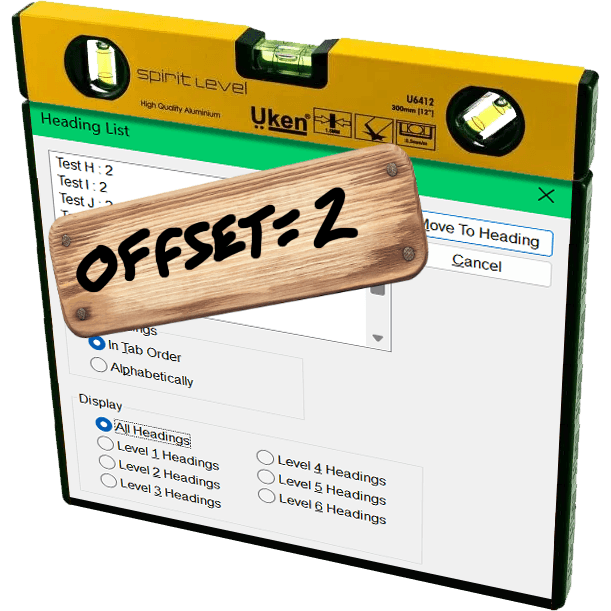
The JAWS heading list dialog with a yellow three-in-one surface level resting on top and a board nailed over it with hand-scrawled ‘offset=2’.

The proposed Document Outline Algorithm, where headings would automatically reset themselves to the appropriate level based on their position in the DOM structure, was never part of a final HTML specification. It was quickly proven to be unworkable; brief support in JAWS demonstrated that. You can read the tortured history (and a JAWS support demo) in my 2016 post There Is No Document Outline Algorithm.

In 2019 WHATWG worked to resurrect <hgroup>, partly in a novel effort to try to resurrect the Document Outline Algorithm. In the end, even that effort was futile. <hgroup> came back, but it came back as a grouping element only. The only impact it has on heading structures is that browser could, if they really wanted, ignore other headings in the same <hgroup>.

In 2020, Steve Faulkner wrote about the doc-subtitle role, from the Digital Publishing WAI-ARIA Module 1.0, as a way to handle subtitles until <hgroup> found its new footing. Sadly, a cadre of authors thought that role could be the basis for the Document Outline Algorithm.

Authors very much want to make the browser decide heading levels for them. Authors also very much continue to write content and HTML structures that make that impossible.

So I wasn’t surprised when Firefox’s recent announcement of headingoffset support coming to Firefox behind a flag resulted in many cheering the “return” (irony quotes) of the Document Outline Algorithm.

But it isn’t.

headingoffset

The headingoffset attribute lets authors offset heading levels for descendants of a given node.

So if you have, say a dialog that starts at <h2>, you could add headingoffset="2" and then let it pull in (server-side or via your preferred user-slowing front-end tooling) another page that uses <h1> as its first heading, you can be comfortable knowing that <h1> will be treated as <h3> in the accessibility tree.

This can be handy for content re-use without authors needing to make every heading a variable or burning down the DOM each time to forcibly re-write them.

But it’s still the author’s job to make an intentional and good decision. The browser will know nothing more about your content or structure than it did before. And it certainly doesn’t reduce WCAG risk.

Other useful nuggets:

  • headingoffset values must be valid non-negative integers.
  • headingoffset values must be between 0 and 8.
  • headingoffset values greater than 8 are specified to max at level 9, but existing bugs may impact that.
  • Other invalid headingoffset values should fall back to level 2, but again, bugs and implementation decisions wil impact that.
  • headingreset is a boolean attribute that tells browsers to ignore headingoffset for that node and its descendants.
  • Do not use headingoffset until you can confirm support for the computed heading level in your target audience browser.

Recap

  1. headingoffset is not the (nor any) Document Outline Algorithm, nor does it replicate it.
  2. headingoffset requires the author to make decisions based on content.
  3. Until JAWS and TalkBack fix existing bugs, probably don’t do / allow any heading levels higher than 6.
  4. Don’t do / allow any heading levels higher than 9.
  5. If you are hoping headingoffset will resolve your heading level problems in a hands-off way with imported or user-generated content, you may end up creating confusion and WCAG risk.
  6. Do not try to use headingoffset to try to recreate the Document Outline Algorithm.

Related

Not a ton of detail in this post, but at 500 words if you want more then here are some resources beyond what I linked:

  •  

Don’t Use Fake Bold or Italic in Social Media

I posted something on Mastodon that uses Unicode math symbols to produce fake bold and fake italic text. I used YayText.com to generate it, but I am not linking it because you I don’t want you to use it.

I embedded the post, but you can go to it directly if you prefer.

Then I recorded the screen reader output.

NVDA 2024.4.2 / Firefox 135. Doesn’t announce the fake bold nor fake italic.
JAWS 2025 / Chrome 133. Announces each fake bold and fake italic letter individually, including its case and style.

Those two videos account for ~78% of primary screen reader use. You could stop there and you’d have a good sense of the divergent experience and how it doesn’t match up with the visible text as you might expect.

This is not new information. I was raising this as a concern back in 2018 when Twitter was not yet a Nazi bar.

I know it’s easy to want to blame screen readers. That reflex, however, is a mistake. Instead, as an author you have some responsibility here.

VoiceOver / macOS 15.3.1 / Safari 18.3. Doesn’t announce the fake bold nor fake italic.
Narrator / Windows 11 24H2 / Edge 133. Doesn’t announce the fake bold nor fake italic.

I’m using default settings. Some users will have different settings, but understand screen reader users have the same range of skill & experience with their kit as everyone else has with their own kit.

Try with your built-in screen reader. You have one built into whatever system you are using to read this post (unless you printed it to dead tree pulp, like a boss). If you are unfamiliar with the commands, such as starting it or navigating, I have some screen reader documentation and resources.

VoiceOver / iPadOS 18.3.1 / Safari. Doesn’t announce the fake bold nor fake italic.
TalkBack 15.2 / Chrome 133. Announces the fake bold and fake italic as if it is regular text. TalkBack started doing this in 2021.

I’ve shared six screen reader experiences.

The takeaway should be do not use sites like YayText to make fake bold or italic text (whether on Bluesky, LinkedIn, that Nazi bar, that other Nazi bar, or the yet other Nazi bar, etc.).

If you’re a tester, you may see the speech logs show the characters. These are lies because that doesn’t mean they are announced.

For comparison, this is what it would look like if it was marked up using HTML (and yes, some Masto instances support this) instead of math symbols:

Please do not eat the shrimp scampi in the fridge. It is tasty but will kill you.

All screen readers announce all those words, even if they don’t all expose the bold or italic styling by default.

Now…

Imagine your local government sends this:

Imagine the impact on screen reader users.

Actually, you don’t have to imagine. I recorded the behavior in 2021. It’s not much different today and the examples above will help you guess even if you don’t read that post or try it yourself.

Update: 9 March 2025

This post landed on Hacker News, with the standard mix of comments from people who read the post, mis-read the post, didn’t read the post, think they know “the fix,” know better, and generally debated the nature of their debates.

  •  
❌