❌

Vue lecture

Technology Limits are Temporary

Years ago I was invited to Netflix to give a talk on why we should design software for mobile and how. In the Q&A I was told that people wouldn't watch movies or TV on small screens. When I gave the same talk at eBay, I heard people would never buy expensive items without reviewing them on large displays. Obviously neither is true today. So why the disconnect?

In short, many people fixate on the limitations of new technologies instead of their long-term potential. It's happened over and over again.

The Commodore 64 had just 64 kilobytes of memory. Programs could take several minutes to start up. A complete personal computer in the 80s could set you back $4,000 of today’s money. Today's $600 MacBook Neo has none of these problems.

The early Web ran on dial-up connections. Designers were stuck with a 256 color "Web-safe" palette and hacked together page layouts using table and font tags. Today's Web runs applications, TV shows, games, and more.

comparison of the screen pixel dimensions of the original iPhone and the iPhone 18 Pro Max

The first iPhone only connected to 2G networks, had no copy and paste, only had 16 built-in apps and no way to add more. I won't belabor the point but you'd think with all these examples behind us, we'd know early technology limitations don't last. And the fixation continues with AI:

  • image models can't draw hands.
  • language models hallucinate.
  • coding models can't write good code.
  • and so on...

four years of changing capabilities in the image generation model midjourney demonstrated by images of Spider-Man

These limitations have largely disappeared in short order. And the folks that focused on what AI models couldn't do are now grappling with the larger impact of what they can do. Designers, writers, and developers all of a sudden face capabilities they actively bet against, leaving them vulnerable to job disruptions and more.

If the last forty years are any guide... technology limits are temporary. Plan accordingly.
  •  

Many Agents, Many Views

In today's AI-powered software, you manage agents, they manage more agents, and those agents manage even more agents. Chat threads break with that scale. We need to know what agents are planning, what they've already done, and how best to steer them. In other words we need different ways of seeing things.

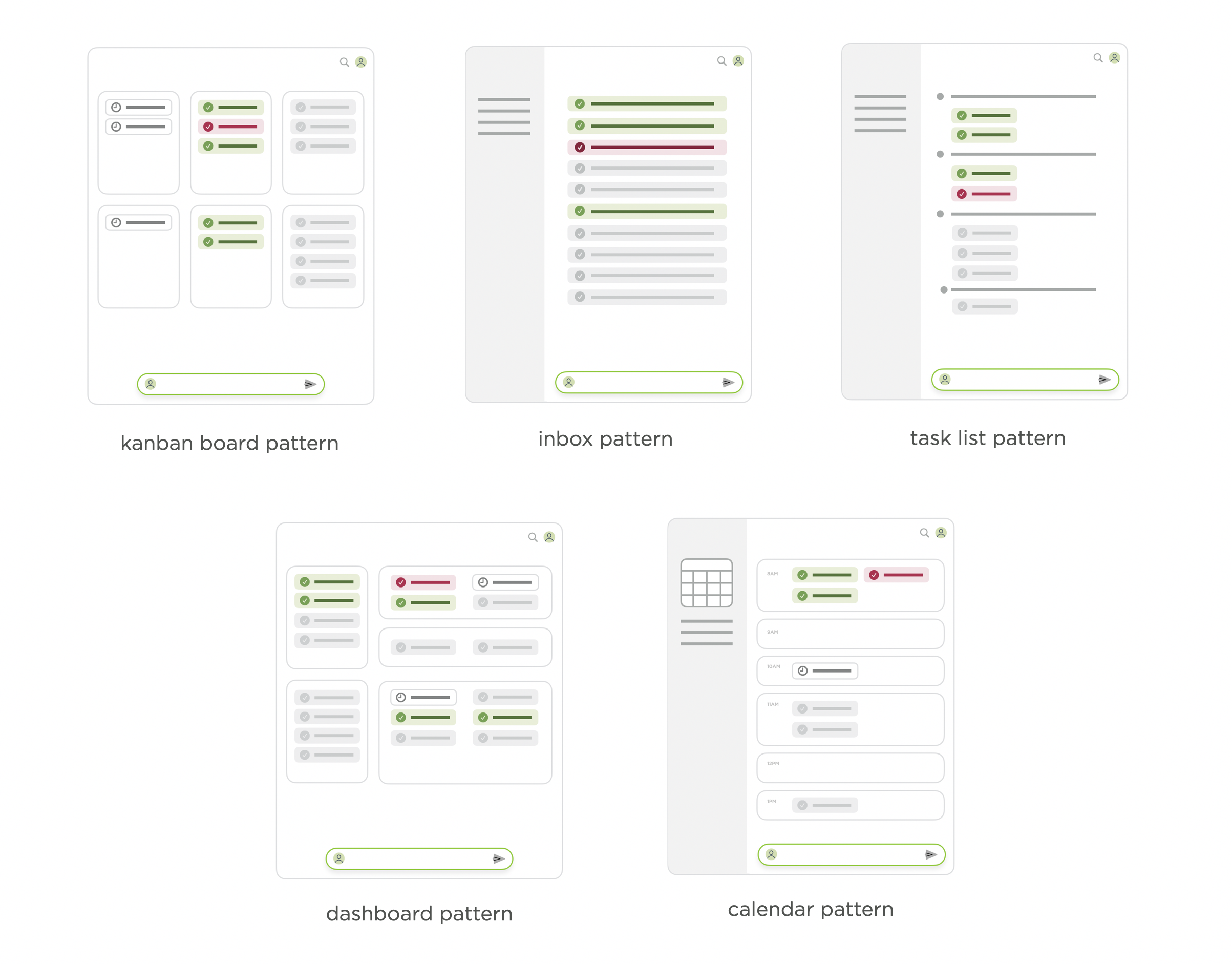
When most people think about staying on top of agent activity, they jump to management views: an inbox like those found in Slack and email; a dashboard like those found in monitoring apps. Effectively these answer the question "what are my agents doing right now?"

I took a look at inboxes, Kanban boards, task lists, dashboards, and calendars in a post last year about agent management interface patterns. But while these kinds of agent views currently get all the attention, more specific and dynamic views may actually be more useful.

agent management interface patterns, like inbox, calendar task, list, dashboard

That's why in Intent, our large scale agent coordination tool for developers, we've built in multiple ways to see what's going on. Intent lets you create any number of documents (we call them notes) when working on a task, so you can have the specific views you need when you need them. A few examples:

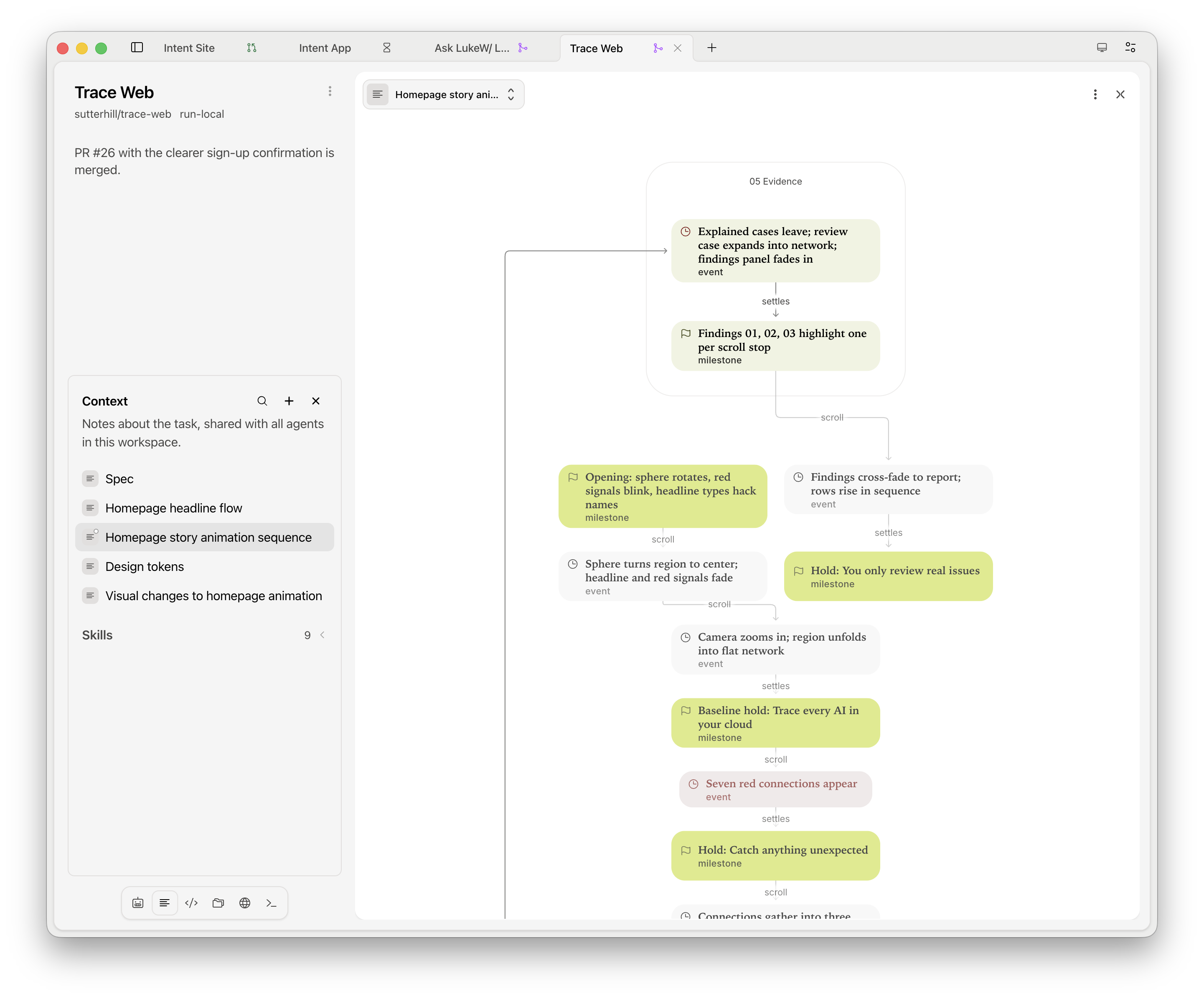
Agents can draw architecture maps, flowcharts, sequence diagrams, and state machines inside notes and chats so you know what they are planning to do, and how, before spending the tokens.

diagram views of agent plans in Intent

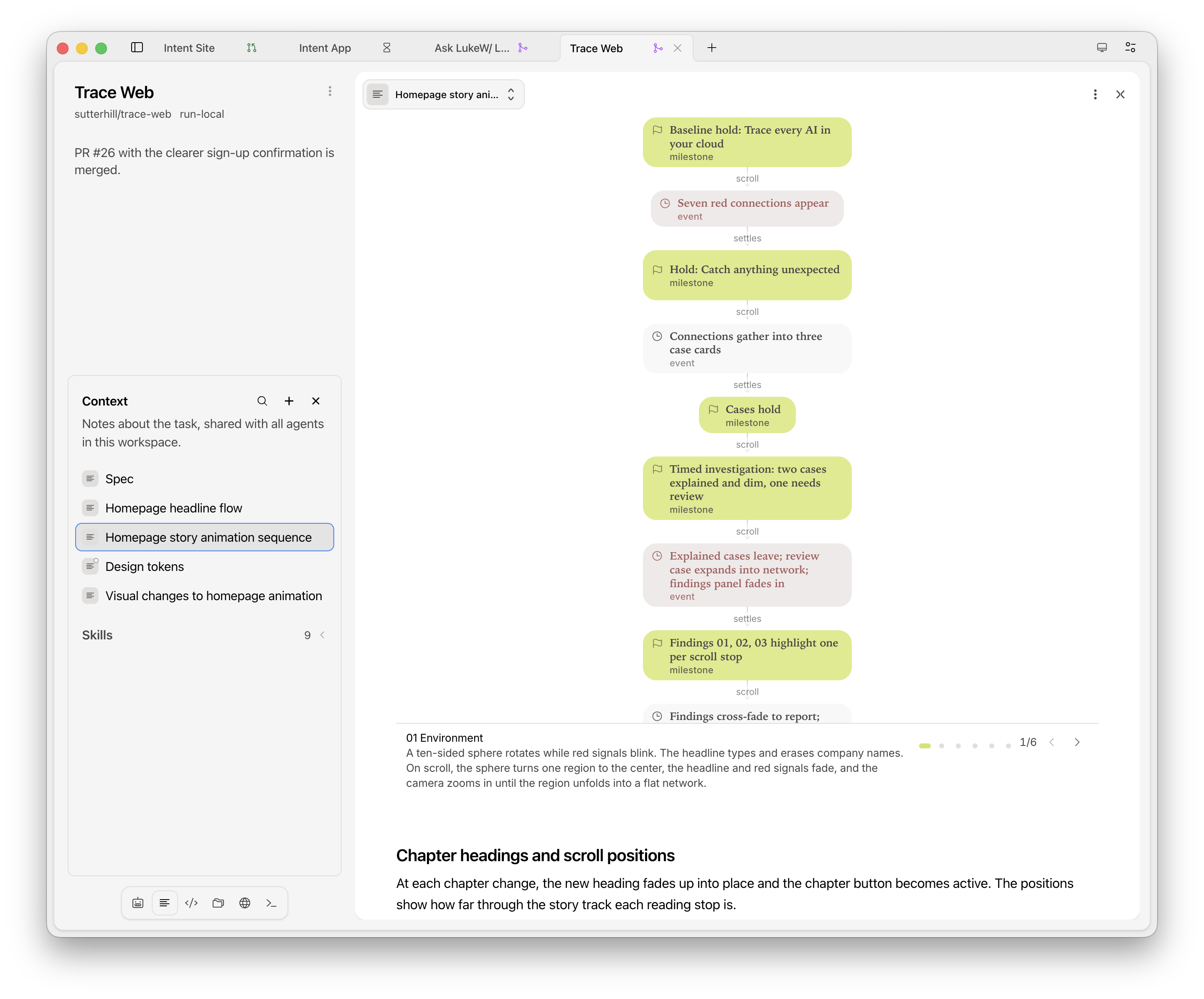
Stepped walk-throughs move you through a diagram one stage at a time, each with a short explanation and the relevant parts highlighted. This not only makes plans easier to follow but also helps you quickly understand the current state of things. Boxes that reference files or notes open them when you click so can go deeper if needed.

step by step diagram views of agent plans in Intent

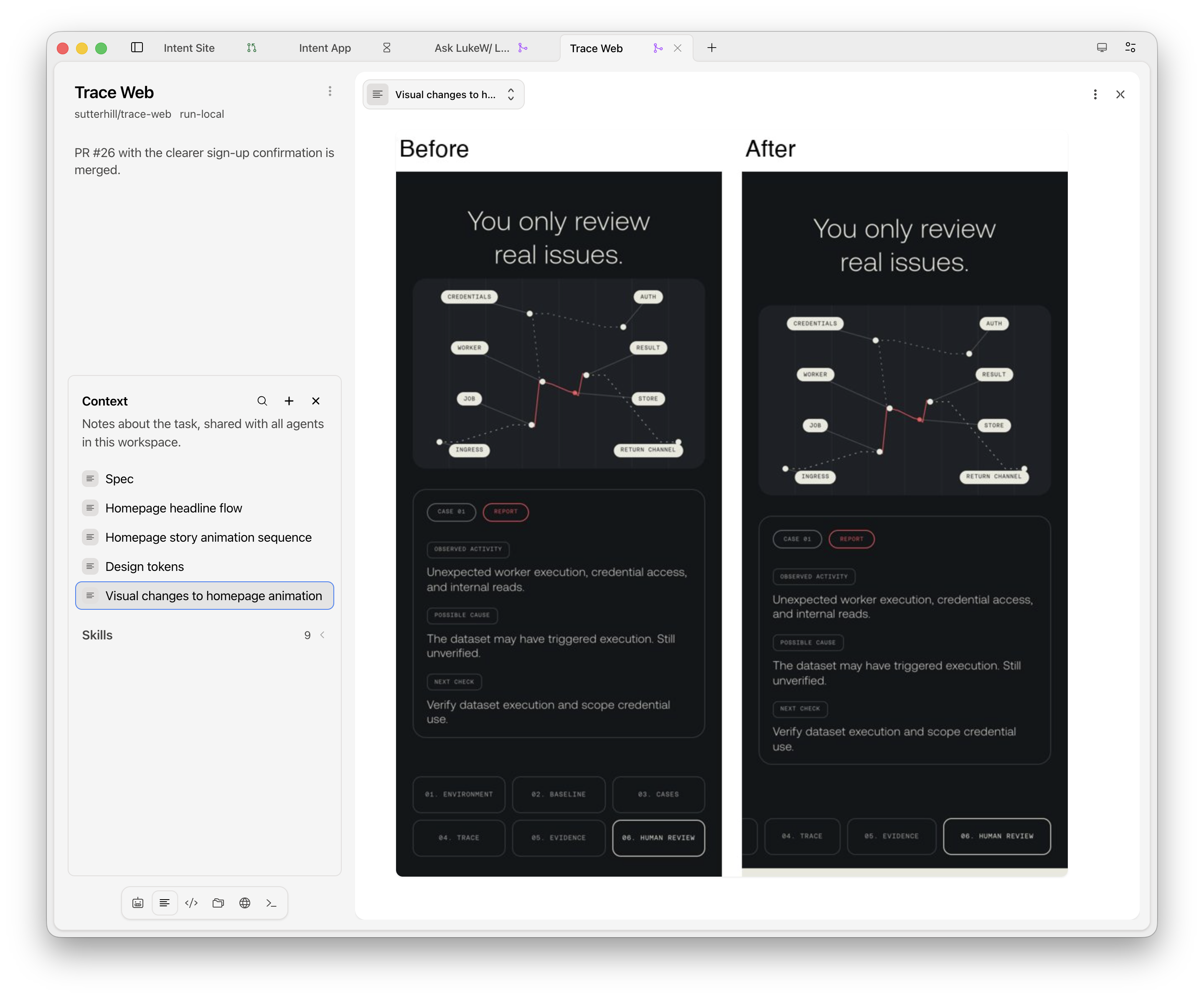
Agents can take before and after screenshots of their UI changes and place them side by side in a note letting you judge results without reading any code. These notes can update with each change or stick around as a historical record. Agents in Intent can also pin a screenshot to show progress at a glance.

Visual reviews of ancient changes in Intent

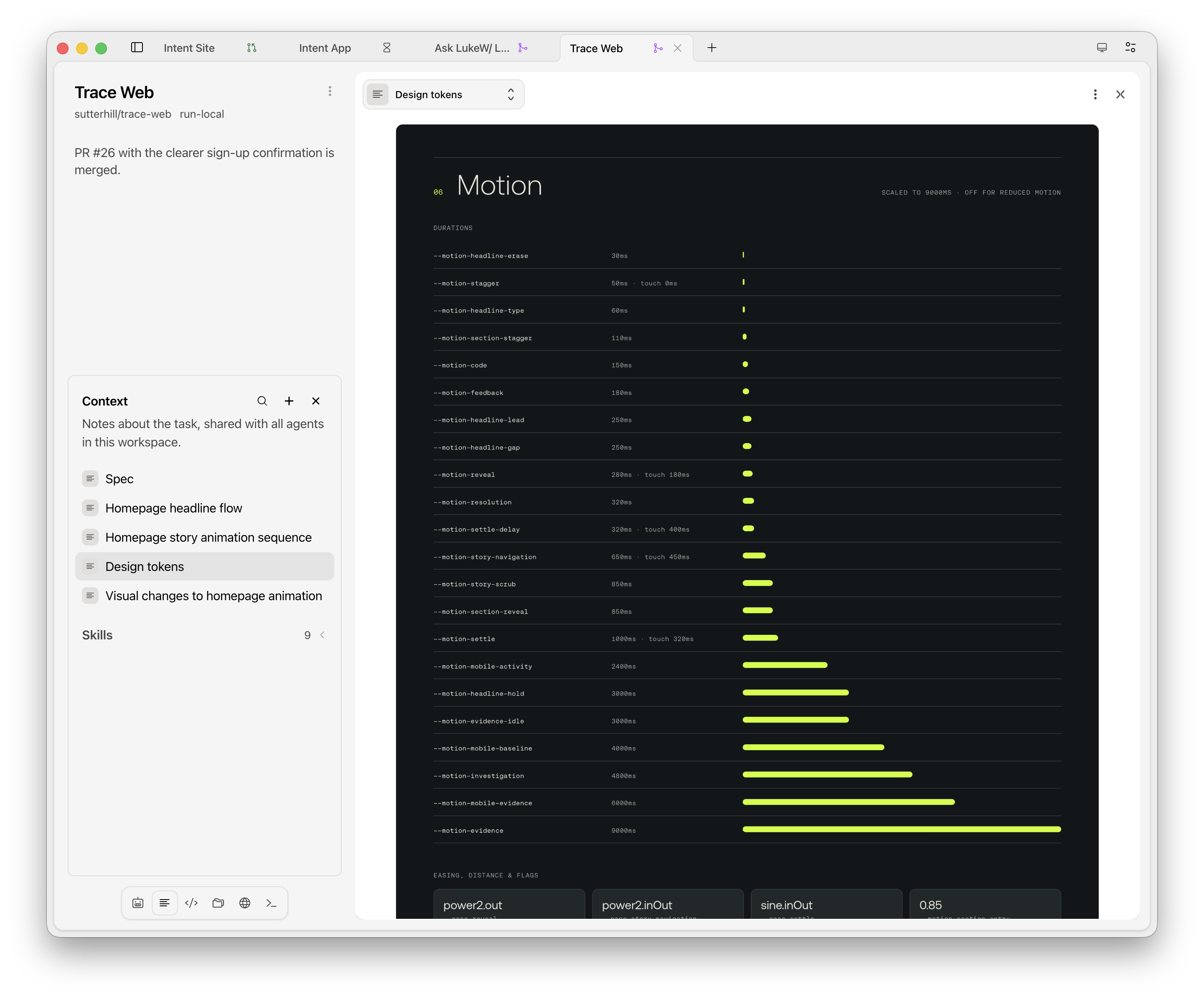
A app or website's design system can also be viewed as a note: colors, type styles, spacing, corner rounding, animation timings, and components with their variants, all in one place. Keeping a view like this open while you work makes "which padding?" one glance away. Agents read the same notes, so their UI work lines up with your references.

dynamic design system views in Intent

Of course, lots of views aren't much help if you can't set them up in a way that's useful. Every panel in Intent can hold a stack of agents, notes, files, terminals, and browser tabs. Drag things between panels, drop one on an edge to split off a new panel, and zoom any panel to full screen if you need focus.

Yes, chat still has a place for kicking off, moving along, and redirecting work. But as agents keep multiplying, a configurable workspace of useful views goes a long way toward steerings thing toward the outcomes you want.

  •  

Design Systems for AI Agents

For as long as I've been working on design systems (20+ years, oof!), I've seen the same pattern play out... design teams invest a lot of time in creating a system, then struggle to keep it up to date as the actual product evolves. Inevitably the design system ends up describing a product that no longer exists.

The most common way to address this was to throw more resources at the problem: design system teams and/or centralized design reviews. But now, AI agents give design systems a different path forward. When agents write most of the code, the design system can become part of what I've called the AI steering layer: the context that keeps every website update aligned with brand, design, and development guidelines. Put simply, a design system for agents is a steering layer for a site's design and front-end code.

With AI agents, anyone on a team can update a website. Marketing adds landing pages, engineering adds docs, a PM tweaks the pricing page. Each of their agents will happily implement its own tone and voice, colors, spacing, etc. unless something steers them toward a unified whole.

That's the case for collaborative steering. A design lead and front-end lead define the grid, fonts, colors, spacing, and components once, and everyone's agents are "snapped to" it. The team keeps shipping and the site keeps its integrity. So what does that look like in practice? Here are a few examples from our recent projects.

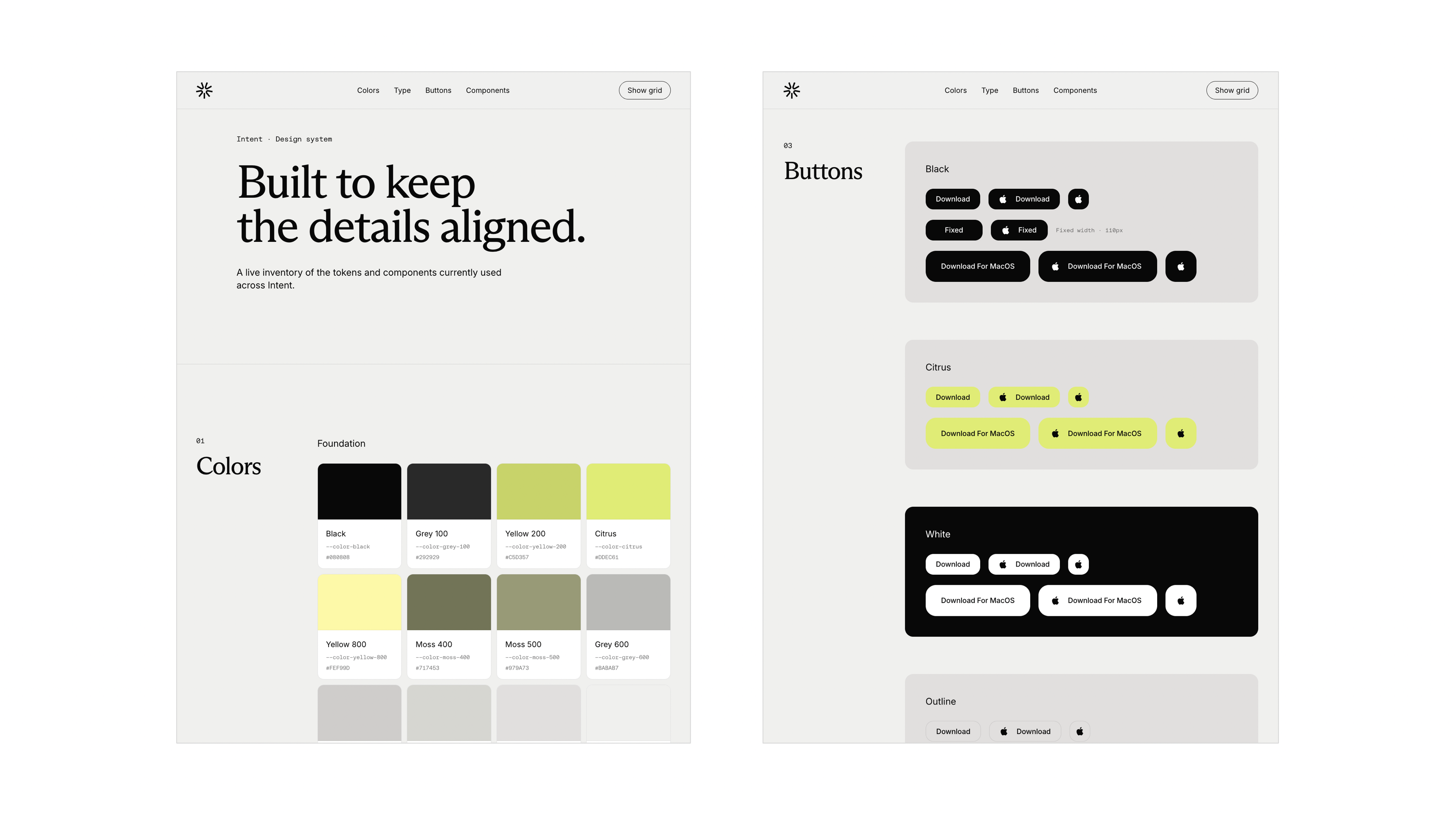
On the Intent website, an AGENTS.md file tells AI agents to reuse the theme classes and CSS variables in the site's global stylesheet instead of duplicating color, typography, or grid values. That stylesheet defines colors, fonts, type sizes, the responsive grid, and light and dark themes as design tokens (named values the whole site shares). A design system page shows it all as live examples agents can inspect.

design system page for agents to apply when people make changes to the Intent website

When someone asks an agent to add a new button, it reuses the existing Button component and its styling, which also adapts to dark mode automatically. And no human has to look anything up.

Intent's design system started from Figma specs that were automatically translated into code using a Figma MCP connection. After that, the code itself became the source of truth and was updated with a new body font, responsive layouts, dark mode, and more as the site evolved. We've even had agents write changes back to the original Figma files. But since the code is the source of truth, that hasn't been necessary in practice.

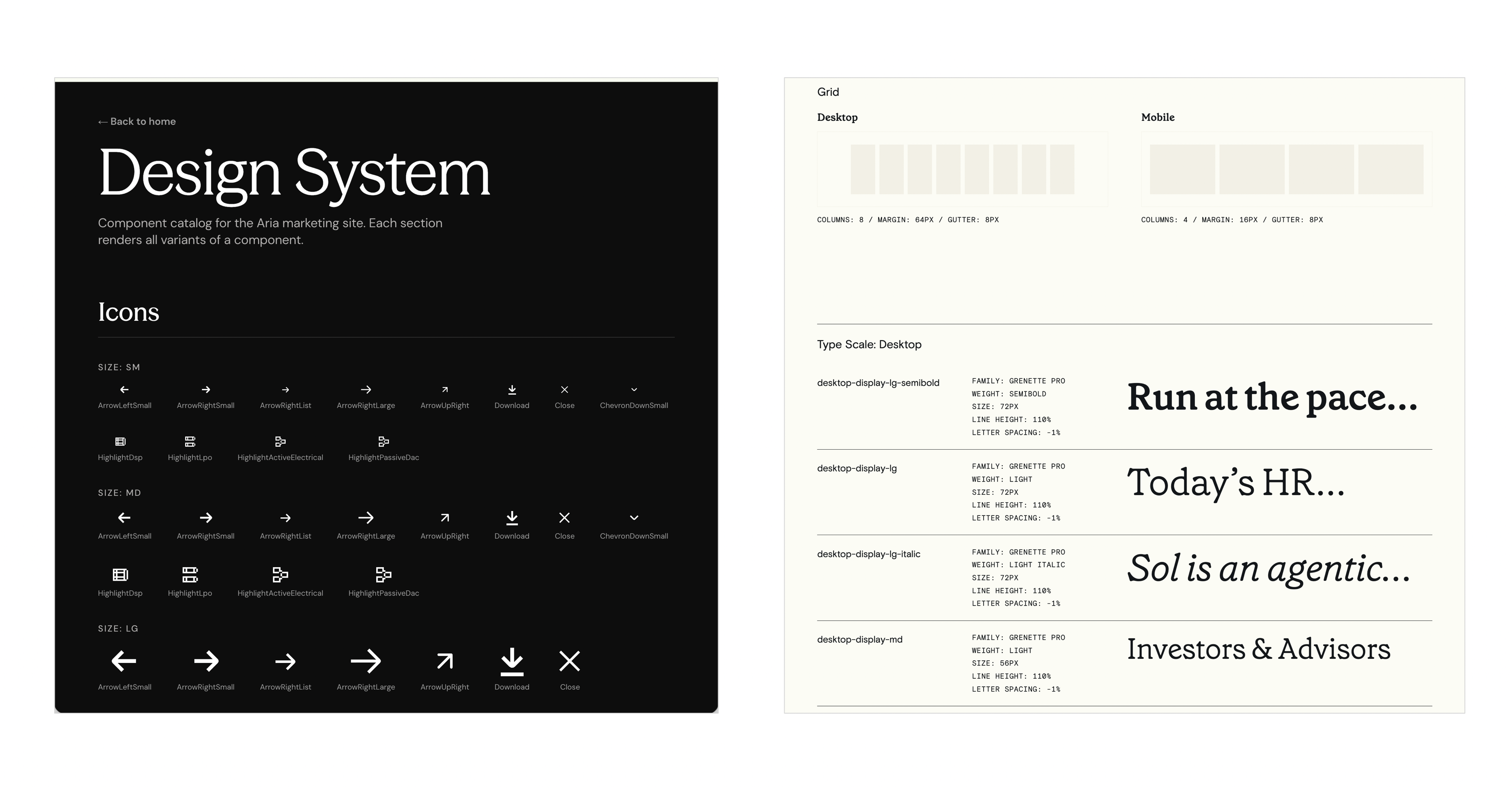
design system pages for agents to apply when people make changes to the Sol and Aria websites

Sol and Aria's websites follow the same approach (links go to their design system pages), each with design tokens, agent instructions, and a design system page that stays current because it's built from the same code as the site.

Design teams have spent years trying to get people to actually read their design system documentation. Agents read it every single time.

  •  
❌