❌

Vue normale

∪ of Target Audiences (Accessibility, SEO, AEO/GEO)

15 juin 2026 à 20:27

Using SEO (search engine optimization) to justify accessibility was only ever a technique for bosses or clients or stakeholders who see accessibility as a cost center and are typically driven more by dashboards or money. Ideally, you want to get past that ASAP to drive better outcomes for humans, not SERPs (search engine results pages). I get it as a foot-in-the-door tactic — hopefully it goes no further.

But SEO also drove bad accessibility practices, such as alt text keyword stuffing, low-contrast text, verbose headings, link text built around keywords, gratuitous landing pages, and more. Karl does a good job of demonstrating how little SEO and accessibility are connected. As such, I’ve always been wary of companies pitching accessibility and SEO in their marketing.

Now I see companies pitching accessible & “AI-ready” or “agent friendly” work, often still including SEO. I’m calling foul.

Venn diagram with three circles. 1, Accessibility: The work needed to make things accessible to humans in assorted contexts. 2, SEO: The work needed to get your sites into search engines and maybe even ranked well. 3, AEO/GEO: The work to get your IP stolen by LLMs as they DDoS your site, so it can be later incorrectly regurgitated. Overlap with Accessibility and SEO: With bonus per­for­ma­tive use of the term “a11y.” Overlap of SEO and AEO/GEO: This is someone tricking you into speed-running having your IP stolen. There is no overlap of Accessibility and AEO/GEO nor all three.

We’ve already seen anti-user guidance from LLM companies asking for their notion of accessible sites. Never mind that these PhD-level genius LLM tools can’t handle a general site most kids navigate with ease. Let’s ignore the failure of that technology and instead start slapping misunderstood ARIA attributes on all our pages instead.

Sure, there’s overlap between SEO and LLM-thieving. SEO and accessibility even have slight overlap. But accessibility is about people. Twisting a human affordance to feed these corporate efforts to make humans redundant (among all the other harms) is a signal. Different people will read that signal in different ways. If it sells work and you still focus on humans first, cool.

But to me that signal says you aren’t serious about the work. That your TESCREAL patch is just waiting to get sewn on. I’m trying to be less absolutist, less black-and-white. But boy is it hard given what I see every time I peel back the veneer.

I made a thing (based on an old experiment) to better illustrate where I see the overlaps.

See the Pen Accessibility + SEO + AEO by Adrian Roselli (@aardrian) on CodePen.
headingoffset is Not the Document Outline Algorithm

11 juin 2026 à 23:26

Hi, just me heading off some bad advice I’m starting to see in developer venues.

Background

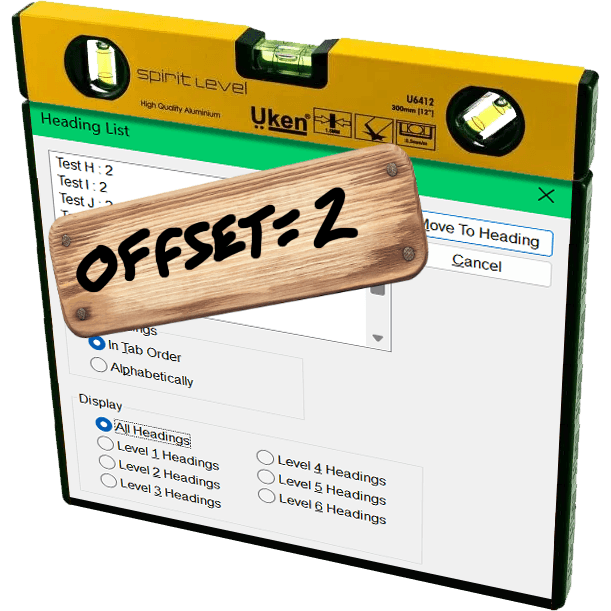
The JAWS heading list dialog with a yellow three-in-one surface level resting on top and a board nailed over it with hand-scrawled ‘offset=2’.

The proposed Document Outline Algorithm, where headings would automatically reset themselves to the appropriate level based on their position in the DOM structure, was never part of a final HTML specification. It was quickly proven to be unworkable; brief support in JAWS demonstrated that. You can read the tortured history (and a JAWS support demo) in my 2016 post There Is No Document Outline Algorithm.

In 2019 WHATWG worked to resurrect <hgroup>, partly in a novel effort to try to resurrect the Document Outline Algorithm. In the end, even that effort was futile. <hgroup> came back, but it came back as a grouping element only. The only impact it has on heading structures is that browser could, if they really wanted, ignore other headings in the same <hgroup>.

In 2020, Steve Faulkner wrote about the doc-subtitle role, from the Digital Publishing WAI-ARIA Module 1.0, as a way to handle subtitles until <hgroup> found its new footing. Sadly, a cadre of authors thought that role could be the basis for the Document Outline Algorithm.

Authors very much want to make the browser decide heading levels for them. Authors also very much continue to write content and HTML structures that make that impossible.

So I wasn’t surprised when Firefox’s recent announcement of headingoffset support coming to Firefox behind a flag resulted in many cheering the “return” (irony quotes) of the Document Outline Algorithm.

But it isn’t.

headingoffset

The headingoffset attribute lets authors offset heading levels for descendants of a given node.

So if you have, say a dialog that starts at <h2>, you could add headingoffset="2" and then let it pull in (server-side or via your preferred user-slowing front-end tooling) another page that uses <h1> as its first heading, you can be comfortable knowing that <h1> will be treated as <h3> in the accessibility tree.

This can be handy for content re-use without authors needing to make every heading a variable or burning down the DOM each time to forcibly re-write them.

But it’s still the author’s job to make an intentional and good decision. The browser will know nothing more about your content or structure than it did before. And it certainly doesn’t reduce WCAG risk.

Other useful nuggets:

  • headingoffset values must be valid non-negative integers.
  • headingoffset values must be between 0 and 8.
  • headingoffset values greater than 8 are specified to max at level 9, but existing bugs may impact that.
  • Other invalid headingoffset values should fall back to level 2, but again, bugs and implementation decisions wil impact that.
  • headingreset is a boolean attribute that tells browsers to ignore headingoffset for that node and its descendants.
  • Do not use headingoffset until you can confirm support for the computed heading level in your target audience browser.

Recap

  1. headingoffset is not the (nor any) Document Outline Algorithm, nor does it replicate it.
  2. headingoffset requires the author to make decisions based on content.
  3. Until JAWS and TalkBack fix existing bugs, probably don’t do / allow any heading levels higher than 6.
  4. Don’t do / allow any heading levels higher than 9.
  5. If you are hoping headingoffset will resolve your heading level problems in a hands-off way with imported or user-generated content, you may end up creating confusion and WCAG risk.
  6. Do not try to use headingoffset to try to recreate the Document Outline Algorithm.

Related

Not a ton of detail in this post, but at 500 words if you want more then here are some resources beyond what I linked:

Announcing our rebrand: A clearer, more intuitive Matomo

As of today, April 30, 2026, we’re announcing the first step of our brand refresh. Another software company talking about a cosmetic redesign? Not quite. This update isn’t just about how Matomo looks. It’s about making the whole Matomo experience clearer, faster and more user-friendy.

Why we’re making this change

Over time, Matomo has grown significantly. New features, new use cases, and a growing global community have shaped what the platform is today.

As an open-source platform, feedback, contributions, and real-world usage play a direct role in how the product evolves. That creates a continuous loop between how Matomo is used and how it improves. Over time, we’ve gathered lots of great feedback on how users experience Matomo, what works well, and where things slows them down.

Some patterns became clear: For many users, navigation could be more intuitive, key insights could surface faster and onboarding could be smoother.

Our rebrand is the starting point for addressing these areas more systematically. Our overall goal is to reduce friction so you can get value from your data faster.

From feedback to product improvements

By turning all our user touchpoints into a modern, clear, and cohesive experience, we want to make it easier for users to understand, adopt, and get value from Matomo.

You’ll start to notice:

  • Updated navigation (top bar and main menu) for better readability
  • Improved main selectors (website, segment and dashboard) for easier use
  • A modernised overall layout, refreshed widgets shadows being an exemplary detail

Our product now even offers a dark-mode that users can easily select in their Matomo settings.

What’s changing, and when?

Starting today, you’ll see the first changes with the updated look and feel of our website. We’ll continue rolling out improvements across onboarding, education, usability, and the overall product experience. All of these improvements are guided by the same principle of putting our users first.

While the brand evolves, our values remain the same:

  • Full data ownership
  • Privacy-first analytics
  • Transparency and control
  • Flexibility for different teams and use cases
  • Accurate, reliable data

If anything, this rebrand sharpens these commitments.

Where we go from here

Rebrands often focus on how things look. This one is about how things work and how they feel to use.

We’d value your feedback as we continue the roll-out. You can reach us at marketing@matomo.org or via our social channels.

Not using Matomo yet? You can explore the new experience with a 21-day free trial.

The post Announcing our rebrand: A clearer, more intuitive Matomo appeared first on Analytics Platform - Matomo.

Tails OS : un système d’exploitation pensé pour l’anonymat

14 août 2025 à 14:37

Imaginez une clé USB qui se prend pour James Bond : dès qu’elle quitte la pièce, pouf, plus aucune trace. C’est à peu près la promesse de Tails (The Amnesic Incognito Live System), un système d’exploitation « bootable » qui tourne depuis une clé ou un DVD, s’appuie sur le réseau Tor et oublie tout en se fermant. La version la plus récente (6.14.2, sortie le 15 avril 2025) arrive même avec des correctifs de sécurité de dernière minute — pas le genre à traîner, donc.

« C’est encore une distro Linux, non ?» – Oui… mais pas vraiment !

Ce qui rend Tails unique

  • Amnésie totale : aucun fichier n’atterrit sur le disque dur de la machine hôte. À chaque redémarrage, vous repartez sur un système vierge.
  • Tor à gogo : tout passe dans les oignons (Tor), même les applis capricieuses. Si un logiciel tente de se connecter en dehors de Tor, il se fait rembarrer fissa.
  • Persistance optionnelle : besoin de garder vos clefs GPG ou vos brouillons LibreOffice ? Activez la « Persistent Storage » chiffrée et choisissez ce qui survit aux reboots.
  • Cycle de sorties éclair : une mise à jour toutes les six semaines, histoire de colmater les failles avant qu’elles ne deviennent des légendes urbaines.
  • Fusion avec le Tor Project (2024) : l’OS est officiellement passé sous l’aile de la fondation Tor — pratique quand votre raison d’être, c’est justement Tor !

Wow ! Pas étonnant que les distributions « classiques » aient l’air un peu plan-plan à côté.

Les points forts qui claquent

Ça fait plaisir…Pourquoi c’est cool
Anonymat par défautTor partout, blocage du réseau clair, ponts Tor si besoin
PortabilitéUne clé USB de 8 Go + un PC de ces dix dernières années et roule ma poule
Coffre‑fort intégréPersistance chiffrée au choix, chiffrement complet
Suite « prête à conspirer »Tor Browser, Thunderbird+OpenPGP, OnionShare, KeePassXC… déjà configurés
Open source + auditsTout le code est public ; les chercheurs en sécu adorent fouiller

Oui, et tout ça gratuitement.

…et les petites galères à prévoir

  • Lent comme un dimanche pluvieux : Tor ajoute de la latence. Oubliez le binge‑watching en 4K.
  • Compat’ matos capricieuse : cartes Wi‑Fi exotiques ou Mac T2 peuvent faire la tête.
  • Pas un OS « au quotidien » : chaque reboot reset. Si vous travaillez sur des projets lourds (montage vidéo, dev quotidien), vous allez râler.
  • Applis limitées : tout nouveau logiciel nécessite la Persistance + un redémarrage, sinon il s’évapore.
  • Apprendre les bonnes pratiques : Tails est sûr, mais pas magique ; utiliser l’« Unsafe Browser » sans précaution, c’est comme mettre un gyrophare sur votre tête – visible !

À qui ça parle ?

  • Journalistes & lanceurs d’alerte qui doivent échanger discrètement.
  • Militants & ONG sous régime hostile.
  • Victimes de violence domestique cherchant un havre numérique.
  • Geeks soucieux de leur vie privée (coucou !).
  • …et, soyons clairs, pas aux gamers invétérés ni aux fans de Photoshop XXL.

Vous cochez une case ?

Envie de tester ? Petit guide express

  1. Téléchargez l’image ISO/USB depuis le site officiel (vérifiez la signature PGP, sinon gare au poisson d’avril).
  2. Gravez ou flashez la bête : Balena Etcher ou l’« Tails Installer » maison, simple comme bonjour.
  3. Désactivez le Secure Boot si votre BIOS grogne.
  4. Démarrez depuis la clé (F12, Esc, ou la touche cabalistique de votre PC).
  5. Configurez la Persistance si besoin : sélectionnez uniquement ce dont vous avez réellement besoin, histoire de ne pas tout garder « juste au cas où ».
  6. Première connexion : Tor détecte l’état du réseau et vous guide. Bloqué ? Essayez les bridges — ça passe crème dans la plupart des cafés.

On en cause ?

Au final, Tails, c’est un peu le coup‑de‑pouce ultime quand on veut un ordinateur jetable mais puissant. Pas fait pour tout le monde, mais un joker précieux dans un monde où nos données ressemblent trop souvent à de la petite monnaie qu’on abandonne sur le comptoir.

Alors, vous vous lancez ? Vous voyez d’autres usages que j’aurais oubliés ? Partagez vos idées — et, promis, on reste discrets 😉

Dépendance numérique : comment la France en est arrivé là, et surtout… comment en sortir ?

Par : Cyroul
9 avril 2025 à 17:36
2025, La France découvre (enfin) sa dépendance numérique Ça y est. Depuis l’augmentation des droits de douanes Trumpistes, la France découvre ses dépendances numériques. Même le chef de l’état défend la souveraineté numérique de la France. Bravo, applaudissement ! Presque 15 ans après la création déjà tardive d’un secrétariat au numérique (qui aura muté en […]

Don’t Use Fake Bold or Italic in Social Media

6 mars 2025 à 01:50

I posted something on Mastodon that uses Unicode math symbols to produce fake bold and fake italic text. I used YayText.com to generate it, but I am not linking it because you I don’t want you to use it.

I embedded the post, but you can go to it directly if you prefer.

Then I recorded the screen reader output.

NVDA 2024.4.2 / Firefox 135. Doesn’t announce the fake bold nor fake italic.
JAWS 2025 / Chrome 133. Announces each fake bold and fake italic letter individually, including its case and style.

Those two videos account for ~78% of primary screen reader use. You could stop there and you’d have a good sense of the divergent experience and how it doesn’t match up with the visible text as you might expect.

This is not new information. I was raising this as a concern back in 2018 when Twitter was not yet a Nazi bar.

I know it’s easy to want to blame screen readers. That reflex, however, is a mistake. Instead, as an author you have some responsibility here.

VoiceOver / macOS 15.3.1 / Safari 18.3. Doesn’t announce the fake bold nor fake italic.
Narrator / Windows 11 24H2 / Edge 133. Doesn’t announce the fake bold nor fake italic.

I’m using default settings. Some users will have different settings, but understand screen reader users have the same range of skill & experience with their kit as everyone else has with their own kit.

Try with your built-in screen reader. You have one built into whatever system you are using to read this post (unless you printed it to dead tree pulp, like a boss). If you are unfamiliar with the commands, such as starting it or navigating, I have some screen reader documentation and resources.

VoiceOver / iPadOS 18.3.1 / Safari. Doesn’t announce the fake bold nor fake italic.
TalkBack 15.2 / Chrome 133. Announces the fake bold and fake italic as if it is regular text. TalkBack started doing this in 2021.

I’ve shared six screen reader experiences.

The takeaway should be do not use sites like YayText to make fake bold or italic text (whether on Bluesky, LinkedIn, that Nazi bar, that other Nazi bar, or the yet other Nazi bar, etc.).

If you’re a tester, you may see the speech logs show the characters. These are lies because that doesn’t mean they are announced.

For comparison, this is what it would look like if it was marked up using HTML (and yes, some Masto instances support this) instead of math symbols:

Please do not eat the shrimp scampi in the fridge. It is tasty but will kill you.

All screen readers announce all those words, even if they don’t all expose the bold or italic styling by default.

Now…

Imagine your local government sends this:

Imagine the impact on screen reader users.

Actually, you don’t have to imagine. I recorded the behavior in 2021. It’s not much different today and the examples above will help you guess even if you don’t read that post or try it yourself.

Update: 9 March 2025

This post landed on Hacker News, with the standard mix of comments from people who read the post, mis-read the post, didn’t read the post, think they know “the fix,” know better, and generally debated the nature of their debates.

❌