❌

Vue normale

Reçu — 10 février 2025 ⏭ Benjamin Bouvier's world

cargo-machete, find unused dependencies quickly

27 avril 2022 à 23:17

cargo-machete is a new Cargo tool that detects unused dependencies in Rust projects, in a fast (yet imprecise) way. As of today you can install it with cargo install cargo-machete and then run it with cargo machete from any folder that contains a workspace or crate, to find if you have potentially unused dependencies. Beware, it can report a few false positives!

Problem statement

When developers hack on code, it's a pretty common to reuse software that already exists and has been written, optimized, and battle-tested by many others. In fact, that's a core idea of the open-source movement, and one historical reason for its existence.

When zooming in into the Rust programming language case, my opinion is that it is also a key reason why Rust has been so successful: having plenty of crates doing everything you might need, already implemented for you and at hand's reach on crates.io. Plus, having the wonder of a one-does-it-all Cargo tool that makes it very easy to use those crates as dependencies in your project. 2

However, this comes with a price: sometimes you add a dependency because it's useful at a particular point in time. Much later, it's not useful anymore, but you may have forgotten about it. And then, the dependency remains as a zombie in your Cargo.toml file. Cargo will include it in the compilation graph, despite the compilation artifacts not being used at all. The unused dependency will just stay there, silently weep, waiting for you to recall it exists.

Of course, the problem can even become worse: maybe you maintain several crates that have unused dependencies. Or maybe you work with many crates as part of a workspace, and each may have unused dependencies. Or simply you use many dependencies yourself, and some may include unused dependencies. If you've published your crates and others use those, then everyone could also compile unused dependencies. At the scale of the entire Rust crates ecosystem, it can have a huge impact on the compile times, produced heat and wasted energy.

Have you heard about our lord and savior, cargo-udeps

There's already a nice tool for this in the ecosystem: cargo-udeps. It will compile your crate (or workspace) and then infer from the compiled artifacts what dependencies are used by your project, and thus show you which dependencies are unused.

That's great, but the way it works forces a few tradeoffs:

  • it requires to compile the whole crate with the Rustc nightly compiler. For me that means recompiling the whole project from scratch, most of the time, since I'm mostly using stable rustc as my daily driver.
  • if you compile for multiple targets (i.e. different combinations of CPU flavor, OS, environment, etc.), you'd need to run cargo-udeps on each of those to find per-target unused dependencies. For instance, if a dependency is only configured when compiling for x86_64 machines, then it may be flagged as unused on every other configuration.
  • most of all, since it look at compilation artifacts, it cannot know if a specific dependency is directly used by your crate, or indirectly, leading to somehwat mystifying results in the case of workspaces.

Let's dive a bit deeper into the last item, which I'll refer to as the transitively-used dependencies problem. Say you have your project AAA that contains a dependency to serde in its Cargo.toml file, while it's not directly used by your code. In fact, if you did a text-search of serde in AAA's code with grep, you wouldn't find a single match1. But now AAA is using another crate, AB, that itself depends on serde. cargo-udeps will see that serde is used overall, so it cannot let you know that AAA's Cargo.toml file references an unused dependency to serde.
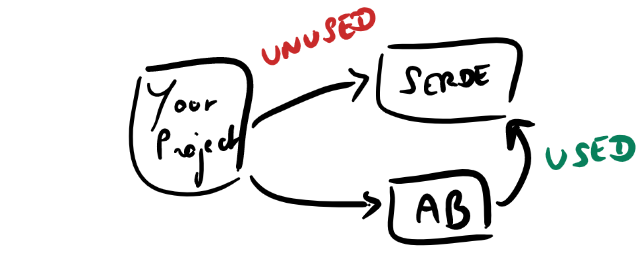
Graph of crates containing one unused crate

How is this a problem? After all, if the workspace uses serde even indirectly, then we will have to compile it at some point, so it's not like it's really unused.

First of all, the AAA crate might be using a different version of serde than the AB crate, and this could result in different copies of the same crate in your workspace. Note there are other nice tools that automatically detect this kind of situation (hi there cargo-deny).

Second, the order in which crates are compiled has an impact on compilation parallelism, and having unused dependencies may add spurious synchronization points in the compilation graph. When a Rust crate gets compiled by Cargo, Cargo proceeds in two phases:

  • first, it collects information so as to unlock the compilation of other crates further down the road that may depend on this particular one. I don't know precisely what it entails, but one can make educated guesses: parse the code, analyze which items are public, compute memory layouts for public types, collect type information and so on and so forth.
  • then, it does the actual compilation: optimize and generate the actual machine code for that particular crate, that will be later linked with other artifacts to form the final executable program.

The advantage of this two-phases scheme is that once Cargo is done with phase 1 for a particular crate, it can kick off the same process for other crates up the dependency tree, while it runs phase 2 concurrently. With a multi-core machine as is the norm on desktop computers, it's almost certain that this will bring speedups!

For instance, consider the following Cargo.toml file from our previous example project:

[dependencies]
serde = "1.0"

Then a possible compilation graph could look like that:
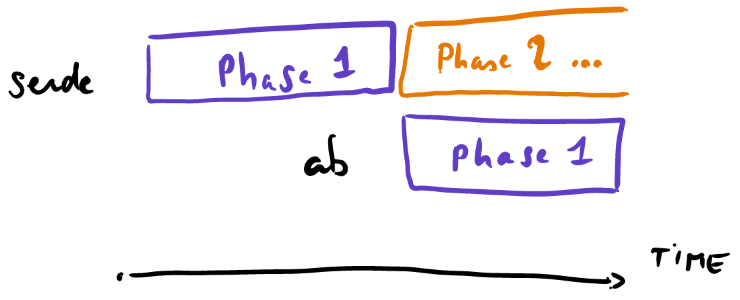
Compilation graph showing phases

In this case, ab phase 1 can start as soon as serde phase 1 has finished, while serde's compilation phase 2 happens in the background.

If you're interested in reducing the overall compile times of your Rust project, I would strongly suggest to go read Rust's documentation around timings visualization. Crates which spend lots of time in the first phase (or more generally, in both phases) are basically pipelining bottlenecks, so identifying/removing/working around them overall speeds up compile times.

Back to our small unused dependency problem: an unused dependency in your Cargo.toml may block the compilation of other crates up the dependency tree, and thus may slow down the whole compilation process by creating useless check points.

Consider a crate C that depends on crates A and B, with B actually unused:
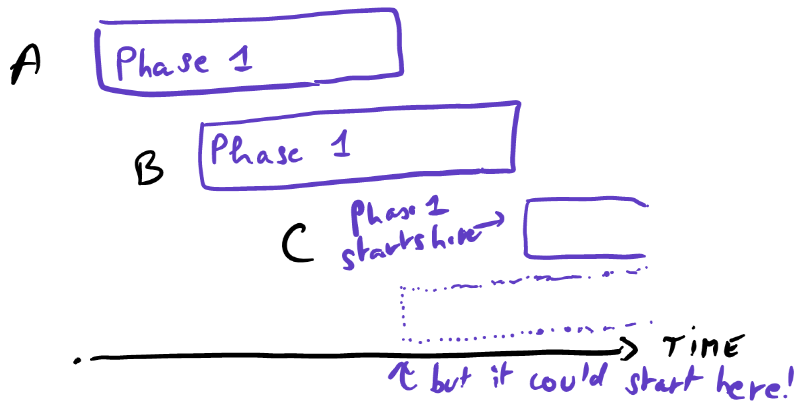
Pipeline stall

Here, the compilation of the crate C could start way earlier, but it's blocking waiting for the compilation of B to finish first, while it's not even used!

Solving this, the naive way

So when I was trying to confirm whether crates found by cargo-udeps were actually used or not in my Rust projects, the thing I'd do would be to grep (or better, use the blazingly fast Rust replacement ripgrep) the crate's name in the project. After all, the crate's name is in the source directory, if and only if the crate is used, right?

The answer is... mostly, yes. If we exclude dynamic code loading via mechanisms like dlopen or WebAssembly, then there aren't so many ways to use other crates directly, in Rust code. In fact, we can exhaustively enumerate all the syntax items to use other dependencies in Rust:

use my_crate;
use your_crate as my_crate;
use { your_crate as my_crate };
extern crate my_crate;

fn main() {
    my_crate::something();
}

I've looked at a bit of Rust code now, and I haven't seen other direct forms; if I am missing any, please let me know! Now, these are the most frequent ways to use a dependency, but there are in fact other ways:

  • build.rs scripts can generate code that could use other crates, and that would not be visible through a text search in the src/ directory, as the generated code is somewhere inside the target/build/ directory.
  • macros (procedural or not) can expand to code that's using other crates, while the source code doesn't explicitly mention them. For instance, the log_once crate uses the log macros in its own macros, but log_once doesn't depend on log explicitly. It's a bold and smart move: it breaks the coupling with the specific version of log , and as long as the high-level API of log is stable (which is the case), then log_once works with any version of log.

And then, there's still a bit of room for some false positives:

  • raw text submatches: e.g. if a crate is named bar, then foobar:: would be a match if we're doing a raw grep search
  • text search isn't syntaxic analysis, and we wouldn't know if a match is in a comment (// use foo;), or a string (String::from("use foo;")).

But that would do most of the job, wouldn't it? In particular, compared to cargo-udeps, this approach doesn't suffer from the transitively-used dependencies problem. If you look for a crate's name in the src/ directory and it's not there, it's likely not used by your crate. The End.

A tedious process calls for automation, so I made a tool

And I've called it cargo-machete. Like a machete, it is very useful for quickly weeding out things, but it is very imprecise and you wouldn't trust it at 100%.

The gist of it is:

  • find directories that might contain Rust projects, as indicated by the presence of a Cargo.toml file
  • for each dependency, create an absolutely ugly regular expression that matches any of the syntaxic forms presented above. The regular expression does better than just raw text search, in particular it doesn't run into the text submatch issue.
    • then for each file in the project, try to match the regular expression against each line of any source file, and stop at the first successful match (which means the dependency is used)

This tool is fast, because it combines the core library behind ripgrep for matching regular expressions, with rayon for running it in parallel across all the dependencies of a project. On my machine, the problem is CPU-bound, because of the execution of the regular expression (and maybe thanks to my NVME storage too). That's only one data point, but on this particular beefy desktop I use, it scans the entirety of the rust-lang/rust repository in 1.08 seconds, or all of BytecodeAlliance/wasmtime in 0.58 seconds.

The tool is open source, of course.

As is the tradition for Cargo tools, it can be installed with:

cargo install cargo-machete

and then can be used, from any directory that contains Rust code (be it a workspace, a single project, or a directory on top of many Rust projects), with the following line:

cargo machete

Here's an output example:

> cargo machete
Looking for crates in this directory and analyzing their dependencies...
/home/ben/code/cargo-machete/integration-tests/with-bench/Cargo.toml -- no package, must be a workspace
just-unused -- /home/ben/code/cargo-machete/integration-tests/just-unused/Cargo.toml:
    log
unused-transitive -- /home/ben/code/cargo-machete/integration-tests/unused-transitive/Cargo.toml:
    lib1
Done!

There are false positives: code generated via macros or build scripts aren't inspected as they're not in the src/ directory and cargo-machete doesn't run any compile step. For instance, if a project depends on log , but uses it only through log_once, then cargo-machete will incorrectly flag log as an unused dependency.

The good news is that, thanks to a contribution from @daniel5151, you can specify known false positives in the Cargo.toml file of your crate, allowing use of cargo-machete in CI setups:

[package.metadata.cargo-machete]
ignored = ["log"] # false positive, used by log_once! macro

As far as I know, the risk for false negatives (i.e. crates that are unused, but the tool thinks they're used) is pretty low. One such instance would be a multi-line string containing one of the use forms, but that seems rather unlikely to be present in most Rust projects.

The tool is still a bit rough, but it's been already quite useful for some projects I've been working on! In a particular work project, most unused dependencies were transitively used and compiled, but the rejiggering of the compilation graph lead to a 5% compile time speedup overall. Good impact over effort ratio.

What about other languages?

What makes this possible in Rust, and could it be extended to other languages?

Dynamic languages by nature dynamically load code, but there are still ways to try to automate detecting unused dependencies same as cargo-machete does. Consider JavaScript and its require function, that can dynamically evaluate a string that's a path to a file with code we want to import. Since there's an infinity of ways to create a string, we can't just perfectly rely on finding require("abc") and assume that if not present, then abc isn't used. Ditto with import statements, which can evaluate dynamic sources. That being said, if JS code is restricted to use require statements with only static strings or static import statements, then this may work too! Although when restricting to static requires, even just loading the code in NodeJS would be sufficient to find unused dependencies with perfect accuraccy.

Back to static languages, where I constrain the problem to non-dynamic dependencies (loaded via dlopen etc.). In a language like C or C++, there are no unified module systems or package description (yet! although cmake might be a de-facto standard). We can still apply this to header files, and look for their inclusion via #include statements. Macros and preprocessed code would also throw a wrench in the process. Then some human intervention would still be required to eliminate the .c files, but I haven't thought about it too much.

Static analysis of compiled binaries might be simpler, for that matter. If we consider the problem for WebAssembly, we can frame it as "which imported functions are not used in the module", potentially eliminating an entire range of host functions. In the simplest case, we could just look at the code section, through the function bodies, and see if there's any reference to indices of every single imported function in call opcodes. Then, there can be function Tables referencing those, so we have to make sure no table elements reference the function. And if any table is mutable and publicly exposed via an export, then a user of the wasm module may reference any function declared in the wasm module, including imported functions, so all bets are off. Note dead-code elimination in wasm would be pretty similar and suffer from the same limitations: after all, a function dependency is just another kind of function, in wasm! Each format may have such idiosyncrasies like that. Static analysis of final binaries (as opposed to libraries) might be possible and reliable, though.

Closing thoughts

For the sake of completeness, I should mention the existence of a rustc crate-wide lint for this, since May 2020 or so: #![warn(unused_crate_dependencies)]. This tells about unused crate dependencies directly as a Rust warning, which in my opinion would be the ideal end goal! Unfortunately, some Github comments suggest it suffers from having too many false positives, and still it requires compiling the code.

@est31, of cargo-udeps's fame, has been working on a better solution. It seems to not be so far from completion, so between this and the Rust lint, I'm hopeful that there could be a time where we have a solution that is perfectly precise, with neither false positives nor false negatives.

In the meanwhile, I hope that cargo-machete can be useful to some of you, or that it inspires others to make similar quick-and-dirty tools, in Rust or in other languages. Thanks for reading this far, and please get in touch if you have any thoughts about this!


  1. Wait for it... ↩

  2. If you don't know about the cargo-edit tool that allows you to add a dependency in one line with cargo add serde to your project: now you do. ↩
A primer on code generation in Cranelift

17 février 2021 à 19:00

Cranelift is a code generator written in the Rust programming language that aims to be a fast code generator, which outputs machine code that runs at reasonable speeds.

The Cranelift compilation model consists in compiling functions one by one, holding extra information about external entities, like external functions, memory addresses, and so on. This model allows for concurrent and parallel compilation of individual functions, which supports the goal of fast compilation. It was designed this way to allow for just-in-time (JIT) compilation of WebAssembly binary code in Firefox, although its scope has broadened a bit. Nowadays it is used in a few different WebAssembly runtimes, including Wasmtime and Wasmer, but also as an alternative backend for Rust debug compilation, thanks to cg_clif.

A classic compiler design usually includes running a parser to translate the source to some form of intermediate representations, then run optimization passes onto them, then feeds this to the machine code generator.

This blog post focuses on the final step, namely the concepts that are involved in code generation, and what they map to in Cranelift. To make things more concrete, we'll take a specific instruction, and see how it's translated, from its creation down to code generation. At each step of the process, I'll provide a short (ahem) high-level explanation of the concepts involved, and I'll show what they map to in Cranelift, using the example instruction. While this is not a tutorial detailing how to add new instructions in Cranelift, this should be an interesting read for anyone who's interested in compilers, and this could be an entry point if you're interested in hacking on the Cranelift codegen crate.

This is our plan for this blog post: each squared box represents data, each rounded box is a process. We're going to go through each of them below.

graph TD; clif[Optimized CLIF]; vcode[VCode]; final_vcode[Final VCode]; machine_code[Machine code artifacts]; lowering([Lowering]); regalloc([Register allocation]); codegen([Machine code generation]); clif --> lowering --> vcode --> regalloc --> final_vcode --> codegen --> machine_code

Intermediate representations

Compilers use intermediate representations (IR) to represent source code. Here we're interested in representations of the data flow, that is instructions themselves and only that. The IRs contain information about the instructions themselves, their operands, type specialization information, and any additional metadata that might be useful. IRs usually map to a certain level of abstraction, and as such, they are useful for solving different problems that require different levels of abstraction. Their shape (which data structures) and numbers often have a huge impact on the performance of the compiler itself (that is, how fast it is at compiling).

In general, most programming languages use IRs internally, and yet, these are invisible to the programmers. The reason is that source code is usually first parsed (tokenized, verified) and then translated into an IR. The abstract syntax tree, aka AST, is one such IR representing the source code itself, in a format that's very close to the source code itself. Since the raison d'être of Cranelift is to be a code generator, having a text format is secondary, and only useful for testing and debugging purposes. That's why embedders directly create and manipulate Cranelift's IR.

At the time of writing, Cranelift has two IRs to represent the function's code:

  • one external, high-level intermediate representation, called CLIF (for Cranelift IR format),
  • one internal, low-level intermediate representation called VCode (for virtual-registerized code).

CLIF IR

CLIF is the IR that Cranelift embedders create and manipulate. It consists of high-level typed operations that are convenient to use and/or can be simply translated to machine code. It is in static single assignment (SSA) form: each value referenced by an operation (SSA value) is defined only once, and may have as many uses as desired. CLIF is practical to use and manipulate for classic compilers optimization passes (e.g. LICM), as it is generic over the target architecture which we're compiling to.

let x = builder.ins().iconst(types::I64, 42);
let y = builder.ins().iconst(types::I64, 1337);
let sum = builder.ins().iadd(x, y);

An example of Rust code that would generate CLIF IR: using an IR builder, two constant 64-bits integer SSA values x and y are created, and then added together. The result is stored into the sum SSA value, which can then be consumed by other instructions.

The code for the IR builder we're manipulating above is automatically generated by the cranelift-codegen build script. The build script uses a domain specific meta language (DSL)1 that defines the instructions, their input and output operands, which input types are allowed, how the output type is inferred, etc. We won't take a look at this today: this is a bit too far from code generation, but this could be material for another blog post.

As an example of a full-blown CLIF generator, there is a crate in the Cranelift project that allows translating from the WebAssembly binary format to CLIF. The Cranelift backend for Rustc uses its own CLIF generator that translates from one of the Rust compiler's IRs.

Finally, it's time to reveal what's going to be our running example! The Chosen One is the iadd CLIF operation, which allows to add two integers of any length together, with wrapping semantics. It is both simple to understand what it does, and exhibits interesting behaviors on the two architectures we're interested in. So, let's continue down the pipeline!

VCode IR

Later on, the CLIF intermediate representation is lowered, i.e. transformed from a high-level one into a lower-level one. Here lower level means a form more specialized for a machine architecture. This lower IR is called VCode in Cranelift. The values it references are called virtual registers (more on the virtual bit below). They're not in SSA form anymore: each virtual register may be redefined as many times as we want. This IR is used to encode register allocation constraints and it guides machine code generation. As a matter of fact, since this information is tied to the machine code's representation itself, this IR is also target-specific: there's one flavor of VCode per each CPU architecture we're compiling to.

Let's get back to our example, that we're going to compile on two instruction set architectures: - ARM 64-bits (aka aarch64), which is used in most mobile devices but start to become mainstream on laptops (Apple's Mac M1, some Chromebooks) - Intel's x86 64-bits (aka x86_64, also abbreviated x64), which is used in most desktop and laptop machines).

An integer addition machine instruction on aarch64 will take three operands: two input operands (one of which must be a register), and another third output register operand. While on the x86_64 architecture, the equivalent instruction involves a total of two registers: one that is a read-only source register, and another that is an in-out modified register, containing both the second source and the destination register. We'll get back to this.

So considering iadd, let's look at (one of2) the VCode instruction that's used to represent integer additions on aarch64 (as defined in cranelift/codegen/src/isa/aarch64/inst/mod.rs):

/// An ALU operation with two register sources and a register destination.
AluRRR {
    alu_op: ALUOp,
    rd: Writable<Reg>,
    rn: Reg,
    rm: Reg,
},

Some details here:

  • alu_op defines the sub-opcode used in the ALU (Arithmetic Logic Unit). It will be AluOp::Add64 for a 64-bits integer addition.
  • rn and rm are the conventional aarch64 names for the two input registers.
  • rd is the destination register. See how it's marked as Writable, while the two others are not? Writable is a plain Rust wrapper that makes sure that we can statically differentiate read-only registers from writable registers; a neat trick that allows us to catch more issues at compile-time.

All this information is directly tied to the machine code representation of an addition instruction on aarch64: each field is later used to select some bytes that will be generated during code generation.

As said before, the VCode is specific to each architecture, so x86_64 has a different VCode representation for the same instruction (as defined in cranelift/codegen/src/isa/x64/inst/mod.rs):

/// Integer arithmetic/bit-twiddling: (add sub and or xor mul adc? sbb?) (32 64) (reg addr imm) reg
AluRmiR {
    is_64: bool,
    op: AluRmiROpcode,
    src: RegMemImm,
    dst: Writable<Reg>,
},

Here, the sub-opcode is defined as part of the AluRmiROpcode enum (the comment hints at which other x86 machine instructions are generated by this same VCode). See how there's only one src (source) register (or memory or immediate operand), while the instruction conceptually takes two inputs? That's because it's expected that the dst (destination) register is modified, that is, both read (so it's the second input operand) and written to (so it's the result register). In equivalent C code, the x86's add instruction doesn't actually do a = b + c. What it does is a += b, that is, one of the sources is consumed by the instruction. This is an artifact inherited from the design of older x86 machines in the 1970's, when instructions were designed around an accumulator model (and representing efficiently three operands in a CISC architecture would make the encoding larger and harder than it is).

Instruction selection (lowering)

As said before, converting from the high-level IR (CLIF) to the low-level IR (VCode) is called lowering. Since VCode is target-dependent, this process is also target-dependent. That's where we consider which machine instructions get eventually used for a given CLIF opcode. There are many ways to achieve the same machine state results for given semantics, but some of these ways are faster than other, and/or require fewer code bytes to achieve. The problem can be summed up like this: given some CLIF, which VCode can we create to generate the fastest and/or smallest machine code that carries out the desired semantics? This is called instruction selection, because we're selecting the VCode instructions among a set of different possible instructions.

How do these IR map to each other? A given CLIF node may be lowered into 1 to N VCode instructions. A given VCode instruction may lead to the code generation of 1 to M machine instructions. There are no rules governing the maximum of entities mapped. For instance, the integer addition CLIF opcode iadd on 64-bits inputs maps to a single VCode instruction on aarch64. The VCode instruction then causes a single code instruction to be generated.

Other CLIF opcodes may generate more than a single machine instruction eventually. Consider the CLIF opcode for signed integer division idiv. Its semantics define that it traps for zero inputs and in case of integer overflow3. On aarch64, this is lowered into:

  • one VCode instruction that checks if the input is zero and trap otherwise
  • two VCode instructions for comparing the input values against the minimal integer value and -1
  • one VCode instruction to trap if the two input values match what we checked against
  • and one VCode instruction that does the actual division operation.

Each of these VCode instruction then generates one or more machine code instructions, resulting in a bit of a longer sequence.

Let's look at the lowering of iadd on aarch64 (in cranelift/codegen/src/isa/aarch64/lower_inst.rs), edited and simplified for clarity. I've added comments in the code, explaining what each line does:

Opcode::Iadd => {
    // Get the destination register.
    let rd = get_output_reg(ctx, outputs[0]).only_reg().unwrap();
    // Get the controlling type of the addition (32-bits int or 64-bits int or
    // int vector, etc.).
    let ty = ty.unwrap();
    // Force one of the inputs into a register, not applying any signed- or
    // zero-extension.
    let rn = put_input_in_reg(ctx, inputs[0], NarrowValueMode::None);
    // Try to see if we can encode the second operand as an immediate on
    // 12-bits, maybe by negating it;
    // Otherwise, put it into a register.
    let (rm, negated) = put_input_in_rse_imm12_maybe_negated(
        ctx,
        inputs[1],
        ty_bits(ty),
        NarrowValueMode::None,
    );
    // Select the ALU subopcode, based on possible negation and controlling
    // type.
    let alu_op = if !negated {
        choose_32_64(ty, ALUOp::Add32, ALUOp::Add64)
    } else {
        choose_32_64(ty, ALUOp::Sub32, ALUOp::Sub64)
    };
    // Emit the VCode instruction in the VCode stream.
    ctx.emit(alu_inst_imm12(alu_op, rd, rn, rm));
}

In fact, the alu_inst_imm12 wrapper can create one VCode instruction among a set of possible ones (since we're trying to select the best one). For the sake of simplicity, we'll assume that AluRRR is going to be generated, i.e. the selected instruction is the one using only register encodings for the input values.

Register allocation

graph TD vcode_vreg[VCode with virtual registers] regalloc([Register allocation]) vcode_rreg[VCode with real registers] codegen([Code generation]) machine_code(Machine code) vcode_vreg --> regalloc --> vcode_rreg --> codegen --> machine_code

VCode, registers and stack slots

Hey, ever wondered what the V in VCode meant? Back to the drawing board. While a program may reference a theoretically unlimited number of instructions, each referencing a theoretically unlimited number of values as inputs and outputs, the physical machine only has a fixed set of containers for those values:

  • either they must live in machine registers: very fast to access in the CPU, take some CPU real estate, thus are costly, so there are usually few of them.
  • or they must live in the process' stack memory: it's slower to access, but we can have virtually any amount of stack slots.
mov %edi,-0x4(%rbp)
mov %rsi,-0x10(%rbp)
mov -0x4(%rbp),%eax

In this example of x86 machine code, %edi, %rsi, %rbp, %eax are all registers; stack slots are memory addresses computed as the frame pointer (%rbp) plus an offset value (which happens to be negative here). Note that stack slots may be referred to by the stack pointer (%rsp) in general.

Defining the register allocation problem

The problem of mapping the IR values (in VCode these are the Reg) to machine "containers" is called register allocation (aka regalloc). Inputs to register allocation can be as numerous as we want them, and map to "virtual" values, hence we call them virtual registers. And... that's where the V from VCode comes from: the instructions in VCode reference values that are virtual registers before register allocation, so we say the code is in virtualized register form. The output of register allocation is a set of new instructions, where the virtual registers have been replaced by real registers (the physical ones, limited in quantity) or stack slots references (and other additional metadata).

// Before register allocation, with unlimited virtual registers:
v2 = v0 + v1
v3 = v2 * 2
v4 = v2 + 1
v5 = v4 + v3
return v5

// One possible register allocation, on a machine that has 2 registers %r0, %r1:
%r0 = %r0 + %r1
%r1 = %r0 * 2
%r0 = %r0 + 1
%r1 = %r0 + %r1
return %r1

When all is well, the virtual registers don't conceptually live at the same time, and they can be put into physical registers. Issues arise when there's not enough physical registers to contain all the virtual registers that live at the same time, which is the case for... a very large majority of programs. Then, register allocation must decide which registers continue to live in registers at a given program point, and which should be spilled into a stack slot, effectively storing them onto the stack for later use. This later reuse will imply to reload them from the stack slot, using a load machine instruction. The complexity resides in choosing which registers should be spilled, at which program point they should be spilled, and at which program points we should reload them, if we need to do so. Making good choices there will have a large impact on the speed of the generated code, since memory accesses to the stack imply an additional runtime cost. For instance, a variable that's frequently used in a hot loop should live in a register for the whole loop's lifetime, and not be spilled/reloaded in the middle of the loop.

// Before register allocation, with unlimited virtual registers:
v2 = v0 + v1
v3 = v0 + v2
v4 = v3 + v1
return v4

// One possible register allocation, on a machine that has 2 registers %r0, %r1.
// We need to spill one value, because there's a point where 3 values are live at the same time!
spill %r1 --> stack_slot(0)
%r1 = %r0 + %r1
%r1 = %r0 + %r1
reload stack_slot(0) --> %r0
%r1 = %r1 + %r0
return %r1

And, since we like to have our cake and eat it too, the register allocator itself should be fast: it should not take an unbounded amount of time to make these allocation decisions. Register allocation has the good taste to be a NP-complete problem. Concretely, this means that implementations cannot find the best solutions given arbitrary inputs, but they'll estimate good solutions based on heuristics, in worst-case quadratic time over the size of the input. All of this makes it so that register allocation has its own whole research field, and has been extensively studied for some time now. It is a fascinating problem.

Register allocation in Cranelift

Back to Cranelift. The register allocation contract is that if a value must live in a real register at a given program point, then it does live where it should (unless register allocation is impossible). At the start of code generation for a VCode instruction, we are guaranteed that the input values live in real registers, and that the output real register is available before the next VCode instruction.

You might have noticed that the VCode instructions only refer to registers, and not stack slots. But where are the stack slots, then? The trick is that the stack slots are invisible to VCode. Register allocation may create an arbitrary number of spills, reloads, and register moves4 around VCode instructions, to ensure that their register allocation constraints are met. This is why the output of register allocation is a new list of instructions, that includes not only the initial instructions filled with the actual registers, but also additional spill, reload and move (VCode) instructions added by regalloc.

As said before, this problem is so sufficiently complex, involved and independent from the rest of the code (assuming the right set of interfaces!) that its code lives in a separate crate, regalloc.rs, with its own fuzzing and testing infrastructure. I hope to shed some light on it at some point too.

What's interesting to us today is the register allocation constraints. Consider the aarch64 integer add instruction add rd, rn, rm: rd is the output virtual register that's written to, while rn and rm are the inputs, thus read from. We need to inform the register allocation algorithm about these constraints. In regalloc jargon, "read to" is known as used, while "written to" is known as defined. Here, the aarch64 VCode instruction AluRRR does use rn and rm, and it defines rd. This usage information is collected in the aarch64_get_regs function (cranelift/codegen/src/isa/aarch64/inst/mod.rs):

fn aarch64_get_regs(inst: &Inst, collector: &mut RegUsageCollector) {
    match inst {
        &Inst::AluRRR { rd, rn, rm, .. } => {
            collector.add_def(rd);
            collector.add_use(rn);
            collector.add_use(rm);
        }
        // etc.

Then, after register allocation has assigned the physical registers, we need to instruct it how to replace virtual register mentions by physical register mentions. This is done in the aarch64_map_regs function (same file as above):

fn aarch64_map_regs<RUM: RegUsageMapper>(inst: &mut Inst, mapper: &RUM) {
    // ...
    match inst {
        &mut Inst::AluRRR {
            ref mut rd,
            ref mut rn,
            ref mut rm,
            ..
        } => {
            map_def(mapper, rd);
            map_use(mapper, rn);
            map_use(mapper, rm);
        }

        // etc.

Note this is reflecting quite precisely what the usage collector did: we're replacing the virtual register mention for the defined register rd with the information (which real register) provided by the RegUsageMapper. These two functions must stay in sync, otherwise here be dragons! (and bugs very hard to debug!)

Register allocation on x86

On Intel's x86, register allocation may be a bit trickier: in some cases, the lowering needs to be carefully written so it satisfies some register allocation constraints that are very specific to this architecture. In particular, x86 has fixed register constraints as well as tied operands.

For this specific part, we'll look at the integer shift-left instruction, which is equivalent to C's x << y. Why this particular instruction? It exhibits both properties that we're interested in studying here. The lowering of iadd is similar, albeit slightly simpler, as it only involves tied operands.

Fixed register constraints

On the one hand, some instructions expect their inputs to be in fixed registers, that is, specific registers arbitrarily predefined by the architecture manual. For the example of the shift instruction, if the count is not statically known at compile time (it's not a shift by a constant value), then the amount by which we're shifting must be in the rcx register5.

Now, how do we make sure that the input value actually is in rcx? We can mark rcx as used in the get_regs function so regalloc knows about this, but nothing ensures that the input resides in it at the beginning of the instruction. To resolve this, we'll introduce a move instruction during lowering, that is going to copy the input value into rcx. Then we're sure it lives there, and register allocation knows it's used: we're good to go!

In a nutshell, this shows how lowering and register allocation play together:

  • during lowering, we introduce a move from a dynamic shift input value to rcx before the actual shift
  • in the register usage function, we mark rcx as used
  • (nothing to do in the register mapping function: rcx is a real register already)

Tied operands

On the other hand, some instructions have operands that are both read and written at the same time: we call them modified in Cranelift and regalloc.rs, but they're also known as tied operands in the compiler literature. It's not just that there's a register that must be read, and a register that must be written to: they must be the same register. How do we model this, then?

Consider a naive solution. We take the input virtual register, and decide it's allocated to the same register as the output (modified) register. Unfortunately, if the chosen virtual register was going to be reused by another later VCode instruction, then its value would be overwritten (clobbered) by the current instruction. This would result in incorrect code being generated, so this is not acceptable. In general we can't clobber the value that was in an input value during lowering, because that's the role of regalloc to make this kind of decisions.

// Before register allocation, with virtual registers:
v2 = v0 + v1
v3 = v0 + 42

// After register allocation, on a machine with two registers %r0 and %r1:
// assign v0 to %r0, v1 to %r1, v2 to %r0
%r0 += v1
... = %r0 + 42 // ohnoes! the value in %r0 is v2, not v0 anymore!

The right solution is, again, to copy this input virtual register into the output virtual register, right before the instruction. This way, we can still reuse the untouched input register in other instructions without modifying it: only the copy is written to.

Pfew! We can now look at the entire lowering for the shift left instruction, edited and commented for clarity:

// Read the instruction operand size from the output's type.
let size = dst_ty.bytes() as u8;

// Put the left hand side into a virtual register.
let lhs = put_input_in_reg(ctx, inputs[0]);

// Put the right hand side (shift amount) into either an immediate (if it's
// statically known at compile time), or into a virtual register.
let (count, rhs) =
    if let Some(cst) = ctx.get_input_as_source_or_const(insn, 1).constant {
        // Mask count, according to Cranelift's semantics.
        let cst = (cst as u8) & (dst_ty.bits() as u8 - 1);
        (Some(cst), None)
    } else {
        (None, Some(put_input_in_reg(ctx, inputs[1])))
    };

// Get the destination virtual register.
let dst = get_output_reg(ctx, outputs[0]).only_reg().unwrap();

// Copy the left hand side into the (modified) output operand, to satisfy the
// mod constraint.
ctx.emit(Inst::mov_r_r(true, lhs, dst));

// If the shift count is statically known: nothing particular to do. Otherwise,
// we need to put it in the RCX register.
if count.is_none() {
    let w_rcx = Writable::from_reg(regs::rcx());
    // Copy the shift count (which is in rhs) into RCX.
    ctx.emit(Inst::mov_r_r(true, rhs.unwrap(), w_rcx));
}

// Generate the actual shift instruction.
ctx.emit(Inst::shift_r(size, ShiftKind::ShiftLeft, count, dst));

And this is how we tell the register usage collector about our constraints:

Inst::ShiftR { num_bits, dst, .. } => {
    if num_bits.is_none() {
        // if the shift count is dynamic, mark RCX as used.
        collector.add_use(regs::rcx());
    }
    // In all the cases, the destination operand is modified.
    collector.add_mod(*dst);
}

Only the modified register needs to be mapped to its allocated physical register:

Inst::ShiftR { ref mut dst, .. } => {
    map_mod(mapper, dst);
}

Virtual registers copies and performance

Do these virtual register copies sound costly to you? In theory, they could lead to the code generation of a move instructions, increasing the size of the code generated and causing a small runtime cost. In practice, register allocation, through its interface, knows how to identify move instructions, their source and their destination. By analyzing them, it can see when a source isn't used after a given move instruction, and thus allocate the same register for the source and the destination of the move. Then, when Cranelift generates the code, it will avoid generating a move from a physical register to the same one6. As a matter of fact, creating a VCode copy doesn't necessarily mean that it will generate a machine code move instruction later: it is present just in case regalloc needs it, but it can be avoided when it's spurious.

Code generation

Oh my, we're getting closer to actually being able to run the code! Once register allocation has run, we can generate the actual machine code for the VCode instructions. Cool kids call this step of the pipeline codegen, for code generation. This is the part where we decipher the architecture manuals provided by the CPU vendors, and generate the raw machine bytes for our machine instructions. In Cranelift, this means filling a code buffer (there's a MachBuffer sink interface for this!), returned along some internal relocations7 and additional metadata. Let's see what happens for our integer addition, when the times come to generate the code for its VCode equivalent AluRRR on aarch64 (in cranelift/codegen/src/isa/aarch64/inst/emit.rs):

// We match on the VCode's identity here:
&Inst::AluRRR { alu_op, rd, rn, rm } => {
    // First select the top 11 bits based on the ALU subopcode.
    let top11 = match alu_op {
        ALUOp::Add32 => 0b00001011_000,
        ALUOp::Add64 => 0b10001011_000,
        // etc
    };
    // Then decide the bits 10 to 15, based on the ALU subopcode as well.
    let bit15_10 = match alu_op {
        // other cases
        _ => 0b000000,
    };
    // Then use an helper and pass forward the allocated physical registers
    // values.
    sink.put4(enc_arith_rrr(top11, bit15_10, rd, rn, rm));
}

And what's this enc_arith_rrr doing, then?

fn enc_arith_rrr(bits_31_21: u32, bits_15_10: u32, rd: Writable<Reg>, rn: Reg, rm: Reg) -> u32 {
    (bits_31_21 << 21)
        | (bits_15_10 << 10)
        | machreg_to_gpr(rd.to_reg())
        | (machreg_to_gpr(rn) << 5)
        | (machreg_to_gpr(rm) << 16)
}

Encoding the instruction parts (operands, register mentions) is a lot of bit twiddling and fun. We do so for each VCode instruction, until we've generated the whole function's body. If you remember correctly, at this point register allocation may have added some spills/reloads/move instructions. From the codegen's point of view, these are just regular instructions with precomputed operands (either real registers, or memory operands involving the stack pointer), so they're not treated particularly and they're just generated the same way other VCode instructions are.

More work is done by the codegen backend then, to optimize blocks placement, compute final branch offsets, etc. If you're interested by this, I strongly encourage you to go read this blog post by Chris Fallin. After this, we're finally done: we've produced a code buffer, as well as external relocations (to other functions, memory addresses, etc.) for a single function. The code generator's task is complete: the final steps consist in linking and, optionally, producing an executable binary.

Mission accomplished!

So, we're done for today! Thanks for reading this far, hope it has been a useful and pleasant read to you! Feel free to reach out to me on the twitterz if you have additional remarks/questions, and to go contribute on Wasmtime/Cranelift if this sort of things is interesting to you 😇. Until next time, take care of yourselves!

Thanks to Chris Fallin for reading and suggesting improvements to this blog post.


  1. Really, Rust is the DSL. It was Python code before, that had the advantage to be faster to update. Yet it was doing a lot of magic behind the curtain, which wasn't very friendly for new people trying to learn and use Cranelift. Despite a statically typed language helping for exploration through tooling, this meta-language is to partially disappear in the long run, see Chris' blog post on this topic. ↩

  2. Aarch64 connoisseurs may notice that there are other ways to encode an addition. Say, if one of the input operands was the result of a bit shift instruction by an immediate value, then it's possible to embed the shift within the add, so we end up with fewer machine instructions (and lower the register pressure). This other possible encoding is sufficiently different in terms of register allocation and code generation that it justifies having its own VCode instruction. AluRRR is simpler in the sense that it's only concerned with register inputs and outputs, thus a perfect example for this post. ↩

  3. What's an integer overflow for signed integer division? Consider an integer value represented on N bits. If you try to divide the smallest integer value -2**N by -1, it should return 2**N, but this is out of range, since the biggest signed integer value we can represent on N bits is (2**N) - 1! So this will overflow and be set to -2**N, which is the initial value, but not the correct result. Good luck debugging this without a software trap! ↩

  4. Register moves may be introduced because a successor block (in the control flow graph) expects a given virtual register to live in a particular real register, or because a particular instruction requires a virtual register to be allocated to a fixed real register that's busy: regalloc can then temporarily divert the busy register into another unused register. ↩

  5. The c in rcx actually stands for count; this is a property inherited from former CPU designs. ↩

  6. Unless this move carries sign- or zero-extending semantics, which is the case for e.g. x86's 32-bits mov instructions on a 64-bits architecture. ↩

  7. Relocations are placeholders for information we don't have yet access to. For instance, when we're generating jump instructions, the jump targets offsets are not determined yet. So we record where the jump instruction is in the code stream, as well as which control flow block it should jump into, so we can patch it later when the final offsets are known: that's the content of our relocation. ↩

Botzilla, a multi-purpose Matrix bot tuned for Mozilla

12 novembre 2020 à 18:49

Over the last year, Mozilla has decided to shut down the IRC network and replace it with a more modern platform. To my greatest delight, the Matrix ecosystem has been selected among all the possible replacements. For those who might not know Matrix, it's a modern, decentralized protocol, using plain HTTP JSON-formatted endpoints, well-documented, and it implements both features that are common in recent messaging systems (e.g. file attachments, message edits and deletions), as well as those needed to handle large groups (e.g. moderation tools, private rooms, invite-only rooms).

In this post I reflect on my personal history of writing chat bots, and then present a panel of features that the bot has, some user-facing ones, some others that embody what I esteem to be a sane, well-behaved Matrix bot.

but first, some history

Back in 2014 when I was an intern at Mozilla, I made a silly IRC JavaScript bot that would quote the @horsejs twitter account, when asked to do so. Then a few other useless features were added: "karma" tracking 1, being a karma guardian angel (lowering the karma of people lowering the karma of some predefined people), keeping track of contextless quotes from misc people...

Over time, it slowly transformed into an IRC bot framework, with modules you could attach and configure at startup, setting which rooms the bot would join, what should be the cooldowns for message sending (more on this later), and so much more! Hence it was renamed meta-bot.

an aside on the morality of bots

I find making bots a fun activity, since once you've passed the step of connecting and sending messages, the rest is mostly easy (cough cough regular expressions cough cough) and creative work. And it's unfortunately easy to be reckless too.

At this time, I never considered the potentially bad effects of quoting text from a random source, viz. fetching tweets from the @horsejs account. If the source would return a message that was inconsiderate, rude, or even worse, aggressive, then the bot would replicate this behavior. It is a real issue because although the bot doesn't think by itself and doesn't mean any harm, its programmers can do better, and they should try to avoid these issues at all costs. A chat bot replicates the culture of the engineers who made it on one hand, but also contributes to propagating this culture in the chat rooms it participates in, normalizing it to the chat participants.

My bot happened to be well-behaved most of the time... until one time where it was not. After noticing the incident and expressing my deepest apologies, I deactivated the module and went through the whole list of modules, to make sure none could cause any harm, in any possible way. I should have known better in the first place! I am really not trying to signal my own virtue, since I failed in a way that should have been predictable. I hope by writing this that other people may reflect about the actions of their bots as well, in case they could be misbehaving like this.

the former fleet of mozilla bots

There were a few other useful IRC bots (of which I wasn't the author) hanging out in the Mozilla IRC rooms, notably Firebot and mrggigles. The latter probably started as a joke too, to enumerate puns from a list in the JavaScript channel. Then it outgrew its responsibilities by helping with a handful of requests: who can review this or this file in Mozilla's source code? what's the status of the continuous integration trees? can this particular C++ function used in Gecko cause a garbage collection?

When we moved over to Matrix, the bots unfortunately became outdated, since the communication protocol (IRC) they were using was different. We could have ported them to the Matrix protocol, but the Not-Invented-Here syndrom was strong with this one: I've been making bots for a while, and I was personally interested in the Matrix protocol and trying out the JS facilities offered by the Matrix ecosystem.

Botzilla features

So I've decided to write Botzilla, a successor in spirit to meta-bot and mrgiggles, written in TypeScript. This is a very unofficial bot, tailored for Mozilla's needs but probably useful in other contexts. I've worked on it informally as a side-project, on my copious spare time. Crafting tools that show useful to other people has been sufficient a reward to motivate me to work on it, so it's been quite fun!

Botzilla's logo

Botzilla's logo, courtesy of Nical

Let's take a look at all the features that the bot offers, at this point.

uuid: Generate unique IDs

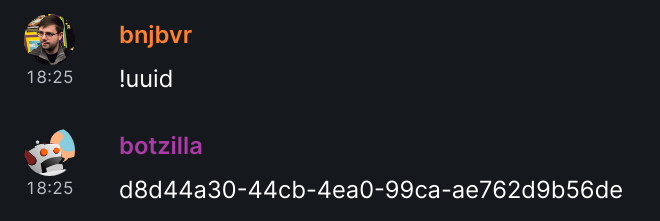
This was a feature of Firebot, and easy enough to replicate, so this was the test feature for the Matrix bot. When saying !uuid, the bot will automatically generate a unique id (using uuid v4), guaranteed GMO-free and usable in any context that would require it. This was the first module, designed to test the framework.

Demo of uuid

treestatus: Inform about CI tree status

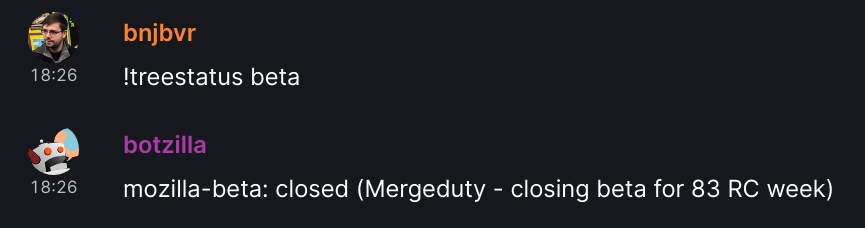
Mozilla developers tend to interact a lot with the continuous integration trees, because code is sometimes landed, sometimes backed out (sorry/thank you sheriffs!), sometimes merged across branches. This leads to the integration trees being closed. Before we had the feature to automatically land patch stacks when the trees reopened, it was useful to be able to get the open/close status of a tree. Asking !treestatus will answer with a list of the status of some common trees. It is also possible to request the status of a particular tree, e.g. for the "mozilla-central" tree, by asking !treestatus mozilla-central (or just central, as a handy shortcut).

Demo of treestatus

Expand bug status

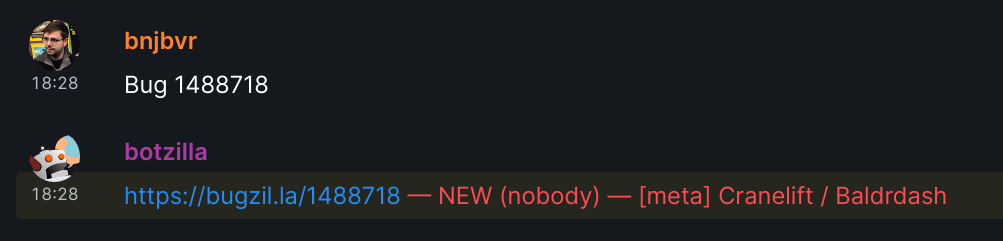
If you have ever interacted with Mozilla's code, there's chances that you've used Bugzilla, and mentioned bug numbers in conversations. The bot caches any message containing bug XXX and will respond with a link to this bug, the nickname of the person assigned to this bug if there's one, and the summary of this bug, if it's public. This is by far the most used and useful module, since it doesn't require a special incantation, but will react automatically to a lot of messages written with no particular intent (see below where it's explained how to not be spammy, though).

Demo of expand-bug

Who Can Review X?

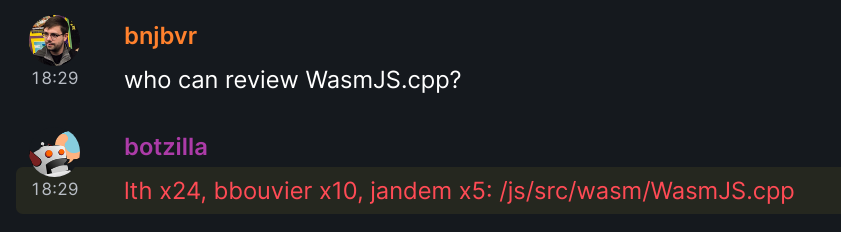
This was a very nice feature that mrgiggles had: ask for potential reviewers for a particular file in the Gecko source tree and get a list of most recent reviewers. Botzilla replicates this, when seeing the trigger: who can review js/src/wasm/WasmJS.cpp?. The list of potential reviewers is extracted from Mercurial logs, looking for the N last reviewers of this particular file.

As a bonus, there's no need to pass the full path to the file, if the file's name is unique in the tree's source code. Botzilla will trigger a search in Searchfox, and will use the unique name in the result list, if there's such a unique result. The previous example thus can be shortened to who can review WasmJS.cpp? since the file's name is unique in the whole code base.

Demo of who can review

{Github,Gitlab} {issues,{P,M}Rs}

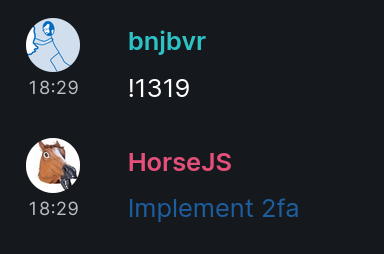
It is possible for a room administrator to "connect" a given Matrix room to a Github repository. Later on, any mention of issues or pull requests by their number, e.g. #1234, will make Botzilla react with the summary and a link to the issue/PR at stake.

This also works for Gitlab repositories, with slight differences: the administrator has to precise what's the root URL of the Gitlab instance (since Gitlab can be selfhosted). Issues are caught when numbers follows a # sign, while merge requests are caught when the numbers follow a ! sign.

Demo of gitlab

!tweet/!toot: Post on Twitter/Mastodon

An administrator can configure a room to tie it up to a Twitter (respectively Mastodon) user account, using API tokens. Then, any person with an administrative role can post messages with !tweet something shocking for the bird site(respectively !toot something heartful for the mammoth site). This makes it possible to allow other people to post on these social networks without the need to give them the account's password.

Unfortunately, the Twitter module hasn't ever been tested, since when I've tried to create a developer account, Twitter accepted it after a few days but then never displayed the API tokens on the interface. The support also never answered when I asked for help. Thankfully Mastodon can be self-hosted and thus it is easier to test. I'm happy to report that it works quite well!

confession and histoire

It is quite common in teams to set up regular standup meetings, where everyone in the team announces what they've been working on in the last few days or week. It also strikes me as important for personal recognition, including towards management, to be able to show off (just a bit!) what you've accomplished recently, and to remember this when times are harder (see also Julia Evans' blog post on the topic).

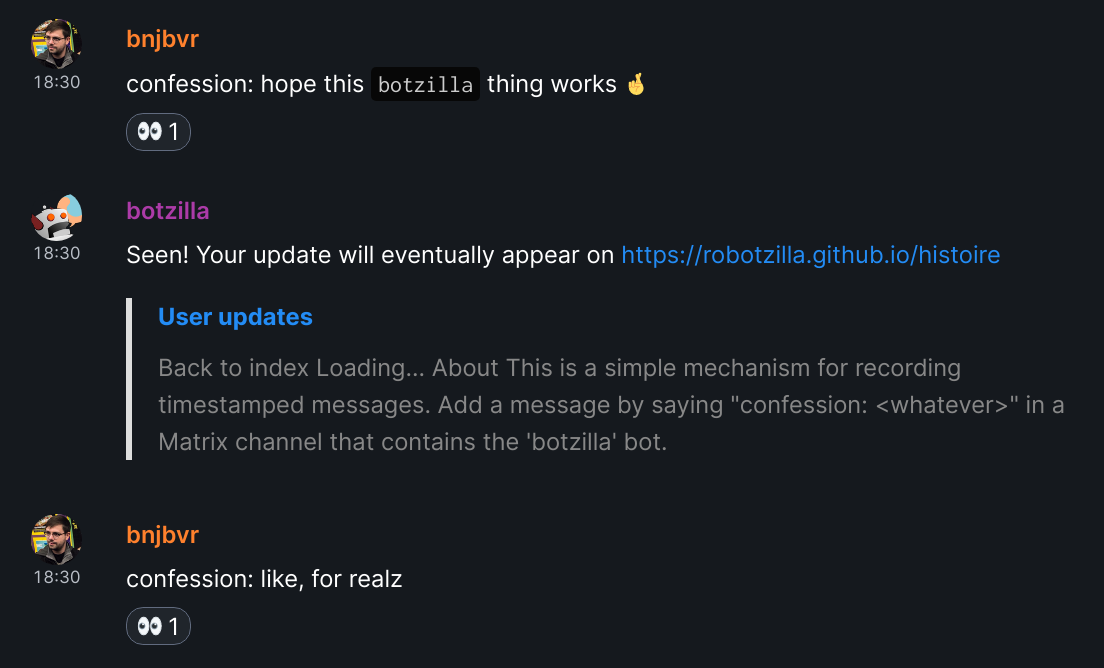
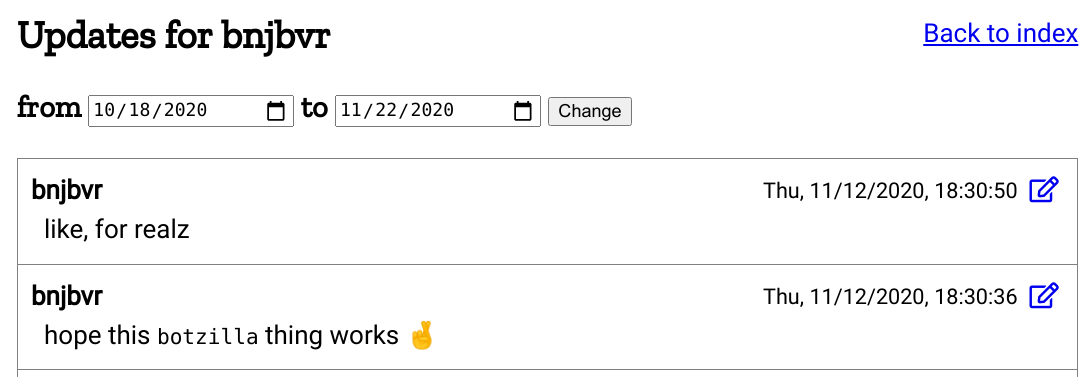
There's a Botzilla module for this. Every time someone starts a message with confession:, then everything after the colon will be saved in a database (...wait for it!). Then, all the confessions are displayed on the Histoire 2 website, with one message feed per user. Note it is possible to send confessions privately to Botzilla (that doesn't affect the frontend though, which is open and public to all!), or in a public channel. Public channels somehow equate to team members, so channels also get their own pages on the frontend.

Demo of confession

Screenshot of Histoire

Now the fun/cursed part is how all of this works. This was implemented in mrgiggles, and I liked it a lot, since it required no kind of backend or frontend server. How so? By (ab)using Github files as the database and Github pages as the frontend. Sending a confession will trigger a request to a Github endpoint to find a database file segregated by time, then it will trigger another request to create/modify it with the content of the confession. The frontend then uses other requests to public Github APIs to read the confessions before dynamically rendering those. Astute readers will notice that under a lot of confession activity, the bot would be a bit slowed down by Github's API use rates. In this case, there's some exponential backoff behavior before trying to re-send unsaved confessions to Github. Overall it works great, and API limitation rates have never quite been a problem.

Intrinsic features: they're good bots, bront

In addition to all the user-facing features, the bot has a few other interesting attributes that are more relevant to consider from a framework point of view. Hopefully some of these ideas can be useful for other bot authors!

Join All The Rooms!

Every time the bot is invited to a channel, be it public or private, it will join the channel, making it easy to use in general. It was implemented for free by the JS framework I've been using, and it is a definitive improvement over the IRC version of the bot.

Sometimes Matrix rooms are upgraded to a new version of the room. The bot will try to join the upgraded room if it can, keeping all its room settings intact during the transition.

Thou shalt not spam

To avoid spamming the channel, especially for modules that are reactions to other messages (think: bug numbers, issues/pull requests mentions), the bot has had to learn how to keep quiet. There are two rules triggering the quieting behavior:

  • if the bot has already reacted less than N minutes ago (where N is a configurable amount) in the same room,
  • or if it has already reacted to some entity in a message, and there's been fewer than M messages in between the last reaction and the last message mentioning the same entity in the same room (M is also configurable)

If any of these two criteria is met, then the bot will keep quiet and it will not react to another similar message. The combination of these two has proven over time to be quite solid in my experience, based on observing the bot's behavior and public reactions to its behavior.

Some similar mechanism is used for the confession module: on a first confession, the bot will answer with a message saying it has seen the confession, including a link to where it is going to be posted, and will add an emoji "eyes" reaction to the message. Posting this long form message could be quite spammy, if there's a lot of confessions around the same time. Under the same criteria, it will just react with an "eyes" emoji to other confessions. Later on, it'll resend the full message, once both criterias aren't blocking it from doing so.

Decentralized administration self-service

The bot can be administrated, by discussing with it using the !admin command. This can happen in both a private conversation with it, or in public channels, yet it is recommended to do so in private channels. To confirm that an admin action has succeeded, it'll use the thumbs-up emoji on the message doing the particular action.

To have a single administrator for the bot would be quite the burden, and it is not resilient to people switching roles, leaving the company, etc. Normally you'd solve this by implementing your own access control lists. Fortunately, Matrix already has a concept of power levels that assigns roles to users, among which there are the administrator and moderator roles.

The bot will rely on this to decide to which requests it will answer. Somebody marked as an administrator or a moderator of a room can administrate Botzilla in this particular room, using the !admin commands. There's still a super-admin role, that must be defined in the configuration, in case things go awry. While administrators only have power over the current room, a super-admin can use its super-powers to change anything in any room. This decentralization of the administrative roles makes it easy to have different settings for different rooms, and to rely a bit less on single individuals.

Key-value store

In general, the bot contains a key-value store implemented in an sqlite database, making it easy to migrate and add context that's preserved across restarts of the bot. This is used to store private information like user repository information and settings for most rooms. Conceptually, each pair of room and module has its own key-value store, so that there's no risk of confusion between different rooms and modules. There's also a key-value per-module store that's applicable to all the rooms, to represent global settings. If there's some non-global (per room) settings for a room, these are preferred over the global settings.

Self-documentation

Each chat module is implemented as a ECMAScript module and must export an help string along the main reaction function. This is then captured and aggregated as part of an !help command, that can be used to request help about usage of the bot. The main help message will display the list of all the enabled modules, and help about a specific module may be queried with e.g. !help uuid.

Future work and conclusion

If I were to start again, I'd do a few things differently:

  • now that the Rust ecosystem around the Matrix platform has matured a bit, I'd probably write this bot in Rust. Starting from JavaScript and moving to TypeScript has helped me catch a few static issues. I'd expect moving to Rust would help handling Matrix events faster, provide end-to-end encryption support for free, and be quite pleasant to use in general thanks to the awesome Rust tooling.
  • use a real single-page app framework for the Histoire website. Maybe? I mean I'm a big fan of VanillaJS, but using it means re-creating your own Web framework like thing to make it nice and productive to use.
  • despite being a fun hack, using Github as a backend has algorithmic limitations, that can make the web app sluggish. In particular, a combined feed for N users on M eras (think: periods) will trigger NxM Github API requests. Using a plain database with a plain API would probably be simpler at this point. This is mitigated with an in-memory cache so only the first time all the requests happen, but crafting my own requests would be more expressive and efficient, and allow for more features too (like displaying the list of rooms on the start view).
  • provide a (better) commands parser. Regular expressions in this context are a bit feeble and limited. Also right now each module could in theory reuse the same command triggers as another one, etc.
  • implement the chat modules in WebAssembly :-) In fact, I think there's a whole business model which would consist in having the bot framework including a wasm VM, and interacting with different communication platforms (not restricted to Matrix). Developers in such a bot platform could choose which source language to use for developing their own modules. It ought to be possible to define a clear, restricted, WASI-like capabilities-based interface that gets passed to each chat module. In such a sandboxed environment, the responsibility for hosting the bot's code is decoupled from the responsibility of writing modules. So a company could make the platform available, and paying users would develop the modules and host them. Imagine git pushing your chat modules and they get compiled to wasm and deployed on the fly. But I digress! (Please do not forget to credit me with a large $$$ envelope/a nice piece of swag if implementing this at least multi-billion dollars idea.)

I'd like to finish by thanking the authors of the previous Mozilla bots, namely sfink and glob: your puppets have been incredible sources of inspiration. Also huge thanks to the people hanging in the matrix-bot-sdk chat room, who've answered questions and provided help in a few occasions.

I hope you liked this presentation of Botzilla and its features! Of course, all the code is free and open-source, including the bot as well as the histoire frontend. At this point it is addressing most of the needs I had, so I don't have immediate plans to extend it further. I'd happily take contributions, though, so feel free to chime in if you'd like to implement anything! It's also a breeze to run on any machine, thanks to Docker-based deployment. Have fun with it!


  1. Karma is an IRC idiosyncrasy, in which users rate up and down other users using their nickname suffixed with ++ or --. Karma tracking consists in keeping scores and displaying those. ↩

  2. Histoire is the French for "history" and "story". Inherited from Steve Fink's very own mrgiggles :-) ↩

Improving my Github workflow

10 octobre 2019 à 18:00

Since I've been working on a Github project for a while now, I thought now would be a good time to gather ways to make it easier to work with Github pull requests (PRs). In particular, it's easy to drown yourself in the incoming flow of Github emails.

This post is for you if:

  • you get lost in tracking which pull requests need attention from you, be it either review requests or just mentions.
  • you would like to strike a better work-life balance when it gets to Github notifications.
  • you would like to filter Github email notifications in smarter ways.

Here are a few tricks I've collected over the years that make it easier to deal with a few things, focusing on Github notifications and emails, since they were the largest issue for me. This is not an exhaustive list of all the nice features Github has, or all the WebExtensions that could help with Github: it is a few things that work for me and are worth sharing. Note that I go from the most mundane to the more specific advices here.

Notifications dashboard

If you're working on several projects, Github can end up sending you too many email notifications.

It's possible to disable some kinds of notifications entirely in the settings, but that's too radical for my needs.

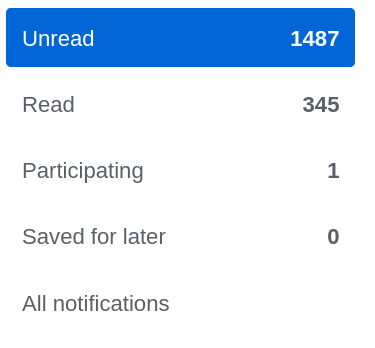
However, Github has a notification dashboard that displays all the activity related to repositories you're watching or issues/pull-requests you're involved in. It's easy to dismiss all the notifications of all projects at once, or per project. There's a tab on the left that allows to select more precisely your level of involvement in the issue: did you participate in it? You can also save some notifications for later, so they're not deleted once you've clicked them; they'll appear under the "Saved for later" tab — I just discovered this!

Note that Github may also send these notifications by email, if you've decided to do so. In this case, I'd strongly recommend allowing the downloads of images in Github emails. Despite the bad effect on your privacy this might have by allowing user tracking, it will also synchronize the notifications' read state, which is nice.

Notification dashboard
count

See how I am totally in control of my notifications? Truth is, I don't need notifications in general, because I'm usually more interested in reviews I need to receive and give.

Pull requests dashboard

Github allows to assign a reviewer to a pull request. At Mozilla, we require a formal review for each change in the code base, unless it's really not meaningful (like, removing trailing whitespaces). Even documentation and tests changes may require a review, depending on the rules of the code module you're working on.

It is very common that a pull request is received with requests for additional changes. In this case, it is important to explicitly re-request a review, otherwise this breaks all the review tracking Github proposes.

Now Github has two interesting pages for this:

Navigating files quicker (addon)

When I know my way around a project, I'll frequently need to see the content of a particular file or directory, that might be a few directories deep. On Github, this means going to the files view, clicking once per directory (at most), and finding the file I want.

The pull request view doesn't show the directory hierarchy and which files of which directory have been touched, which is a light inconvenience too.

Good news, everyone! There is one WebExtension called Octotree that adds a directory view within a panel to the left of Github's UI. By default, it's folded and doesn't take much space; you need to hover it with the mouse to make it appear. On pull requests, it will show files that have been modified with the diff summary for each file. Note the website shows features from the PRO version, but there's a free version that addresses the needs detailed above.

This is an example of the Octotree panel on our project's repository:

Octotree example

To be honest, I haven't investigated using the search bar, which could be quite handy for this too, especially thanks to keyboard shortcuts.

Dealing with work and personal projects

If you're using Github for personal and work related projects, you might have been bothered by work emails coming into your personal mailbox. That has happened to me in the past, causing some unnecessary mental load over the weekend and unnecessarily breaking the state of relaxation.

Fortunately, Github allows you to redirect emails from a particular Github Organization to a specific email address. Of course, this only works when the repository is owned by an organization and you're part of this organization.

I'm lucky to work on such projects at the moment. It's not a silver bullet though, because some projects are sometimes owned by personal accounts, making this trick useless. As far as I know, there are no good solutions in this case.

Email filters

The biggest remaining offender certainly is Github emails, in general. Fortunately, Github has made it easy to filter them. I'll mention examples in the Gmail email client, since that's what we're using at work, but these apply to any other modern email client too.

Filter by project

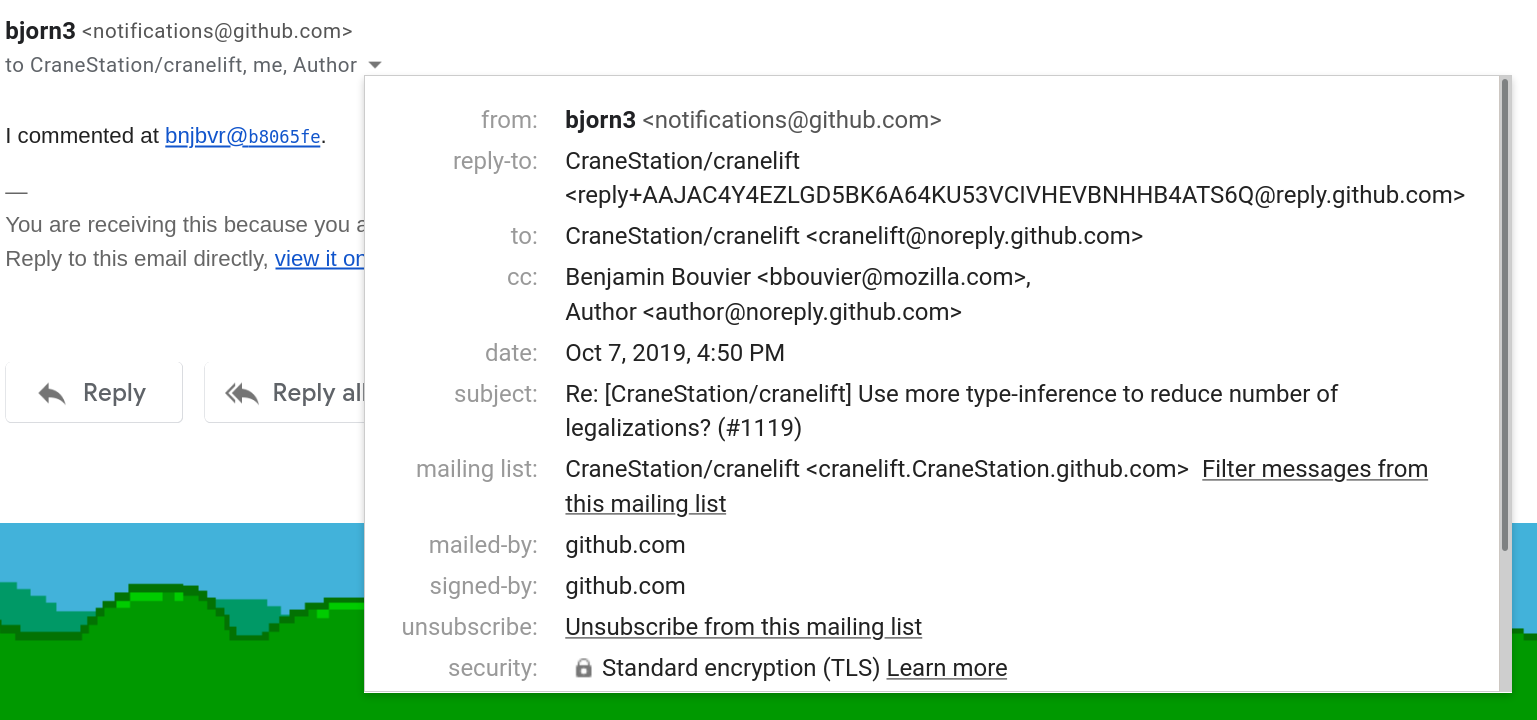
Each email coming from a specific project comes with a mailing list-id, which is a specific header that some email clients know how to interpret. For instance, in Gmail, when you click on the small arrow next to the list of recipients, you'll see many details about the current email, including, if there's one, the "mailing-list" id, and a link to automatically create a filter for this mailing-list. That allows you to create a particular directory/tag in which the filter can automatically put all the emails with this id.

Filter by reason

In addition to filtering by project (and this is where Gmail tags / Thunderbird's saved searches truly shine), it's also possible to infer more information from the Github email notifications, by looking at the list of recipients or custom email headers.

Indeed, when there's a specific reason why an email was sent to you, Github will add a (fake) recipient in the CC field, its address username being the reason why the email was sent to you. For instance, in an email telling me that somebody requested a review from me, the email address review_requested@github.com will appear in the CC list. If you look at the full message, you'll also see the custom email header X-GitHub-Reason set to review_requested.

All the possible reasons are detailed in Github's documentation.

These extra CC email addresses and email headers allow creating very powerful filters that add supplementary tags to an email. For me, they relate directly to the importance of the incoming email: reviews and mentions are usually something I pay very close attention to, and thus they get filtered in a special top-level tag in Gmail.

Here's an example of all the information you might find about a given email in Gmail: in particular, look at the CC list and mailing-list type ids.

Notification dashboard count

Note that Gitlab also adds some similar custom headers that can be filtered by some powerful email clients. I won't go into detail about those.

One more thing, Mozillian edition

If you're working on Mozilla code, Gecko and/or external projects, there's this neat addon that Mike Conley made. It will add an icon to the Firefox button bar, showing you the number of requests assigned to you on Github and Phabricator, as well as the number of pending Bugzilla requests.

It requires a minimal setup step for Github (filling your username) and Bugzilla (adding a Bugzilla API token), and then it Just Works. It smartly reuses a Phabricator token from the current Firefox Container's session, if there's one.

You may think that having such a display all the time might provoke anxiety during non-working hours. And you'd be right to think so! So the author of the addon has added a feature to not display this information outside working hours, that you can define as you like. Great stuff!

That's it, folks!

Thanks for reading this far! I hope this helped you to some extent, allowing you to spend less time in Github and more time doing the actual work. If you have more interesting tips for using Github effectively, feel free to add a comment or ping me on twitter!

A new blog theme!

13 juin 2019 à 19:00

Just a quick note! I've just updated my blog's design and UI so it is more convenient, modern and light. It is still using the Pelican blog system, only the theme has changed. The previous theme, Flex, was elegant and it has been quite pleasant to use, but it had a few subtle drawbacks that revealed as time went. Here I explain what were my needs, which other blog designs inspired me, and link to all the different resources I've used.

Embeds: tracking and comments

I use some embeds in my blog: since Pelican generates static files, it can't handle more complicated features like counting visitors or a comment system. Soon, I've wanted to get a rough idea of the number of visitors and where they come from, to understand which posts are the most useful (and of course, to bless my ego). I've been using self-hosted, open-source systems for that purpose, like Matomo (née Piwik), because I don't want my blog's visitors to get (even more) tracked by Google Analytics, which would be counter to my values. This led to a meaningful contribution to add support for Matomo in the theme, so other people don't have to redo this work themselves!

Later, I switched over to the Fathom analytics system, because it's lighter, it knows less about my visitors (only number of visits/visitors by page and the referrer), and its dashboard is a gazillion times faster to load (all it loads are static files!) than Matomo's. So I had to tweak the theme for this too! And then, when I decided to add an embed for a self-hosted, open-source comment system named isso (think of it as an alternative to the centralized Disqus), I needed to add support for it as well. This meant digging into the theme and understanding how it works, and each time I wanted to add a new embed, I had to repeat this process.

CSS and markup

After reading a well-written and quite interesting online class on typography on BetterWebType (read it if you haven't! it helped me understanding why some websites were more pleasant to use, and put explanations onto all the intuitions and feelings I had on the topic), I've changed a few lines in the CSS source file, tweaking fonts, width, line height etc.

A few other changes affecting the markup also happened over time, for which I had to add CSS rules. Of course there were a few conflicts with preexisting rules, since that's pretty common in CSS; but the fact that I didn't write the CSS rules in the first place made it harder to understand how and where these rules were used.

Writing my own

I also got a bit bored of the design itself, especially the aside bar on the left which felt a bit early 2010, as well as the overall sense of density. Some other blogs' strong takes inspired me a lot: in particular, I'd like to point to my colleague and friend Paul Adenot's blog, and its refined, minimalistic design (as well as its amazing body font, look at the K/it or Q/uo ligatures, they're insane). There's also the blog of Julia Evans, which in addition to containing amazingly instructive blog posts about system programming, shows all the blog posts as a long list in the index page, making it clear, informative and helping discoverability.

With all of this in mind, since I had to acquire more control over the theme anyway and I wanted it to look much different, I decided to write my own. Of course, it's free software. This is what you should be seeing right now.

As an extra to all the items I've mentioned before, I'd like to give a shoutout to the open-source fonts I've used. The header font is bluu, a font created by Jean-Baptiste Morizot from the fantastic Velvetyne type foundry. Go check it out if you're a typo nerd! or if you're looking for some original and well-thought fonts. The body font is Inter UI; it feels quite modern and it has been designed with computer screens in mind.

Previous vs new home page:

Previous home page New home page

Previous vs new post page:

Previous post page New post page

Flex thee well

I still think Flex is a great theme to start with, and I'm thankful to the authors for writing it in the first place, since it has served me well. Thanks!

I'd also like to thank people who gave me feedback and helped me write the CSS (me can't CSS) of this theme, including Flaburgan, Maiwann, Marien, Thomas and other Framasoft friends.

And thank you for reading this far! I think blogging and self-hosting are still important and relevant, to avoid depending on commercial platforms, like Medium, which repeatedly tries to get you to subscribe, displays thousands of popovers and attempts to abuse your attention into reading always more (and spending more time on their website). It's easy to host your own blog! Even if you don't have your own server, you can use Github or Gitlab pages, with fancy automatic systems that make publishing a breeze.

I'd be curious to hear your feedback on this new design, including code improvements (remember? it's free software!). Feel free to type in a comment, or hit me up on twitter!

Quatre ans de Kresus, bonjour Kresus.org

23 août 2018 à 10:00

De la volonté derrière Kresus

Il y a une dizaine d'années, alors fervent utilisateur de HomeBank, je découvre avec stupéfaction et beaucoup d'intérêt l'application mobile de Linxo. Ce service permet de récupérer ses opérations bancaires depuis le site de sa banque, de manière automatisée, tout en analysant les transactions et en permettant de les catégoriser, afin de générer des graphes simples et clairs pour expliquer aux utilisateur.ice.s comment évoluent leurs finances personnelles : combien a été dépensé ou économisé tel mois ? quelles sont les trois sources principales de dépenses au cours des six derniers mois ? J'ai utilisé un peu cette application mobile à l'époque. Elle m'était très utile, alors jeune étudiant, n'ayant qu'un budget limité et aucune idée de comment le gérer.

Si c'est gratuit, c'est quoi le produit ?

Il m'est apparu assez vite que le service étant gratuit, Linxo devait avoir une autre source de financement que l'unique option premium qu'ils proposaient alors. En y réfléchissant un peu, on peut trouver plusieurs possibles intérêts pour eux. Par exemple, ce pourrait être tout simplement de pouvoir récupérer une grande quantité de données bancaires, utilisable comme source de données pour un algorithme de catégorisation automatique. Un tel algorithme de catégorisation pourrait ensuite être revendu à des services tiers. De mémoire, j'ai aussi vu une autre source de financement basée sur des publicités ciblées. Dans ce cas, le logiciel propose d'analyser les transactions bancaires pour permettre d'identifier des coûts récurrents, et ensuite met en avant des offres de services similaires d'entreprises partenaires ; le revenu est ici une commission. Par exemple, si vous avez une assurance habitation dont l'échéance est mensuelle, le système peut le détecter et vous proposer des publicités pour d'autres assurances habitations moins chères (mais pas forcément équivalentes !) chez des concurrents. Dans le pire des cas, l'intérêt caché pourrait être de revendre des informations extraites des transactions bancaires, comme la récurrence et les noms des enseignes où nous effectuons des paiements. Au mieux, cela est effectué de manière anonyme et n'a pas une grande incidence personnelle. Au pire, cela révèle des détails de notre intimité, notamment si l'information est rattachée à une personne identifée. Ces informations peuvent être très utiles pour les assurances et les banques pour évaluer divers risques liés à des emprunts ou des polices d'assurance. Mais des entreprises plus classiques peuvent également en faire usage, en mettant en place des publicités ultra-ciblées qui touchent aux aspects émotionnels.

De manière certaine, j'ai été immédiatement gêné par le fait de devoir confier à une entreprise mes identifiants bancaires, à savoir mon login et mon mot de passe, le sésame pour accéder au site de ma banque, attribuant parfois des autorisations plus variées que la simple lecture seule, comme celle d'effectuer des virements. Après cette réflexion, je me désinscris. Je cherche une alternative libre aussi complète, car je veux être capable de vérifier dans le code du logiciel ce qui est fait avec mes identifiants ; un logiciel libre peut difficilement fomenter des coups fourrés. N'en trouvant pas, je brandis ma liste de projets à long terme, aussi connue sous le nom de liste des projets que je ne mettrai probablement jamais en place, ou encore liste des rêves libristes. J'y ajoute une entrée : créer une alternative libre et auto-hébergeable qui fasse la même chose que Linxo, sans trop savoir comment m'y prendre.

CozyCloud et son gestionnaire de finances personnelles

Capture de cozypfm

Un peu plus tard, je découvre CozyCloud, et notamment l'application cozy-pfm, développée par un prestaire. C'est ce clône libre dont j'ai tant rêvé. La clé qui me manquait, c'était l'intégration avec l'outil pour récupérer les données bancaires : ce logiciel s'appuie sur les épaules d'un outil complet de scrapping [1] libre, weboob. Très vite, l'application montre ses limites : des doublons apparaissent dans mes opérations bancaires. En effet, l'outil de scrapping est capable de nous fournir un cliché de nos comptes bancaires à un instant donné. Un gestionnaire de finances personnelles essaie de mettre en place une continuité, donc de joindre les instantanés en un film à 24 images par seconde, qui retracerait l'historique plus complet de nos comptes. Mais parfois, ce dernier se trompe parce qu'il ne dispose pas d'assez d'informations, ou parce que les banques changent la manière dont sont présentées les opérations au cours du temps (et ça arrive beaucoup plus souvent qu'on ne le croit !). Naïvement, on pourrait penser que si deux transactions récupérées lors de différentes synchronisations ont la même date, le même libellé et le même montant, alors ce sont des doublons. Mais les banques se permettent de modifier au cours du temps l'une ou plusieurs de ces composantes, rendant la tâche du gestionnaire de finances personnelles bien plus complexe. C'est ainsi que des doublons apparaissent : ce sont des paires d'opérations qui ont tout en commun sauf une composante qui a changé entre deux instantanés pris sur le site de la banque.

L'autre souci de CozyPFM est que l'application a été développée sur commande, par un prestataire qui a ensuite fini sa mission et rendu les clés. Une fois la mission du consultant accomplie, l'application passe en mode maintenance, ce qui signifie que seuls les gros bugs sont corrigés et que celle-ci ne connaît plus de grandes nouveautés. Quand j'essaie de contribuer au code, je me heurte à une difficulté, celle-ci technique : l'utilisation d'une technologie que je ne comprends pas, qui m'impose beaucoup de contraintes pour essayer de simplifier le développement, et que je n'ai pas envie de faire l'effort d'apprendre. L'intuition a sonné juste, au vu de l'actuelle désuètude de l'outil : il s'agissait de la bibliothèque de code JavaScript backbone.

Kresus, d'hier à aujourd'hui

Je m'en souviens encore précisément, c'était juste hier, le 31 juillet 2014, que j'écris un premier commit, parce que je n'arrive pas à démarrer le serveur de cozy-pfm. Très vite, je décide que si je veux pouvoir m'approprier le code, il va falloir de plus grosses modifications structurelles sur le client Web ; ainsi naquit un fork, sous le nom de Kresus (pour devenir riche comme Crésus !). S'ensuivent de nombreux changements, autant dans les choix techniques (réécriture complète du serveur de CoffeeScript vers du JavaScript moderne, réécriture du client Web avec React.js, puis plus tard en ajoutant une couche Redux.js) que dans les fonctionnalités apportées (écran de déduplication manuelle des transactions bancaires pour palier au problème initial, ajout de la catégorisation, mise en place de graphiques). D'autres gens sont intéressés, notamment d'autres personnes qui contribuent à CozyCloud ; je tire parti de l'expérience de la contribution chez Mozilla pour tâcher d'être chaleureux, remercier ces inconnu.e.s qui m'offrent des retours, voire des patches, trop content d'avoir des utilisateur.ice.s.

Capture de Kresus en aout 2018

Aujourd'hui, quatre ans plus tard, il y a suffisamment de contributeur.i.ces externes pour que mes deux mains ne suffisent plus à les compter. Il y a une (tentative de) gouvernance commune du projet. Il y a une gestion du produit avec une vision plus long terme, même si celle-ci n'est pas toujours clairement définie. Hey, il y a même un forum pour que tout un chacun puisse s'exprimer, et un site officiel, avec son propre blog, que je vous incite à suivre ; mon blog personnel ne mentionnera Kresus que rarement dorénavant, plutôt sur les aspects personnels si j'en ressens l'envie. Le travail s'effectue de manière distribuée, parfois se bloque temporairement, parce que l'on a une vie qui se déroule en parallèle, et moins de temps libre ; et c'est bien naturel et entièrement irréprochable ! Les exigences d'un certain niveau de qualité font que les contributions peuvent mettre du temps à être intégrées. Est-ce que la conception est cohérente ? Est-ce que les éléments introduits n'interagissent pas négativement avec d'autres fonctionnalités ? Peut-on généraliser ou simplifier le besoin ? Ensuite il faut tester les changements apportés pour s'assurer que rien d'autre ne casse, vérifier un éventuel impact sur la réactivité de l'application, jeter un coup d'oeil pour vérifier le rendu et la réactivité sous mobile. Des corrections peuvent être demandées, pour les plus prolifiques, démarrant un possible cycle d'aller-retours. Comme le dit la sagesse populaire : tout seul, on va plus vite ; ensemble, on va plus loin. Il y a des fonctionnalités dans Kresus auxquelles je n'aurais jamais pensées, il y a des éléments d'interface bien plus peaufinés que ce que je n'aurais jamais su faire, il y a des questions de design que je ne me serais jamais posées. Et c'est tant mieux !

Merci, toi !

Une petite communauté se créé, autour de personnes qui discutent du projet, décrivent comment l'installer sur son serveur, résolvent des soucis lors de la mise en place ou de l'utilisation, partagent leurs trucs et astuces. Que ce soit en utilisant Kresus, en en parlant à des gens autour d'elles et d'eux, en nous faisant des retours (quand quelque chose se passe mal ou quand quelque chose pourrait mieux se passer), en nous posant des questions sur les valeurs et les principes sous-jacents du projet, ou en contribuant au code ou aux systèmes pour que d'autres puissent l'installer chez eux : vous contribuez activement à Kresus, et à ce titre je vous remercie personnellement. Vous faites vivre ce logiciel, c'est par vous qu'il est libre et vous pouvez être fières et fiers de vos contributions.

Et si vous avez envie de contribuer également, et que vous avez peur de ne pas savoir comment faire, détrompez-vous ! Tout le monde a sa pierre à apporter à un logiciel libre, tout le monde est légitime de poser des questions ou de présenter ses problématiques ; nous ferons de notre mieux pour les comprendre. Donc n'hésitez-pas, venez sur le forum, ouvrez un sujet, commentez-en un autre, essayez Kresus sur le site de démo ! Et surtout, si quelque chose ne fonctionne pas pour vous ou ne vous convient pas, n'hésitez-pas à venir nous le signaler ! On ne peut travailler sur les défauts que si on les a clairement identifiés. Et à force de scruter de très (trop) près le logiciel, on perd parfois le recul nécessaire pour identifier de bénignes bévues. On a commencé à mettre en place des tests d'expérience utilisateur.ice, et on a encore beaucoup de chemin à faire. Bref, c'est un petit geste pour vous, mais pour nous, ça peut vouloir dire beaucoup !

En conclusion, joyeux anniversaire Kresus, joyeux 4 ans, essayons ensemble de te faire grandir encore ! Dans les vastes chantiers futurs, nous aimerions toujours passer à un système d'auto-catégorisation des transactions bancaires, avoir un meilleur système de dédoublonnage des transactions, trouver d'autres informations pertinentes à présenter (identifier les transactions récurrentes et prévoir les soldes négatifs). Et dans les grands plans futurs, il y a toujours cette volonté de faire voyager Kresus en dehors de France, et donc de trouver des systèmes pour se brancher sur les banques étrangères ! La route est longue, mais la banque est libre...

[1] Le scrapping est une méthode qui permet artificiellement de créer des APIs pour des sites qui n'en ont pas, en se faisant passer pour un navigateur Web, en connaissant a priori la structure des pages et en extrayant les données recherchées. C'est très fragile, mais absolument nécessaire quand il n'y a rien d'autre (et les banques sont très jalouses de la propriété de leurs données !).

Making calls to WebAssembly fast and implementing anyref

4 juillet 2018 à 18:00

Since this is the end of the first half-year, I think it is a good time to reflect and show some work I've been doing over the last few months, apart from the regular batch of random issues, security bugs, reviews and the fixing of 24 bugs found by our fuzzers.

Bug 1319203: Make JS to WebAssembly calls blazingly fast

If we want more WebAssembly (wasm) adoption, there shouldn't be a big costly barrier between the two universes. That is, calls from one world to the other should be fast. For a very long time, calls from JS to asm.js/WebAssembly have been quite slow in Firefox. In fact, we didn't optimize them at all. For ease and speed of implementation at the time, asm.js call activations (data structures recording information about the function being currently called in the VM) were very different from the JS ones. This difference indicated some significant structural differences, like the capability to reconstruct call stack information used by Error() stack frames, or just tracing the stack for garbage collection purposes. After putting a lot of hard work into refactoring and low-level changes over the last year, Spidermonkey was finally ripe for an optimization.

When we call from JS to asm.js/wasm, the call passes through C++, does a bunch of work and then calls into a piece of glue code directly written in assembly: the interpreter entry stub. This stub is quite small: it just copies out the C++ arguments into the right places the wasm function being called expects, sets up some small machine state, calls into the function, then does error checking and eventually returns to the C++ caller. The critical part is JIT compilation. JIT compilation means that the code is compiled to machine code by the just-in-time compiler, IonMonkey. When a JS function has been JIT-compiled and it calls into wasm, then the caller would have to go back to C++ first, before the control flow is redirected to WebAssembly.

Diagram showing interpreter entry stub

Starting with Firefox 60, the JIT compiler makes no distinctions between calling a JavaScript function or a WebAssembly function, meaning it uses the same call optimizations for both kinds of function. A new piece of glue code, the JIT entry stub, is generated for each exported function: it converts and unboxes the arguments read from the JIT-compiled JS caller into the right primitive types as expressed in the wasm function's signature, sets up some machine registers, calls into the wasm function being called and then converts the result into a format the JS caller will understand.

Diagram showing JIT entry stub

As you can see, the C++ step that was originally required to call wasm from JS has been completely eliminated!

This resulted in massive speedups over a variety of different situations: when a wasm function is directly / indirectly / polymorphically called, or used as a getter/setter, or called by Function.prototype.call/apply, when the call is missing required arguments, etc. Here's a brief summary of the results, but there might be a full-blown blog post about these optimizations coming on Mozilla Hacks at some point in the future. (calling 1 billion times into very simple functions, lower is better)

Charts showing evolution of performance

This work is not entirely done yet: we can still even better optimize in the case of a function call from JS when the called wasm function is definitely known to be a unique wasm target; see the tracking bug.

Bug 1422043: Lazy entry stub generation

The previous bug resolution came with an important memory issue: every exported function now generates a rather big chunk of code for the JIT entry, having an impact on the memory occupied by the code itself. This would be fine in most situations where the number of exported functions is generally low. But when the wasm module exports a Table (think of the equivalent of a C++ function table with signature checks), we have to assume that every single function, including those not explicitly exported, needs entry stubs. Indeed, each function can be eventually called through the Table, after calls to WebAssembly.Table.set. In fact, the existing code already suffered from this because of the interpreter entries, but it had been largely amplified by the much larger JIT entry stubs.

To fix this, we've decided to lazily generate all the entry stubs for functions exported through a table. That is, if a function is explicitly exported, its stubs will be generated at wasm compile time, but other functions won't have stubs yet. If a non-exported function is called through a Table, we'll generate the entry stubs the first time it is called. This involves some fun interactions with our tiered compilation mechanism, which can compile functions and create new entry stubs in the background while the running thread will generate lazy ones.

Not only this fixed the memory regression introduced by bug 1319203, but it actually made the situation even better than the baseline, because we didn't need to generate those interpreter entries for table-exported functions by default anymore:

Charts showing evolution of memory usage

Since it's not entirely readable from the chart: after the patches, the AngryBots and ZenGarden entry stubs memory usages went down to respectively 262 and 362 KB. This was also a relatively huge win in compilation times, but on such a low scale that it didn't make a huge difference on total compile time.

Bug 1447591: Remove wasm::BinaryToText

WebAssembly is a binary format, and there is an equivalent human-readable and debuggable text format: the WebAssembly Text format, or WAT format. While SpiderMonkey once directly produced WAT for display in C++, it's now easier for debugger.html to do so in JS. This also made the mapping between bytecode offsets and text offsets (source maps) more consistent with the display, and it could be useful in other places where this project is being used. Recently after confirming that the C++ implementation wasn't used anymore, I was able to remove it. It's not every day that you get a net loss of around 5,500 lines of code, which is always nice: less code means fewer bugs and less maintenance burden, especially when the code is dead.

Bug 1445272 / 1450261: Implement basic anyref support

A new proposal has been made to the WebAssembly specification committee a few months ago: to add reference types to the type system. Reference types are a new way to represent a reference to any host values. In a Web environment, this means being capable of playing with JavaScript values within WebAssembly. This is a huge difference with the existing type system, which only contains primitive types: integers represented on 32 or 64 bits, IEEE754 floating-point numbers represented on 32 or 64 bits. This is also a first step for implementing garbage collection (GC) integration within WebAssembly: since these reference values have been allocated on the GC heap in JavaScript, they need to be traced during wasm execution.

The basic implementation of this feature in the first bug allows one to use a new type, called anyref, as part of a function's signature or in local variables, be it in a function definition or an imported function. This allows using JS variables within wasm and pass them around to other JS functions. The second bug implemented the capability to read and write anyref values in wasm Globals [1]. Since Globals can be manipulated outside of the wasm Module thanks to their JS API, and garbage collections can happen at any time in JS, we needed to implement GC barriers to make sure that the stored value would not be marked as unused during tracing. There is good literature explaining why these barriers are needed and what they do, so I will not expand too much on the topic.

Here's an example of usage according to latest spec drafts (and therefore subject to change for now):

(module
    (func $alert (import "env" "alert") (param anyref))
    (global $global_ref (mut anyref) (ref.null anyref))
    (func (export "set_and_alert") (param $param anyref) (result anyref)
        ;; Put the previous value of $global_ref on the virtual value stack.
        get_global $global_ref
        ;; Get the argument anyref value and store it in $global_ref.
        get_local $param
        set_global $global_ref
        ;; Call the $alert method with the argument anyref value.
        get_local $param
        call $alert
        ;; The previous value of $global_ref is still on the stack and will be
        ;; returned.
    )
)

Example of wasm text format using anyref.

(async function() {
    let { instance } = await WebAssembly.instantiate(wasmBinary, {
        env: {
            alert(obj) {
                alert(`Hello, ${obj.name}!`);
            }
        }
    });
    console.log(instance.exports.set_and_alert({
        name: 'world',
        secretVal: 42
    }));
    // alerts "Hello, world!", logs null

    console.log(JSON.stringify(instance.exports.set_and_alert({
        name: 'there'
    })));
    // alerts "Hello, there!", logs { name: 'world!', secretVal: 42 }
})();

Example of JavaScript using the module defined above, passing JS values and reading them from WebAssembly.

This is a very preliminary prototype and it might change in the next few months. If you feel adventurous, you can try it on Firefox Nightly by setting the about:config pref javascript.options.wasm_gc to true; note that we haven't fully hooked this up to garbage collection yet, so your experimentation might occasionally throw out-of-memory exceptions. In any case, if you see something, say something.

Say you are a compiler developer, and you would like to port your language to WebAssembly, and your language uses a GC. At the moment, the only way you can do this is by compiling your garbage collector to WebAssembly, and it would be backed by the wasm Module's memory. This works, but it won't be very efficient. Plus, there's already a very efficient, solidly tested, constantly improving garbage collector in your browser that uses all the possible dirty low-level tricks known to mankind, which is the GC being used for JavaScript. What if we could give you access to the garbage collector directly? Then you'd just need to give a way to define structures, and then could use a set of opcodes to allocate them, read and write fields on them, etc. At the moment, the reference types proposal only allows you to move garbage-collected values around. There's also code in Firefox Nightly to experiment with defining your own data structures and using them, but it is very very early. If you're interested in following us implementing more parts, this tracking issue might be of interest.

[1] Think of a C++ "global" value, not a JavaScript "global".

Future work

There is still much more work to be done on the implementation of WebAssembly in Spidermonkey, to implement other new proposals, to make it faster, or to have even better generated code.

A big thank you for the proofreading to Waldo, steveklabnik and ashleygwilliams. Extra thanks go to Ashley who also drew the two diagrams showing how stubs evolved.

Freedom-enabling, not mindless productivity

11 décembre 2017 à 09:00

Freedom-enabling, not mindless productivity

There are many self-development articles out there on blogs, detailing all the techniques and methods that one can use to work better, be happier, become more successful, whatever you can dream of. It really feels like these techniques can all be reduced to a well-defined set of core habits. Work out. Practice journaling. Meditate. Be grateful. Read a lot. Drink a liter of water every day. Alright, you get the idea; if you're reading this you probably went through a whole lot of other very similar self help posts in the past. Or even read books about the topic. However, those can easily be misinterpreted. Let's find out how. This post is mostly an open-mind manifesto, with some principles that might be obvious to some, but for others they might help ease the mind and relax.

If all you have is a todo-list, everything looks like a task

Have you ever bought a self-development book and read through the ratings section right within the book? It is often placed at the beginning, and it is a convincing marketing way to make sure your readers get hooked from the start. It gives credibility too; look at all these random people who confirm the effectiveness of what you're about to read, before you actually know what they're talking about. They expand on how their life changed when they used a particular technique, and how they are applying it to every field of their life, how they feel much better now than other people around them, and how they astonished their friends and family by causing a radical change in their life.

I think this is the reason why so many of these books are put aside by most people, who materialize an interesting objection: this is the formula for a sect-like cult. Is it this stunning that we talk about productivity gurus in the first place? Let's think about it for a second: these comments seem to suggest that our whole world generates a wide range of different issues that can all be addressed with a low number of solutions. You can take any problem in your life, turn it in one particular way so as to see it through the lenses of this new method, and solve it one way or the other. Every problem can be solved with a single technique. This can be the source of a confirmation bias: if you want it badly enough, and try long enough, you can be pretty sure that any issues can fit the scope of that given method you're experimenting with.

In my opinion, this excess can be harmful. In fact, if we'd try to draw a parallel with politics, I'd say these look like the premises for a fascist regime (note I am not a historian, so this might be incomplete according to my high-school memories). Indeed, some of it is there: providing the same answer to all public issues (thus re-branding them, which can be facilitated by designating scapegoats), forcing one into adopting behavior that might not be suited for them, having a clear distinction between us (who have access to The Solution) versus them (who don't/can't have access to it), setting up a cult of the personality towards the author of The Solution.

Why would we act like this? I am no sociologist, and there are probably many reasons, but we can explore some basic ideas: maybe some people feel powerless when facing the complexity of a world where everything is intertwined in so many ways and evolving at a very high pace. Having a unique, predefined, seemingly theoretically proven answer provides them with some sense of order and intellectual easiness. On one side, whole ranges of issues then get easily resolved and put aside, which gives head space for other matters; on the other side, it means that there are no conflicts in thinking, less freedom of choice, no attempts to solutions that are more suited to different groups and contexts, and which ultimately could be better overall. Last but not least, it also mean this group could be wrong, remain stuck with their opinions and get away with them. But while being a huge one, that's just one pain point of productivity. What else is wrong?

There's another common objection that I call the fallacies of mimicry: as if by imitating the actions and habits of so-called successful people, you could get their success too. Warren Buffet reads a lot of hours a day; he is insanely rich; so if I read a lot of hours a day, then I'll become rich, somehow, right? I think this kind of reasoning is completely flawed, as it inverts the consequences with the premises. Notably, when you get successful enough (which seems to translate here by "you don't have to worry about money anymore"), you get this great amount of free time that gives you the possibility to read. There's another quirk in that thinking: different methods, techniques, habits apply to different people in different contexts, and there's no one unique solution that works for all. So repeating the actions of others might not be suited for your particular situation, and it could show useless.

This also raises another point I wonder about: is the seek of productivity only a topic for the privileged? If you consider something like Maslow's hierarchy of needs, productivity would probably belong to the highest level (self-actualization), since it assumes all other issues in your life have been addressed first. If we put aside the working life aspect, a great amount of knowledge can also apply to one's personal life and free time. Yet, it feels it's a sign that "success" compounds, to some extent: the less you have to worry about universal basic needs, the more you can have time to read, learn, get better and enhance yourself, which in turn makes you more suited to reach whatever goal you aim for, thus becoming even more successful. It doesn't only happen with productivity, but also for instance with education: kids from richer families tend to perform better than kids from poorer families, etc. (there are studies that back this theory up, and of course I can't find links back to them).

So we've identified issues related to productivity methods. But let's not throw the baby out with the bath water. There has to be a way to make value out of it. How can we get past these problems?

To seek the whys

There's always something else that's tickling me about those posts: they seem to confound the means and the ends. Being productive isn't an end per se, it is a tool. And it seems that people forget what is their own motivation in the first place, what is their why. Why do you want to be more productive or successful anyways? Do you want to work less? Or to spend more time with your friends and family? Or to spend more time on hobbies and passions that can make you feel more fulfilled? Or is your motivation entirely different, and you want to raise up in your company's hierarchy, by rising up your throughput, the quantity and quality of your work? All motives are valid here of course. But there should be one in the first place, otherwise motivation might not quite follow, and thus the practice of routines will be aborted very soon after they get started. This is often a very strong sign for myself, when I consider doing something, add it to a todo-list and months later it is still there; maybe it wasn't that useful or valuable, and I can erase it with a light heart.

And when the initial, kickstarting motivation is right there, the why should also help set a limit to the endless quest of productivity. To know when to stop. For instance, when you managed to get more time for a dedicated hobby, and you're plain satisfied, what would be the point of squeezing even more in your limited free time? Remember, productivity is a means to an end, not an end by itself. Without this in mind, you could be chasing an endless goal and wanting always more work. But enough is enough.

People get easily fooled into thinking that more working hours imply more quality work. That's a societal feeling: in a capitalistic society, being productive means contributing to growth thus the good economic health of an entity greater than yourself (your country, your region, the world). And since people mix up being productive with working long hours, the confusion is easy to make. But I think productivity is quite the opposite of this. I think this is about trying to work the least number of hours to advance work on the most important and valuable things. To be maximally efficient with the minimum amount of resources. Identify those actions which will have the most positive impact, help the greatest number of people, be valuable. So this is another opportunity to acknowledge the need for a why: why do you work, in the first place? Is the work you're doing valuable, or are you doing busy work (like handling emails, answering very quickly on instant chat systems, etc.) to make it look like you're productive? Or more humbly, one might just be working to get the occasional pay check, since work doesn't have to be a source of fulfillment, but instead can just be a means to an end too. Again, all motives are good here; but there should be one to make sense out of it.

Also, blocking time for rest and non-work activities is critical; neuroscience has proven that the brain mostly works under two modes, a focused mode (when we consciously think about or work on a given problem) and a diffused mode (that gets triggered whenever we rest, do errands). Getting stuck in one of the two is the best way to miss better solutions or do subefficient work. It seems probably obvious to most that the former is needed, but a lot of people tend to underestimate the usefulness of the latter. A lot of background processing happens in this mode, and creative solutions can emerge out of this mind state: this might have happened to you through dreams, reveries, showers or workout breakthroughs, for instance.

To do what you want, to want what you do

Despite the apparent logical inversion, I think there's something that makes habit recommendations very appealing; in the end, it's not about reproducing these success stories but much more about having a high-end lifestyle, in which you take time for some particular actions and habits, instead of feeling that you lack time for these. It is much more about being conscious of what really matters to you, what you really want to do, rather than getting rich and famous.

I state that the following is one goal of productivity: to be more aware of all the choices we're making (what to work on) so that our work is more in adequation with our principles and real objectives. The definition of work here is larger than just a job: it could be any activity one practices on their time. Thus it is about freedom, that is, the way to express what you truly desire to do and then to do it with purpose. Or in the words of French writer and journalist Françoise Giroud: happiness is doing what you want, and wanting what you do. I think other people call this autonomy or integrity; I hope you get the idea.

In particular, I don't want others to preconceive life choices for myself. Even if they have theorized the topic and proven with objective metrics that it worked for them. So here is my meta-productivity advice: to try different methods, to make your own solutions out of them, to choose what works according to the context. Even if I need to spend a lot of time on thinking things through first, before applying my own crafted solutions, it is such a lower entry cost than doing erratic stuff without purpose and realize later I lost my time. Of course, I might not find the best solution on the first try, but that's alright. It might mean I switch routines from one week to the other, or I don't have a consistent agenda; that is okay. I can experiment with many possible ways to do one thing, according to my current context: my state of mind, geographical location, needs, expectations, levels of energy, unexpected events popping up throughout the day, political context, really anything. As long as everything I do is conscious, works for me and makes me feel more fulfilled, I'll choose the trade-off of not having perfect control and a predefined answer to everything.

What some call the (self) review process matters here: one has to make sure they're doing their own Right Thing, in terms of process and goals, at periodic intervals. Otherwise, there's a risk to get drawn in the froth of the days, lose sight on what truly matters to us and get lost. During this process, it is important to pretend you're an external observer to yourself, so as to avoid falling into judgement and then feeling overwhelmed or unhappy with yourself. You can for instance consider you're a scientific researcher that just tries to assess hypothesis and confront them with the reality. Or anything else really; as long as you keep it fun!

With this in mind, productivity has been much less stressful to me, and much more of an experimental journey. It has ceased being a tyrant always claiming for more of my time and it now feels more like a companion in the quest for happiness.

A huge thank you to Jan Keromnes and Adrian Gaudebert for proof-reading this and suggesting improvements.

Photo by Justin Luebke on Unsplash.

Kresus: version 0.11.0

6 mai 2017 à 20:30

L'équipe vient de publier une nouvelle version de Kresus, un gestionnaire libre de finances personnelles sur lequel je travaille. Pour rappel, cette application web, basée sur Weboob et disponible de manière autonome ou dans CozyCloud, vous permet de vous connecter à votre compte bancaire, de récupérer vos opérations et de les classifier pour savoir comment vous dépensez votre argent afin de mieux maîtriser vos finances.

En résumé

De nouvelles banques, une expérience utilisateur encore améliorée, un chargement initial un peu plus rapide, plus de stabilité pour la récupération des données bancaires, et des simplifications pour l'auto-hébergement au sommaire de cette version mineure !

Nouvelles banques et support de Weboob

Kresus s'appuie sur les épaules du logiciel libre Weboob pour récupérer les données bancaires.

La version minimale de weboob pour utiliser Kresus est maintenant la version 1.2. Cependant, comme nous avons observé que de plus en plus de modules bancaires ne fonctionnent plus en version 1.2, nous recommandons d’installer la version de développement pour profiter des mises à jour continues.

Nous avons ajouté le support pour les nouvelles entités bancaires que Weboob supporte désormais :

  • Laydernier et Société Marseillais de Crédit (groupe Crédit du Nord)
  • Les comptes professionnels du Crédit Mutuel de Bretagne
  • Le Crédit Mutuel du Massif Central
  • BTP Banque

Le support des épargnes salariales a été largement augmenté également :

  • Prado Epargne
  • Crédit Mutuel Epargne Salariale
  • CIC Epargne Salariale
  • BNP Epargne Salariale
  • Axa Epargne Salariale
  • Société Générale Epargne Salariale
  • HSBC Epargne Salariale

Par ailleurs, le module S2E (qui gère les plans épargne entreprises de plusieurs banques) a été supprimé ; les accès actuellement configurés seront migrés automatiquement vers les modules bancaires appropriés.

Amélioration de l'interface utilisateur et de l'expérience utilisateur

Notre travail sur l'interface et l'expérience utilisateur continue :

  • Il est maintenant possible de cacher le menu, indépendemment de la taille de l'écran (ce n’était possible que sur mobile jusqu’à présent).
  • Les dates sont enfin affichées de manière homogène entre les navigateurs, en fonction de la langue choisie par l’utilisateur.
  • Les sélecteurs ont été stylisés pour s’afficher de manière uniforme dans tous les navigateurs.
  • Les graphiques utilisent maintenant les mêmes couleurs que la page de rapport.
  • Les sélecteurs de type et catégories dans la vue des opérations s'ouvrent dès le premier clic.
  • Beaucoup de corrections de vocabulaire, d'erreurs de typographie et d’affichage.

Kresus se chargera également plus rapidement, dorénavant ! Le client a été allégé en supprimant plusieurs dépendances peu usitées et en minifiant les fichiers de code, diminuant la taille totale des fichiers que le navigateur doit charger, ce qui implique un chargement plus rapide. Ce nettoyage des dépendances s'accompagne d'un travail d'intégration de toutes ces dernières sous forme de paquets npm. Ceci permettra un suivi plus fin de la mise à jour de ces dépendances.

Stabilité

Côté serveur, l’import des opérations a été amélioré de manière à s’assurer du bon séquencement de toutes les opérations asynchrones (import de comptes puis d’opérations). Ceci devrait régler plusieurs problèmes observés d'imports multiples, d'opérations allouées aux mauvais comptes etc.

Auto-hébergement

Il est maintenant possible d’héberger Kresus autrement qu’à la racine d’un domaine (par exemple https://mondomaine.fr/kresus). Pour cela, il faut passer la variable d'environnement KRESUS_URL_PREFIX à l'application. Cette variable désigne le chemin d'accès depuis la racine (/kresus dans l'exemple).

Le Dockerfile a été amélioré pour couvrir de plus nombreuses dépendances des modules bancaires par défaut.

Le mot de la fin

Merci à tous les contributeurs, et en particulier aux hyperactifs nicofrand et ZeHiro pour avoir écrit ce billet et pour leurs très nombreuses contributions !

Comme d'habitude, si vous avez des remarques ou suggestions, n'hésitez-pas à nous le faire savoir, sur mastodon, twitter, le canal IRC, la liste de diffusion, ou encore diaspora !

Kresus: version 0.10.0

20 février 2017 à 11:00

L'équipe de Kresus vient de publier une nouvelle version de Kresus, un gestionnaire libre de finances personnelles sur lequel je travaille. Pour rappel, cette application web, basée sur Weboob et disponible de manière autonome ou dans CozyCloud, vous permet de vous connecter à votre compte bancaire, de récupérer vos opérations et de les classifier pour savoir comment vous dépensez votre argent afin de mieux maîtriser vos finances.

En résumé

Cette nouvelle version apporte de nombreuses améliorations de l'interface utilisateur et met à niveau la version autonome (en dehors de Cozy) en termes de fonctionnalités. Merci aux 3 contributeurs de cette nouvelle version, et aux 80 commits effectués, pour un total de 151 fichiers modifiés, avec 2080 ajouts et 1406 suppressions de lignes de code !

Nouvelles banques

Kresus s'appuie sur les épaules du logiciel libre Weboob pour récupérer les données bancaires. Nous avons donc ajouté le support pour les nouvelles entités que Weboob supporte désormais : la banque Nuger (groupe Crédit du Nord) et l'assurance vie Spirica (groupe Crédit Agricole).

Version autonome

Suite aux récentes décisions de l'équipe CozyCloud, et aux changements techniques qui en résultent, cette version de Kresus pourrait être la dernière à fonctionner avec Cozy. Cependant, rien de grave ! D'une part, Kresus continuera de fonctionner tant que la mise à jour vers la version 3 de Cozy n'aura pas eu lieu. D'autre part, nous mettons tout en œuvre pour que la version autonome de Kresus, c'est-à-dire celle qui peut se lancer sans Cozy, soit la plus simple à installer et la plus fonctionnelle possible, afin que la transition soit très simple. Par ailleurs, nous cherchons de l'aide pour empaqueter Kresus dans YunoHost, à bon entendeur :-)

Pour cela, voici quelques améliorations apportées dans cette version :

  • Il est désormais possible de changer la langue d'utilisation de Kresus dans la version autonome, au grand bonheur des francophones, puisque la langue par défaut était celle de Shakespeare.
  • Il est désormais possible de configurer un relais SMTP, afin que Kresus puisse envoyer des emails. Les utilisateurs de la version autonome pourront désormais profiter des alertes et des rapports emails ! Pour cela, allez dans la section des Préférences, puis Alertes, et dépliez le petit panneau de "Configuration" pour régler les paramètres du relais SMTP.
  • Le fichier README (Lisez-moi, pour les puristes) a été partiellement revu et mis à jour, pour correspondre plus précisément au processus d'installation. Installer Kresus en mode autonome est aussi simple qu'installer Weboob et exécuter npm install -g kresus en ligne de commande !

Amélioration de l'interface utilisateur et de l'expérience utilisateur

  • Désormais, tous les comptes sont affichés depuis le menu, ainsi que le solde total des comptes associés à la banque en question, le tout dans une interface plus légère et plus simple.
  • Les graphiques ont également subi un coup de peinture, notamment les graphiques qui représentent des données sur de longues périodes, pour lesquels les labels ne se chevaucheront désormais plus. La sélection des types d'entrées (crédits, débits, ou les deux) pour le graphique par catégorie a également été simplifiée. Vous pouvez désormais sélectionner le graphique à afficher par défaut, en utilisant le menu de préférences intégré.
  • La section des paramètres a été simplifiée, et les paramètres par défaut sont désormais accessibles depuis les sections qui les concernent. Toujours dans les paramètres, les IBANs sont désormais affichés plus proprement.
  • La saisie des montants, lors de recherches, dans les budgets ou lors d'un ajout manuel d'opérations, a également été revue, puisqu'une icône de signe accompagne désormais les montants entrés par l'utilisateur.
  • C'est bientôt le printemps, et la liste des opérations commence déjà à rayonner de couleurs ! En effet, chaque opération assignée à une catégorie revêtira la couleur associée à cette catégorie.
  • Dans la section Doublons, vous pouvez désormais vérifier le libellé personnalisé d'une opération, en plus de son libellé bancaire, en survolant l'icône ? afin de vous ôter tout doute.
  • Dans la section Budget, les seuils négatifs sont désormais possibles et deux nouvelles possibilités d'affichage font leur apparition : la vue en pourcentages et le fait de pouvoir cacher les catégories sans seuils.
  • La synchronisation des comptes d'une banque envoie beaucoup moins de données sur le réseau et est plus fluide à l'affichage.

Mobile

Plusieurs améliorations ont été apportées pour rendre l'application plus accessible sur mobile :

  • Le défilement vertical est désormais utilisable dans le menu.
  • Les marges et espaces vides entre les différents blocs ont été réduits et optimisés.
  • L'affichage du solde, des dépenses, revenus et balance est réorganisé sous forme de damier au lieu de quatre lignes.
  • Des menus déroulants sont utilisés pour les sous-menus des sections paramètres et graphiques au lieu des menus hamburgers.
  • Les champs du formulaire de recherche ont été réagencés pour être plus lisibles.

Nouvelles fonctionnalités

  • Pour les utilisateurs de Cozy, une notification est émise par compte bancaire, et non plus par accès à une banque. Lorsqu'une seule opération a été importée, son montant est directement affiché dans la notification.
  • Il arrive que les informations liées aux comptes bancaires changent au cours du temps (par exemple, le libellé d'un compte peut changer), impliquant des problèmes de doublons au sein de Kresus. Désormais, un algorithme efficace de détection de comptes en double a été implémenté, et les comptes ne devraient plus être mélangés. Le prochain chantier sur le sujet concerne une meilleure détection automatique des opérations en double.
  • La gestion de Weboob a été améliorée : les erreurs sont désormais mieux indiquées, mieux gérées et plus explicites. Les mises à jours des modules sont également plus robustes.

Le mot de la fin

Merci à tous les contributeurs, et en particulier aux hyperactifs nicofrand et ZeHiro pour avoir participé à l'écriture de ce billet et pour leurs très nombreuses contributions !

Comme d'habitude, si vous avez des remarques ou suggestions, n'hésitez-pas à nous le faire savoir, par twitter, le canal IRC, la liste de diffusion, ou encore diaspora !

Kresus: version 0.9.0

31 octobre 2016 à 18:30

L'équipe de Kresus vient de publier une nouvelle version de Kresus, un gestionnaire de finances personnelles open-source sur lequel je travaille. Pour rappel, cette application, basée sur Weboob, est disponible dans CozyCloud ou en dehors et vous permet de vous connecter à votre compte bancaire, récupérer vos opérations et les classifier pour savoir où votre argent passe.

Kresus Utilise Des Nouveaux Moyens De Communication, Son Facteur Le Déteste, Découvrez Son Secret

Kresus prend son envol et a désormais un site web officiel avec une section Foire Aux Questions en construction ! Des nouveaux moyens de communication ont également été mis en place : en plus du classique canal IRC déjà existant, une liste de diffusion a été ouverte pour les annonces de mises à jour, mais aussi pour faciliter le support à toutes les étapes, lors de l'installation ou de l'utilisation quotidienne de Kresus. N'hésitez-pas à vous inscrire ! Pour des interactions plus courtes et pour rester au courant des nouveautés, un compte twitter a également été ouvert, n'hésitez-pas à nous envoyer des remarques courtes ou vos messages d'amour, ça fait toujours plaisir ;-)

Les nouveautés de cette version

Un grand merci aux 4 contributeurs de cette nouvelle version, pour un total de 62 commits !

Nouvelles banques

De nombreux nouveaux modules bancaires ont été intégrés dans Kresus :

  • Amundi
  • AFER
  • Banque de Savoie
  • Crédit agricole Épargne Longue des Salariés
  • Crédit du nord Plan Épargne Entreprise
  • Number26
  • Yomoni

Budget

Vous pouvez désormais évaluer vos dépenses pour un compte donné, catégorie par catégorie, et savoir si vous avez dépassé le budget alloué à une catégorie pour le mois ou combien il vous reste à dépenser. Il suffit pour ça d'affecter dans la nouvelle section "Budget" un budget à chaque catégorie et le calcul se fera automatiquement. Pour vérifier vos transactions des mois précédents, modifiez la période souhaitée. Pour accéder rapidement aux transactions affectées à une catégorie pour la période sélectionnée, cliquez sur l'icône "Recherche".

Interface et expérience utilisateur

  • La section "Catégories" a été revue pour une utilisation plus simple et rapide : vous pouvez désormais directement modifier le titre d'une catégorie sans cliquer sur le bouton "Éditer".
  • La section "À propos" située jusqu'ici dans la section "Préférences" a été déplacée dans le menu, tout en bas. Par défaut repliée, cliquez sur la ligne tout en bas du menu pour ouvrir cette section et accéder aux raccourcis vers le site web de Kresus, la license, le code source ou encore le blog.
  • Lorsque vous ajoutez Kresus à l'écran d'accueil de votre smartphone, celui-ci est détecté comme une application web et la barre de navigation du navigateur est automatiquement cachée afin de gagner de l'espace (si votre navigateur le supporte).
  • L'affichage des détails d'une opération se fait dans une modale sur un navigateur de bureau.
  • Les types d'opérations sont désormais triés dans l'ordre alphabétique.
  • Lorsque vous demandez à effectuer une opération qui prend du temps (comme importer un nouveau compte), des écrans d'attente vous sont désormais affichés, vous prévenant qu'il est normal que l'opération prenne un peu de temps. Un des plus gros problèmes d'expérience utilisateur (et un des plus vieux trolls du canal IRC de CozyCloud) est ainsi réglé !
  • Il est désormais possible de naviguer au clavier dans la liste des opérations afin de modifier le type, l'intitulé ou la catégorie. Pour déplier le menu déroulant, il suffit d'appuyer sur la touche espace de votre clavier et de sélectionner le bon type/catégorie avec les flèches et valider par la touche entrée.
  • Dans la section "Doublons", il est désormais possible de trouver facilement plus de doublons en cliquant sur les boutons "En trouver plus/moins".

Accès multiples à une même banque

Kresus ne savait auparavant pas gérer le fait d'avoir plusieurs comptes avec plusieurs logins / mots de passe dans une même banque (par exemple si vous et votre compagnon.ne êtes tous les deux dans la même banque). C'est désormais un problème du passé et réglé dans cette version !

Forcer la resynchronisation du solde

Si vous observez un écart entre le solde sur le site de votre banque et dans Kresus, et que vous avez essayé toutes les solutions suivantes pour que le montant affiché dans Kresus corresponde au montant affiché par la banque : - Détecter les doublons et les fusionner. - Supprimer une opération qui serait dans Kresus mais pas sur le site de votre banque. - Ajouter manuellement une opération présente sur le site de votre banque mais pas dans Kresus.

Il existe une nouvelle solution (de dernier recours) qui consiste à resynchroniser purement et simplement le montant donné par Kresus avec celui indiqué par votre banque. Dans les paramètres > Comptes bancaires, sur la ligne du compte à synchroniser, une nouvelle icône (roue crantée) a fait son apparition ; en cliquant dessus, vous pourrez automatiquement resynchroniser le solde de votre compte.

Le point sysadmin / devops

  • Si vous avez installé Kresus depuis la version précédente, vous avez probablement dû installer Weboob de manière globale sur votre machine. Comme c'était une pratique controversée d'un point de vue administration de système, il est maintenant possible d'installer Weboob de manière locale (par exemple dans un virtualenv), tout en indiquant à Kresus où se trouve cette installation locale, à l'aide de la variable d'environnement KRESUS_WEBOOB_DIR à définir au moment du lancement du serveur :

    $ KRESUS_WEBOOB_DIR=/code/weboob ./bin/kresus

    Merci @nledez pour cette contribution !

  • Pour éviter des erreurs lorsque la récupération de vos opérations est trop longue (notamment en cas de nombreuses transactions à récupérer), le temps d'attente du retour (et traitement) des modules Weboob a été augmenté à 5 secondes. Pour les utilisateurs de cozy, il vous faudra cependant également augmenter le timeout de cozy-proxy.

Maintenance

  • Presque chaque version de Kresus arrive avec sa réécriture ; cette fois-ci, c'est presque tout le client qui a été réarrangé à l'aide du framework Redux, afin d'éviter la duplication d'état et les inconsistances graphiques dans l'interface.
  • Diverses améliorations ont été apportées afin de faciliter le développement : des tests unitaires, des vérifications de cohérence au moment de la construction binaire, etc.

Le mot de la fin

Merci à tous les contributeurs, et en particulier aux hyperactifs nicofrand et ZeHiro pour avoir participé à l'écriture de ce billet et pour leurs très nombreuses contributions !

Comme d'habitude, si vous avez des remarques ou suggestions, n'hésitez-pas à nous le faire savoir, par twitter, le canal IRC, la liste de diffusion, diaspora ou encore sur le forum de cozy !

Laverna Webclipper, the story of a WebExtension

18 septembre 2016 à 17:10

Yesterday I've spent my afternoon on a very small side-project related to Laverna.

Laverna is an offline-first, no-backend Web application that allows you to write notes directly from your browser, classify them in notebooks, with a live-preview Markdown editor and a powerful yet simple tagging system. Besides being offline-first, it also allows you to sync between different devices, using Dropbox as a backend or your own instance of a RemoteStorage server. All of this makes it a powerful free and open-source alternative to software like Evernote or even Microsoft OneNote.

A WebClipper for Laverna

There was already an official webclipper, but when I've tried it, it didn't work. Looking at the code and the last commit date, it seemed a bit deprecated; so I made my own that uses WebExtensions (since I really wanted to learn a bit more about these), that you can find here on Github.

The idea behind a web clipper is very simple: you go on a Web page that contains some interesting content and you would like to keep it for later (for example, to read it later, or to keep it as reference). So the addon introduces a new click button in the browser bar that opens a new Laverna tab and prefills the field with the parsed content, one-click away from being saved. This is useful because some read-it-later services can't have access to content behind paid-walls, for instance.

See it in action here.

If you're interested in getting this addon, you can go on the official addons for Firefox website (as of the day of this writing, the addon has not been validated yet).

The Implementation

This project is using Readability.js for retrieving the "interesting content" of a page, and then renders it to Markdown (since Laverna uses this format) thanks to html.md. The rest is plumbing :)

WebExtensions are a new safe and portable way to write addons for Web browsers. Heavily inspired from Chrome's Addons APIs, the main thrust is that WebExtensions should Just Work© on any Web browser supporting them (any Chromium-based, Edge and Firefox, as of today).

This is fantastic news! ... when all the browsers will support it. As of today, this addon will only work on Firefox, and here is why.

First, programming a WebExtension is hard. I mean really hard; debugging it may quickly become a nightmare, because debug messages can appear in the developer console (for the content script, which is the "client" part of your addon), or in a specific addon debugger console (for background scripts), or even in the stdout logs of your browser. Some issues, like parsing errors in your JavaScript files, may be really hard to find in this context.

Second, at some point in the addon's workflow, you need to inject the Markdown content into the Laverna's text editor. Laverna uses CodeMirror for their rich text editor, so dumping the content is not just as simple as setting the value property of the target textarea. You need to retrieve the CodeMirror instance somehow and call one of its methods. The instance is fortunately saved in the .CodeMirror property of the textarea, so you could retrieve it, if you really were on the client page. But browsers don't allow that, unless modifying the observed page itself, which I didn't know about when writing this addon.

That being said, Firefox gives you a (hacky) way to do so (through wrappedJSObject), so you can indeed access the original JS DOM object of the observed page and retrieve the CodeMirror instance, then call its setValue method. Pfew! Chrome doesn't have this hack, which is merely the reason why it doesn't work there.

Unrelated to these issues: whenever one clicks on the clipper button, the page is parsed, which has the unfortunate side-effect of clearing the parsed content (that's how Readability works). One can clone the entire DOM to prevent this issue, but this API is not (yet?) available in WebExtensions, at least under Firefox. To work around this, the page is reloaded in the background after you've clicked the button. Filthy, right?

Get in touch!

If you have any remarks or suggestions, don't hesitate to ping me on twitter or diaspora; I love any kind of feedback, since this is usually the only way to get better and understand what matters. If you're interested in contributing to this addon, let's get in touch!

Une image Docker pour Kresus / Weboob

29 août 2016 à 11:30

Si vous suivez ce blog, vous avez dû entendre parler de Kresus, le gestionnaire de finances personnelles open-source sur lequel je travaille. Pour rappel, cette application, basée sur Weboob, est disponible dans CozyCloud et vous permet de vous connecter à votre compte bancaire, récupérer vos opérations et les classifier pour savoir où votre argent passe.

Kresus sans Cozy

Depuis quelques versions, vous pouvez également lancer Kresus sans avoir à installer une instance complète de CozyCloud. Toutes les fonctionnalités ne sont pas présentes, car soit elles ne sont pas implémentées pour le moment (par exemple, l'envoi d'alertes par emails), soit elles n'ont pas d'équivalents (par exemple, les notifications dans le dashboard cozy). Mais tout le reste est là, et c'est une manière simple et rapide d'utiliser Kresus. Un contributeur, Nicolas, a même écrit un excellent tutoriel pour ce mode d'installation ! Merci à lui.

Des précautions

A savoir : dans la version autonome (ou standalone) de Kresus, il n'y a aucune couche d'authentification incluse par défaut, vous devez donc l'ajouter vous-même pour protéger votre accès à Kresus (sinon tous les gens qui connaissent l'URL de votre Kresus pourront lire vos comptes !). Aussi, aucune donnée n'est chiffrée dans la version autonome (pas même le mot de passe), donc isolez et protégez correctement votre instance.

Nouveau : une image Docker pour Kresus et Weboob

J'ai rajouté récemment, et notablement mis à jour hier soir une image Docker qui contient une version récente de Weboob et lance un Kresus autonome, exposant vers l'extérieur son port d'écoute (9876 par défaut) et un volume de données. Ce qui veut dire que vous pouvez maintenant lancer kresus ou weboob en quelques commandes :

  • D'abord, récupérer le dépôt :

    git clone https://framagit.org/bnjbvr/kresus && cd kresus

  • Une première fois, créer l'image :

    docker build -t kresus .

  • Puis ensuite, autant de fois que vous le voulez, vous pouvez instancier l'image créée :

    docker run -p 9876:9876 -v /home/moi/kresus-data:/usr/data -ti -d kresus --name kresus

  • Si vous désirez exposer Kresus sur le web, pensez bien à suivre le tutoriel de Nicolas pour rajouter une couche d'authentification et un serveur web proxy.

Suite à ça, vous pouvez ouvrir un navigateur sur http://localhost:9876 et jouer avec Kresus. Par ailleurs, le répertoire /home/moi/kresus-data contiendra les données, dans cet exemple (et vous pouvez donc supprimer l'image Docker sans perdre vos données). C'est aussi simple que ça !

Si vous voulez jouer avec les applications de Weboob, il suffit d'ouvrir un terminal dans le docker qui fait tourner Kresus :

  • docker exec -ti kresus /bin/bash
  • Puis dans le bash ouvert : boobank --help

Des idées de modifications pour la suite

Si vous êtes intéressés pour contribuer à Kresus et notamment à cette nouvelle image Docker, voici quelques idées :

  • rajouter un cron qui mette à jour Weboob régulièrement.
  • mettre en place les bonnes pratiques Docker dans ce Dockerfile.
  • mettre en place un serveur frontal nginx (ou un lien possible) avec un mot de passe défini par une variable d'environnement défini au moment de docker run (ou quelque autre solution qui permettrait de rajouter une authentification facilement).

Le mot de la fin !

Comme d'habitude, si vous avez des remarques ou suggestions, n'hésitez-pas à me le faire savoir, sur irc, par twitter, sur diaspora ou sur le forum de cozy !

Kresus: version 0.8.0

5 août 2016 à 19:30

Je viens de publier une nouvelle version de Kresus, le gestionnaire de finances personnelles open-source sur lequel je travaille. Pour rappel, cette application, basée sur Weboob, est disponible dans CozyCloud et vous permet de vous connecter à votre compte bancaire, récupérer vos opérations et les classifier pour savoir où votre argent passe.

Action requise pour les auto-hébergés : installation de Weboob

Avant de passer à la liste détaillée des changements, il y a une procédure de migration qui nécessitera une action de votre part, si vous êtes auto-hébergés (c'est-à-dire si vous n'utilisez pas d'instance bêta sur l'infrastructure de CozyCloud). Si vous êtes utilisateur de l'infrastructure de CozyCloud, le changement devrait avoir été effectué par l'équipe des administrateurs systèmes de Cozy, et vous pouvez passer à la partie suivante.

Si vous êtes auto-hébergés, il vous faudra installer Weboob par vos propres moyens et vous assurer que l'utilisateur qui lance le processus de Kresus ait accès à Weboob. J'ai personnellement effectué une installation globale. Je recommande d'installer la version 1.1 ou supérieure de Weboob, pour être certain que les modules des sites ne soient pas dépassés.

Si vous utilisez l'application cozy_management, il existe maintenant une commande permettant d'effectuer l'installation globale de Weboob telle qu'elle est nécessaire pour que Kresus fonctionne sur votre machine :

cozy_management install_weboob

Un grand merci à nicofrand pour cette fonctionnalité !

Auparavant, Weboob, le système qui se connecte à votre banque pour récupérer la liste des comptes et opérations, était installé par Kresus et cela nécessitait des dépendences externes. Il a été décidé que Weboob devait désormais être installé au préalable par l'administrateur système : Kresus n'essaiera plus de l'installer. Cela simplifie beaucoup de choses, notamment en facilitant la gestion des dépendences nécessaires lors de l'installation.

La version courte

Pour cette version, beaucoup de changements peu visibles pour l'utilisateur : c'est beaucoup de nettoyage et de changements structurels dans le code (séparation du code client en composants logiques et lint complet), qui devraient faciliter la maintenance et l'amélioration du code par le futur. Aussi, beaucoup de problèmes relatifs à la détection des doublons et à la synchronisation automatique des comptes ont été réglés.

Un changement visible et notable : la liste des opérations est désormais beaucoup plus fluide lors du scroll, même si vous avez des tonnes d'opérations.

En cas de problèmes de balances

Si vous rencontrez des problèmes de synchronisation entre Kresus et votre banque, par exemple si Kresus affiche des soldes de comptes qui ne correspondent pas aux montants indiqués sur le site de votre banque, il est conseillé de vérifier les doublons dans la section correspondante et d'essayer de les fusionner à la main.

Si malgré la détection de doublons, vous avez encore des problèmes de montant, laissez un message sur le fil associé du forum de Cozy ! J'aimerais expérimenter des méthodes plus agressives de détection automatique de doublons, et cela nécessite de savoir quelles sont les situations qui posent fréquemment problème.

Les contributions en détail

Un grand merci aux 7 contributeurs de cette nouvelle version, pour un total de 108 commits !

  • @AwYiss, qui avait déjà grandement amélioré l'interface utilisateur, a frappé de nouveau, en intégrant les préférences au niveau design, rendant cette partie plus consistente avec le reste de l'application et très élégante.
  • @nicofrand a corrigé des soucis de style (CSS) lors de l'ajout manuel d'opération.
  • Bezleputh (de la communauté Weboob) a corrigé un bogue qui empêchait l'import d'opérations, si celles-ci présentaient des informations manquantes.
  • @brouberol a ajouté un Dockerfile (ou RecetteÀMarcel pour les puristes de l'OS souverain) afin de pouvoir tester Kresus rapidement en production. J'espère pouvoir écrire un peu plus sur le sujet bientôt.
  • @PandiPanda69 a effectué une revue du code avec la sécurité à l'esprit :
    • Correction de bogue : lors de l'import d'une instance, si le fichier JSON contient des erreurs de syntaxe, ne pas essayer de l'importer.
    • Ajout de la possibilité de chiffrer l'export de son instance Kresus et d'importer une instance chiffrée de Kresus. Avec cette nouvelle méthode d'import, le mot de passe peut être inclus dans le fichier exporté, en toute sécurité ! (cette fonctionnalité n'est pas encore activée car elle nécessite une réflexion et des tests approfondis ainsi qu'une implémentation côté interface)
  • @ZeHiro:
    • Amélioration de la visualisation de la liste des opérations sur interface mobile (en lecture seule pour le moment).
    • Amélioration sensible des traductions : les notifications et textes des emails sont désormais traduits en français ou en anglais, selon la langue choisie dans votre Cozy !
    • Utilisation de la vraie monnaie du compte, avec le symbole monétaire associé, dans toute l'interface utilisateur.
    • Amélioration de la détection manuelle des doublons (deux opérations sont considérées comme des doublons seulement si leurs types sont identiques).
    • Suppression de faux positifs dans la détection automatique des doublons (deux opérations avec la même date, le même montant et le même libellé).
    • Si votre mot de passe expire, Kresus vous enverra désormais un mail une et une seule fois pour vous le signaler, et n'importera plus d'opérations automatiquement jusqu'à la mise à jour du mot de passe (le même comportement est prévu si le mot de passe devient erroné, s'il n'est pas mis à jour dans Kresus).
    • Ajout de la possibilité de supprimer une opération manuellement. N'utilisez cette fonctionnalité qu'en dernier recours et seulement si la détection de doublons n'a pas marché !
    • Fix spécifique à un problème spécifique de plateforme sous raspberry pi.
  • De manière notable, ZeHiro et moi-même avons contribué ensemble à des fonctionnalités majeures :
    • Grâce à une implémentation de l'infinite scrolling dans la liste des opérations, celle-ci est bien plus fluide à s'afficher, même si vous avez beaucoup d'opérations !
    • Découpage du code en modules logiques et refactoring pour que le code client passe le lint (validation statique du style du code). Ce n'est pas visible pour l'utilisateur, mais ça aide grandement les développeurs en leur évitant de se poser plein de questions futiles sur le style du code.
  • votre serviteur:
    • utilisation de Weboob au niveau global (voir paragraphe sur la procédure de migration).
    • meilleure représentation des erreurs. Normalement, les erreurs devraient être plus claires à comprendre, côté client comme ou dans les logs côté serveur, grâce à une meilleure cohérence et à des logs plus détaillés et facultatifs. Un mode de debugging pour Weboob a été également rajouté, ce qui est très utile en cas de problèmes de synchronisation avec votre banque, pour remonter des logs aux développeurs de Weboob !
    • la récupération automatique des opérations ne s'arrête plus en cas d'échec. Si les opérations n'étaient plus récupérées automatiquement toutes les nuits chez vous, c'était peut-être à cause de ce bug.
    • les graphiques des opérations en valeurs négatives pointent désormais vers le haut et non plus vers le bas.

Le mot de la fin

La prochaine version est déjà presque prête et comprend une réécriture presque complète du client avec une autre technologie (redux). Après cette réécriture, on devrait plus facilement pouvoir ajouter de nouveau des grosses fonctionnalités !

Comme d'habitude, si vous avez des remarques ou suggestions, n'hésitez-pas à me le faire savoir, par twitter, sur diaspora ou sur le forum de cozy !

Making asm.js/WebAssembly compilation more parallel in Firefox

22 avril 2016 à 15:00

In December 2015, I've worked on reducing startup time of asm.js programs in Firefox by making compilation more parallel. As our JavaScript engine, Spidermonkey, uses the same compilation pipeline for both asm.js and WebAssembly, this also benefitted WebAssembly compilation. Now is a good time to talk about what it meant, how it got achieved and what are the next ideas to make it even faster.

What does it mean to make a program "more parallel"?

Parallelization consists of splitting a sequential program into smaller independent tasks, then having them run on different CPU. If your program is using N cores, it can be up to N times faster.

Well, in theory. Let's say you're in a car, driving on a 100 Km long road. You've already driven the first 50 Km in one hour. Let's say your car can have unlimited speed from now on. What is the maximal average speed you can reach, once you get to the end of the road?

People intuitively answer "If it can go as fast as I want, so nearby lightspeed sounds plausible". But this is not true! In fact, if you could teleport from your current position to the end of the road, you'd have traveled 100 Km in one hour, so your maximal theoritical speed is 100 Km per hour. This result is a consequence of Amdahl's law. When we get back to our initial problem, this means you can expect a N times speedup if you're running your program with N cores if, and only if your program can be entirely run in parallel. This is usually not the case, and that is why most wording refers to speedups up to N times faster, when it comes to parallelization.

Now, say your program is already running some portions in parallel. To make it faster, one can identify some parts of the program that are sequential, and make them independent so that you can run them in parallel. With respect to our car metaphor, this means augmenting the portion of the road on which you can run at unlimited speed.

This is exactly what we have done with parallel compilation of asm.js programs under Firefox.

A quick look at the asm.js compilation pipeline

I recommend to read this blog post. It clearly explains the differences between JIT (Just In Time) and AOT (Ahead Of Time) compilation, and elaborates on the different parts of the engines involved in the compilation pipeline.

As a TL;DR, keep in mind that asm.js is a strictly validated, highly optimizable, typed subset of JavaScript. Once validated, it guarantees high performance and stability (no garbage collector involved!). That is ensured by mapping every single JavaScript instruction of this subset to a few CPU instructions, if not only a single instruction. This means an asm.js program needs to get compiled to machine code, that is, translated from JavaScript to the language your CPU directly manipulates (like what GCC would do for a C++ program). If you haven't heard, the results are impressive and you can run video games directly in your browser, without needing to install anything. No plugins. Nothing more than your usual, everyday browser.

Because asm.js programs can be gigantic in size (in number of functions as well as in number of lines of code), the first compilation of the entire program is going to take some time. Afterwards, Firefox uses a caching mechanism that prevents the need for recompilation and almost instaneously loads the code, so subsequent loadings matter less*. The end user will mostly wait for the first compilation, thus this one needs to be fast.

Before the work explained below, the pipeline for compiling a single function (out of an asm.js module) would look like this:

  • parse the function, and as we parse, emit intermediate representation (IR) nodes for the compiler infrastructure. SpiderMonkey has several IRs, including the MIR (middle-level IR, mostly loaded with semantic) and the LIR (low-level IR closer to the CPU memory representation: registers, stack, etc.). The one generated here is the MIR. All of this happens on the main thread.
  • once the entire IR graph is generated for the function, optimize the MIR graph (i.e. apply a few optimization passes). Then, generate the LIR graph before carrying out register allocation (probably the most costly task of the pipeline). This can be done on supplementary helper threads, as the MIR optimization and LIR generation for a given function doesn't depend on other ones.
  • since functions can call between themselves within an asm.js module, they need references to each other. In assembly, a reference is merely an offset to somewhere else in memory. In this initial implementation, code generation is carried out on the main thread, at the cost of speed but for the sake of simplicity.

So far, only the MIR optimization passes, register allocation and LIR generation were done in parallel. Wouldn't it be nice to be able to do more?

* There are conditions for benefitting from the caching mechanism. In particular, the script should be loaded asynchronously and it should be of a consequent size.

Doing more in parallel

Our goal is to make more work in parallel: so can we take out MIR generation from the main thread? And we can take out code generation as well?

The answer happens to be yes to both questions.

For the former, instead of emitting a MIR graph as we parse the function's body, we emit a small, compact, pre-order representation of the function's body. In short, a new IR. As work was starting on WebAssembly (wasm) at this time, and since asm.js semantics and wasm semantics mostly match, the IR could just be the wasm encoding, consisting of the wasm opcodes plus a few specific asm.js ones*. Then, wasm is translated to MIR in another thread.

Now, instead of parsing and generating MIR in a single pass, we would now parse and generate wasm IR in one pass, and generate the MIR out of the wasm IR in another pass. The wasm IR is very compact and much cheaper to generate than a full MIR graph, because generating a MIR graph needs some algorithmic work, including the creation of Phi nodes (join values after any form of branching). As a result, it is expected that compilation time won't suffer. This was a large refactoring: taking every single asm.js instructions, and encoding them in a compact way and later decode these into the equivalent MIR nodes.

For the second part, could we generate code on other threads? One structure in the code base, the MacroAssembler, is used to generate all the code and it contains all necessary metadata about offsets. By adding more metadata there to abstract internal calls **, we can describe the new scheme in terms of a classic functional map/reduce:

  • the wasm IR is sent to a thread, which will return a MacroAssembler. That is a map operation, transforming an array of wasm IR into an array of MacroAssemblers.
  • When a thread is done compiling, we merge its MacroAssembler into one big MacroAssembler. Most of the merge consists in taking all the offset metadata in the thread MacroAssembler, fixing up all the offsets, and concatenate the two generated code buffers. This is equivalent to a reduce operation, merging each MacroAssembler within the module's one.

At the end of the compilation of the entire module, there is still some light work to be done: offsets of internal calls need to be translated to their actual locations. All this work has been done in this bugzilla bug.

* In fact, at the time when this was being done, we used a different superset of wasm. Since then, work has been done so that our asm.js frontend is really just another wasm emitter.

**** ** referencing functions by their appearance order index in the module, rather than an offset to the actual start of the function. This order is indeed stable, from a function to the other.

Results

Benchmarking has been done on a Linux x64 machine with 8 cores clocked at 4.2 Ghz.

First, compilation times of a few asm.js massive games:

The X scale is the compilation time in seconds, so lower is better. Each value point is the best one of three runs. For the new scheme, the corresponding relative speedup (in percentage) has been added:

Compilation times of various
benchmarks

For all games, compilation is much faster with the new parallelization scheme.

Now, let's go a bit deeper. The Linux CLI tool perf has a stat command that gives you an average of the number of utilized CPUs during the program execution. This is a great measure of threading efficiency: the more a CPU is utilized, the more it is not idle, waiting for other results to come, and thus useful. For a constant task execution time, the more utilized CPUs, the more likely the program will execute quickly.

The X scale is the number of utilized CPUs, according to the perf stat command, so higher is better. Again, each value point is the best one of three runs.

CPU utilized on DeadTrigger2

With the older scheme, the number of utilized CPUs quickly rises up from 1 to 4 cores, then more slowly from 5 cores and beyond. Intuitively, this means that with 8 cores, we almost reached the theoritical limit of the portion of the program that can be made parallel (not considering the overhead introduced by parallelization or altering the scheme).

But with the newer scheme, we get much more CPU usage even after 6 cores! Then it slows down a bit, although it is still more significant than the slow rise of the older scheme. So it is likely that with even more threads, we could have even better speedups than the one mentioned beforehand. In fact, we have moved the theoritical limit mentioned above a bit further: we have expanded the portion of the program that can be made parallel. Or to keep on using the initial car/road metaphor, we've shortened the constant speed portion of the road to the benefit of the unlimited speed portion of the road, resulting in a shorter trip overall.

Future steps

Despite these improvements, compilation time can still be a pain, especially on mobile. This is mostly due to the fact that we're running a whole multi-million line codebase through the backend of a compiler to generate optimized code. Following this work, the next bottleneck during the compilation process is parsing, which matters for asm.js in particular, which source is plain text. Decoding WebAssembly is an order of magnitude faster though, and it can be made even faster. Moreover, we have even more load-time optimizations coming down the pipeline!

In the meanwhile, we keep on improving the WebAssembly backend. Keep track of our progress on bug 1188259!

Previous writings about Mozilla work

9 mars 2016 à 18:00

I am currently a compiler engineer at Mozilla corporation, the company making the Firefox browser among else. Our JavaScript virtual machine, Spidermonkey, is split in several tiers, including an highly optimizing Just-In-Time (JIT) compiler able to compile JavaScript to assembly at runtime. My previous work has involved efficiently compiling Float32 arithmetic to hardware instructions and implement a new SIMD API for the Web.

About Float32 optimizations

The full blog post is there. It has been written in November 2013.

The main idea is that if you have float32 inputs to an operation; and you cast them to doubles; and you apply an arithmetic operation to these inputs; and you cast the result back to a float32, then you'd have the same result as if you did the entire computation with float32 values and operations.

So we've introduced an operation in JavaScript that converts a Number to its closest float32 IEEE754 representation: Math.fround. Said differently, the above equivalence says that:

function f(x, y) {
    return x + y;
}

function g(x, y) {
    var xf = Math.fround(x);
    var yf = Math.fround(y);
    return Math.fround(xf + yf);
}

// For all x, y that can be represented exactly as float32:
assert(f(x, y) === g(x, y));

Yes, ===. The same === you've been told not to use for floating-point Numbers. But here, we have bitwise equality, so we can use strict equality*.

Processors have special instructions for carrying out float32 arithmetic, which have higher throughput than the equivalent double ones. With this result in mind, we could add a pass that would spot opportunities where the computations are equivalent (thanks to Math.fround hints) and emit float32 instructions instead of double instructions. This sped up a some numerical applications and games engines by a few points.

* a careful reader would object that this is wrong for x = y = NaN, which I've put away for the sake of simplicity.

About SIMD.js

The full blog post is there. It has been written in March 2015.

Nowadays, processors have instructions sets that allow them to execute several simple arithmetic operations at once. For instance, let's say you have two arrays of integers and you want to add each element to the corresponding one in the other array. If both arrays have size N, this means you'll have to carry out N scalar additions. But processors can actually group these into bundles of several additions, with SIMD; for the case of 32-bits wide integers, on most modern processors, you need at most Math.ceil(N / 4) instructions. The blog post details what SIMD.js is and what bottlenecks we hit during implementation.

Conclusion

This was a small reminder about previously written blog posts. If you're into JavaScript, compilers or low-level optimization, I can only recommend you to go read the Mozilla's JavaScript blog.

A Tale Of Linux On The Desktop

27 janvier 2016 à 21:00

So I've received a new desktop machine at home, on which only Windows 10 was installed. I've decided to install Linux, for my day-to-day hacking. Unfortunately, when I've plugged the Ubuntu (nobody's perfect) USB drive to my computer, I had the surprise to see a black screen showing up just after booting, and nothing else. Here are some notes taken during the installation of Linux on this machine.

Twitter fame

Graphics not working

Graphics don't work, but we can still install Ubuntu in non-graphic mode with an alternate install image, namely the network installer. Let's try that.

The machine has a Nvidia graphics card, so the open-source Nouveau graphics driver is used by default. Suspecting proprietary drivers might solve the problem, I decide to download them. Then, to my greatest surprise, I find out network isn't working, be it the wireless network or Ye Olde Ethernet network.

Ethernet not working

The computer vendor's website says the network card is an Atheros Killer 2400. Looking that up on the web with my favorite search engine, this StackOverflow page showed up. The solution to make ethernet work at the end of the installation is the following:

modprobe alx
echo 1969 e0a1 > /sys/bus/pci/drivers/alx/new_id

This enables the module alx and registers the device to the module. Now ethernet is working. Fiuu. Let's keep moving.

Install All The Drivers!

The ubuntu's nvidia troubleshooting page gives you a nice tool that show you what drivers are adapted to your hardware: ubuntu-drivers. Here's an output example given by this command:

$ sudo ubuntu-drivers devices
== /sys/devices/pci0000:00/0000:00:01.0/0000:01:00.0 ==
vendor   : NVIDIA Corporation
modalias : pci:v000010DEd00000FE9sv0000106Bsd00000130bc03sc00i00
driver   : xserver-xorg-video-nouveau - distro free builtin
driver   : nvidia-340-updates - distro non-free
driver   : nvidia-340 - distro non-free
driver   : nvidia-352 - distro non-free recommended
driver   : nvidia-352-updates - distro non-free

So this tells me what the recommanded driver for my nvidia card is. For bonus credit, it also shows me a recommended driver for the builtin WiFi card. Once I've installed it, it has been working like a charm!

Moar graphics settings

After the nvidia driver has been installed, a tweak was needed to ensure the driver outputs video on the DVI port instead of the VGA port. Beforehand, the xorg.conf file was generated thanks to the nvidia-xsettings command.

Final boss: UEFI

Now that all minimal drivers are correctly installed and configured, let's try to reboot. Although I've installed the grub bootloader on the main disk, I can't find a way to access it, even by trying all the lines in the boot menu.

The reason is that I've boot up the USB drive in legacy mode, which is not UEFI mode. As a matter of fact, Ubuntu has been installed in legacy mode but the machine is booting with UEFI, so Linux can't be seen from the bootloader.

Fortunately, this is Linux, and everything that has been done can be undone. If you can find a way to boot with UEFI and log in under Linux (maybe chrooting), then you can follow this procedure.

I couldn't boot in UEFI mode, but I could run the Boot-Repair-Disk on USB as UEFI, so I've followed the procedure there and converted my installation into UEFI mode.

Linux After All

And here we are, with Linux working out of the box^W^W^W^W. So yes, 2016 will be another year of Linux on the desktop for me; but it still feels unlikely for a newcomer to install Ubuntu and see it Just Work on any given machine, so maybe 2017 will be the year of Linux on the desktop, but not 2016.

Many thanks to @etnbrd, @martiusweb and @padenot for the detailed explanations about some Linux specifics and for advices.

Kresus: version 0.7.0

18 janvier 2016 à 23:59

Je viens de publier une nouvelle version de Kresus, le gestionnaire de finances personnelles open-source sur lequel je travaille. Pour rappel, cette application, basée sur Weboob, est disponible dans CozyCloud et vous permet de vous connecter à votre compte bancaire, récupérer vos opérations et les classifier pour savoir où votre argent passe.

La version courte

  • Coup de pinceau magistral sur l'interface, merci @AwYiss !
  • Support de nouvelles banques, merci @ZeHiro !
  • Possibilité de sélectionner un compte par défaut, merci @nicofrand !
  • Réparation du lien entre factures et opérations bancaires, merci @ZeHiro !
  • Couleurs associées aux catégories, merci @nicofrand !
  • Réparation du module HelloBank.
  • Mise à jour automatique quotidienne de Weboob.
  • L'installation sera désormais plus rapide (l'application est précompilée par les développeurs, et non plus compilée au moment de l'installation).

Les contributions en détail

Un grand merci à tous les contributeurs qui ont été hyperactifs ce mois-ci !

  • @AwYiss a personnalisé et donné un coup de jeune à toute l'interface ! Notamment, l'interface est maintenant utilisable sur mobile. Merci @AwYiss!
  • @nicofrand a été prolifique :
    • Il y a désormais un bouton "fermer" et un bouton "vider et fermer" dans la fenêtre de recherche des opérations, qui explicitent mieux les intentions.
    • Il est maintenant possible d'éditer les champs personnalisés de connexion aux banques (par ex. la phrase secrète de connexion, etc.).
    • Un compte peut désormais être sélectionné comme compte par défaut, dans les préférences (étoile à côté des comptes). C'est ce compte-là qui s'affichera en premier quand vous vous connecterez à Kresus.
    • Kresus a une belle favicon, pour les versions mobiles !
    • Weboob peut être mis à jour sans qu'aucun compte ne soit présent, grâce à l'onglet "avancé" affiché lors de l'installation.
    • Il est désormais possible d'assigner une couleur à une catégorie. Cette couleur sera utilisée dans les graphiques en barre et en camembert pour représenter ladite catégorie.
  • @ZeHiro a également été très efficace :
    • Il est désormais possible de retirer un libellé personalisé d'une opération.
    • Il est possible de quitter le champ de libellé personalisé en pressant Echap.
    • Les factures liées par Konnector n'étaient pas récupérées correctement, c'est maintenant réparé !
    • Support de quelques nouvelles banques et intégration de toutes les variantes des banques, avec les icônes associées !
    • Des opérations peuvent être rajoutées à la main dans un compte. Bien que cela soit très utile, c'est pour le moment mal géré par la reconnaissance automatique des opérations, et donc à n'utiliser que si vous savez vraiment bien ce que vous faites.
    • Qualité du code : début de lint côté client.
  • votre serviteur :
    • mise à jour du module bancaire HelloBank
    • fusion automatique des comptes doublons très probables
    • mise à jour automatique des modules weboob, une fois par jour
    • possibilité de changer le login d'accès à une banque
    • amélioration de la qualité du code avec un lint côté serveur
    • meilleur affichage des erreurs côté client
    • mise à jour du système de build, des fichiers lisez-moi, etc.
    • simplification des traductions et ajout d'un script pour vérifier la cohérence entre les traductions.

Si vous voulez voir encore plus de détails, les commits sont présentés par là.

Le mot de la fin

Comme d'habitude, si vous avez des remarques ou suggestions, n'hésitez-pas à me le faire savoir, par twitter ou sur le forum de cozy !

Hello Mozilla, world!

31 décembre 2015 à 23:59

Hello Mozilla!

Hello world! And in advance, happy new year!

I am going to try to blog more about my work at Mozilla, and this will happen in this new mozilla category. You can expect technical posts about SpiderMonkey (the JS virtual machine implementation in Mozilla Firefox), OdinMonkey / asm.js, WebAssembly (wasm), and all things Mozilla in this category.

Feel free to reach me out via twitter, and see you soon!

CozyCloud : migrer son instance 2, le retour

19 novembre 2015 à 14:00

Si vous vous rappelez bien, j'ai déjà écrit un article pour expliquer comment migrer son instance https://cozy.io d'un endroit vers un autre. Ces derniers jours, je me suis rendu compte que mon serveur personnel était sous-utilisé et qu'il me serait possible d'en prendre un plus léger et moins cher, d'où la nécessité d'une nouvelle migration d'un serveur à un autre.

Edit (10 février 2016) : j'ai ajouté la copie des répertoires permanents à cette procédure, sans avoir pu tester. Vos retours sur cette partie sont les bienvenus !

Les étapes sont les suivantes :

  • Récupérer la base de l'ancien Cozy.
  • Recopier le répertoire de données permanentes des apps.
  • La mettre en place dans le nouveau Cozy.
  • Réinstaller les applications.

Récupérer la base de l'ancien Cozy

Il s'agit d'un fichier qui contient toutes les données relatives à votre Cozy, que ce soit des données internes (par exemple, quelles applications installées) ou propres aux applications (par exemple, vos comptes en banques).

Si votre Cozy est hébergé par CozyCloud (sur cozycloud.cc donc), il est possible de demander l'export de la base de données CouchDB à l'équipe Cozy. Problème réglé.

Si vous êtes auto-hébergé, il va falloir mettre les mains dans le cambouis :

D'abord, réduire la taille de la base de données, c'est-à-dire effectuer un compactage de la base de données. C'est parti, depuis l'ancien serveur :

    # On éteint Cozy pour éviter l'apparition de nouvelles données
    sudo service supervisor stop
    # On fait une sauvegarde de la base, en cas de pépin
    cd /var/lib/couchdb/
    sudo cp cozy.couch cozy.couch.backup
    # On compacte la base
    sudo cozy-monitor compact

Ensuite, récupérer la base elle-même. Celle-ci est contenue dans le répertoire /var/lib/couchdb/ et porte le nom de cozy.couch, sauf si vous l'avez modifié vous-même.

L'ancien Cozy était installé par le package Debian

Si vous avez installé votre serveur avec le package Debian ou Ubuntu, il est possible d'utiliser l'outil scp pour effectuer cette tâche, en vous connectant depuis le nouveau serveur vers l'ancien. Si vous utilisez cette méthode, prenez soin de nommer la version sur le nouveau serveur cozy.couch.new, c'est important pour la suite.

L'ancien Cozy était installé avec Docker

Si comme moi vous avez préféré jouer avec le feu et utiliser Docker pour installer votre cozy, il va falloir ruser un peu. Personnellement, j'ai choisi la méthode malpropre, à savoir exposer la base de données sur le serveur web pendant un court instant et utiliser wget sur le nouveau cozy. Il est sûrement possible d'extraire le fichier depuis le Docker vers l'hôte, mais j'avoue ne pas avoir cherché ; si quelqu'un connaît une méthode, je suis preneur ! Pour ma méthode « malpropre », il faut modifier le fichier de configuration de nginx pour donner accès au fichier :

    # Copier la base vers /var/www
    sudo cp /var/lib/couchdb/cozy.couch /var/www/cozy.couch.new
    # Donner les droits en lecture à nginx
    sudo chown www-data:www-data -R /var/www
    # Editer le fichier de config de nginx avec le meilleur éditeur du monde
    sudo vim /etc/nginx/sites-available/cozy.conf

J'ai remplacé le bloc location/ { proxy_set_header ... par le suivant :

    location / {
        root /var/www;
        try_files $uri $uri/ /index.html;
    }

Toujours depuis l'ancien serveur, bien penser à relancer nginx :

    sudo service nginx restart

Ensuite, depuis le nouveau serveur, sur lequel je suppose que vous avez déjà installé le paquet cozy et qu'il tourne correctement :

    cd /var/lib/couchdb
    # Stopper supervisor va arrêter tout cozy
    sudo service supervisor stop
    sudo service couchdb stop
    sudo wget https://monanciencozy.tld/cozy.couch.new

Recopier les données permanentes des applications

Cela a été rajouté depuis l'écriture initiale de ce blog post, il est donc probable que cela ne fonctionne pas, dans quel cas contactez-moi svp !

Depuis des versions récentes de la plateforme, Cozy autorise les applications à avoir un répertoire de données permanentes, qui sont conservées même si l'application a été désinstallée. C'est très pratique pour porter facilement des applications qui utilisent des fichiers comme mémoire vers Cozy !

Pour porter ce répertoire, voici la procédure à effectuer :

  • copier le répertoire sur la machine précédente et le mettre dans un zip, par exemple:

    # depuis la machine qui héberge l'ancien cozy
    cd /usr/local/var/cozy
    zip /tmp/usr-local-var-cozy.zip -r ./*
    
  • transférer le zip vers le nouveau serveur (avec votre méthode préférée : FTP, Web, scp, etc.). Par exemple, avec scp:

    # depuis la nouvelle machine
    scp user@ancienne-machine:/tmp/usr-local-var-cozy.zip /tmp
    
  • remplacer le répertoire sur la nouvelle machine:

    # depuis la nouvelle machine
    mkdir -p /usr/local/var/cozy
    cd /usr/local/var/cozy && zip backup.zip -r ./*
    unzip /tmp/usr-local-var-cozy.zip
    

Mettre en place la base dans le nouveau cozy

Je suppose que vous avez déjà récupéré la base d'une manière ou d'une autre, et que celle-ci est déjà présente dans /var/lib/couchdb, sous le nom cozy.couch.new. Depuis le nouveau serveur, effectuez les commandes suivantes :

        cd /var/lib/couchdb
        # On arrête Cozy (via supervisor) et couchdb
        sudo service supervisor stop
        sudo service couchdb stop
        # Backup de l'ancienne base
        sudo mv cozy.couch cozy.couch.old
        sudo mv cozy.couch.new cozy.couch
        sudo chown -R couchdb:couchdb ./cozy.couch
        # On relance le tout
        sudo service couchdb start
        sudo service supervisor start

Et voilà ! Après cela, il va falloir attendre quelques minutes que le contrôleur Cozy relance les applications.

Réinstaller les applications manquantes

L'import de la base comprend les données internes à Cozy, notamment les informations sur les applications installées. Comme on vient d'importer une base qui vient d'un autre cozy où des applications sont installées, le nouveau cozy va penser que certaines applications sont présentes sur le disque, alors qu'elles ne le sont pas. Il est nécessaire d'effectuer une petite réparation ici, au niveau de la pile logicielle cozy et des applications installées. Heureusement, l'équipe a pensé à ça et nous a fourni une commande qui permet de réinstaller les applications utilisateurs. C'est parti, depuis le nouveau serveur :

    # Mettre à jour cozy-monitor (utile pour les image préinstallées)
    sudo npm install -g cozy-monitor
    # Mettre à jour l'ensemble de la pile Cozy pour commencer
    sudo cozy-monitor update-all-cozy-stack
    # Réinstaller les applications manquantes
    sudo cozy-monitor reinstall-missing-app

J'ai eu plusieurs erreurs à ce moment-là, souvent liées à des applications qui n'étaient plus trouvées sur github, ou des erreurs réseaux. En général, relancer la commande fonctionne, sinon j'ai purement et simplement désinstallé l'application en question. Par exemple, si l'application plantée était Kresus, j'ai simplement effectué

    sudo cozy-monitor uninstall kresus

Ce n'est pas un problème, car la désinstallation d'une application n'implique pas la désinstallation des données. Ensuite, il est possible de réinstaller les applications depuis l'interface du site web.

Pour terminer, il faut mettre à jour les permissions des dossiers contenant les données persistantes :

   cd /usr/local/var/cozy
   # On change les permissions pour chaque dossier. Note, penser à changer
   # le nom de l'application à chaque fois
   sudo chown -R cozy-nomApp nomApp

Conclusion

Notons que la migration d'un serveur à l'autre est désormais beaucoup plus facile qu'auparavant ! Pas besoin de rafistoler les données directement dans la base, et il existe une commande pour réinstaller les applications automatiquement. Bien joué, l'équipe Cozy !

J'espère que cette procédure aura marché pour vous, j'ai écrit ces notes rapidement et de mémoire. Si j'ai oublié quoi que ce soit, n'hésitez pas à me contacter sur twitter, diaspora ou sur irc (mon nick est bnjbvr). Si ça a marché et que vous avez apprécié, n'hésitez pas à me le dire également. ;-)

❌